

5.7a MCP Basics
Connect external services through MCP (Model Context Protocol) to let AI call databases, search engines, monitoring platforms, and any other tools.
📝 Course Notes
Key takeaways from this lesson:
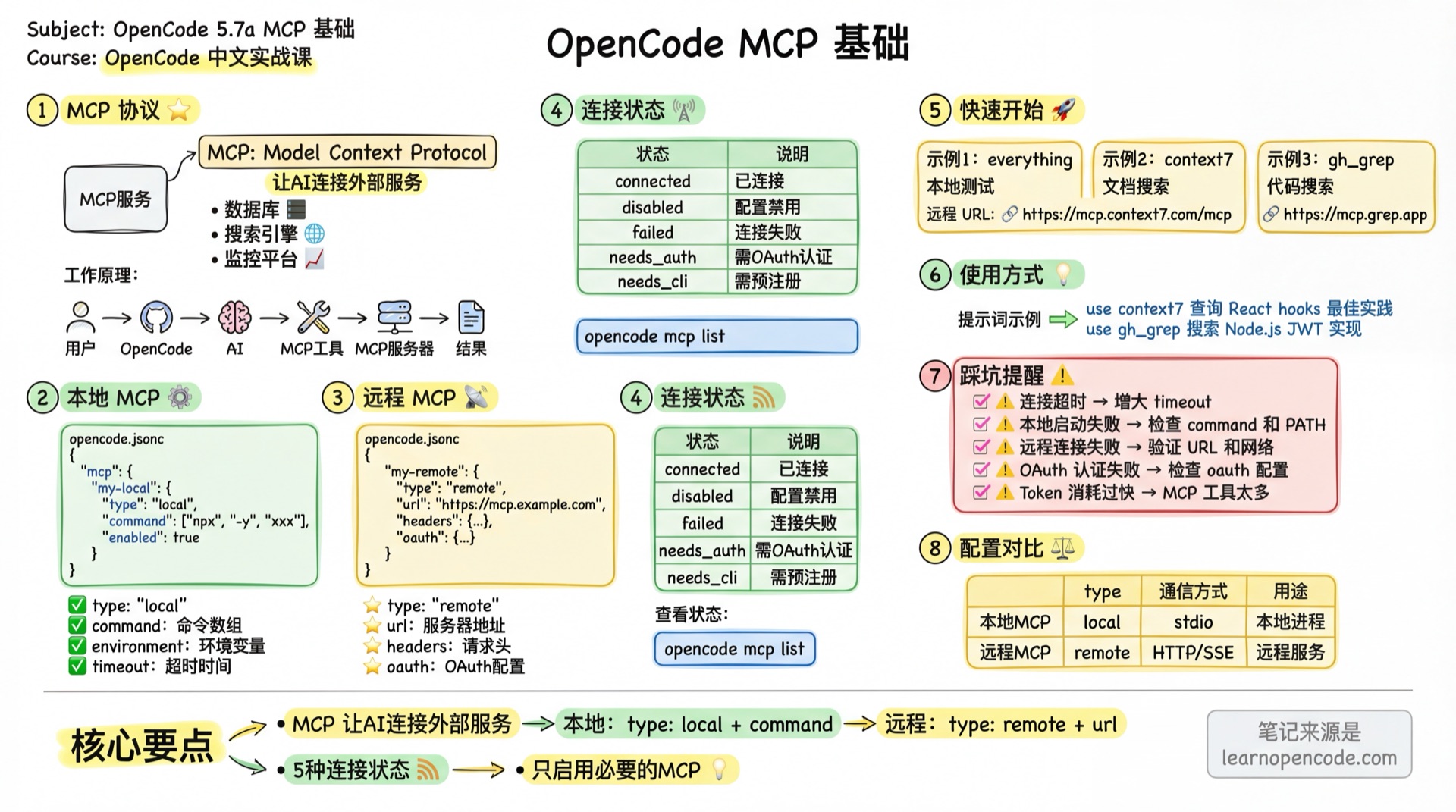
What You'll Learn
- Understand MCP's role and architecture
- Configure local MCP servers
- Configure remote MCP servers
- Check MCP connection status
Your Current Challenge
- AI can work with local files but cannot access external services
- You want AI to inspect Sentry logs, search documentation, or query databases
- You have heard of MCP but do not know how to configure or use it
What is MCP
MCP (Model Context Protocol) is a standard protocol that allows AI to call external tools and services.
Core Concepts:
- MCP Server: An external process or remote service that provides tools
- MCP Tool: Specific functionality exposed by the server (e.g., search, query, operate)
- MCP Client: OpenCode's built-in connector
How It Works:
User Question → OpenCode → AI Decides to Call MCP Tool → MCP Server Executes → Returns ResultImportant Notes
- MCP servers increase context consumption; more tools mean faster token usage
- Some MCPs (like GitHub) add a lot of tokens, easily exceeding context limits
- Recommend enabling only necessary MCP servers
Configuration File Locations
OpenCode looks for configuration files in multiple locations, later loaded files override earlier ones (priority from low to high):
| Load Order | Location | Purpose |
|---|---|---|
| 1 (lowest) | ~/.config/opencode/opencode.json | Global config, shared across all projects |
| 2 | opencode.json | Project root directory config |
| 3 (highest) | .opencode/opencode.json | Project-level config (recommended) |
Why recommend .opencode/opencode.json?
It has the highest priority and placing it in the .opencode/ directory keeps things tidy, making it easier to manage alongside other configs (like agents, commands).
Interactive Setup: opencode mcp add
Don't want to manually edit JSON? Use the interactive command to add MCP:
opencode mcp addFollow the prompts:
? Location: (Use arrow keys)
❯ Current project
    /path/to/project/.opencode/opencode.json
  Global
    ~/.config/opencode/opencode.json

? MCP server name: filesystem

? Select MCP server type:
❯ Local
  Remote

? Enter command to run:
opencode x @modelcontextprotocol/server-filesystem /path/to/allowed/dir
⚠️ Note: Location selection only appears in Git projects. Non-Git projects will write directly to global config.
You should see:
✓ MCP server "filesystem" added successfullyLocal MCP Servers
Local MCP servers run on your machine and communicate via stdio.
Configuration
Configure under mcp in opencode.json or .opencode/opencode.json:
{
  "$schema": "https://opencode.ai/config.json",
  "mcp": {
    "my-local-mcp": {
      "type": "local",
      "command": ["npx", "-y", "@modelcontextprotocol/server-everything"],
      "enabled": true,
      "environment": {
        "MY_ENV_VAR": "value"
      }
    }
  }
}
Configuration Options
| Option | Type | Required | Description |
|---|---|---|---|
type | String | ✓ | Must be "local" |
command | Array | ✓ | Command array, e.g., ["npx", "-y", "xxx"] or ["bun", "x", "xxx"] |
cwd | String | Working directory for the MCP process; relative paths are resolved from the current workspace directory | |
environment | Object | Environment variable key-value pairs | |
enabled | Boolean | Whether enabled, defaults to true | |
timeout | Number | Connection timeout (milliseconds), defaults to 30000 |
⚠️ Note: Official docs describe timeout default as 2000+ms, but actual source code default is 30000ms (30 seconds). Source:
mcp/index.ts:29
Without cwd, a local MCP process uses the current workspace directory directly. A relative path is resolved against the workspace directory; an absolute path is used as-is.
{
  "mcp": {
    "project-tools": {
      "type": "local",
      "command": ["npx", "-y", "my-project-mcp"],
      "cwd": "tools/mcp"
    }
  }
}
Source: the cwd definition for local MCP config and workspace-relative resolution.
Roots and Capability Negotiation
When connecting to an MCP server, OpenCode declares the roots client capability. If the server requests roots, OpenCode returns the file:// URI for the current workspace directory. This is not another editable setting, and it does not automatically expose arbitrary directories.
What the server can provide is determined by the capabilities it declares. For example, tools are discovered only when the server declares tools, and resource-related features appear only when it declares resources. Do not assume that a successful connection means the server supports every MCP capability.
Source: client capabilities and roots response.
Usage
After configuration, add prompts in conversation to guide AI usage:
use the my-local-mcp tool to do somethingRemote MCP Servers
Remote MCP servers connect via HTTP/SSE protocol.
Configuration
{
  "$schema": "https://opencode.ai/config.json",
  "mcp": {
    "my-remote-mcp": {
      "type": "remote",
      "url": "https://mcp.example.com/mcp",
      "enabled": true,
      "headers": {
        "Authorization": "Bearer {env:MY_API_KEY}"
      }
    }
  }
}
Configuration Options
| Option | Type | Required | Description |
|---|---|---|---|
type | String | ✓ | Must be "remote" |
url | String | ✓ | Remote MCP server URL |
enabled | Boolean | Whether enabled, defaults to true | |
headers | Object | Custom request headers | |
oauth | Object/false | OAuth config or disable OAuth | |
timeout | Number | Connection timeout (milliseconds), defaults to 30000 |
Connection Status
MCP connections have 5 states:
| Status | Description |
|---|---|
connected | Connected, tools available |
disabled | enabled: false in config, not connected |
failed | Connection failed, check error message |
needs_auth | OAuth authentication required |
needs_client_registration | Pre-registration of client ID required |
Check current status:
opencode mcp listQuick Start Examples
Example 1: Local Test Server
{
  "$schema": "https://opencode.ai/config.json",
  "mcp": {
    "everything": {
      "type": "local",
      "command": ["npx", "-y", "@modelcontextprotocol/server-everything"]
    }
  }
}
Test usage:
use the everything tool to add 3 and 4Example 2: Context7 Document Search
{
  "$schema": "https://opencode.ai/config.json",
  "mcp": {
    "context7": {
      "type": "remote",
      "url": "https://mcp.context7.com/mcp"
    }
  }
}
Test usage:
use context7 to search React hooks best practicesExample 3: Grep Code Search
{
  "$schema": "https://opencode.ai/config.json",
  "mcp": {
    "gh_grep": {
      "type": "remote",
      "url": "https://mcp.grep.app"
    }
  }
}
Test usage:
use the gh_grep tool to search how to implement JWT verification in Node.jsCommon Issues
| Issue | Cause | Solution |
|---|---|---|
| MCP connection timeout | Timeout set too short or slow network | Increase timeout value, default is 30000ms |
| Local MCP fails to start | Command doesn't exist or path error | Confirm command array is correct, check PATH |
| Remote MCP connection failed | Wrong URL or server unavailable | Verify URL is correct, check network |
Lesson Summary
You learned:
- MCP Protocol: Standard protocol for AI to connect external services
- Configuration Locations: Project-level vs. global settings, and team-shared vs. personal preferences
- Interactive Setup: The
opencode mcp addcommand - Local MCP:
type: "local"+commandarray - Remote MCP:
type: "remote"+url - Connection Status: 5 states and how to check them
Next Steps
- 5.7b MCP Advanced - OAuth authentication, permission management, more MCP examples
Having Issues?
Stuck on MCP configuration? Join the community to connect with 2000+ fellow learners and get real-time help.