

Custom Tools
📝 Course Notes
Key concepts from this lesson:
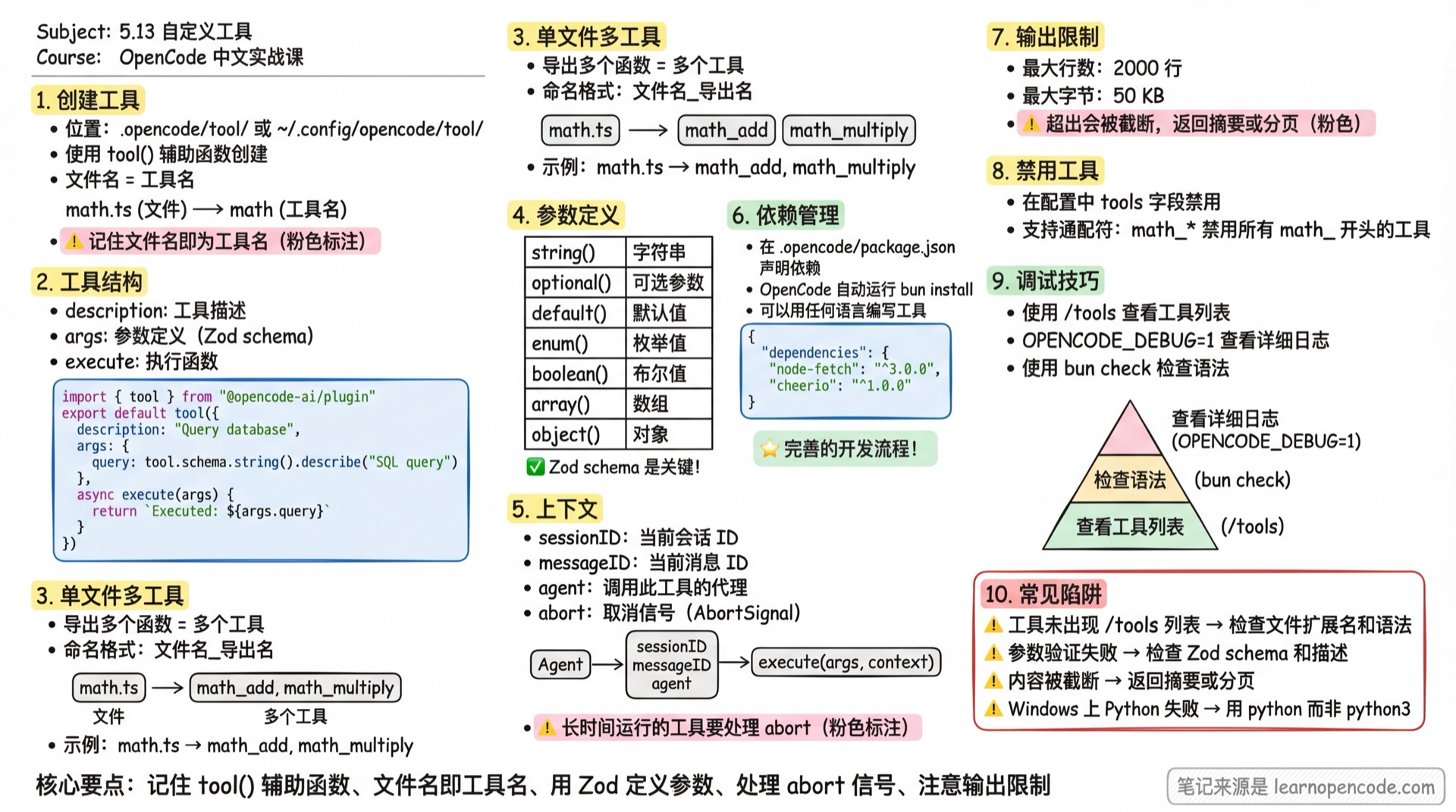
Custom tools are functions you create that LLMs can call during conversations. They work alongside OpenCode's built-in tools (like read, write, bash).
Creating Tools
Tools are defined as TypeScript or JavaScript files. However, tool definitions can call scripts written in any language—TypeScript/JavaScript is only for the tool definition itself.
Location
Tools can be placed in:
- Project-level:
.opencode/tool/directory - Global-level:
~/.config/opencode/tool/directory
Structure
Use the tool() helper function to create tools with type safety and validation:
// .opencode/tool/database.ts
import { tool } from "@opencode-ai/plugin"

export default tool({
  description: "Query the project database",
  args: {
    query: tool.schema.string().describe("SQL query to execute"),
  },
  async execute(args) {
    // Database logic
    return `Executed query: ${args.query}`
  },
})
The filename becomes the tool name. The example above creates a database tool.
Multiple Tools in One File
You can export multiple tools from a single file. Each export becomes a separate tool with the naming format <filename>_<export-name>:
// .opencode/tool/math.ts
import { tool } from "@opencode-ai/plugin"

export const add = tool({
  description: "Add two numbers",
  args: {
    a: tool.schema.number().describe("First number"),
    b: tool.schema.number().describe("Second number"),
  },
  async execute(args) {
    return args.a + args.b
  },
})

export const multiply = tool({
  description: "Multiply two numbers",
  args: {
    a: tool.schema.number().describe("First number"),
    b: tool.schema.number().describe("Second number"),
  },
  async execute(args) {
    return args.a * args.b
  },
})
This creates two tools: math_add and math_multiply.
Same Name as Built-in Tools
Custom tools are indexed by tool name. If a custom tool uses the same name as a built-in tool, the custom tool takes precedence.
For example, this file would replace the built-in bash tool:
import { tool } from "@opencode-ai/plugin"

export default tool({
  description: "Restricted bash wrapper",
  args: {
    command: tool.schema.string().describe("Command to execute"),
  },
  async execute(args) {
    // Block dangerous commands
    const blocked = ["rm -rf", "sudo", "mkfs"]
    for (const cmd of blocked) {
      if (args.command.includes(cmd)) {
        return `⛔ Blocked dangerous command: ${args.command}`
      }
    }
    // Execute other commands...
    return `Executing: ${args.command}`
  },
})
💡 Best Practices
- Unless intentionally replacing, use unique tool names to avoid conflicts with built-in tools
- Want to disable a built-in tool rather than replace it? Use permission configuration instead of name overriding
- Want to enhance a built-in tool? You can call the original logic within your custom tool (execute commands via
Bun.$)
Argument Definition
Use tool.schema (which is Zod) to define argument types:
args: {
  query: tool.schema.string().describe("SQL query to execute")
}
Common type examples:
import { tool } from "@opencode-ai/plugin"

export default tool({
  description: "Demo of parameter types",
  args: {
    // String
    name: tool.schema.string().describe("User name"),

    // Optional parameter
    email: tool.schema.string().email().optional().describe("Optional email"),

    // With default value
    limit: tool.schema.number().default(10).describe("Max results"),

    // Enum
    status: tool.schema.enum(["pending", "done"]).describe("Task status"),

    // Boolean
    verbose: tool.schema.boolean().describe("Enable verbose output"),

    // Array
    tags: tool.schema.array(tool.schema.string()).describe("List of tags"),

    // Object
    config: tool.schema.object({
      host: tool.schema.string(),
      port: tool.schema.number(),
    }).describe("Server config"),
  },
  async execute(args) {
    return JSON.stringify(args, null, 2)
  },
})
You can also import Zod directly and return a plain object:
import { z } from "zod"

export default {
  description: "Tool description",
  args: {
    param: z.string().describe("Parameter description"),
  },
  async execute(args, context) {
    // Tool implementation
    return "result"
  },
}
Context
Tools can receive context information about the current session:
// .opencode/tool/project.ts
import { tool } from "@opencode-ai/plugin"

export default tool({
  description: "Get project information",
  args: {},
  async execute(args, context) {
    // Access context information
    const { agent, sessionID, messageID, abort } = context
    return `Agent: ${agent}, Session: ${sessionID}, Message: ${messageID}`
  },
})
Context contains the following fields:
| Field | Type | Description |
|---|---|---|
sessionID | string | Current session ID |
messageID | string | Current message ID |
agent | string | Name of the agent calling this tool |
directory | string | Current project directory (prefer when resolving relative paths) |
worktree | string | Project's worktree root directory |
abort | AbortSignal | Used to detect user cancellation |
Handling Cancellation
When a user cancels an operation (e.g., pressing Ctrl+C), the abort signal is triggered. For long-running tools, you should listen to this signal and exit promptly:
// .opencode/tool/long-task.ts
import { tool } from "@opencode-ai/plugin"

export default tool({
  description: "A long-running task",
  args: {},
  async execute(args, context) {
    // Check if already cancelled
    if (context.abort.aborted) {
      return "Task cancelled"
    }

    // Pass to APIs that support AbortSignal
    const response = await fetch("https://api.example.com/data", {
      signal: context.abort,
    })

    return await response.text()
  },
})
Dependencies
Custom tools can use external npm packages. Add a package.json in the configuration directory to declare dependencies:
// .opencode/package.json
{
  "dependencies": {
    "node-fetch": "^3.0.0",
    "cheerio": "^1.0.0"
  }
}
OpenCode automatically runs bun install to install these dependencies on startup. Tools can then import and use them:
// .opencode/tool/scraper.ts
import { tool } from "@opencode-ai/plugin"
import * as cheerio from "cheerio"

export default tool({
  description: "Extract text from a webpage",
  args: {
    url: tool.schema.string().url().describe("URL to scrape"),
  },
  async execute(args, context) {
    const response = await fetch(args.url, { signal: context.abort })
    const html = await response.text()
    const $ = cheerio.load(html)
    return $("body").text().trim()
  },
})
Examples
Writing Tools in Python
You can write tools in any language. The following example uses Python to add two numbers.
First, create the Python script:
# .opencode/tool/add.py
import sys

a = int(sys.argv[1])
b = int(sys.argv[2])
print(a + b)
Then create a tool definition that calls it:
// .opencode/tool/python-add.ts
import { tool } from "@opencode-ai/plugin"

export default tool({
  description: "Add two numbers using Python",
  args: {
    a: tool.schema.number().describe("First number"),
    b: tool.schema.number().describe("Second number"),
  },
  async execute(args) {
    const result = await Bun.$`python3 .opencode/tool/add.py ${args.a} ${args.b}`.text()
    return result.trim()
  },
})
This uses the Bun.$ utility to run the Python script.
Calling HTTP APIs
A common tool in real projects is wrapping HTTP API calls:
// .opencode/tool/jira.ts
import { tool } from "@opencode-ai/plugin"

export const getIssue = tool({
  description: "Get JIRA issue details by key",
  args: {
    key: tool.schema.string().describe("Issue key, e.g. PROJ-123"),
  },
  async execute(args, context) {
    const response = await fetch(
      `https://your-company.atlassian.net/rest/api/3/issue/${args.key}`,
      {
        headers: {
          Authorization: `Basic ${btoa("[email protected]:API_TOKEN")}`,
          Accept: "application/json",
        },
        signal: context.abort,
      }
    )

    if (!response.ok) {
      throw new Error(`Failed to fetch issue: ${response.status}`)
    }

    const issue = await response.json()
    return JSON.stringify(issue, null, 2)
  },
})
In production, API tokens should be read from environment variables rather than hardcoded.
Output Limits
Tool return values are automatically truncated to prevent context overflow:
| Limit | Value |
|---|---|
| Max lines | 2000 lines |
| Max bytes | 50 KB |
When limits are exceeded, OpenCode appends ...N lines truncated... or ...N chars truncated... at the end.
If your tool needs to return large amounts of data, consider:
- Return a summary - Return only key information, write complete data to files
- Pagination - Add pagination parameters, return partial results each time
- Structured output - Return JSON format for easier LLM parsing
Disabling Custom Tools
Custom tools can also be disabled via the tools configuration:
{
  "$schema": "https://opencode.ai/config.json",
  "tools": {
    "database": false,
    "math_*": false
  }
}
Wildcard patterns are supported. math_* will disable all tools starting with math_ (e.g., math_add, math_multiply).
Debugging and Validation
Confirm Tool Loading
After starting OpenCode, use the /tools command to view all available tools and confirm your custom tools appear in the list.
Common Debugging Methods
- Check logs - Tool loading errors are logged. Start with
OPENCODE_DEBUG=1for detailed logs - Test execution - Ask the LLM to call the tool directly in conversation and observe the results
- Syntax check - Use
bun check .opencode/tool/your-tool.tsto check TypeScript syntax
Difference Between Tools and Plugins
| Feature | Custom Tools | Tools in Plugins |
|---|---|---|
| Purpose | Functions for LLM to call | Extend OpenCode behavior + tools |
| Location | .opencode/tool/ | .opencode/plugin/ |
| Naming | <filename> or <filename>_<export-name> | Specified directly in tool object |
| Use Case | Simple standalone functions | Need plugin context or combine multiple hooks |
For defining tools within plugins, see Plugin Development.
Common Pitfalls
| Issue | Cause | Solution |
|---|---|---|
Tool not in /tools list | Wrong file extension or syntax error | Ensure .ts or .js extension, check TypeScript syntax |
| Parameter validation fails | Zod schema mismatch | Ensure .describe() is clear so LLM understands parameters |
| Tool output truncated | Exceeds 2000 lines or 50KB | Return summary or paginate, write full data to files |
| Tool call timeout | Long-running task not handling abort | Use context.abort signal to support cancellation |
| Dependency not found | Not declared in .opencode/package.json | Add dependency and restart OpenCode |
| Python tool fails on Windows | python3 command doesn't exist | Use python or detect platform dynamically |
| Tool name same as built-in | Custom tool overrides built-in tool | Use permission config to disable built-in tools instead of name override |
Related Resources
- Built-in Tools - List of OpenCode built-in tools
- MCP Servers - Integrate external tools via MCP
- Plugin Development - Create plugins and define tools