

Session Sharing
📝 Course Notes
Key takeaways from this lesson:
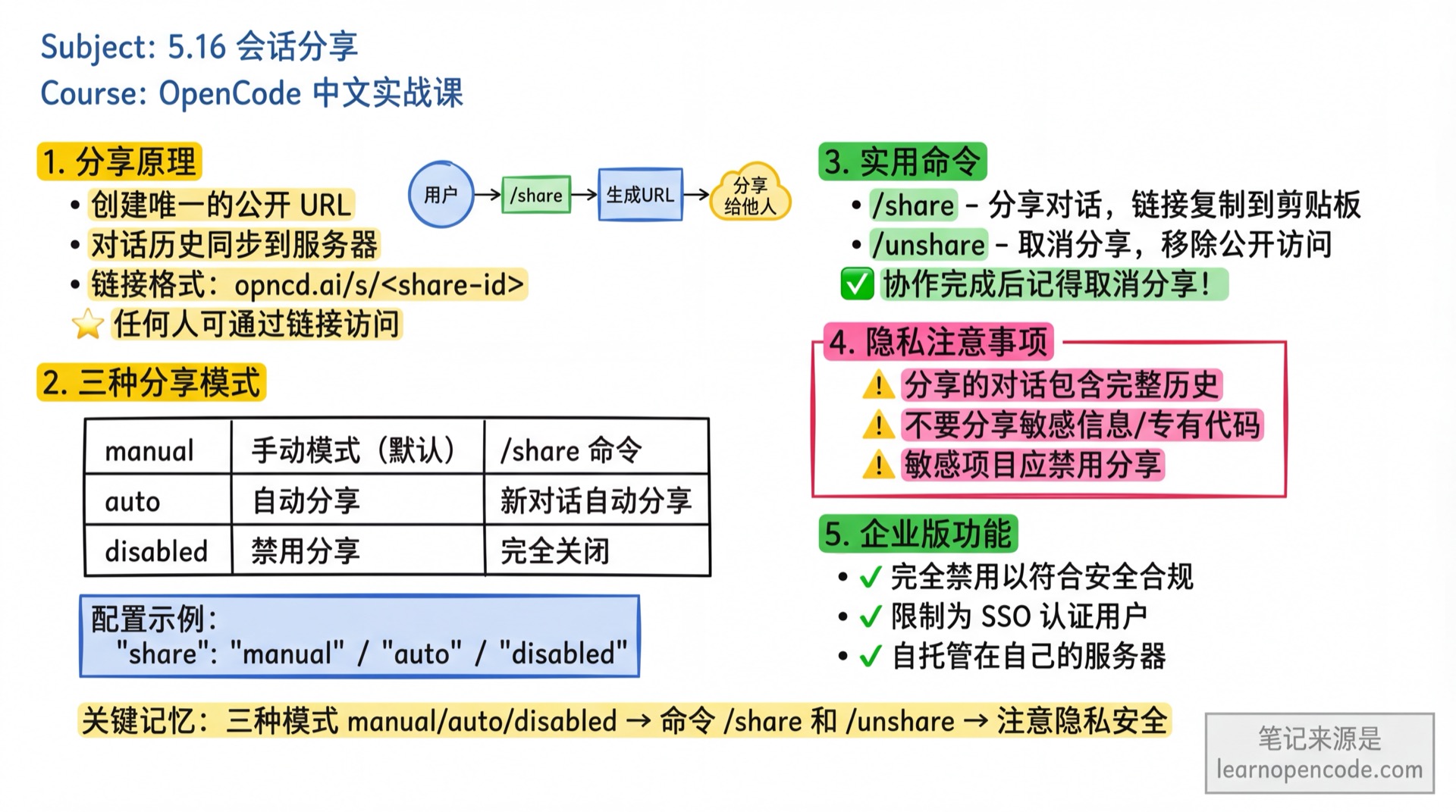
OpenCode's sharing feature allows you to create public links to conversations, making it easy to collaborate with your team or get help.
Shared conversations are publicly accessible to anyone with the link.
How It Works
When sharing a conversation, OpenCode:
- Creates a unique public URL for the session
- Syncs the conversation history to the server
- Makes the conversation accessible via a shareable link:
opncd.ai/s/<share-id>
Sharing Modes
OpenCode supports three sharing modes:
Manual Mode (Default)
Manual sharing mode is used by default. Sessions are not automatically shared, but you can use the /share command to share manually:
/shareThis generates a unique URL and copies it to your clipboard.
To explicitly set manual mode in your configuration:
{
  "$schema": "https://opncd.ai/config.json",
  "share": "manual"
}
Auto Sharing
Enable automatic sharing for all new conversations by setting share to "auto" in your configuration:
{
  "$schema": "https://opncd.ai/config.json",
  "share": "auto"
}
With auto sharing enabled, every new conversation is automatically shared and generates a link.
Disable Sharing
Completely disable sharing by setting share to "disabled":
{
  "$schema": "https://opncd.ai/config.json",
  "share": "disabled"
}
To enforce this setting across your team, add it to your project's opencode.json and commit it to Git.
Unshare
To stop sharing a conversation and remove it from public access:
/unshareThis removes the share link and deletes the data associated with the conversation.
Privacy Considerations
When sharing conversations, keep in mind:
Data Retention
Shared conversations remain accessible until you explicitly unshare them, including:
- Complete conversation history
- All messages and responses
- Session metadata
Recommendations
- Only share conversations without sensitive information
- Review conversation content before sharing
- Unshare after collaboration is complete
- Avoid sharing conversations with proprietary code or confidential data
- Disable sharing entirely for sensitive projects
Enterprise Edition
For enterprise deployments, the sharing feature can be:
- Completely disabled for security compliance
- Restricted to only SSO-authenticated users
- Self-hosted on your own infrastructure
Learn more about Enterprise Edition.