

5.6b Keybindings
Customize 60+ keybindings to build a workflow that feels natural.
📝 Course Notes
Key concepts from this lesson:
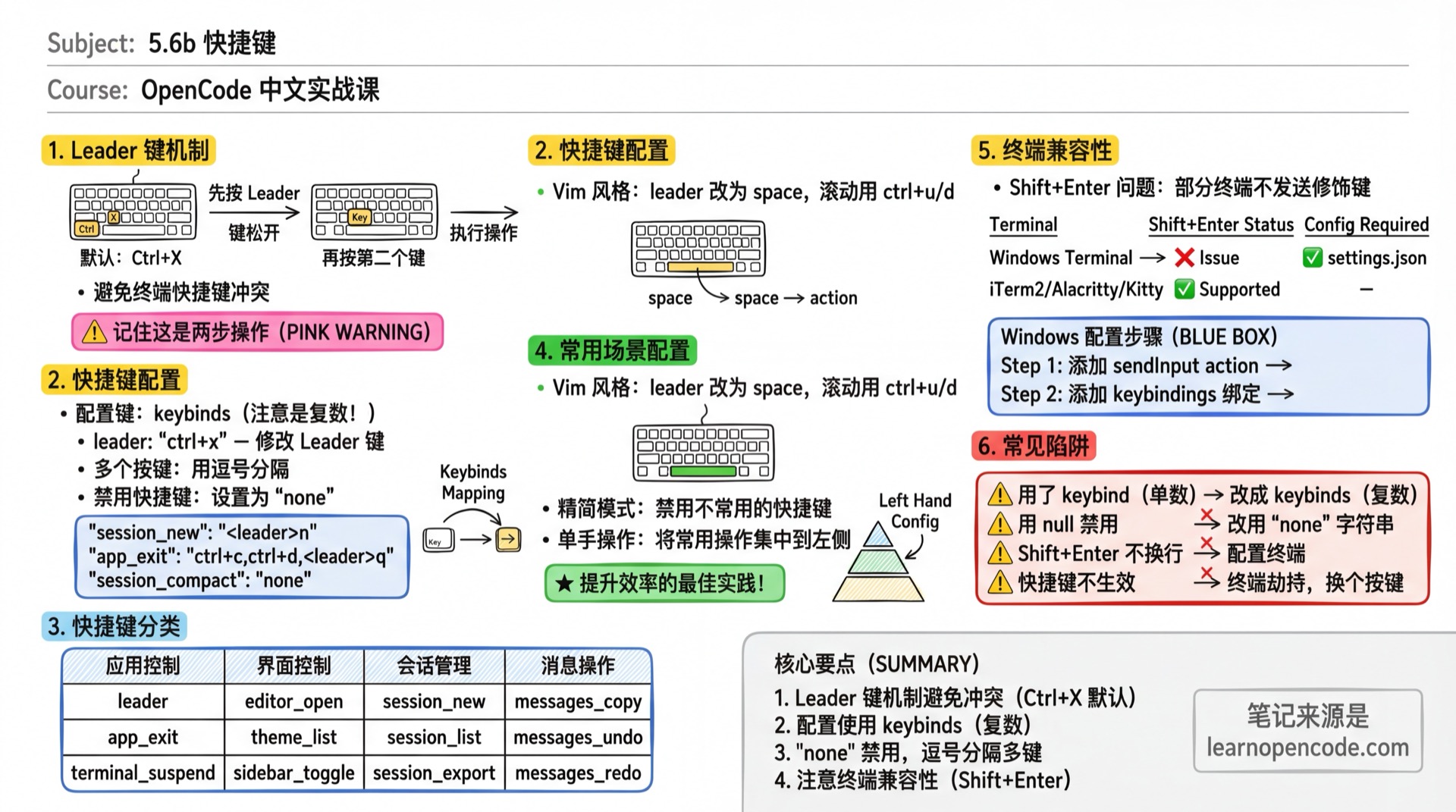
What You'll Learn
- Master the Leader key mechanism
- Customize any keybinding
- Disable unwanted keybindings
- Resolve terminal keybinding conflicts
Leader Key
OpenCode uses a Leader key to avoid conflicts with terminal shortcuts.
Default Leader key: Ctrl+X
Usage: Press Leader key, release, then press the second key.
Ctrl+X → n    # New session
Ctrl+X → l    # Session list
Ctrl+X → m    # Model list
Keybinding Configuration
TUI keybindings use a flat keybinds map in a standalone tui.json or tui.jsonc file:
{
  "$schema": "https://opencode.ai/tui.json",
  "keybinds": {
    // Change Leader key
    "leader": "ctrl+x",

    // Custom keybindings
    "session_new": "<leader>n",
    "model_list": "<leader>m",

    // Multiple keys for same function (comma-separated)
    "app_exit": "ctrl+c,ctrl+d,<leader>q",

    // Disable keybinding
    "session_compact": false
  }
}
The common config locations are listed below. Later configs override earlier ones:
tui.json/tui.jsoncin the global config directory- A custom file referenced by
OPENCODE_TUI_CONFIG tui.json/tui.jsoncfiles discovered from the current directory up to the filesystem root, then applied from the rootmost directory back toward the current directory.opencode/tui.json/.opencode/tui.jsoncfiles encountered along the way- TUI configuration in
OPENCODE_CONFIG_DIR
Ordinary project files are applied from the root side toward the current directory, so the nearest one wins. Multiple .opencode directories are merged in the opposite direction—from the current side toward the root—so on conflicts the rootmost directory is loaded later and wins. OPENCODE_CONFIG_DIR is loaded last.
When upgrading from an older release, the TUI checks legacy main configs in the global location, along the project path, in config directories, and at the path specified by OPENCODE_CONFIG. It migrates their theme, keybinds, and legacy tui fields into a tui.json in the same directory. If the target tui.json already exists, that directory is skipped; tui.jsonc alone does not prevent migration. Only after the new file has been written successfully and a .tui-migration.bak backup has been created or reused are the legacy fields removed from the original config. The main config no longer reads these TUI fields.
Disable Keybindings
Set a binding to "none" or false to disable it:
{
  "keybinds": {
    "session_compact": "none",
    "sidebar_toggle": false
  }
}
Multiple Key Bindings
Use commas to separate multiple keys:
{
  "keybinds": {
    "input_newline": "shift+return,ctrl+return,alt+return,ctrl+j"
  }
}
Common Configurable Keybindings
Application Control
| Key Name | Default | Description |
|---|---|---|
leader | ctrl+x | Leader key |
app_exit | ctrl+c,ctrl+d,<leader>q | Exit application |
diff_open | none | Open the diff viewer (normally opened through /diff or the command palette) |
terminal_suspend | ctrl+z | Suspend terminal |
terminal_title_toggle | none | Toggle terminal title |
Interface Control
| Key Name | Default | Description |
|---|---|---|
editor_open | <leader>e | Open external editor |
theme_list | <leader>t | Theme list |
sidebar_toggle | <leader>b | Toggle sidebar |
scrollbar_toggle | none | Toggle scrollbar |
status_view | <leader>s | Status view |
tool_details | none | Toggle tool details |
tips_toggle | <leader>h | Toggle homepage tips |
Session Management
| Key Name | Default | Description |
|---|---|---|
session_new | <leader>n | New session |
session_list | <leader>l | Session list |
session_export | <leader>x | Export session |
session_timeline | <leader>g | Session timeline |
session_interrupt | escape | Interrupt response |
session_background | ctrl+b | Move a synchronously running subagent into the background |
session_compact | <leader>c | Compact context |
session_fork | none | Fork from message |
session_rename | ctrl+r | Rename session |
session_share | none | Share session |
session_unshare | none | Unshare session |
Session Navigation
| Key Name | Default | Description |
|---|---|---|
session_child_cycle | right | Cycle child sessions |
session_child_cycle_reverse | left | Cycle child sessions in reverse |
session_parent | up | Return to the parent session |
Message Operations
| Key Name | Default | Description |
|---|---|---|
messages_copy | <leader>y | Copy message |
messages_undo | <leader>u | Undo message |
messages_redo | <leader>r | Redo message |
messages_toggle_conceal | <leader>h | Toggle code block folding |
Here, messages_undo and messages_redo operate at the session level. Undo returns to the selected message and rolls back the associated file patches that came after it; redo restores the reverted state. If you set "snapshot": false in the main opencode.json or opencode.jsonc, messages can still be reverted, but file changes will not be undone or restored. These bindings are distinct from input_undo and input_redo inside the input field.
Diff Viewer
The diff viewer is enabled by default. Open it with /diff, the command palette, or a custom diff_open binding. It includes a file tree and can switch between workspace changes and changes from the latest AI turn. If the current branch is not the default branch, it also offers a comparison against the main branch. The viewer supports file and hunk navigation, single-file patches, unified and split views, and reviewed markers.
| Key Name | Default | Description |
|---|---|---|
diff_close | escape,q | Close the viewer and return to the previous screen |
diff_toggle | enter,space | Expand a directory or select a file |
diff_expand / diff_collapse | right / left | Expand or collapse a file-tree item |
diff_expand_all | E | Expand all directories |
diff_switch_focus | tab | Move focus between the file tree and patch pane |
diff_next_hunk / diff_previous_hunk | ] / [ | Jump to the next or previous hunk |
diff_next_file / diff_previous_file | n / p | Jump to the next or previous file |
diff_toggle_file_tree | b | Show or hide the file tree |
diff_single_patch | s | Switch between a single patch and all patches |
diff_switch_source | d | Switch the diff source |
diff_toggle_view | v | Switch between split and unified views |
diff_help | ? | Show the complete diff keybinding help |
m is the diff viewer's built-in “mark as reviewed” key. It is not part of the configurable keybinds map.
Message Scrolling
| Key Name | Default | Description |
|---|---|---|
messages_page_up | pageup,ctrl+alt+b | Page up |
messages_page_down | pagedown,ctrl+alt+f | Page down |
messages_half_page_up | ctrl+alt+u | Half page up |
messages_half_page_down | ctrl+alt+d | Half page down |
messages_first | ctrl+g,home | Jump to first |
messages_last | ctrl+alt+g,end | Jump to last |
messages_next | none | Next message |
messages_previous | none | Previous message |
messages_last_user | none | Last user message |
Model & Agent
| Key Name | Default | Description |
|---|---|---|
model_list | <leader>m | Model list |
model_cycle_recent | f2 | Cycle recent models |
model_cycle_recent_reverse | shift+f2 | Cycle recent (reverse) |
model_cycle_favorite | none | Cycle favorite models |
model_cycle_favorite_reverse | none | Cycle favorites (reverse) |
variant_cycle | ctrl+t | Cycle model variants |
agent_list | <leader>a | Agent list |
agent_cycle | tab | Cycle Agent |
agent_cycle_reverse | shift+tab | Cycle Agent (reverse) |
command_list | ctrl+p | Command palette |
prompt_skills | none | Open the Skill picker |
Input Area Basics
| Key Name | Default | Description |
|---|---|---|
input_submit | return | Send message |
input_newline | shift+return,ctrl+return,alt+return,ctrl+j | New line |
input_clear | ctrl+c | Clear input |
input_paste | ctrl+v | Paste |
input_undo | ctrl+-,super+z | Undo input |
input_redo | ctrl+.,super+shift+z | Redo input |
Input Area Cursor Movement
| Key Name | Default | Description |
|---|---|---|
input_move_left | left,ctrl+b | Move left one character |
input_move_right | right,ctrl+f | Move right one character |
input_move_up | up | Move up one line |
input_move_down | down | Move down one line |
input_word_forward | alt+f,alt+right,ctrl+right | Move forward one word |
input_word_backward | alt+b,alt+left,ctrl+left | Move backward one word |
input_line_home | ctrl+a | Move to line start |
input_line_end | ctrl+e | Move to line end |
input_visual_line_home | alt+a | Move to visual line start |
input_visual_line_end | alt+e | Move to visual line end |
input_buffer_home | home | Move to buffer start |
input_buffer_end | end | Move to buffer end |
Cursor Appearance
Cursor appearance is not a keybinding. Configure it alongside keybinds:
{
  "$schema": "https://opencode.ai/tui.json",
  "cursor": {
    "style": "line",
    "blinking": true
  }
}
style can be block, underline, line, or default. The default value preserves your terminal settings, in which case blinking has no effect.
Input Area Selection
| Key Name | Default | Description |
|---|---|---|
input_select_left | shift+left | Select left |
input_select_right | shift+right | Select right |
input_select_up | shift+up | Select up |
input_select_down | shift+down | Select down |
input_select_word_forward | alt+shift+f,alt+shift+right | Select next word |
input_select_word_backward | alt+shift+b,alt+shift+left | Select previous word |
input_select_line_home | ctrl+shift+a | Select to line start |
input_select_line_end | ctrl+shift+e | Select to line end |
input_select_visual_line_home | alt+shift+a | Select to visual line start |
input_select_visual_line_end | alt+shift+e | Select to visual line end |
input_select_buffer_home | shift+home | Select to buffer start |
input_select_buffer_end | shift+end | Select to buffer end |
Input Area Deletion
| Key Name | Default | Description |
|---|---|---|
input_backspace | backspace,shift+backspace | Backspace |
input_delete | ctrl+d,delete,shift+delete | Delete character |
input_delete_line | ctrl+shift+d | Delete entire line |
input_delete_to_line_end | ctrl+k | Delete to line end |
input_delete_to_line_start | ctrl+u | Delete to line start |
input_delete_word_forward | alt+d,alt+delete,ctrl+delete | Delete next word |
input_delete_word_backward | ctrl+w,ctrl+backspace,alt+backspace | Delete previous word |
History
| Key Name | Default | Description |
|---|---|---|
history_previous | up | Previous history |
history_next | down | Next history |
OpenCode Desktop Keybindings
OpenCode Desktop's input field supports Readline/Emacs style keybindings (built-in, not configurable):
| Keybinding | Function |
|---|---|
Ctrl+A | Move to line start |
Ctrl+E | Move to line end |
Ctrl+B | Move back one character |
Ctrl+F | Move forward one character |
Alt+B | Move back one word |
Alt+F | Move forward one word |
Ctrl+D | Delete current character |
Ctrl+K | Delete to line end |
Ctrl+U | Delete to line start |
Ctrl+W | Delete previous word |
Alt+D | Delete next word |
Ctrl+T | Transpose characters |
Ctrl+G | Cancel popup / Interrupt response |
Terminal Compatibility
Shift+Enter Issue
Some terminals don't send the Shift+Enter modifier key by default.
Symptom: Pressing Shift+Enter sends the message instead of creating a new line.
Windows Terminal Configuration
Edit settings.json (path: %LOCALAPPDATA%\Packages\Microsoft.WindowsTerminal_8wekyb3d8bbwe\LocalState\settings.json):
Add to the actions array:
{
  "command": {
    "action": "sendInput",
    "input": "\u001b[13;2u"
  },
  "id": "User.sendInput.ShiftEnterCustom"
}
Add to the keybindings array:
{
  "keys": "shift+enter",
  "id": "User.sendInput.ShiftEnterCustom"
}
Save and restart Windows Terminal.
Other Terminals
- iTerm2: Supported by default, no configuration needed
- Alacritty: Supported by default
- Kitty: Supported by default
- GNOME Terminal: May need to update to a newer version
Common Configuration Scenarios
Vim Style
{
  "keybinds": {
    "leader": "space",
    "messages_page_up": "ctrl+u",
    "messages_page_down": "ctrl+d",
    "messages_first": "gg",
    "messages_last": "G"
  }
}
Minimal Mode
Disable uncommon keybindings:
{
  "keybinds": {
    "sidebar_toggle": "none",
    "scrollbar_toggle": "none",
    "session_fork": "none",
    "session_share": "none",
    "session_unshare": "none",
    "tips_toggle": "none"
  }
}
One-Handed Layout
Concentrate common operations on the left hand:
{
  "keybinds": {
    "session_new": "ctrl+n",
    "session_list": "ctrl+l",
    "model_list": "ctrl+m",
    "agent_cycle": "ctrl+tab"
  }
}
Troubleshooting
| Symptom | Cause | Solution |
|---|---|---|
| Keybinding not working | Terminal intercepted the key | Check terminal settings or use a different key |
| Shift+Enter doesn't create new line | Terminal doesn't send modifier key | Configure terminal (see above) |
| Configured but no response | Used keybind (singular) | Use keybinds (plural) |
Using null to disable doesn't work | Syntax error | Use "none" or false instead |
| Leader key conflict | Conflicts with other programs | Use a different Leader key like ctrl+space |
| Ctrl+C doesn't clear input | Intercepted by terminal's SIGINT | Use a different key or accept default behavior |
Keybinding Mnemonic
Tab cycles Agent, Ctrl+C clears
Press Leader, then a letter for the action you need
n for new, l for list, m for model
u to undo, r to redo
Left and right arrows cycle through child sessions
Lesson Summary
You learned:
- Using the Leader key mechanism to avoid conflicts
- Customizing keybindings in
keybinds - Using
"none"orfalseto disable unwanted keybindings - Using commas to bind multiple keys
- Resolving terminal Shift+Enter compatibility issues
Related Resources
- v1.18.22 keybinding definitions - Flat bindings, disabled values, and default diff keys
- v1.18.22 background-session and Skill bindings / Skill - New bindings and their defaults
- v1.18.22 cursor configuration - Cursor shape and blinking
- v1.18.22 TUI config loading order - Global, custom, project, and
.opencodeconfigs - v1.18.22 TUI config migration - Migration from
opencode.jsontotui.json - v1.18.22 diff viewer - Navigation, views, and source switching
- v1.18.22 session revert - Revert/unrevert behavior and file-patch restoration
- v1.18.22 snapshot configuration - File-restoration boundary when
snapshot:false - Quick Reference / Keybindings Cheat Sheet - Printable cheat sheet
- 5.6a Theme System - Appearance customization
- 5.1 Configuration Guide - Complete configuration reference