

A1 Writer Workflow
💡 One-liner: Use Plan mode to ideate framework, Build mode to output content.
📝 Course Notes
Key takeaways from this lesson:
What You'll Be Able to Do
- Master the standard AI-assisted writing workflow
- Use Plan mode for ideation and outlining
- Use Build mode to output formal content
- Learn the right way to iterate and revise
Your Current Struggle
- Using AI to write, but the output lacks structure
- Always asking AI to output directly, with inconsistent quality
- Don't know how to iterate, so you start over every time
When to Use This Technique
- When you need: AI-assisted writing to produce high-quality content
- And you don't want: Relying on luck every time
🎒 Before You Start
Make sure you've completed the following:
- [ ] Completed 3.1 Plan vs Build
- [ ] Have a writing project folder
Core Concept
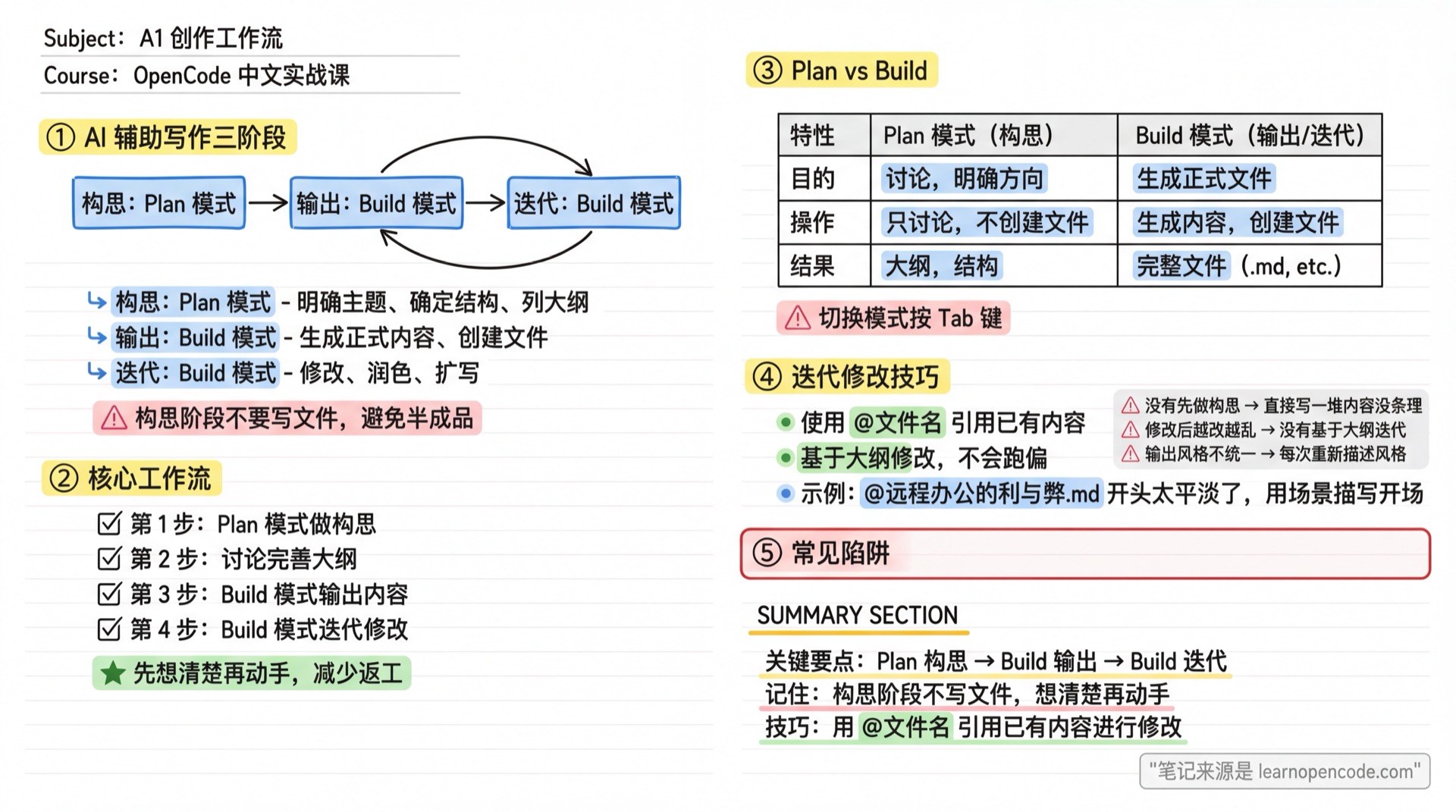
Three Stages of AI-Assisted Writing
| Stage | Mode | What to Do |
|---|---|---|
| Ideation | Plan | Define topic, determine structure, outline |
| Output | Build | Generate formal content, create files |
| Iteration | Build | Revise, polish, expand |
Why Separate Stages
- Don't create files during ideation: Avoid half-finished products
- Think before you act: Reduce rework
- Iteration has a basis: Modify based on outline, won't go off track
Follow Along
Step 1: Create a Writing Project Folder
Why
Keep all writing content in one place.
mkdir ~/my-writing
cd ~/my-writing
opencode
Step 2: Switch to Plan Mode for Ideation
Why
Ideation only needs discussion, no file creation.
Press Tab to ensure the status bar shows Plan.
Enter:
I want to write an article about "Pros and Cons of Remote Work", targeting workplace newcomers, around 800 words. Please help me:
1. Determine the article structure
2. List key points for each section
3. Suggest an engaging title
You should see: AI outputs the article framework and outline, but creates no files
Step 3: Discuss and Refine the Outline
Why
Finalize direction before writing.
Based on AI's suggestions, continue discussing:
Can we add a personal experience example to the "Disadvantages of Remote Work" section? Please revise the outline.Step 4: Switch to Build Mode for Output
Why
Once the outline is set, start generating formal content.
Press Tab to switch to Build mode.
Enter:
Based on the outline we just discussed, write the complete article and save it as remote-work-pros-cons.mdYou should see: AI creates the file and writes the complete article
Step 5: Iterate and Revise
Why
First drafts usually need adjustments.
Continue revising in Build mode:
@remote-work-pros-cons.md The opening is too plain. Start with an engaging scene description.You should see: AI modifies the file's opening
📋 Magic Prompt
✍️ Writing Starter Template
Expected result: Generate complete article framework and outline for future writing
## Role
You are a senior content strategist, skilled at structured thinking and content planning.

## Task
Generate complete article framework and outline based on the topic provided by user.

## Input Information
### Required
- Article Topic: [Topic]
- Target Audience: [Reader Profile]

### Optional
- Article Purpose: [Persuade/Educate/Entertain/Tutorial?] (Default: Educate)
- Word Count: [Words] (Default: 12000+)
- Tone Style: [Professional/Casual & Humorous/Warm & Healing?] (Default: Casual & Humorous)

## Output Specification
1. **Article Positioning**
   - Core message (one sentence)
   - Target audience's pain points/needs
   - What readers will gain

2. **Article Structure**
   | Section | Purpose | Estimated Words |
   |---------|---------|-----------------|
   | Opening | Hook attention | xxx words |
   | Body | Core content | xxx words |
   | Closing | Call to action | xxx words |

3. **Key Points per Section**
   - Opening: How to introduce
   - Body: Core arguments + supporting materials
   - Closing: Summary + memorable quote

4. **Alternative Titles** (3 options)
   - Title 1
   - Title 2
   - Title 3

## Constraints
- ✅ Structure should be clear, each section's purpose well-defined
- ✅ Key points should be specific, not just "deliver value"
- ✅ Consider reader's reading experience and attention curve
- ❌ Avoid overly complex structures
- ❌ Avoid vague key points
Checklist ✅
Must pass all items to continue
- [ ] Completed ideation in Plan mode
- [ ] Generated files in Build mode
- [ ] Can iterate on existing files
Common Pitfalls
| Issue | Cause | Solution |
|---|---|---|
| AI outputs content without structure | No ideation first | Discuss outline in Plan mode first |
| Revisions get messier | Not iterating based on outline | Go back to outline, clarify what to change |
| Inconsistent output style | Redescribing style each time | Fix style preferences in AGENTS.md |
Lesson Summary
You learned:
- Three stages of AI-assisted writing (Ideation → Output → Iteration)
- Plan mode for ideation, Build mode for output
- Use
@filenameto modify existing content
Next Lesson Preview
Next lesson: Blog & Newsletter Writing — master batch topic planning, series article management, and style consistency.
📚 More Complete Templates: Prompt Template Library