

B1 Developer Daily
💡 One-line summary: Use Plan Agent to understand code, use Build Agent to write features and fix bugs.
📝 Course Notes
Key takeaways from this lesson:
What You'll Be Able to Do
- Quickly understand unfamiliar codebases
- Use AI to assist in developing new features
- Efficiently locate and fix bugs
- Master the Plan → Build development workflow
Your Current Struggles
- Taking over unfamiliar projects, spending hours reading code
- Not knowing where to start when adding new features
- Difficulty locating bugs, unsure where the problem lies
When to Use This Approach
- When you need: AI to boost your daily development efficiency
- And you don't want to: Write and search everything manually
🎒 Before You Start
Make sure you've completed the following:
- [ ] Completed 3.1 Plan vs Build
- [ ] Have a code project ready
Core Concept
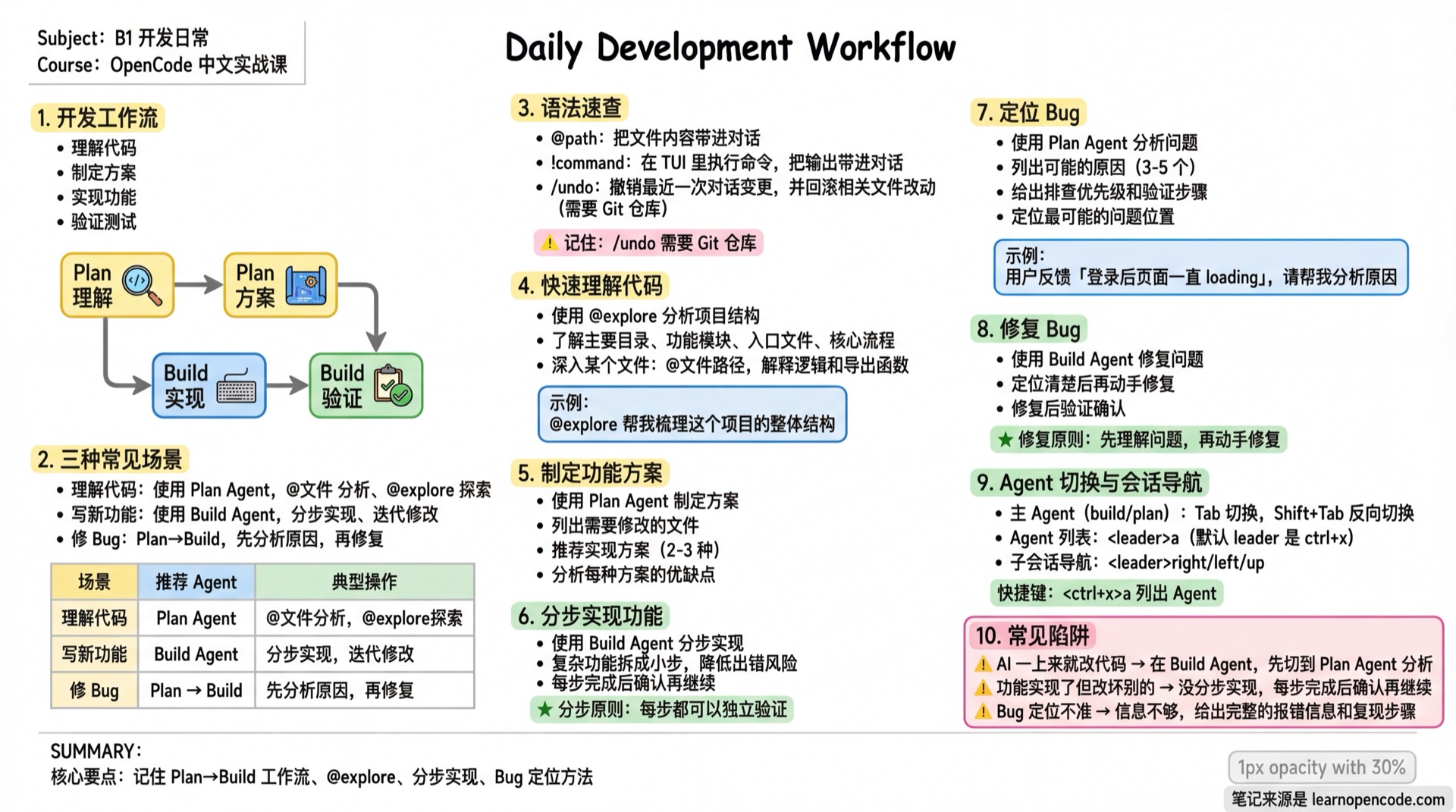
Development Workflow
Understand Code(Plan) → Plan Solution(Plan) → Implement Feature(Build) → Verify & Test(Build)Three Common Scenarios
| Scenario | Recommended Agent | Typical Operations |
|---|---|---|
| Understand code | Plan | @file analysis, @explore exploration |
| Write new feature | Build | Step-by-step implementation, iterative changes |
| Fix bug | Plan→Build | Analyze root cause first, then fix |
Syntax Quick Reference (Only These Four Are Used in This Lesson)
@path: Include file content in the conversation!command: Execute command in TUI and include output in the conversation/undo: Undo the last conversation change and roll back related file modifications (requires Git repository)/redo: Restore the conversation content and related files that were just undone
For detailed syntax, see: https://opencode.ai/docs/tui
If you set
"snapshot": falsein the main configuration,/undoand/redostill move the conversation boundary, but they do not restore files. Source references:session/revert.ts:38-98andconfig.ts:52-55.
Follow Along
Step 1: Quickly Understand Code
Why The first step in taking over a project is understanding the code structure.
Switch to Plan Agent:
@explore Help me understand the overall structure of this project, including:
1. Main directories and functional modules
2. Entry files and core workflows
3. Technology stack and frameworks used
Dive into a specific file:
@src/services/auth.ts What's the logic of this authentication module? List all exported functions and their purposesStep 2: Plan Feature Implementation
Why Think through the plan before writing code.
Continue in Plan Agent:
I want to add an "email notification" feature to this project that sends a welcome email after a user successfully registers.
Please help me analyze:
1. Which files need to be modified
2. Recommended implementation approaches (2-3 options)
3. Pros and cons of each approach
4. Which approach you recommend and why
Step 3: Implement Feature Step by Step
Why Break complex features into small steps to reduce the risk of errors.
Switch to Build Agent:
Implement the email notification feature according to approach 1:

Step 1: Create email service module src/services/email.ts
- Use nodemailer
- Support SMTP configuration
- Export sendEmail function
After confirming Step 1 is complete:
Step 2: Call email service after successful user registration
@src/controllers/auth.ts Add logic to send welcome email after successful register function
Step 4: Locate Bug
Why Understand the problem before fixing the bug.
Switch to Plan Agent:
Users report "page keeps loading after login", please help me analyze:
1. What are the possible causes
2. How to investigate (give specific steps)
3. Which file is most likely to have the problem
Step 5: Fix Bug
Why Fix only after you've clearly located the issue.
Switch to Build Agent:
@src/hooks/useAuth.ts Problem located here:
- isLoading is not reset to false after successful login
- Please fix this issue
📋 Magic Prompts
🔍 Code Explanation
Expected result: Clear explanation of code logic, helping understand unfamiliar code
## Role
You are a senior technical documentation engineer, skilled at explaining complex code in simple terms.

## Task
Explain the code provided by the user, helping them understand its functionality, principles, and potential issues.

## Input Information
### Required
- Programming Language: [Language]
- Code: @[file path] or [paste code]

### Optional
- Reader Level: [Beginner/Intermediate/Advanced] (Default: Intermediate)
- Focus Areas: [Specific aspects you want to understand?]

## Output Format
1. **One-line Summary** (≤50 characters)
2. **Block-by-block Explanation**: Code snippet (with line numbers) + Purpose + Principle
3. **Key Concepts**: Design patterns/algorithms/language features involved
4. **Potential Issues**: 🔴Critical / 🟡Suggested / 🟢Tip
5. **Usage Example**: How to call this code

## Constraints
- ✅ Explain progressively, from shallow to deep
- ✅ Add analogies for beginners
- ✅ Keep technical terms in English, explain in native language
- ❌ Avoid only saying "what it does" without "why"
- ❌ Avoid assuming the reader knows advanced concepts
⚡ Feature Implementation
Expected result: Step-by-step implementation of new features, each step verifiable
## Role
You are a full-stack developer, skilled at translating requirements into runnable code.

## Task
Implement complete features step by step based on requirements description.

## Input Information
### Required
- Requirements Description: [Describe the feature you want]
- Programming Language: [Language]

### Optional
- Framework: [Framework?]
- Related Dependencies: [Installed dependencies?]
- Constraints: [Performance/compatibility requirements?]

## Output Format
Each step outputs:
1. **Step Goal**: What this step accomplishes
2. **Code Implementation**: Complete runnable code
3. **Verification Method**: How to confirm this step succeeded
4. **Next Step Preview**: What comes next

## Constraints
- ✅ Code must be directly runnable
- ✅ Include necessary error handling
- ✅ Clear and standardized naming
- ✅ Wait for user confirmation after each step before continuing
- ❌ Avoid outputting too much code at once
- ❌ Avoid over-engineering
🐛 Bug Localization
Expected result: Systematic analysis and root cause identification
## Role
You are a senior troubleshooting engineer, skilled at reverse-engineering root causes from symptoms. Clear troubleshooting approach and rigorous hypothesis testing.

## Task
Analyze the bug described by the user, locate possible causes, and provide fix solutions.

## Input Information
### Required
- Problem Description: [Describe the issue phenomenon]
- Expected Behavior: [What it should be]
- Actual Behavior: [What it actually is]

### Optional
- Reproduction Steps: [How to reproduce?]
- Related Code: @[file path?]
- Error Message: [Error logs?]
- Environment Info: [Runtime environment?]
- Attempted Solutions: [What have you tried?]

## Output Format
1. **Problem Summary**: One-sentence summary of core symptoms
2. **Root Cause Analysis**: Sorted by likelihood from high to low
   | Rank | Possible Cause | Likelihood | Evidence |
3. **Verification Methods**: Verification steps for each cause
4. **Fix Solutions**:
   - Temporary Fix: Quick stopgap
   - Permanent Fix: Thorough repair
   - Prevention Measures: Avoid recurrence

## Constraints
- ✅ Sort by likelihood, verify most likely first
- ✅ Verification methods must be specific and executable
- ✅ Fix solutions must consider side effects
- ❌ Avoid making too many changes at once
- ❌ Avoid giving answers without explaining reasons
Agent Switching and Session Navigation (Scenario Course Quick Reference)
- Main Agents (
build/plan): Switch withTab; reverse switch withShift+Tab. - Agent List:
<leader>a(default leader isctrl+x, i.e., pressctrl+xthena). - Sub-session navigation:
Rightmoves to the next child session,Leftmoves to the previous child session, andUpreturns to the parent session. These three actions use the arrow keys directly by default; you do not press the Leader key first.
For a complete keybinding list: see 5.6b Keybindings.
Checklist ✅
All items must be completed before proceeding
- [ ] Used @explore to understand project structure
- [ ] Used Plan Agent to create feature plan
- [ ] Used Build Agent to implement features step by step
- [ ] Know how to use Plan+Build to fix bugs
Common Pitfalls
| Symptom | Cause | Solution |
|---|---|---|
| AI starts changing code immediately | In Build Agent | Switch to Plan Agent first for analysis |
| Feature works but breaks other things | Didn't implement step by step | Confirm after each step before continuing |
| Bug location inaccurate | Insufficient information | Provide complete error messages and reproduction steps |
Lesson Summary
You learned:
- Using Plan Agent to understand code and create plans
- Using Build Agent to implement features step by step
- Using Plan→Build workflow to fix bugs
- Combining @explore and @file references
Next Lesson Preview
In the next lesson, we'll learn about code refactoring and test generation to improve code quality.
📚 More Complete Templates: Prompt Template Library