

C4 Automation Scripts
💡 One-line summary: Turn repetitive workflows into "commands + scripts" for one-click reuse.
📝 Course Notes
Key takeaways from this lesson:
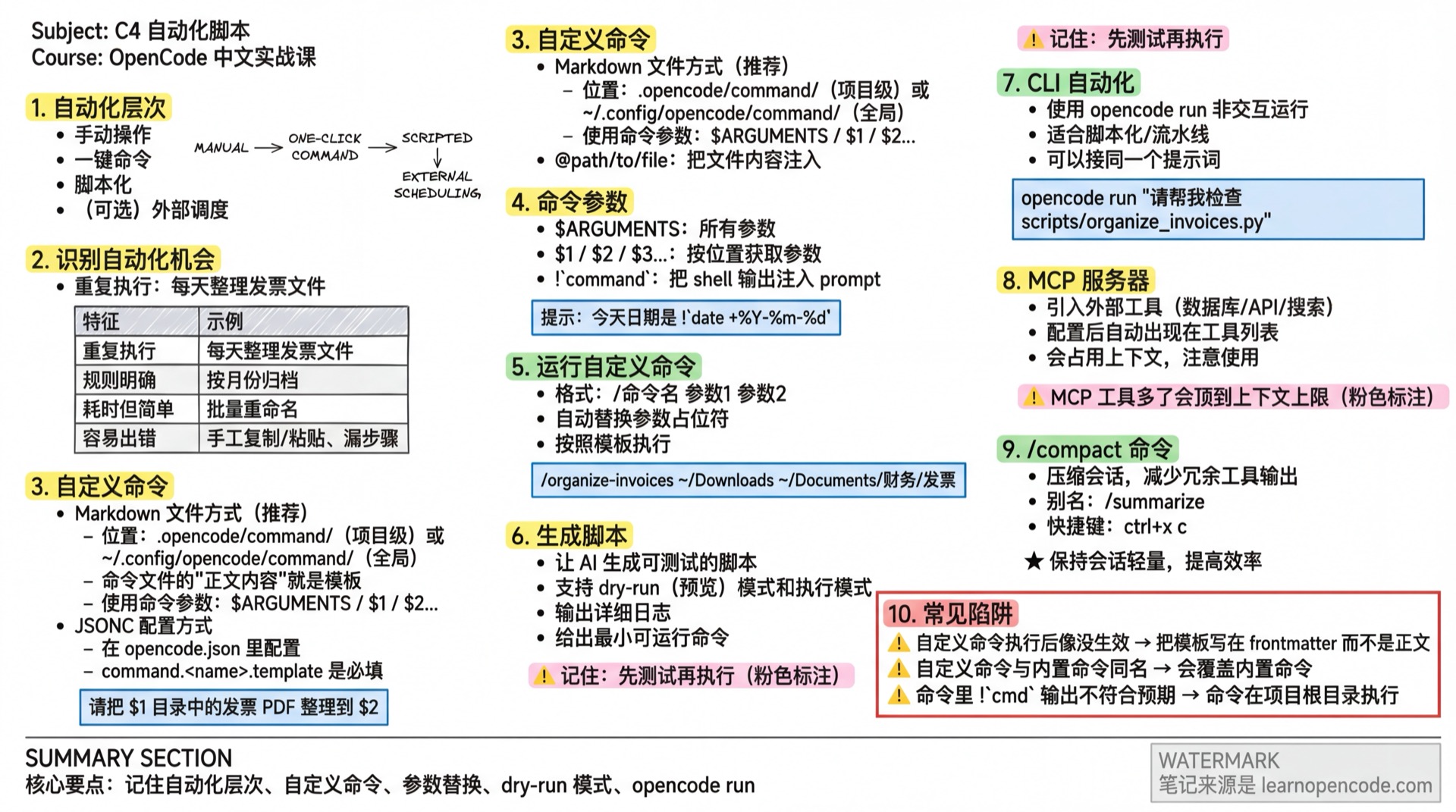
What You'll Be Able to Do
- Identify repetitive tasks that can be automated
- Turn tasks into reusable "custom commands"
- Let AI help you generate and iterate on scripts
- Chain automation together using CLI
Your Current Struggles
- Doing repetitive work every day, wasting time
- Want to write automation scripts, but don't know how to program
- Want "one-click execution", but have to re-describe requirements each time
When to Use This Approach
- When you need: Let the computer automatically complete repetitive tasks
- And don't want to: Manually do the same thing every day
🎒 Before You Start
Make sure you've completed the following:
- [ ] Completed C1 File Organization
- [ ] Have a repetitive task you want to automate
Core Concepts
Identifying Automation Opportunities
| Characteristic | Example |
|---|---|
| Repeated execution | Organizing invoice files daily |
| Clear rules | Archiving by month |
| Time-consuming but simple | Batch renaming |
| Error-prone | Manual copy/paste, missing steps |
Automation Layers
Manual Operation → One-click Command → Scripted → (Optional) External SchedulingAvailable Tools/Features (OpenCode)
| Tool/Feature | Purpose | Key Notes (Verifiable) |
|---|---|---|
| Custom Commands | Turn "prompt templates" into fixed /command-name | Command templates come from: Markdown file content (Official: opencode/packages/web/src/content/docs/commands.mdx:33~opencode/packages/web/src/content/docs/commands.mdx:34; Source: opencode/packages/opencode/src/config/config.ts:214~opencode/packages/opencode/src/config/config.ts:218) |
| Command Arguments | Pass arguments to commands | $ARGUMENTS / $1 / $2… (Official: opencode/packages/web/src/content/docs/commands.mdx:111~opencode/packages/web/src/content/docs/commands.mdx:161) |
| Command Shell Output Embedding | Inject !`cmd` output into prompt | Syntax !`command` (Official: opencode/packages/web/src/content/docs/commands.mdx:164~opencode/packages/web/src/content/docs/commands.mdx:179; Source: opencode/packages/opencode/src/config/markdown.ts:7~opencode/packages/opencode/src/config/markdown.ts:15) |
| Command File Reference | Inject file content using @path/to/file | Syntax @... (Official: opencode/packages/web/src/content/docs/commands.mdx:198~opencode/packages/web/src/content/docs/commands.mdx:212; Source: opencode/packages/opencode/src/config/markdown.ts:6~opencode/packages/opencode/src/config/markdown.ts:12) |
opencode run | Non-interactive execution (for scripting/pipelines) | CLI supports opencode run [message..] (Official: opencode/packages/web/src/content/docs/cli.mdx:311~opencode/packages/web/src/content/docs/cli.mdx:350) |
| MCP Servers | Introduce external tools (databases/APIs/search) | MCP tools become automatically available, but consume context (Official: opencode/packages/web/src/content/docs/mcp-servers.mdx:8~opencode/packages/web/src/content/docs/mcp-servers.mdx:21) |
/compact | Compress session, reduce redundant tool output | Alias /summarize; shortcut ctrl+x c (Official: opencode/packages/web/src/content/docs/tui.mdx:82~opencode/packages/web/src/content/docs/tui.mdx:90) |
Follow Along
Step 1: Describe Your Repetitive Task (Get "Rules" First, Then "Execution")
Why The biggest fear in automation is "unclear rules". You need to express the process as rules that machines can execute.
I need to do these repetitive tasks every day:
1. Move invoice PDFs from the downloads folder to Finance/Invoices/
2. Create subdirectories by month (e.g., 2025-01/)
3. Rename to "Invoice_Date_Amount.pdf" format

Please do two things first:
A) Write down the rules clearly (date source, amount source, how to handle conflicts)
B) Provide a "preview first, execute later" solution
Step 2: Turn the Process into a "Custom Command"
Why You don't want to rewrite long prompts every time.
Method 1: Use Markdown Command Files (Recommended)
Command file locations (Official):
- Project-level:
.opencode/command/ - Global:
~/.config/opencode/command/
(Official: opencode/packages/web/src/content/docs/commands.mdx:80~opencode/packages/web/src/content/docs/commands.mdx:84)
Create .opencode/command/organize-invoices.md:
---
description: Organize invoices (archive + rename)
agent: build
model: anthropic/claude-opus-4-5-thinking
---

Please organize invoice PDFs from the $1 directory into $2:

Requirements:
1. First output "list of operations to be performed" (move/rename), don't execute directly
2. Execute after I confirm

Hint: Today's date is !`date +%Y-%m-%d`
Run the command:
/organize-invoices ~/Downloads ~/Documents/Finance/InvoicesExplanation:
- The "body content" of the command file is the template (Official:
opencode/packages/web/src/content/docs/commands.mdx:33~opencode/packages/web/src/content/docs/commands.mdx:34).!`date ...`will inject command output into the prompt (Official:opencode/packages/web/src/content/docs/commands.mdx:164~opencode/packages/web/src/content/docs/commands.mdx:179).
Method 2: Configure Commands in opencode.json using JSONC
{
  "$schema": "https://opencode.ai/config.json",
  "command": {
    "organize-invoices": {
      "template": "Please organize invoice PDFs from the $1 directory into $2:\n\nRequirements:\n1. First output operation list (move/rename), don't execute directly\n2. Execute after I confirm\n",
      "description": "Organize invoices (archive + rename)",
      "agent": "build",
      "model": "anthropic/claude-opus-4-5-thinking",
      "subtask": true
    }
  }
}
Notes:
command.<name>.templateis required (Official:opencode/packages/web/src/content/docs/commands.mdx:221~opencode/packages/web/src/content/docs/commands.mdx:236).description/agent/model/subtaskare all optional (Source:opencode/packages/opencode/src/config/config.ts:49~opencode/packages/opencode/src/config/config.ts:55; Official:opencode/packages/web/src/content/docs/commands.mdx:57~opencode/packages/web/src/content/docs/commands.mdx:66).subtask: trueforces subagent usage (Official:opencode/packages/web/src/content/docs/commands.mdx:77~opencode/packages/web/src/content/docs/commands.mdx:93).
Step 3: Let AI Generate the "Script", But Require Testability
Why The biggest fear with automation scripts is "write once and run directly". You need to be able to test, reuse, and iterate.
Based on the rules above, help me create a script scripts/organize_invoices.py:
1. Scan source directory for PDFs
2. Parse date/amount (provide strategy if parsing fails)
3. Generate target directory structure
4. Output detailed logs (how each file is processed)

Requirements:
- Implement both "preview mode (dry-run)" and "execute mode"
- Give me a minimal runnable command
Step 4: Use CLI to Chain Automation for "Scripted Invocation"
Why You may want to trigger the same prompts in terminal scripts or pipelines.
OpenCode CLI supports non-interactive execution:
opencode run "Please help me check the parameter design of scripts/organize_invoices.py and provide improvement suggestions"(Official: opencode/packages/web/src/content/docs/cli.mdx:311~opencode/packages/web/src/content/docs/cli.mdx:350)
Advanced: Extended Features
Using MCP Servers (Optional)
MCP lets OpenCode introduce external tools. After configuration, MCP tools automatically appear in the available tools list (Official: opencode/packages/web/src/content/docs/mcp-servers.mdx:8~opencode/packages/web/src/content/docs/mcp-servers.mdx:9).
Example: Add a Local Test MCP (Official example: @modelcontextprotocol/server-everything):
{
  "$schema": "https://opencode.ai/config.json",
  "mcp": {
    "mcp_everything": {
      "type": "local",
      "command": ["npx", "-y", "@modelcontextprotocol/server-everything"]
    }
  }
}
(Official: opencode/packages/web/src/content/docs/mcp-servers.mdx:70~opencode/packages/web/src/content/docs/mcp-servers.mdx:82)
Tips
- MCP consumes context; more tools make it easier to hit context limits (Official:
opencode/packages/web/src/content/docs/mcp-servers.mdx:14~opencode/packages/web/src/content/docs/mcp-servers.mdx:21). - You can use
enabled: falseto temporarily disable a server (Official:opencode/packages/web/src/content/docs/mcp-servers.mdx:43~opencode/packages/web/src/content/docs/mcp-servers.mdx:44).
Use /compact to Keep Sessions "Lightweight"
/compact- Alias:
/summarize - Shortcut:
ctrl+x c
(Official: opencode/packages/web/src/content/docs/tui.mdx:82~opencode/packages/web/src/content/docs/tui.mdx:90)
env/file Variable Substitution in Config (Also Correcting provider.apiKey Syntax)
OpenCode supports {env:VAR} and {file:path} (Official: opencode/packages/web/src/content/docs/config.mdx:75~opencode/packages/web/src/content/docs/config.mdx:95).
Using anthropic as an example, apiKey goes in provider.<id>.options.apiKey:
{
  "$schema": "https://opencode.ai/config.json",
  "provider": {
    "anthropic": {
      "options": {
        "apiKey": "{env:ANTHROPIC_API_KEY}"
      }
    }
  },
  "model": "anthropic/claude-opus-4-5-thinking",
  "small_model": "anthropic/claude-haiku-4-5"
}
(Official: opencode/packages/web/src/content/docs/config.mdx:170~opencode/packages/web/src/content/docs/config.mdx:181; Source: opencode/packages/opencode/src/config/config.ts:740~opencode/packages/opencode/src/config/config.ts:763)
Checkpoint ✅
Must pass all items to continue
- [ ] Identified an automatable task
- [ ] Turned the process into a custom command (Markdown or JSON)
- [ ] Generated a testable script (supports dry-run)
- [ ] Know how to use
opencode runfor scripted triggers
Common Pitfalls
| Symptom | Cause | Solution |
|---|---|---|
| Custom command "seems not to work" after execution | Wrote template in frontmatter instead of body | Command file "body content" is the template (Official: opencode/packages/web/src/content/docs/commands.mdx:33~opencode/packages/web/src/content/docs/commands.mdx:34) |
| Custom command has same name as built-in command | Will override built-in command | Avoid naming conflicts with /init, /share, etc. (Official: opencode/packages/web/src/content/docs/commands.mdx:319~opencode/packages/web/src/content/docs/commands.mdx:323) |
!`cmd` output in command doesn't match expectations | Command executes in project root directory | Write paths relative to project root, or specify directory in template (Official: opencode/packages/web/src/content/docs/commands.mdx:194~opencode/packages/web/src/content/docs/commands.mdx:195) |
Provider's apiKey doesn't work | Written as provider.<id>.apiKey | Put it in provider.<id>.options.apiKey per Schema (Source: opencode/packages/opencode/src/config/config.ts:740~opencode/packages/opencode/src/config/config.ts:763) |
Evidence Index (OpenCode Behaviors Covered in This Lesson)
| Topic | Conclusion | Evidence |
|---|---|---|
| Command template source | Markdown body is template | opencode/packages/web/src/content/docs/commands.mdx:33~opencode/packages/web/src/content/docs/commands.mdx:34 |
| Command argument placeholders | Supports $ARGUMENTS and $1... | opencode/packages/web/src/content/docs/commands.mdx:111~opencode/packages/web/src/content/docs/commands.mdx:161 |
| Command shell embedding | Supports !`command` | opencode/packages/web/src/content/docs/commands.mdx:164~opencode/packages/web/src/content/docs/commands.mdx:179 |
| CLI automation | Supports opencode run | opencode/packages/web/src/content/docs/cli.mdx:311~opencode/packages/web/src/content/docs/cli.mdx:350 |
| MCP capabilities | MCP tools become automatically available but increase context | opencode/packages/web/src/content/docs/mcp-servers.mdx:8~opencode/packages/web/src/content/docs/mcp-servers.mdx:21 |
Lesson Summary
You learned:
- Identify repetitive tasks that can be automated
- Use custom commands to solidify processes
- Let AI generate testable scripts
- Use CLI to chain automation together
🎉 Congratulations on completing all Efficiency Boost courses!
Next Steps
- Want to learn more customization techniques? → Stage 5: Deep Customization
- Want to try other scenarios? → Content Creation Track or Developer Track