

5.4 Slash Commands
One-liner: Customize slash commands to trigger complex tasks with
/command-name.
📝 Course Notes
Key takeaways from this lesson:
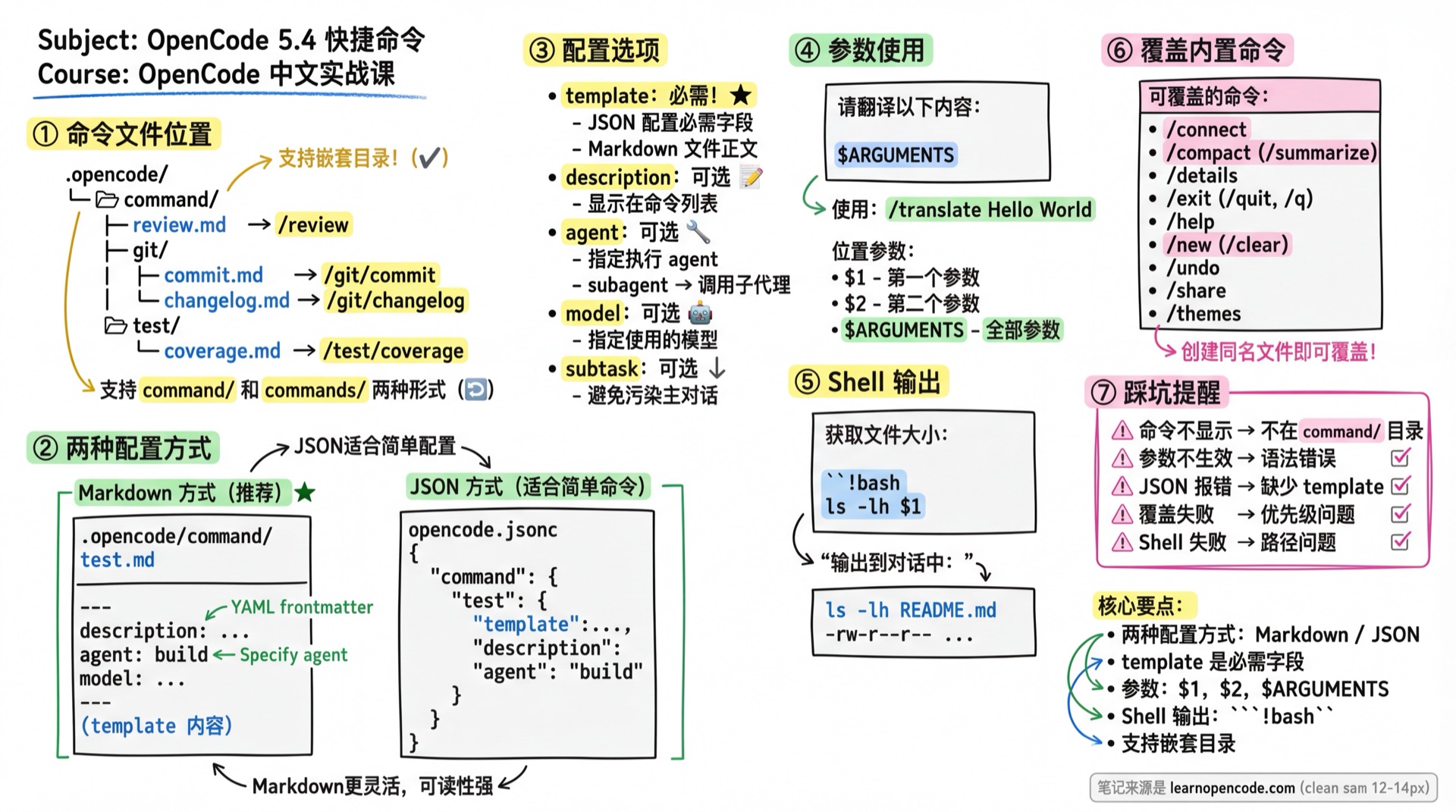
What You'll Be Able to Do
- Create custom slash commands (using JSON or Markdown)
- Use parameters, variables, and shell output
- Specify which agent and model the command uses
- Override built-in commands
Your Current Pain Points
- No shortcuts for common operations
- Typing complete prompts every time
- Built-in commands aren't enough, want to add your own
When to Use This
- When you need: One-click triggers for common tasks
- And don't want to: Type long commands every time
Command File Locations
| Location | Scope | Notes |
|---|---|---|
.opencode/command/**/*.md | Current project | Supports nested directories |
.opencode/commands/**/*.md | Current project | commands plural form also supported |
~/.config/opencode/command/**/*.md | Global | Shared across all projects |
Source: config.ts#L191
Nested directory example:
.opencode/
└── command/
    ├── review.md           → /review
    ├── git/
    │   ├── commit.md       → /git/commit
    │   └── changelog.md    → /git/changelog
    └── test/
        └── coverage.md     → /test/coverage
Two Configuration Methods
Method 1: Markdown File (Recommended)
Create .opencode/command/test.md:
---
description: "Run tests and show coverage"
agent: "build"
model: "anthropic/claude-opus-4-5-thinking"
---

Run the complete test suite and generate a coverage report.
Focus on failed tests and provide fix suggestions.
Usage: /test
Method 2: JSON Configuration
Configure in opencode.jsonc:
{
  "$schema": "https://opencode.ai/config.json",
  "command": {
    // Key name is the command name
    "test": {
      // template is required
      "template": "Run the complete test suite and generate a coverage report.\nFocus on failed tests and provide fix suggestions.",
      "description": "Run tests and show coverage",
      "agent": "build",
      "model": "anthropic/claude-opus-4-5-thinking"
    }
  }
}
Usage: /test
Comparison: Markdown is better for complex prompts (multi-line, formatted); JSON is suitable for simple commands or batch management.
Configuration Options Explained
template (Required)
The prompt template sent to the LLM when the command executes.
- JSON config: Required field
- Markdown config: File content is the template, no explicit declaration needed
Source: config.ts#L450
description (Optional)
Command description, displayed in the TUI command list.
---
description: "Quick code review"
---
agent (Optional)
Specify which agent executes this command.
---
agent: "plan"
---
Behavior rules:
- If specified agent is a subagent (mode=subagent), command triggers subagent call by default
- If not specified, uses the currently active agent
Source: Official Docs - Agent
model (Optional)
Override the model used for this command.
---
model: "anthropic/claude-opus-4-5-thinking"
---
subtask (Optional)
Force command to run as a subtask.
---
subtask: true
---
Use cases:
- Don't want command execution to pollute main conversation context
- Force subagent execution even if agent's mode is set to
primary
Source: Official Docs - Subtask
Prompt Template Syntax
$ARGUMENTS - All Arguments
Pass all content after the command as arguments.
---
description: "Create React component"
---

Create a React component named $ARGUMENTS with TypeScript type support.
Usage: /component Button → replaces $ARGUMENTS with Button
$1, $2, $3... - Positional Arguments
Reference each argument by position.
---
description: "Create specified file"
---

Create a file named $1 in directory $2 with content: $3
Usage:
/create-file config.json src "{ \"key\": \"value\" }"Replacement result:
$1→config.json$2→src$3→{ "key": "value" }
!command - Shell Command Output
Execute a shell command and embed the output in the prompt.
---
description: "Analyze test coverage"
---

Current test results:
!`npm test`

Based on these results, suggest ways to improve coverage.
Another example:
---
description: "Review recent changes"
---

Recent Git commits:
!`git log --oneline -10`

Please review these changes and provide improvement suggestions.
Commands execute in the project root directory, output becomes part of the prompt.
@file - File Reference
Reference file contents.
---
description: "Review component"
---

Review the @src/components/Button.tsx component.
Check for performance issues and provide improvement suggestions.
Supported formats:
@src/file.ts- Relative path@./relative/path.ts- Explicit relative path
Source: markdown.ts#L6
Complete Examples
Code Review Command
.opencode/command/review.md:
---
description: "Review code quality of specified file"
agent: "plan"
---

@$1

Please review this file's code quality, focusing on:
1. Code conventions and naming
2. Potential bugs
3. Performance issues
4. Maintainability
Usage: /review src/main.ts
Smart Commit Command
.opencode/command/commit.md:
---
description: "Generate commit message from changes"
---

Generate a commit message based on the following changes:

!`git diff --staged`

Requirements:
- Follow Conventional Commits specification
- Be concise, explain "why" not "what"
Usage: /commit
Translation Command
.opencode/command/translate.md:
---
description: "Translate to Chinese"
subtask: true
---

Please translate the following content to Chinese:

$ARGUMENTS
Usage: /translate Hello World
Using
subtask: trueprevents translation content from polluting main conversation context.
Override Built-in Commands
Create a file with the same name to override built-in commands.
Overridable Built-in Commands
| Command | Function | Aliases |
|---|---|---|
/connect | Add Provider | - |
/compact | Compress current session | /summarize |
/details | Toggle tool execution details | - |
/editor | Open external editor | - |
/exit | Exit OpenCode | /quit, /q |
/export | Export conversation as Markdown | - |
/help | Show help | - |
/init | Create/update AGENTS.md | - |
/models | List available models | - |
/new | New session | /clear |
/redo | Restore undone session content and associated files | - |
/sessions | List/switch sessions | /resume, /continue |
/share | Share session | - |
/themes | List themes | - |
/undo | Return to the previous user message and roll back associated files | - |
/unshare | Unshare | - |
Source: Official Docs - TUI Commands
/undo and /redo do more than hide or restore messages: they also use snapshots to roll back or restore associated files. If the main configuration sets "snapshot": false, you can still undo and redo the session, but the files will not be restored with it.
Source (v1.18.22):
session/revert.ts:38-98andconfig.ts:52-55
Override Example
.opencode/command/help.md:
---
description: "Project-specific help"
---

This is project-specific help information.

## Common Commands

- /review <file> - Code review
- /commit - Smart commit
- /translate <text> - Translation
Common Pitfalls
| Issue | Cause | Solution |
|---|---|---|
| Command not showing | File not in correct directory | Ensure file is in command/ or commands/ directory |
| Command name error | Filename contains special characters | Command name comes from file path, use - instead of spaces |
| Parameters not working | Syntax error | Use $ARGUMENTS or $1, $2 |
| JSON config error | Missing template | template is required for JSON config |
| Nested directory command name | Don't understand the rule | Path git/commit.md → command /git/commit |
| Override command failed | Priority issue | Project-level commands take precedence over global |
| Shell command failed | Path issue | Commands execute in project root |
Lesson Summary
You learned:
- Two configuration methods: Markdown files and JSON configuration
- Using parameters (
$ARGUMENTS,$1) and shell output (!`cmd`) - Configuration options:
description,agent,model,subtask - Overriding built-in commands
Next Lesson Preview
In the next lesson, we'll learn about permission control.