

C2 Data Processing
💡 One-sentence summary: Use AI to analyze CSV/JSON data and automatically generate reports and visualizations.
📝 Course Notes
Key takeaways from this lesson:
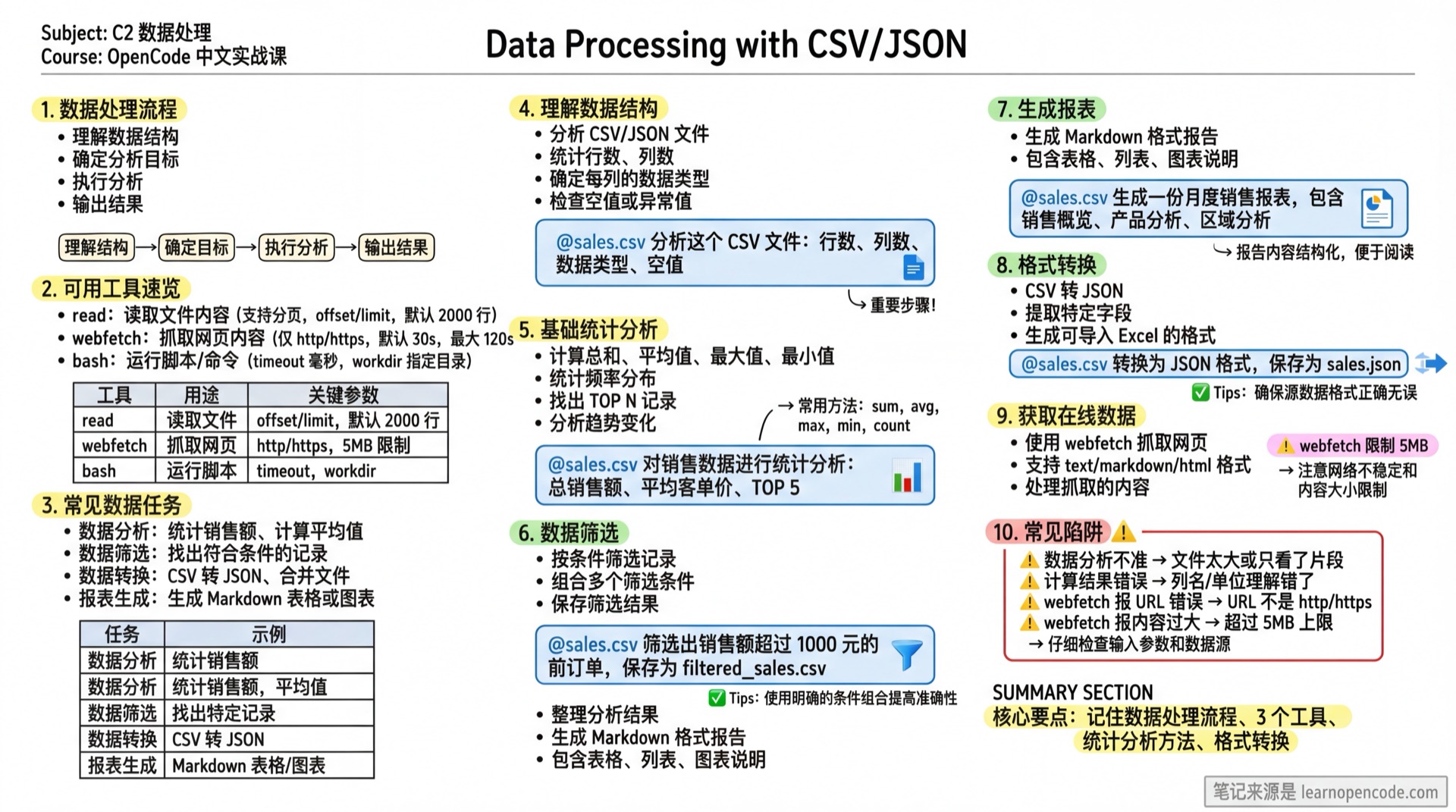
What You'll Be Able to Do
- Analyze CSV and JSON files
- Extract key data statistics
- Generate data reports
- Convert data formats
Your Current Struggles
- Can't write Excel formulas well, rely on manual calculations for data analysis
- Want to find patterns in data but don't know how to use data analysis tools
- Need to generate reports but formatting takes too much time
When to Use This Technique
- When you need to: Quickly analyze data and generate reports
- And you don't want to: Learn complex Excel formulas or Python
🎒 Before You Start
Make sure you have completed the following:
- [ ] Completed C1 File Organization
- [ ] Have a CSV or JSON data file
Core Concepts
Data Processing Workflow
Understand Data Structure → Define Analysis Goals → Execute Analysis → Output ResultsAvailable Tools (This course only covers OpenCode-related capabilities)
| Tool | Purpose | Key Parameters/Behaviors (Verifiable) |
|---|---|---|
read | Read file content (supports pagination) | offset (0-based start line), limit (default 2000 lines) (source: opencode/packages/opencode/src/tool/read.ts:12~opencode/packages/opencode/src/tool/read.ts:21) |
webfetch | Fetch webpage content | url only supports http/https (source: opencode/packages/opencode/src/tool/webfetch.ts:21~opencode/packages/opencode/src/tool/webfetch.ts:24); default timeout 30s, max 120s (source: opencode/packages/opencode/src/tool/webfetch.ts:7~opencode/packages/opencode/src/tool/webfetch.ts:9); response size limit 5MB (source: opencode/packages/opencode/src/tool/webfetch.ts:6~opencode/packages/opencode/src/tool/webfetch.ts:84) |
bash | Run scripts/commands | timeout (milliseconds, default 2 minutes: opencode/packages/opencode/src/tool/bash.ts:20~opencode/packages/opencode/src/tool/bash.ts:80), workdir (specify run directory: opencode/packages/opencode/src/tool/bash.ts:62~opencode/packages/opencode/src/tool/bash.ts:67) |
Tips
- In TUI, use
@sales.csvto inject file content into context (official:opencode/packages/web/src/content/docs/tui.mdx:30~opencode/packages/web/src/content/docs/tui.mdx:43). webfetch.timeoutunit is "seconds" (parameter description:opencode/packages/opencode/src/tool/webfetch.ts:18~opencode/packages/opencode/src/tool/webfetch.ts:19).
Common Data Tasks
| Task | Example |
|---|---|
| Data Analysis | Calculate sales totals, compute averages |
| Data Filtering | Find records matching specific criteria |
| Data Conversion | CSV to JSON, merge files |
| Report Generation | Generate Markdown tables or charts |
Follow Along
Step 1: Understand Data Structure
Why
First understand what the data looks like.
cd ~/data  # Replace with your data directory
opencode
@sales.csv Analyze this CSV file:
1. How many rows of data (if you can't count precisely, explain why and provide alternatives)
2. What columns (fields) are there
3. Data type of each column (what's your basis for inference)
4. Are there any null or abnormal valuesStep 2: Basic Statistical Analysis
Why
Quickly understand data overview.
@sales.csv Perform statistical analysis on sales data:
1. Total sales
2. Average order value
3. Top 5 products by sales volume
4. Monthly sales trend
Step 3: Data Filtering
Why
Find records matching specific criteria.
@sales.csv Filter the following data:
1. Orders with sales over 1000 yuan
2. All orders from January this year
3. Customer orders from Beijing

Save the results as filtered_sales.csv
Step 4: Generate Report
Why
Organize analysis results into a readable report.
@sales.csv Generate a monthly sales report including:

## Sales Overview
- Total sales this month
- Month-over-month growth rate
- Number of orders

## Product Analysis
- Top 10 products table by sales volume
- Category distribution

## Regional Analysis
- Sales ranking by region

Save as monthly-report.md
Step 5: Format Conversion
Why Different scenarios require different formats.
@sales.csv Complete the following conversions:
1. Convert to JSON format, save as sales.json
2. Extract customer information, generate customers.csv
3. Generate a format that can be imported into Excel
Advanced: Fetching Online Data
Using the webfetch Tool
Besides local files, you can also fetch data from webpages for analysis:
Use webfetch to fetch a webpage (please output a summary of the raw content you obtained), and explain:
1. Whether you got text / markdown / html
2. How you would convert it to analyzable data (CSV/JSON/table)
Tips
webfetchsupportstext/markdown(default) /html(source:opencode/packages/opencode/src/tool/webfetch.ts:14~opencode/packages/opencode/src/tool/webfetch.ts:18).- Default timeout 30s, max 120s (source:
opencode/packages/opencode/src/tool/webfetch.ts:7~opencode/packages/opencode/src/tool/webfetch.ts:9). - Response size limit 5MB, will error if exceeded (source:
opencode/packages/opencode/src/tool/webfetch.ts:6~opencode/packages/opencode/src/tool/webfetch.ts:84).
bash: Running Data Processing Scripts (Optional)
If you want to固化 "filter/clean/convert" operations into scripts (for reuse), you can have AI generate the script first, then run it with bash.
Tips
bash.timeoutunit is milliseconds, default 2 minutes (source:opencode/packages/opencode/src/tool/bash.ts:20~opencode/packages/opencode/src/tool/bash.ts:80).- Output default max 30000 characters (source:
opencode/packages/opencode/src/tool/bash.ts:19~opencode/packages/opencode/src/tool/bash.ts:36).
Checklist ✅
All items must be completed before proceeding
- [ ] Analyzed CSV/JSON file structure
- [ ] Completed basic statistics
- [ ] Filtered target data
- [ ] Generated readable reports
Common Pitfalls
| Issue | Cause | Solution |
|---|---|---|
| Inaccurate data analysis | File too large or only viewed partially | First have AI summarize structure + sampling, then do full analysis (use read.offset/limit for pagination if needed) |
| Wrong calculation results | Misunderstood column names/units | First have AI restate column meanings and units, then have it calculate |
webfetch URL error | URL is not http/https | Confirm link protocol (source: opencode/packages/opencode/src/tool/webfetch.ts:21~opencode/packages/opencode/src/tool/webfetch.ts:24) |
webfetch content too large | Exceeds 5MB limit | Use a smaller page/API, or fetch in segments (source: opencode/packages/opencode/src/tool/webfetch.ts:6~opencode/packages/opencode/src/tool/webfetch.ts:84) |
Evidence Index (OpenCode behaviors covered in this lesson)
| Topic | Conclusion | Evidence |
|---|---|---|
read.offset/limit | offset starts from 0; default read 2000 lines | opencode/packages/opencode/src/tool/read.ts:12~opencode/packages/opencode/src/tool/read.ts:21 |
webfetch limits | http/https only; default 30s, max 120s; 5MB | opencode/packages/opencode/src/tool/webfetch.ts:6~opencode/packages/opencode/src/tool/webfetch.ts:24 |
File reference @... | TUI supports @file content injection | opencode/packages/web/src/content/docs/tui.mdx:30~opencode/packages/web/src/content/docs/tui.mdx:43 |
bash default timeout/truncation | Default 2 minutes; output default 30000 characters | opencode/packages/opencode/src/tool/bash.ts:19~opencode/packages/opencode/src/tool/bash.ts:36; opencode/packages/opencode/src/tool/bash.ts:20~opencode/packages/opencode/src/tool/bash.ts:80 |
Lesson Summary
You learned:
- Analyze CSV/JSON data structure
- Perform basic statistical analysis
- Filter data by conditions
- Generate Markdown reports
Next Lesson Preview
In the next lesson, we'll learn how to use AI to learn programming, making AI your programming tutor.