

B3 Documentation & Git
💡 One-liner: Use AI to auto-generate README, commit messages, and PR descriptions.
📝 Course Notes
Key takeaways from this lesson:
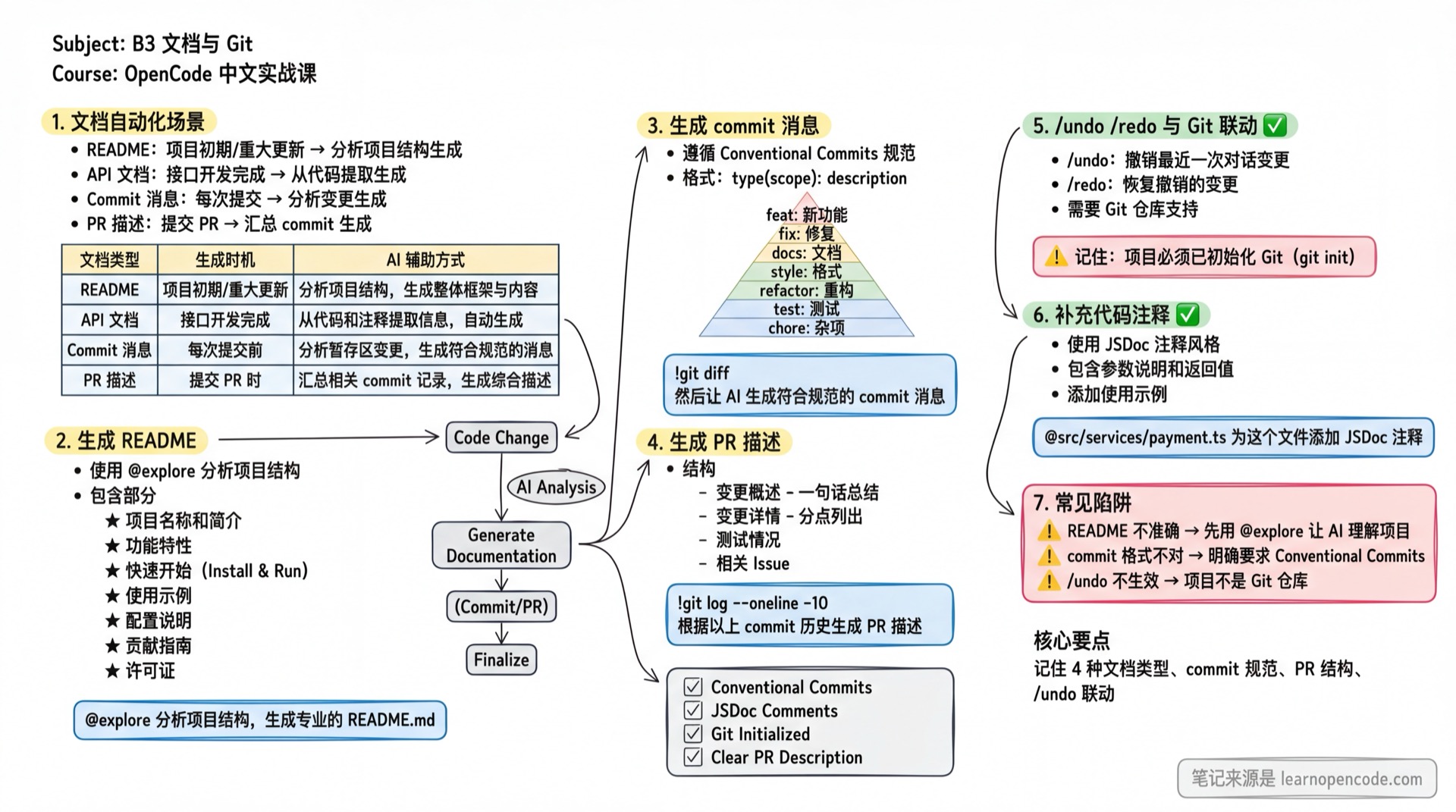
What You'll Be Able to Do
- Auto-generate project README
- Let AI write commit messages
- Generate PR descriptions
- Use /undo /redo with Git integration
Your Current Struggles
- README writing is painful, or you just skip it
- Commit messages are sloppy, hard to understand later
- PR descriptions - no idea how to write them properly
When to Use This
- When you need to: efficiently complete documentation and Git collaboration tasks
- And don't want to: spend too much time on these "chores"
🎒 Before You Start
Make sure you've completed the following:
- [ ] Completed B1 Developer Daily
- [ ] Project has Git initialized (
git init)
Core Concept
Documentation Automation Scenarios
| Doc Type | When to Generate | AI Assistance |
|---|---|---|
| README | Project start / major updates | Analyze project structure |
| API Docs | After interface development | Extract from code |
| Commit Message | Each commit | Analyze changes |
| PR Description | Submitting PR | Summarize commits |
Follow Along
Step 1: Generate README
Why A good README is the face of your project.
Switch to Build Agent:
@explore Analyze the project structure and generate a professional README.md:

Include the following sections:
1. Project name and description
2. Features (Feature list)
3. Quick Start (installation and running)
4. Usage examples
5. Configuration
6. Contributing guide
7. License

Save as README.md
Step 2: Generate Commit Message
Why
Standardized commit messages make tracking easier.
First, check the changes:
In OpenCode TUI, messages starting with
!execute shell commands and bring the output into the conversation: https://opencode.ai/docs/tui
!git diffThen let AI generate:
Based on the above changes, generate a commit message following Conventional Commits:
- Format: type(scope): description
- type: feat/fix/docs/style/refactor/test/chore
- Concise, no more than 50 characters
Execute the commit:
!git add . && git commit -m "feat(auth): add email verification on registration"Step 3: Generate PR Description
Why
Clear PR descriptions help reviewers understand.
Get recent commit list (example):
!git log --oneline -10Based on the above commit history, generate a PR description:
## Summary
(one sentence)
## Changes
(list main modifications)
## Testing
(what was tested)
## Related Issues
(related issue numbers)Step 4: Use /undo to Revert
Why
Revert AI mistakes.
If you're not satisfied with AI's changes:
/undoYou should see: The session returns to the previous user message, and file patches associated with everything after it are rolled back as well (file restoration requires a Git repository). For more details, see https://opencode.ai/docs/tui#undo or Appendix/Command Reference.
To restore the conversation and files you just undid:
/redo
"snapshot": falsedisables only file restoration; it does not disable conversation undo/redo. Source references:session/revert.ts:38-98andconfig.ts:52-55.
Step 5: Add Code Comments
Why
Good comments are living documentation.
@src/services/payment.ts Add JSDoc comments to this file:
- For every exported function
- Include parameter descriptions and return values
- Include usage examples
📋 Magic Prompts
📄 README Generation
Expected outcome: Generate a professional project README for quick onboarding
## Role
You are a technical documentation engineer who excels at writing easy-to-understand project docs.

## Task
Generate a professional README.md for the project.

## Input
### Required
- Project name: 【name】
- One-liner description: 【description】
- Tech stack: 【tech stack】

### Optional
- Target users: 【who will use this?】
- Project structure: @explore or [paste structure]

## Output Specification
Include the following sections:
1. **Project Title and Badges**
2. **Description** (3-5 sentences)
3. **Features** (as a list)
4. **Quick Start**
   - Prerequisites
   - Installation steps (copy-paste ready)
   - Run commands
5. **Configuration** (env vars, config files)
6. **API Documentation** (if applicable)
7. **FAQ**
8. **Contributing**
9. **License**

## Constraints
- ✅ Quick start commands must be copy-paste ready
- ✅ Configuration must be complete with all required fields
- ✅ Use appropriate badges (build status, version, etc.)
- ❌ Avoid being too verbose, keep it concise
- ❌ Don't miss key configurations
🔧 Commit Message Generation
Expected outcome: Generate standardized Conventional Commits format messages
## Role
You are a code standards expert who excels at writing standardized commit messages.

## Task
Generate a commit message following Conventional Commits based on code changes.

## Input
### Required
- Changes: !git diff or [paste change description]

### Optional
- Related Issue: 【Issue number?】

## Output Specification
Format: `<type>(<scope>): <description>`

### type Selection
- feat: new feature
- fix: bug fix
- docs: documentation update
- style: code formatting (no logic change)
- refactor: refactoring (not feature or fix)
- test: test related
- chore: build/tool/dependencies

### Standards
- description under 50 characters
- Use imperative mood (add, fix, update, not added, fixed)
- If changes are complex, add body for details
- If related to an Issue, add `Closes #123` in footer

## Constraints
- ✅ type should accurately reflect change type
- ✅ description should be specific about what changed
- ❌ Avoid vague descriptions like "fix bug", "update code"
- ❌ Don't repeat type in description
📝 PR Description Generation
Expected outcome: Generate clear PR descriptions to help reviewers understand changes
## Role
You are a technical writing expert who excels at writing clear technical docs.

## Task
Generate a PR description based on commit history.

## Input
### Required
- Commit history: !git log --oneline -10 or [paste commit list]

### Optional
- PR purpose: 【What problem does this PR solve?】
- Related Issue: 【Issue number?】

## Output Specification
```markdown
## Summary
(one sentence describing the PR's purpose)

## Changes
- Detailed change 1
- Detailed change 2
- ...

## Testing
- [ ] Unit tests pass
- [ ] Integration tests pass
- [ ] Manual testing complete

## Screenshots/Recordings
(if UI changes, attach screenshots)

## Related Issues
Closes #【Issue number】

## Reviewer Notes
(areas needing special attention)
```

## Constraints
- ✅ Summary should be clear in one sentence
- ✅ Changes should be specific, not just copying commit messages
- ✅ If UI changes, remind to attach screenshots
- ❌ Don't miss related Issues
- ❌ Don't make changes section too vague
Checklist ✅
All must pass before continuing
- [ ] Generated README.md
- [ ] Used AI to generate commit messages
- [ ] Know how to generate PR descriptions
- [ ] Know /undo and Git integration
Common Pitfalls
| Issue | Cause | Solution |
|---|---|---|
| README inaccurate | AI analysis incomplete | Use @explore first to let AI understand the project |
| Wrong commit format | No standard specified | Explicitly require Conventional Commits |
| /undo changed the messages but did not restore the files | The project is not a Git repository, or snapshot: false is set | Use a Git repository and enable snapshots |
Lesson Summary
You learned:
- Auto-generate project README
- Generate standardized commit messages
- Generate PR descriptions
- /undo /redo with Git integration
Next Lesson Preview
Next lesson we'll learn about CI/CD integration, putting AI to work in pipelines.
📚 More Templates: Prompt Template Library