

A2 Blog & Newsletter Writing
💡 One-line summary: Build a content production line with OpenCode — batch topics, series management, style consistency.
📝 Course Notes
Key takeaways from this lesson:
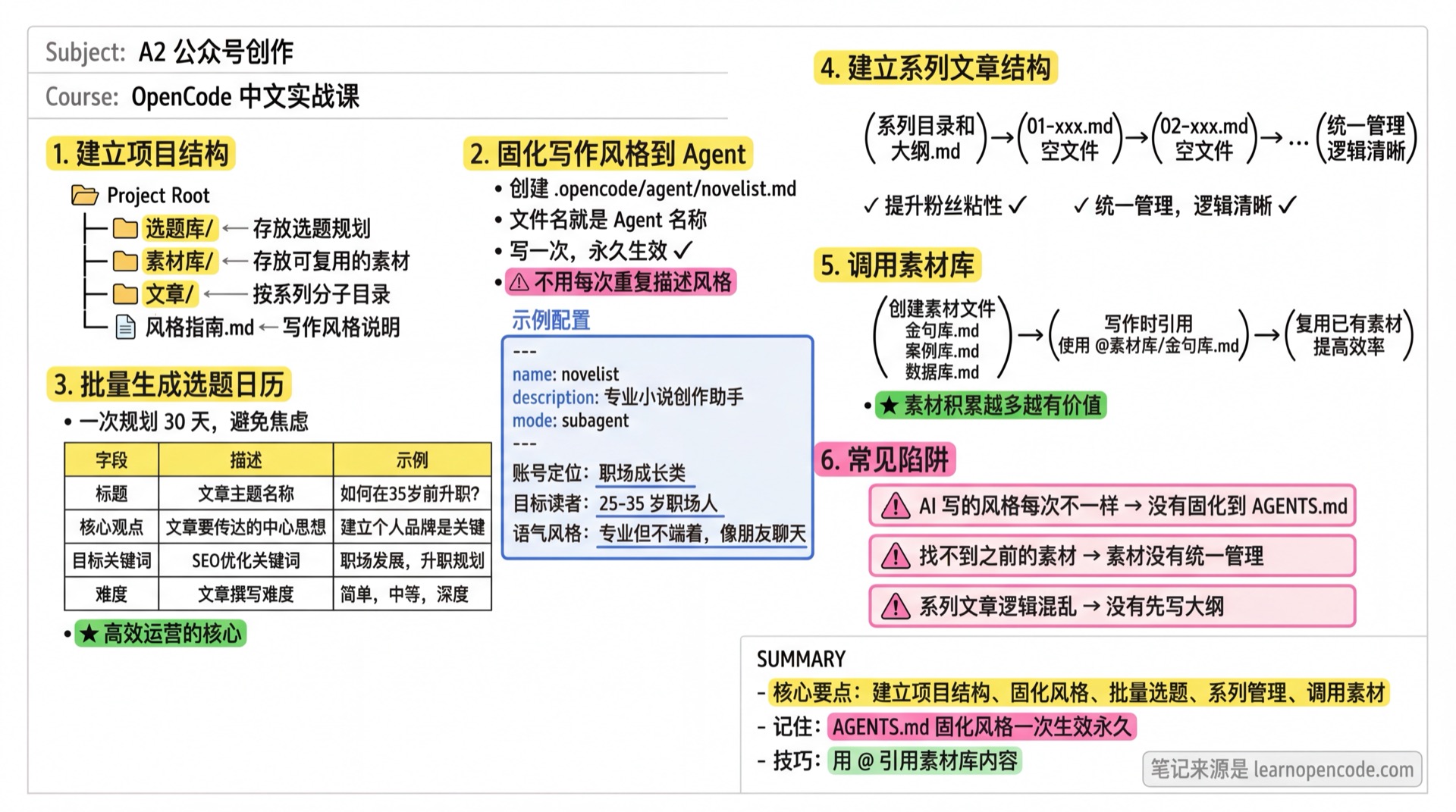
What You'll Be Able to Do
- Generate a 30-day content calendar in one go
- Build a directory structure for article series
- Lock your writing style into AGENTS.md
- Reference local asset library to generate articles
Why OpenCode Instead of Web-based AI?
| Capability | Web-based AI | OpenCode |
|---|---|---|
| Batch topic generation | ❌ Copy-paste only | ✅ Generate once, save to files |
| Style consistency | ❌ Re-describe every time | ✅ AGENTS.md locks it in forever |
| Series management | ❌ Can't manage multiple files | ✅ Directory structure, outlines/chapters separate |
| Asset library | ❌ Can't read local files | ✅ @asset reference to historical content |
| Version tracking | ❌ | ✅ Git tracks creation history |
Your Current Struggle
- Re-describing your style requirements every time you write
- No topic planning, writing whatever comes to mind
- Series articles in chaos, can't find previous content
When to Use This Technique
- When you need: Efficient content operations, batch content production
- And you don't want: Starting from scratch every time, inconsistent style
🎒 Before You Start
Make sure you've completed the following:
- [ ] Completed A1 Writing Workflow
- [ ] Have a blog or newsletter (or a planned niche/positioning)
Follow Along
Step 1: Set Up Your Blog/Newsletter Project Structure
Why
Centralize all content instead of scattered files everywhere.
mkdir ~/my-blog
cd ~/my-blog
opencode
Ask AI to create the directory structure:
Help me set up a blog content management structure:
- topics/ (store topic planning)
- assets/ (store reusable materials)
- posts/ (organize by series)
- style-guide.md (writing style guidelines)

Create these directories and empty files
Step 2: Lock Your Writing Style into an Agent
Why
Write once, works forever — no need to repeat descriptions.
Agent configuration can be placed in two locations:
- Global:
~/.config/opencode/agent/- Shared across all projects - Project-level:
.opencode/agent/- Specific to current project
The filename is the agent name, e.g., blogger.md (not blogger/blogger.md)
Help me create a writing agent, save to .opencode/agent/blogger.md:

---
name: blogger
description: Professional content creator assistant, skilled at topic ideation, outlining, and copy editing
mode: subagent
temperature: 0.8
---

Blog niche: Career growth and productivity
Target audience: 25-35 year old professionals
Tone: Professional but approachable, like chatting with a friend
Article structure: Hook with a question → Deliver value → End with a memorable insight
Banned words: synergy, leverage, disrupt, game-changer, paradigm shift
Word count: 12000+-22000+ words
You should see: AI created the agent configuration file
💡 This is OpenCode's Unique Value
Every time you write, AI will automatically follow this style — no need to repeat.
Step 3: Batch Generate Topic Calendar
Why
Plan a month at once, avoid daily topic anxiety.
Based on my blog niche (career growth), generate a 30-day content calendar:

Requirements:
1. 3 posts per week, 12 posts total
2. Include: title, core insight, target keywords
3. Consider seasonal themes (year-end reflection, new year planning)
4. Mark difficulty (Easy/Medium/Deep)

Save as topics/2025-january-calendar.md
Step 4: Build Article Series Structure
Why
Series articles boost subscriber loyalty, but need unified management.
I want to write a "Workplace Communication" series, 5 articles total.

Help me:
1. Create posts/workplace-communication-series/ directory
2. Create outline.md (series plan, each article's position, publish order)
3. Create empty files for each article (01-xxx.md format)

Series plan:
- Article 1: Why Your Communication Always Fails
- Article 2: 3 Techniques for Upward Communication
- Article 3: Core Principles of Cross-team Communication
- Article 4: How to Navigate Difficult Conversations
- Article 5: Build Your Personal Brand Through Communication
Step 5: Generate Articles Using Asset Library
Why
Reuse existing materials to improve efficiency.
First, add some assets:
Create these files under assets/:

quotes.md - Collected insights and quotes
cases.md - Real workplace case studies
data.md - Research data and statistics
Then write articles based on assets:
Write a blog post based on the topic "3 Techniques for Upward Communication".

Requirements:
1. Follow the style in AGENTS.md
2. Reference quotes from @assets/quotes.md
3. Use cases from @assets/cases.md
4. Around 2000 words

Save as posts/workplace-communication-series/02-upward-communication-techniques.md
📋 Magic Prompts
📅 30-Day Topic Planning
Expected result: Generate complete content calendar, plan a month at once
## Role
You are a senior content strategist, expert at topic planning and editorial calendars.

## Task
Generate a 30-day content calendar based on blog positioning.

## Input
### Required
- Blog niche: [YOUR NICHE]
- Target audience: [AUDIENCE PROFILE]
- Publishing frequency: [N] posts per week

### Optional
- Current events: [Seasonal topics to include?]
- Previous topics: [Already covered topics?]

## Output Format
Generate topic table:
| Date | Title | Core Insight | Target Keywords | Difficulty | Type |
|------|-------|--------------|-----------------|------------|------|

### Difficulty Labels
- Easy (30 min)
- Medium (1 hour)
- Deep (2 hours)

### Type Labels
- How-to: Practical tips, methods
- Story: Case studies, experiences
- Opinion: Commentary, reflections
- Roundup: Summaries, lists

## Constraints
- ✅ Each topic includes core insight, not just title
- ✅ Consider timeliness (holidays, seasons, events)
- ✅ Vary difficulty and type
- ❌ Avoid homogeneous topics
- ❌ Avoid repeating covered content
🎨 Style Lock Template
Expected result: Generate Agent configuration, lock in blog style
## Role
You are a brand strategist, expert at defining and locking in brand voice.

## Task
Create a writing style configuration (AGENTS.md) for the blog.

## Input
### Required
- Blog name: [BLOG NAME]
- Niche: [FIELD]
- Target audience: [Age, profession, pain points]

### Optional
- Tone style: [e.g., "Professional but friendly"?]
- Reference blogs: [Style references?]

## Output Format
Generate AGENTS.md configuration:

```yaml
---
name: [BLOG NAME]
description: [One-line description]
---

## Blog Positioning
[Positioning description]

## Target Audience Profile
- Age:
- Profession:
- Pain points:
- Needs:

## Tone & Voice
[Detailed description, including positive and negative examples]

## Article Structure Template
1. Opening: [How to hook]
2. Body: [Core content structure]
3. Closing: [How to wrap up]

## Banned Words
[Words to avoid, comma separated]

## Signature Phrases
[Personal style phrase examples]

## Word Count Range
[Word count]
```

## Constraints
- ✅ Style description should be specific with examples
- ✅ Banned words should be practical
- ✅ Article structure should be reusable
- ❌ Avoid vague descriptions
📚 Series Article Planning
Expected result: Generate series structure, maintain content coherence
## Role
You are a content architect, expert at planning serialized content.

## Task
Design overall structure and positioning for each article in a series.

## Input
### Required
- Series theme: [THEME]
- Article count: [N] articles
- Series goal: [What readers will gain]

### Optional
- Target audience: [Audience profile?]
- Publishing cadence: [Posts per week?]

## Output Format
1. **Series Overview**
   - Series positioning
   - Target audience
   - Core value

2. **Article Plan**
   | # | Title | Core Content | Relation to Previous | Relation to Next |
   |---|-------|--------------|---------------------|------------------|

3. **Progression Logic**
   - From [starting point] to [end point]
   - Each article's advancement relationship

4. **Directory Structure**
   ```
   series-name/
   ├── outline.md
   ├── 01-xxx.md
   ├── 02-xxx.md
   └── ...
   ```

## Constraints
- ✅ Each article has standalone value, but connects to series
- ✅ Clear progression logic
- ✅ Consider reader's learning curve
- ❌ Avoid content overlap
- ❌ Avoid large jumps in difficulty
Checklist ✅
All items must pass before continuing
- [ ] Created blog/newsletter project directory structure
- [ ] Created AGENTS.md to lock in writing style
- [ ] Generated 30-day topic calendar
- [ ] Built at least one article series structure
Common Pitfalls
| Issue | Cause | Solution |
|---|---|---|
| AI writes in different styles each time | Style not locked in AGENTS.md | Write style requirements into AGENTS.md |
| Can't find previous materials | Assets not centrally managed | Create assets/ directory |
| Series articles have confused logic | No outline written first | Create series outline.md first |
Advanced Tips
Create Quick Commands
Turn common operations into slash commands:
mkdir -p .opencode/commandCreate .opencode/command/blog.md:
---
description: Quickly generate a blog post
---

Write a blog post based on the following topic:

Topic: $ARGUMENTS

Requirements:
1. Follow the style in AGENTS.md
2. Reference relevant materials from @assets/
3. Around 2000 words
4. Save to posts/ directory
Then just type /blog upward communication techniques to quickly generate.
Lesson Summary
You learned:
- Lock writing style in AGENTS.md (works forever)
- Batch generate topic calendar (30-day planning)
- Build directory structure for article series
- Reference local asset library to generate articles
This is what web-based AI cannot do — this is OpenCode's value.
Next Lesson Preview
Next lesson: Short-form Social Content — batch post generation, hashtag library management, image-text pairing.
📚 More Templates: Prompt Library