

5.11 Enterprise Features
💡 TL;DR: Understand OpenCode Enterprise deployment options and data security safeguards.
📝 Course Notes
Key takeaways from this lesson:
What You'll Be Able to Do
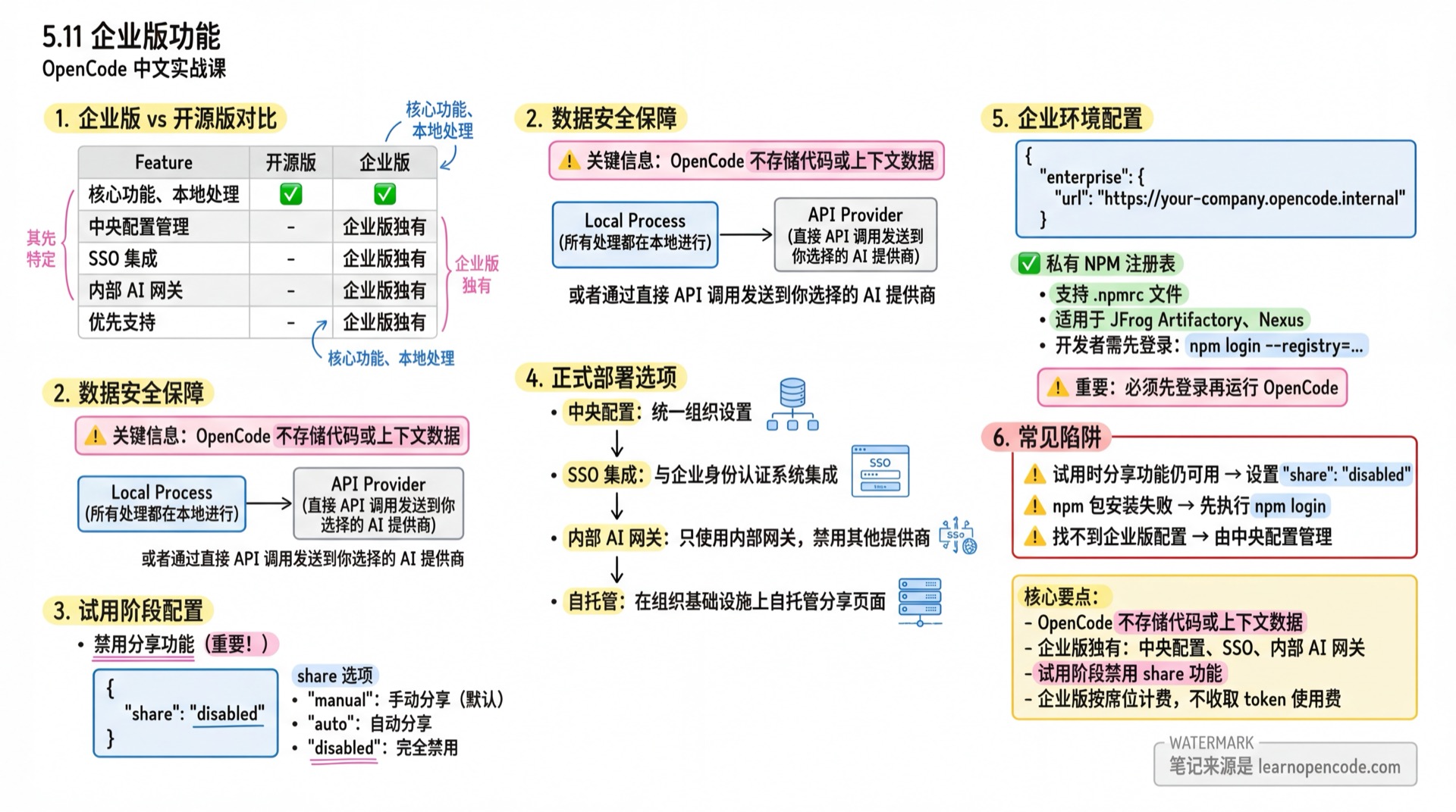
- Understand the differences between Enterprise and Open Source versions
- Configure data security options during enterprise trial
- Learn about formal deployment options
Your Current Challenge
- Using OpenCode personally and want to promote it to your team
- Concerned about code and data security
- Unsure what additional features the Enterprise version offers
When to Use This
- When you need: Ensure code and data never leave your enterprise infrastructure
- And you need: Centralized configuration management and SSO integration
Enterprise vs Open Source
| Feature | Open Source | Enterprise |
|---|---|---|
| Core Features | ✅ | ✅ |
| Local Processing (no code storage) | ✅ | ✅ |
| Central Configuration Management | ❌ | ✅ |
| SSO Integration | ❌ | ✅ |
| Internal AI Gateway Integration | ❌ | ✅ |
| Priority Support | ❌ | ✅ |
Source: enterprise.mdx
Start Trial
OpenCode is open source and does not store any code or context data. Teams can start trialing immediately.
Data Processing
OpenCode does not store your code or context data. All processing happens locally or is sent directly via API calls to your chosen AI provider.
This means you can safely use OpenCode as long as you use a trusted provider or an internal AI gateway.
Disable Share Feature
The only thing to note is the optional /share feature. If users enable sharing, conversation data is sent to opencode.ai hosted services.
Recommended for enterprise trials - disable this feature:
// opencode.json
{
  "$schema": "https://opencode.ai/config.json",
  "share": "disabled"
}
share configuration options:
| Value | Description |
|---|---|
"manual" | Manual sharing (default) |
"auto" | Automatically share new sessions |
"disabled" | Completely disable sharing |
Source: config.ts:790-795
Code Ownership
You own all code generated by OpenCode. There are no license restrictions or ownership claims.
Formal Deployment
After completing the trial, visit the OpenCode website to discuss pricing and implementation plans.
Central Configuration
Enterprise version can set unified central configuration for the entire organization.
Central configuration can:
- Integrate with your organization's SSO provider
- Ensure all users only access internal AI gateways
SSO Integration
Through central configuration, OpenCode can integrate with your organization's SSO provider for authentication.
This allows OpenCode to obtain credentials for internal AI gateways through existing identity management systems.
Internal AI Gateway
Central configuration can also restrict OpenCode to only use internal AI gateways.
You can disable all other AI providers to ensure all requests go through organization-approved infrastructure.
Self-Hosting
⚠️ This feature is on the roadmap
While disabling the share page is recommended to ensure data doesn't leave the organization, Enterprise can also help self-host the share page on your infrastructure.
If needed, visit the OpenCode website to contact us.
Pricing Notes
Enterprise uses per-seat pricing.
If you have your own LLM gateway, there are no token usage fees.
For specific pricing, visit the OpenCode website to get a quote tailored to your organization's needs.
Enterprise Environment Configuration
enterprise.url Configuration
The only enterprise-specific configuration option:
// opencode.json
{
  "$schema": "https://opencode.ai/config.json",
  "enterprise": {
    "url": "https://your-company.opencode.internal"
  }
}
This URL is used for enterprise features like share services.
Source: config.ts:922-926
Private NPM Registry
OpenCode natively supports .npmrc files through Bun to use private npm registries.
If your organization uses private registries like JFrog Artifactory or Nexus, ensure developers have authenticated before running OpenCode.
Log in to private registry:
npm login --registry=https://your-company.jfrog.io/api/npm/npm-virtual/This creates authentication credentials in ~/.npmrc, which OpenCode will automatically use.
Manually configure .npmrc:
# ~/.npmrc
registry=https://your-company.jfrog.io/api/npm/npm-virtual/
//your-company.jfrog.io/api/npm/npm-virtual/:_authToken=${NPM_AUTH_TOKEN}
⚠️ Important: Developers must log in to the private registry before running OpenCode.
FAQ
What is OpenCode Enterprise?
OpenCode Enterprise is for organizations that want to ensure code and data never leave internal infrastructure. It achieves this through central configuration integration with SSO and internal AI gateways.
How do I get started with Enterprise?
Simply let your team start an internal trial. OpenCode doesn't store code or context data by default, making it easy to begin.
Then visit the OpenCode website to discuss pricing and implementation plans.
How is Enterprise priced?
We offer per-seat enterprise pricing. If you have your own LLM gateway, there are no token usage fees.
For specific details, visit the OpenCode website to get a customized quote for your organization's needs.
Is Enterprise data secure?
Yes. OpenCode does not store your code or context data. All processing happens locally or is sent directly via API calls to your AI provider.
Through central configuration and SSO integration, your data stays securely within your organization's infrastructure.
Can I use a private NPM registry?
Yes. OpenCode natively supports .npmrc files through Bun. If your organization uses private registries like JFrog Artifactory or Nexus, ensure developers authenticate before running OpenCode.
See the "Private NPM Registry" section above for details.
Common Pitfalls
| Issue | Cause | Solution |
|---|---|---|
| Share feature still available during trial | Default is "manual" | Set "share": "disabled" in opencode.json |
| npm package installation fails | Not logged into private registry | Run npm login for private registry first |
| Can't find enterprise config options | Configuration managed by central config | Contact enterprise admin for configuration |
Lesson Summary
You learned:
- Enterprise core features: central configuration, SSO, internal AI gateway
- Key fact: OpenCode does not store code or context data
- How to disable share feature during trial
- Enterprise environment configuration options
Next Lesson Preview
In the next lesson, we'll complete "the most common stumbling block in enterprise environments": how to integrate your company's unified authentication into OpenCode for automatic token retrieval and default configuration deployment.