

C1 File Organization
💡 One-line summary: Use AI to batch rename, categorize and archive, and search file contents.
📝 Course Notes
Key takeaways from this lesson:
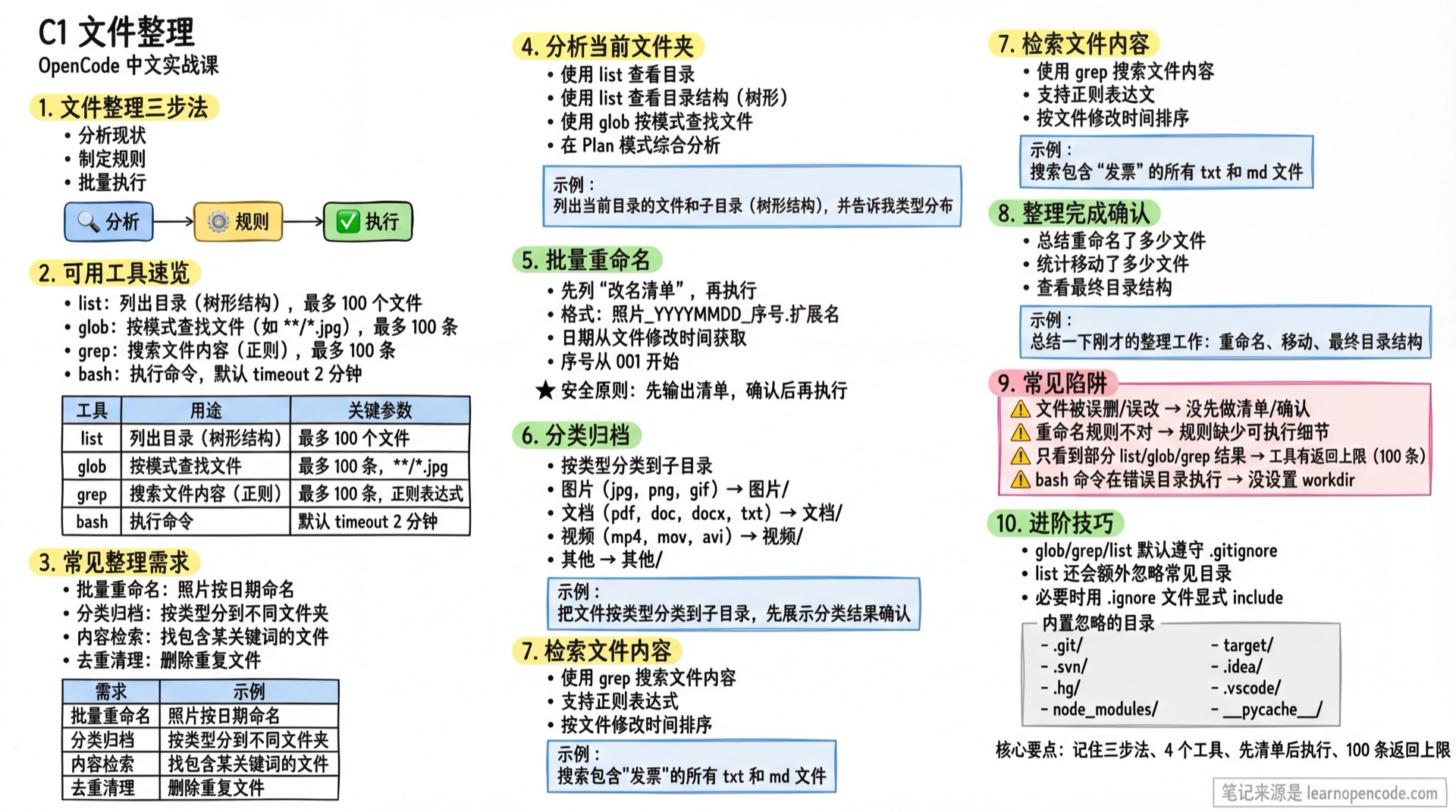
What You'll Be Able to Do
- Batch rename files
- Categorize and archive by rules
- Search file contents
- Organize messy folders
Your Current Struggles
- Downloads folder is a mess, can't find anything
- Want to batch rename, but changing one by one is too tedious
- Remember a file contains certain content, but forgot its name
When to Use This Approach
- When you need to: organize a messy folder
- And don't want to: manually operate on files one by one
🎒 Before You Start
Make sure you've completed the following:
- [ ] Completed 2.1 Interface and Basic Operations
- [ ] Have a folder that needs organizing
Core Concept
File Organization Three-Step Method
Analyze Status → Define Rules → Batch ExecuteAvailable Tools (This lesson only covers OpenCode-related capabilities)
| Tool | Purpose | Key Parameters/Behavior (Verifiable) |
|---|---|---|
list | List directory (tree structure) | path (absolute path, optional for current directory), ignore (additional ignore glob list); returns max 100 files (source: opencode/packages/opencode/src/tool/ls.ts:35~opencode/packages/opencode/src/tool/ls.ts:60) |
glob | Find files by pattern (e.g. **/*.jpg) | pattern, path (optional); returns max 100 results sorted by modification time (source: opencode/packages/opencode/src/tool/glob.ts:33~opencode/packages/opencode/src/tool/glob.ts:63) |
grep | Search file contents (regex) | pattern, include; returns max 100 matches sorted by modification time (source: opencode/packages/opencode/src/tool/grep.ts:88~opencode/packages/opencode/src/tool/grep.ts:92) |
bash | Execute commands | workdir (optional, avoids cd && ...), timeout (milliseconds, default 2 minutes: opencode/packages/opencode/src/tool/bash.ts:20~opencode/packages/opencode/src/tool/bash.ts:80); output max 30000 characters by default (source: opencode/packages/opencode/src/tool/bash.ts:19~opencode/packages/opencode/src/tool/bash.ts:36) |
Tips
- In TUI, you can also use
!prefix to run commands directly (official:opencode/packages/web/src/content/docs/tui.mdx:46~opencode/packages/web/src/content/docs/tui.mdx:55). @filereference injects file content into context (official:opencode/packages/web/src/content/docs/tui.mdx:30~opencode/packages/web/src/content/docs/tui.mdx:43).
Common Organization Needs
| Need | Example |
|---|---|
| Batch Rename | Photos named by date |
| Categorize Archive | Sort into different folders by type |
| Content Search | Find files containing specific keywords |
| Dedupe Cleanup | Delete duplicate files (suggest dry-run/list first) |
Follow Along
Step 1: Analyze Current Folder
Why Understand what files exist before defining organization rules.
Start OpenCode in the target folder:
cd ~/Downloads  # Replace with the directory you want to organize
opencode
You can also directly:
opencode /path/to/project(official:opencode/packages/web/src/content/docs/tui.mdx:16~opencode/packages/web/src/content/docs/tui.mdx:20).
Method 1: Use list tool to view directory structure
List files and subdirectories in the current directory (tree structure), and tell me:
1. What subdirectories exist approximately
2. File type distribution (images/documents/archives, etc.)
3. Which naming patterns look like they belong together
Tips
list.pathrequires absolute path (parameter description:opencode/packages/opencode/src/tool/ls.ts:39~opencode/packages/opencode/src/tool/ls.ts:42).listreturns max 100 files; for large directories, useglobto narrow scope first (source:opencode/packages/opencode/src/tool/ls.ts:35~opencode/packages/opencode/src/tool/ls.ts:60).
Method 2: Use glob tool to search by pattern
Find all image files (e.g. jpg/png/gif), and list them by modification time from newest to oldestFind all PDF files (**/*.pdf)Tips
globresults are sorted by modification time (source:opencode/packages/opencode/src/tool/glob.ts:54~opencode/packages/opencode/src/tool/glob.ts:55).globreturns max 100 results; if you only see partial results, they've been truncated (source:opencode/packages/opencode/src/tool/glob.ts:40~opencode/packages/opencode/src/tool/glob.ts:63).
Method 3: Comprehensive Analysis (Plan Mode)
Switch to Plan mode:
Analyze the files in this directory:
1. How many files and subdirectories exist (if you can't get exact count, explain why)
2. File type distribution (images, documents, videos, etc.)
3. Naming pattern analysis
4. Suggested organization plan (give "rules" first, then "execution steps")
Step 2: Batch Rename
Why Unified naming makes management easier.
Recommended: List "rename plan" first, then execute
Rename all image files in this directory according to these rules:
- Format: Photo_YYYYMMDD_sequence.extension
- Date obtained from file modification time
- Sequence starts from 001

Requirements:
1. First output only the "files to be renamed list (old name → new name)", don't execute
2. Execute after I confirm
⚠️ Safety Reminder
Whether OpenCode "prompts for confirmation" is determined by permission.
permissionsupportsallow/ask/deny(official:opencode/packages/web/src/content/docs/permissions.mdx:14~opencode/packages/web/src/content/docs/permissions.mdx:18).editpermission covers write/modify/patch and other file change operations (official:opencode/packages/web/src/content/docs/permissions.mdx:86~opencode/packages/web/src/content/docs/permissions.mdx:88).
If you want to force confirmation for every file change, set it to ask in config:
{
  "$schema": "https://opencode.ai/config.json",
  "permission": {
    "edit": "ask"
  }
}
Optional: Use bash + workdir (More controllable)
If you want "scriptable + rollback capable", have AI generate script first, then run with bash in specified directory.
Tips
bash.workdirspecifies the run directory, avoidingcd && ...(parameter:opencode/packages/opencode/src/tool/bash.ts:62~opencode/packages/opencode/src/tool/bash.ts:67).bash.timeoutunit is milliseconds, default 2 minutes (source:opencode/packages/opencode/src/tool/bash.ts:20~opencode/packages/opencode/src/tool/bash.ts:80).
Step 3: Categorize and Archive
Why
Categorizing by type makes searching easier.
Categorize files in this directory into subdirectories by type:
- Images (jpg, png, gif) → Images/
- Documents (pdf, doc, docx, txt) → Documents/
- Videos (mp4, mov, avi) → Videos/
- Others → Others/

Requirements:
1. Show categorization results for my confirmation first
2. Then execute the move
Step 4: Search File Contents
Why Find files containing specific content.
Use grep tool to search content
Search all txt and md files containing "invoice"Tips
grepuses regular expressions (parameter:opencode/packages/opencode/src/tool/grep.ts:12~opencode/packages/opencode/src/tool/grep.ts:16).- Results max 100, sorted by file modification time (source:
opencode/packages/opencode/src/tool/grep.ts:88~opencode/packages/opencode/src/tool/grep.ts:92).
Step 5: Confirm Organization Complete
Why
Confirm organization results meet expectations.
Summarize the organization work just completed:
1. How many files were renamed
2. How many files were moved
3. Final directory structure
Checklist ✅
All must pass to continue
- [ ] Analyzed folder status
- [ ] Completed batch rename
- [ ] Completed categorize and archive
- [ ] Can search file contents
Common Pitfalls
| Issue | Cause | Solution |
|---|---|---|
| Files accidentally deleted/modified | No list/confirmation first | Have AI output "operation list" first, then execute |
| Rename rules incorrect | Rules lack executable details | Fill in details like "format/source/sequence/override strategy" |
Only seeing partial list/glob/grep results | Tool has return limit (100) | Narrow scope: more specific path/pattern/include |
glob/grep doesn't find files you think exist | ripgrep follows .gitignore by default | Refer to official .ignore mechanism (official: opencode/packages/web/src/content/docs/tools.mdx:348~opencode/packages/web/src/content/docs/tools.mdx:364) |
list doesn't see certain directories | list has built-in common ignore directories | Use glob/grep to locate directly; or check list built-in ignore list (source: opencode/packages/opencode/src/tool/ls.ts:8~opencode/packages/opencode/src/tool/ls.ts:33) |
| bash command runs in wrong directory | workdir not set | Use workdir to specify directory (source: opencode/packages/opencode/src/tool/bash.ts:62~opencode/packages/opencode/src/tool/bash.ts:67) |
Advanced Tips
1) Understand "Ignore Rules" Sources
OpenCode's glob/grep/list internally uses ripgrep (official: opencode/packages/web/src/content/docs/tools.mdx:348~opencode/packages/web/src/content/docs/tools.mdx:352), so it follows .gitignore.
Additionally: list tool has extra built-in ignored directories (source: opencode/packages/opencode/src/tool/ls.ts:8~opencode/packages/opencode/src/tool/ls.ts:33), including (deduplicated):
node_modules/__pycache__/.git/dist/,build/,target/vendor/bin/,obj/.idea/,.vscode/.zig-cache/,zig-out.coverage,coverage/tmp/,temp/.cache/,cache/,logs/.venv/,venv/,env/
2) When Necessary, Let ripgrep Search "Ignored Directories"
Official docs provide a method: create .ignore file in project root to explicitly allow certain paths to be searched (official: opencode/packages/web/src/content/docs/tools.mdx:354~opencode/packages/web/src/content/docs/tools.mdx:364).
!node_modules/
!dist/
!build/
Evidence Index (OpenCode behaviors covered in this lesson)
| Topic | Conclusion | Evidence |
|---|---|---|
list return limit | Max 100 files | opencode/packages/opencode/src/tool/ls.ts:35~opencode/packages/opencode/src/tool/ls.ts:60 |
list built-in ignore directories | Has hardcoded ignore list | opencode/packages/opencode/src/tool/ls.ts:8~opencode/packages/opencode/src/tool/ls.ts:33 |
glob return limit/sorting | Max 100, sorted by mtime | opencode/packages/opencode/src/tool/glob.ts:33~opencode/packages/opencode/src/tool/glob.ts:63 |
grep return limit/sorting | Max 100, sorted by file mtime | opencode/packages/opencode/src/tool/grep.ts:88~opencode/packages/opencode/src/tool/grep.ts:92 |
bash default timeout | Default 2 minutes | opencode/packages/opencode/src/tool/bash.ts:20~opencode/packages/opencode/src/tool/bash.ts:80 |
bash output truncation | Max 30000 characters by default | opencode/packages/opencode/src/tool/bash.ts:19~opencode/packages/opencode/src/tool/bash.ts:36 |
.gitignore/.ignore | ripgrep follows .gitignore by default; .ignore can explicitly include | opencode/packages/web/src/content/docs/tools.mdx:348~opencode/packages/web/src/content/docs/tools.mdx:364 |
permission behavior | allow/ask/deny; edit covers write/modify/patch | opencode/packages/web/src/content/docs/permissions.mdx:14~opencode/packages/web/src/content/docs/permissions.mdx:18; opencode/packages/web/src/content/docs/permissions.mdx:86~opencode/packages/web/src/content/docs/permissions.mdx:88 |
Lesson Summary
You learned:
- Analyze folder status
- Batch rename files
- Categorize and archive by rules
- Search file contents
Next Lesson Preview
Next lesson we'll learn data processing—using AI to analyze CSV, JSON and generate reports.