

5.1b Advanced Configuration
Master all OpenCode configuration options to build a fully customized development environment.
📝 Course Notes
Key takeaways from this lesson:
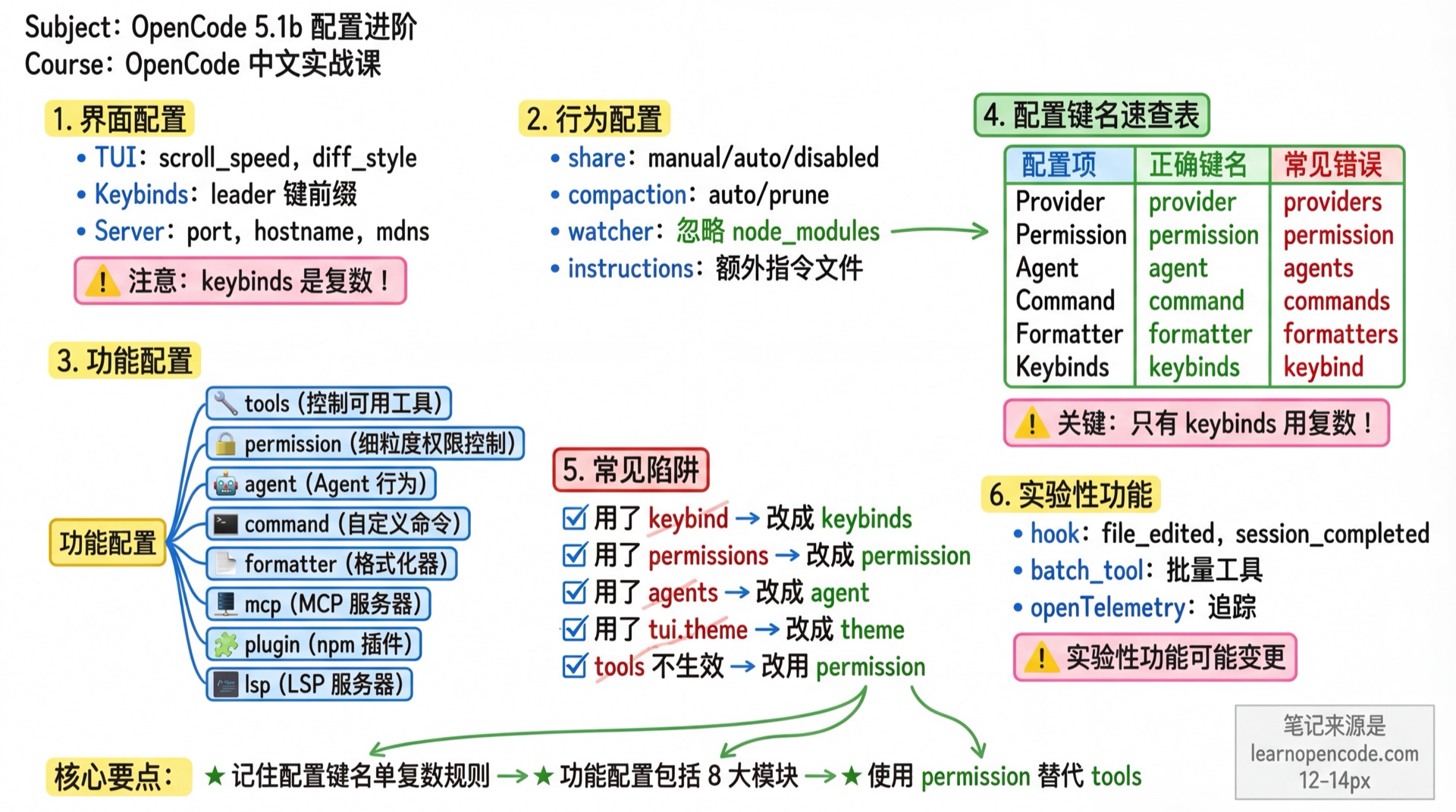
What You'll Be Able to Do
- Configure the interface (TUI, keybinds, server)
- Configure behavior (share, compaction, watcher)
- Configure features (Provider, tools, permissions, agents, commands, MCP, etc.)
- Use experimental features
- Configure custom API URLs for models
Your Current Pain Points
- Want to customize keybinds
- Want to control which tools the AI can use
- Want to batch disable certain MCP tools
- Want to configure privately deployed APIs for models
- Want to know what hidden configurations exist
When to Use This
- When you need: Full control over OpenCode's behavior
- And you don't want: To be limited by default settings
Interface Configuration
TUI Configuration
TUI settings live in a separate tui.json or tui.jsonc file, with fields defined directly at the top level:
{
  "$schema": "https://opencode.ai/tui.json",
  "scroll_speed": 3,
  "scroll_acceleration": {
    "enabled": true
  },
  "diff_style": "auto",
  "cursor": {
    "style": "block",
    "blinking": true
  }
}| Field | Description | Default |
|---|---|---|
scroll_speed | Scroll speed multiplier (minimum 0.001) | 3 |
scroll_acceleration.enabled | Enable macOS-style accelerated scrolling | false |
diff_style | Diff display style | "auto" |
cursor.style | Cursor shape: block, underline, line, or default | "block" when cursor is configured |
cursor.blinking | Whether the cursor blinks; has no effect when style is default | true when cursor is configured |
scroll_acceleration.enabledtakes precedence overscroll_speed. When enabled, scroll_speed is ignored.
The main configuration loader strips the legacy theme, keybinds, and tui fields. The migrator checks the old main configuration only when the TUI starts: if a tui.json already exists in the same directory, migration is skipped. Otherwise, it writes a new tui.json, creates or reuses <original-file>.tui-migration.bak, and then removes those three fields from the old main configuration. A tui.jsonc file by itself does not prevent migration.
Standalone TUI configurations are merged in this order: the global configuration, OPENCODE_TUI_CONFIG, ordinary project configurations, .opencode configurations along the path, and OPENCODE_CONFIG_DIR. Later sources take precedence. Ordinary project files are applied from the root side toward the current directory, so files nearer the current directory win. Multiple .opencode directories are merged from the current side toward the root, so on conflicts the rootmost directory is loaded later and wins. OPENCODE_CONFIG_DIR is loaded last.
diff_style options:
"auto"- Adapts based on terminal width"stacked"- Always displays in single column
Keybinds Configuration
Customize keyboard shortcuts:
{
  "$schema": "https://opencode.ai/tui.json",
  "keybinds": {
    "leader": "ctrl+x",
    "session_new": "<leader>n",
    "session_compact": "<leader>c",
    "model_list": "<leader>m",
    "agent_list": "<leader>a",
    "session_interrupt": "escape"
  }
}
Note: The configuration key is
keybinds(plural) and lives at the top level oftui.json. This differs from the singularpermissionandagentkeys in the main configuration.
Leader Key
Most shortcuts use a leader key prefix to avoid terminal conflicts:
{
  "$schema": "https://opencode.ai/tui.json",
  "keybinds": {
    "leader": "ctrl+x"
  }
}
Default is ctrl+x. Press the leader key followed by the shortcut, e.g., ctrl+x then n to create a new session.
Disabling Keybinds
Set the value to "none" or false to disable a keybind:
{
  "$schema": "https://opencode.ai/tui.json",
  "keybinds": {
    "session_compact": "none"
  }
}
Common Keybinds
| Config Key | Default | Description |
|---|---|---|
app_exit | ctrl+c,ctrl+d,<leader>q | Exit application |
session_new | <leader>n | New session |
session_list | <leader>l | Session list |
session_interrupt | escape | Interrupt current operation |
session_compact | <leader>c | Compact session |
session_background | ctrl+b | Move a synchronous subagent to the background |
model_list | <leader>m | Model list |
agent_list | <leader>a | Agent list |
agent_cycle | tab | Switch Agent |
command_list | ctrl+p | Command list |
messages_undo | <leader>u | Undo message |
messages_redo | <leader>r | Redo message |
diff_open | none | Open the Diff viewer (unbound by default) |
prompt_skills | none | Open the Skill picker (unbound by default) |
See Quick Reference: Keybinds for a list of commonly used shortcuts.
Source: TUI configuration schema and flat keybinds and disabled values.
Server Configuration
Configure the server for opencode serve and opencode web commands:
{
  "server": {
    "port": 4096,
    "hostname": "0.0.0.0",
    "mdns": true,
    "mdnsDomain": "opencode.local",
    "cors": ["http://localhost:5173"]
  }
}| Field | Description |
|---|---|
port | Listen port |
hostname | Listen address (defaults to 0.0.0.0 when mdns is enabled) |
mdns | Enable mDNS service discovery (LAN devices can discover) |
mdnsDomain | Custom domain for mDNS service (default opencode.local) |
cors | List of allowed CORS origins |
Behavior Configuration
Share Configuration
Control session sharing behavior:
{
  "share": "manual"
}| Value | Description |
|---|---|
"manual" | Manual sharing (default), use /share command |
"auto" | Automatically share new sessions |
"disabled" | Disable sharing feature |
Compaction Configuration
Control context compaction behavior:
{
  "compaction": {
    "auto": true,
    "prune": true,
    "reserved": 10000
  }
}| Field | Description | Default |
|---|---|---|
auto | Auto-compact when context is full | true |
prune | Remove old tool outputs to save tokens | true |
reserved | Token buffer during compaction, reserves enough window to prevent overflow | - |
Watcher Configuration
Configure file watcher ignore patterns:
{
  "watcher": {
    "ignore": ["node_modules/**", "dist/**", ".git/**", "*.log"]
  }
}
Use glob syntax to exclude noisy directories and reduce file watcher overhead.
Instructions Configuration
Specify additional instruction files (merged with AGENTS.md):
{
  "instructions": [
    "CONTRIBUTING.md",
    "docs/guidelines.md",
    ".cursor/rules/*.md",
    "packages/*/AGENTS.md"
  ]
}
Supports glob patterns. Use cases:
- Reuse existing rule files (e.g., Cursor's rules)
- Share team coding standards
- Include subproject rules in monorepos
References Configuration
Use references to add local directories or Git repositories to the project context:
{
  "references": {
    "design-system": {
      "path": "../design-system",
      "description": "Team component library and design standards"
    },
    "upstream": {
      "repository": "https://github.com/example/upstream.git",
      "branch": "main",
      "description": "Upstream implementation reference",
      "hidden": true
    }
  }
}
Use path for local references and repository for Git references, with an optional branch. References with a description are added to the system context; hidden: true only hides them from @ autocomplete. The old singular key, reference, is deprecated—use references instead.
customize-opencodeis now a built-in Skill for safely changing OpenCode's own configuration, so you do not need to install it separately. Scout was briefly introduced earlier but removed before the target version; do not configure or depend on it.
Source: references schema, main configuration key and deprecated alias, and the built-in customize-opencode Skill.
Feature Configuration
Provider Configuration
Configure AI providers and their models:
{
  "provider": {
    "anthropic": {
      "options": {
        "apiKey": "{env:ANTHROPIC_API_KEY}",
        "baseURL": "https://custom-anthropic.example.com/v1",
        "timeout": 600000,
        "setCacheKey": true
      },
      "models": {
        "claude-sonnet-4-5": {
          "provider": {
            "api": "https://custom-api.example.com/v1"
          }
        }
      }
    }
  }
}
Provider-level Options
| Field | Description |
|---|---|
options.apiKey | API key, supports {env:VAR_NAME} environment variable replacement |
options.baseURL | Custom API base URL (for proxies or private deployments) |
options.timeout | Request timeout (milliseconds), set to false to disable |
options.setCacheKey | Enable Prompt Caching (Anthropic only) |
options.enterpriseUrl | GitHub Enterprise URL (Copilot only) |
Model-level Custom API URL
Added in v1.1.60+
Configure independent API URL for individual models:
{
  "provider": {
    "openai": {
      "models": {
        "gpt-4o": {
          "provider": {
            "api": "https://api.custom-openai.com/v1"
          }
        }
      }
    }
  }
}
Use cases:
- Use different deployments of the same provider (e.g., Azure OpenAI in different regions)
- Test privately deployed models
- Configure model-specific proxy servers
Whitelist/Blacklist
Control available models:
{
  "provider": {
    "openai": {
      "whitelist": ["gpt-4o", "gpt-4o-mini"],
      "blacklist": ["gpt-3.5-turbo"]
    }
  }
}| Field | Description |
|---|---|
whitelist | Only allow these models |
blacklist | Disable these models |
whitelistandblacklistare mutually exclusive. When both exist,whitelisttakes precedence.
Tools Configuration
Control tools available to the LLM:
{
  "tools": {
    "write": false,
    "bash": false,
    "webfetch": true
  }
}
All tools are enabled by default. Set to false to disable.
Wildcards
The tools key is ultimately converted to permission rules, so wildcards work indirectly through the permission system:
{
  "tools": {
    "mymcp_*": false
  }
}
Disables all tools from the MCP server named mymcp.
Recommend using
permissionconfiguration directly for wildcard control with finer-grained allow/ask/deny options.
Tools vs Permission
tools is a legacy configuration that automatically converts to permission:
| tools setting | Equivalent permission |
|---|---|
"write": false | "edit": "deny" |
"bash": false | "bash": "deny" |
We recommend using
permissionfor finer-grained control (allow/ask/deny). See 5.5 Permissions.
Permission Configuration
Fine-grained permission control:
{
  "permission": {
    "edit": "ask",
    "bash": {
      "*": "ask",
      "git *": "allow",
      "npm *": "allow",
      "rm *": "deny"
    }
  }
}
Note: The config key is
permission(singular), notpermissions.
For detailed configuration, see 5.5 Permissions.
Agent Configuration
Configure Agent behavior:
{
  "agent": {
    "code-reviewer": {
      "description": "Code review expert",
      "mode": "subagent",
      "model": "anthropic/claude-opus-4-5-thinking",
      "prompt": "You are a code review expert...",

      // Advanced configuration
      "temperature": 0.3,
      "top_p": 0.9,
      "steps": 50,
      "color": "#FF5733",
      "hidden": true,

      // Permissions
      "permission": {
        "edit": "deny"
      }
    }
  }
}
Note: The config key is
agent(singular), notagents.
Advanced Configuration Fields
| Field | Type | Description |
|---|---|---|
temperature | finite number | Creativity parameter; the valid range depends on the model and Provider |
top_p | finite number | Nucleus sampling parameter; the valid range depends on the model and Provider |
variant | string | Default model variant (only effective when using the model configured for this Agent) |
steps | positive integer | Maximum automatic iterations; once reached, the Agent returns a final plain-text response rather than continuing. This is not a tool-call limit |
color | string | Hex color (e.g., #FF5733) or theme color name (e.g., primary) |
hidden | boolean | Hide from @ menu (only effective for subagents) |
maxStepsis deprecated, usestepsinstead.
For detailed configuration, see 5.2 Custom Agents.
Command Configuration
Define commands in the configuration file:
{
  "command": {
    "test": {
      "template": "Run tests and show failed results",
      "description": "Run tests",
      "agent": "build",
      "model": "anthropic/claude-opus-4-5-thinking"
    },
    "component": {
      "template": "Create a React component named $ARGUMENTS",
      "description": "Create new component"
    }
  }
}
Note: The config key is
command(singular), notcommands.
| Field | Description |
|---|---|
template | Command template, $ARGUMENTS represents the argument |
description | Command description |
agent | Agent to use |
model | Model to use |
subtask | Whether to run as a subtask |
For detailed configuration, see 5.4 Custom Commands.
Formatter Configuration
Configure code formatters:
{
  "formatter": {
    "prettier": {
      "disabled": true
    },
    "custom-prettier": {
      "command": ["npx", "prettier", "--write", "$FILE"],
      "environment": {
        "NODE_ENV": "development"
      },
      "extensions": [".js", ".ts", ".jsx", ".tsx"]
    }
  }
}
Note: The config key is
formatter(singular), notformatters.
Set to false to completely disable formatting:
{
  "formatter": false
}
For detailed configuration, see 5.18 Formatters.
MCP Configuration
Configure MCP servers:
{
  "mcp": {
    "context7": {
      "type": "local",
      "command": ["npx", "-y", "@upstash/context7-mcp"]
    },
    "sentry": {
      "type": "remote",
      "url": "https://mcp.sentry.dev/mcp",
      "headers": {
        "Authorization": "Bearer your-token"
      },
      "oauth": {
        "clientId": "xxx",
        "clientSecret": "xxx",
        "scope": "read write"
      }
    }
  }
}
Remote MCP servers support headers (custom request headers) and oauth (OAuth authentication). Set oauth to false to disable automatic OAuth detection.
For detailed configuration, see 5.7 MCP Extensions.
Plugin Configuration
Load npm plugins:
{
  "plugin": ["opencode-helicone-session", "@my-org/custom-plugin"]
}
You can also place local plugins (.ts or .js files) in the .opencode/plugin/ directory.
For detailed configuration, see 5.12 Plugin System.
LSP Configuration
Configure LSP servers:
{
  "lsp": {
    "typescript": {
      "disabled": true
    },
    "custom-lsp": {
      "command": ["my-lsp-server", "--stdio"],
      "extensions": [".custom", ".myext"],
      "env": {
        "DEBUG": "true"
      },
      "initialization": {
        "settings": {}
      }
    }
  }
}| Field | Description |
|---|---|
disabled | Disable this LSP |
command | Startup command |
extensions | File extensions (required for custom LSP) |
env | Environment variables |
initialization | LSP initialization configuration |
Set to false to disable all LSP:
{
  "lsp": false
}
For detailed configuration, see 5.19 LSP Servers.
Experimental Features
{
  "experimental": {
    "batch_tool": true,
    "openTelemetry": true,
    "continue_loop_on_deny": false
  }
}| Field | Description |
|---|---|
batch_tool | Enable batch tools |
openTelemetry | Enable OpenTelemetry tracing |
disable_paste_summary | Disable automatic summary when pasting large text |
primary_tools | List of tools restricted to Primary Agent only |
continue_loop_on_deny | Continue loop when tool is denied |
mcp_timeout | Global timeout for MCP requests (milliseconds) |
⚠️ Experimental features may change or be removed at any time.
About Hooks
Hook functionality is implemented through the plugin system, not the experimental configuration. See 5.12c Hooks.
Complete Configuration Example
Main configuration, opencode.jsonc:
{
  "$schema": "https://opencode.ai/config.json",

  // === Models ===
  "model": "anthropic/claude-opus-4-5-thinking",
  "small_model": "anthropic/claude-haiku-4-5",
  "default_agent": "build",

  // === Provider ===
  "provider": {
    "anthropic": {
      "options": {
        "apiKey": "{env:ANTHROPIC_API_KEY}",
        "timeout": 600000,
        "setCacheKey": true
      }
    },
    "openai": {
      "models": {
        "gpt-4o": {
          "provider": {
            "api": "https://custom-api.example.com/v1"
          }
        }
      }
    }
  },
  "disabled_providers": ["gemini"],

  // === User ===
  "username": "Developer",

  // === Server ===
  "server": {
    "port": 4096,
    "hostname": "localhost"
  },

  // === Behavior ===
  "share": "manual",
  "compaction": {
    "auto": true,
    "prune": true
  },
  "autoupdate": true,
  "watcher": {
    "ignore": ["node_modules/**", "dist/**"]
  },
  "instructions": ["CONTRIBUTING.md"],

  // === Permissions ===
  "permission": {
    "edit": "ask",
    "bash": {
      "*": "ask",
      "git *": "allow"
    }
  },

  // === Agent ===
  "agent": {
    "code-reviewer": {
      "description": "Code review expert",
      "mode": "subagent",
      "temperature": 0.2,
      "permission": {
        "edit": "deny"
      }
    }
  },

  // === Commands ===
  "command": {
    "test": {
      "template": "Run tests",
      "description": "Run test suite"
    }
  },

  // === Formatter ===
  "formatter": {
    "prettier": {
      "disabled": false
    }
  },

  // === MCP ===
  "mcp": {
    "context7": {
      "type": "local",
      "command": ["npx", "-y", "@upstash/context7-mcp"]
    }
  }
}
Interface configuration, tui.jsonc:
{
  "$schema": "https://opencode.ai/tui.json",
  "theme": "catppuccin",
  "scroll_speed": 3,
  "diff_style": "auto",
  "keybinds": {
    "leader": "ctrl+x",
    "session_new": "<leader>n"
  }
}
Common Pitfalls
| Issue | Cause | Solution |
|---|---|---|
Used keybind | Wrong key name | Use keybinds (plural) in tui.json |
Used permissions | Wrong key name | Should be permission (singular) |
Used agents | Wrong key name | Should be agent (singular) |
Used commands | Wrong key name | Should be command (singular) |
Used formatters | Wrong key name | Should be formatter (singular) |
Put theme / keybinds / tui in the main configuration | Wrong configuration file | Move them to a sibling tui.json / tui.jsonc file |
| tools config not working | Legacy config | Recommend using permission |
| baseURL not working | Wrong location | Should be in provider.options.baseURL, not top-level |
| Model API URL not working | Wrong field | Model-level uses provider.api, Provider-level uses options.baseURL |
| Keybind conflicts | Terminal conflict | Use leader key prefix |
| LSP customization failed | Missing extensions | Custom LSP must specify extensions |
Config Key Quick Reference
| Config Item | Correct Key | Common Mistake |
|---|---|---|
| Provider | provider | |
| Permission | permission | |
| Agent | agent | |
| Command | command | |
| Formatter | formatter | |
| Keybinds (TUI configuration) | keybinds | |
| Theme (TUI configuration) | theme |
Lesson Summary
You learned:
- Standalone TUI interface settings and keybinds, plus server settings in the main configuration
- Behavior configuration: share, compaction, watcher, instruction files
- Feature configuration: Provider, references, tools, permissions, agents, commands, formatters, MCP, plugins, and LSP
- Experimental features: batch tools, OpenTelemetry, etc.
- Custom model API URLs (v1.1.60+)
Related Resources
- 5.1a Configuration Basics - Core configuration
- 5.2 Custom Agents - Detailed Agent configuration
- 5.4 Custom Commands - Detailed Command configuration
- 5.5 Permissions - Detailed Permission configuration
- 5.7 MCP Extensions - Detailed MCP configuration
- Quick Reference: Keybinds - Common keybinds
- Quick Reference: Configuration - Configuration cheat sheet
Next Lesson Preview
In the next lesson, we'll learn how to create custom Agents.