

Global Instructions
💡 One-liner: Create a rule file that AI reads every time it sends a message—no need to repeat "reply in English".
📝 Course Notes
Key takeaways from this lesson:
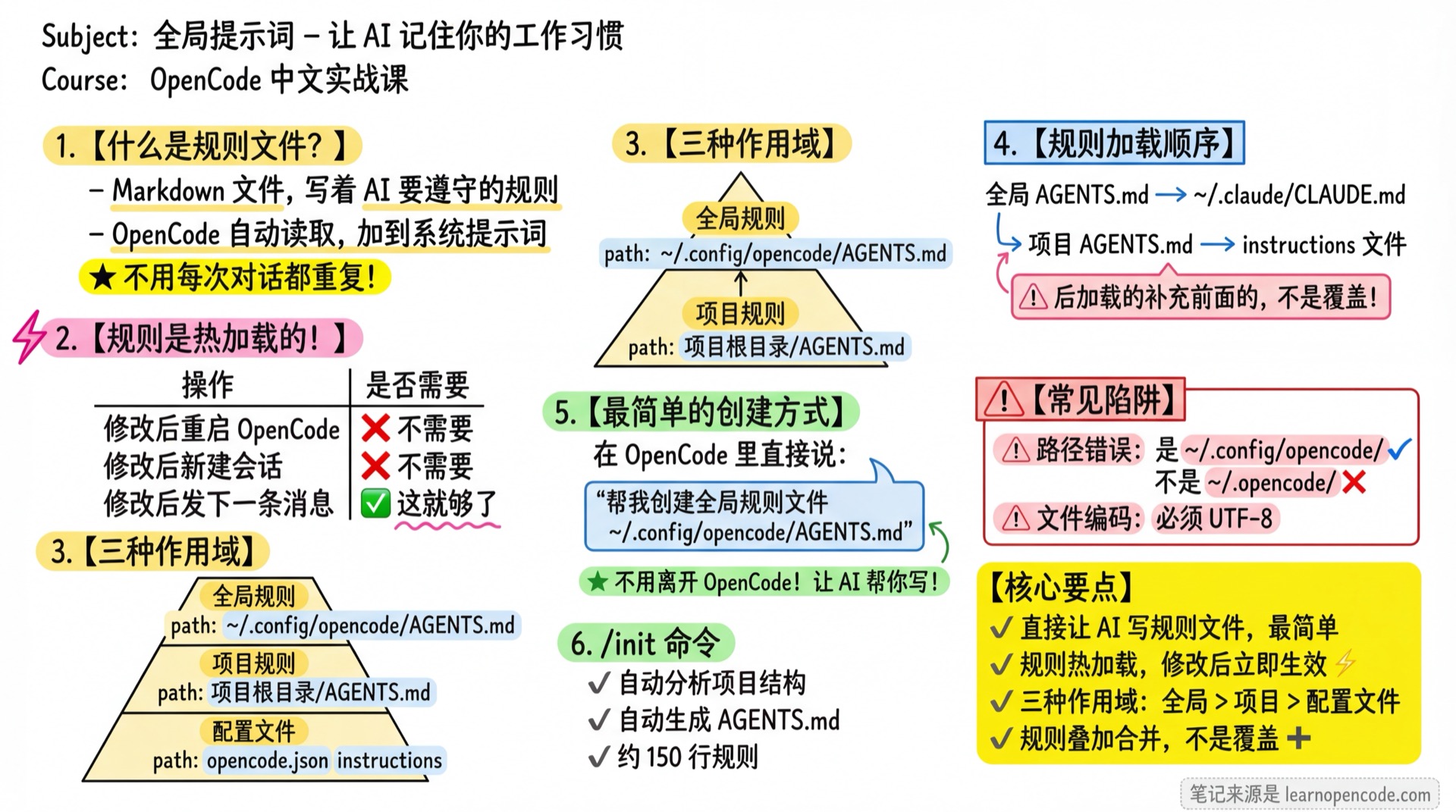
What You'll Be Able to Do
- Make AI permanently remember "reply in English"
- Set your coding standards (indentation, naming style, etc.)
- Define project-specific rules
- Reuse your preferences across projects
Your Current Pain Points
- Every new conversation requires saying "please reply in English"
- AI always forgets your preferred code style
- Project has specific conventions, but AI keeps ignoring them
- Switching projects means re-teaching AI
When to Use This
- When you need: AI to follow certain fixed rules
- And you don't want to: Repeat them in every conversation
🎒 Prerequisites
Make sure you've completed the following:
- [ ] Completed 2.1 Interface & Operations
- [ ] Can have normal conversations with AI
Core Concepts
What is a "Rule File"?
A rule file is simply a Markdown file containing rules you want AI to follow. OpenCode automatically reads this file and adds its content to the system prompt.
Benefits:
- No need to repeat in every conversation
- Rules can be long and detailed
- Can use Markdown formatting for organization
Rules are Hot-Reloaded!
⚡ Important Concept
Rule file changes take effect immediately—no need to restart OpenCode or create a new session!
OpenCode re-reads the rule file every time a message is sent. This means:
| Action | Required? |
|---|---|
| Restart OpenCode after modifying rules | ❌ No |
| Create new session after modifying rules | ❌ No |
| Send next message after modifying rules | ✅ That's all |
Practical effect: After AI helps you update the rule file, just send your next message and the new rules will take effect.
Three Scopes
OpenCode supports three scopes of rules for different scenarios:
| Scope | Location | Use Case |
|---|---|---|
| Global Rules | ~/.config/opencode/AGENTS.md | Preferences for all projects |
| Project Rules | Project root AGENTS.md | Project-specific conventions |
| Config File | instructions field in opencode.json | Reference multiple rule files |
🤔 Why AGENTS.md?
OpenCode supports both AGENTS.md and CLAUDE.md (for Claude Code compatibility). We recommend AGENTS.md as it's the standard name for OpenCode.
Rule Loading Order
Rules are loaded in this order, with later ones supplementing (not overwriting) earlier ones:
1. Global ~/.config/opencode/AGENTS.md
2. Global ~/.claude/CLAUDE.md (compatibility mode)
3. Project directory searches upward for AGENTS.md / CLAUDE.md
4. Files specified in config instructionsResult: All rules take effect and are merged together.
Follow Along
💡 Core Philosophy
Don't leave OpenCode! Let AI create the rule file for you—that's the easiest way.
Step 1: Let AI Create Global Rules
Why
Since you're already using OpenCode, having AI write the file for you is most convenient.
In OpenCode's input box, type:
Help me create a global rule file at ~/.config/opencode/AGENTS.md with the following content:

Always reply in English
You should see: AI will create the directory and file, then write your rules.
📦 What Will AI Do?
AI will perform operations like:
- Check if
~/.config/opencode/directory exists - If not, create the directory
- Create
AGENTS.mdfile and write your rules
You don't need to manually enter any commands!
Step 2: Verify Rules Are Working
Why
Confirm OpenCode has read the rules.
Simply type hello in the current session.
You should see: AI replies to you in English.
💡 Rules Take Effect Immediately
Since rules are hot-loaded, after AI creates the file, the next message will follow the new rules. No need to create a new session!
📦 Verification Tip
Ask AI: "What rules are you currently following?" It will list the rules in the system prompt.
Step 3: Refine Your Rules
Why
One rule is too few—let's add some practical ones.
Continue in OpenCode:
Help me update the global rule file at ~/.config/opencode/AGENTS.md to:

## Language & Style

- Always reply in English
- Answer questions directly, no pleasantries
- Code comments in English too

## Code Standards

- Use 2-space indentation
- Variable names in camelCase
- Function names start with verbs (e.g., getUserById)

## Work Habits

- Read relevant files before modifying code
- Ask first when uncertain, don't guess
- Make only minimal necessary changes each time
You should see: AI has updated the rule file.
Step 4: (Optional) Create Project Rules
Why
Some rules only apply to specific projects.
Start OpenCode in your project directory, then say:
Help me create AGENTS.md in the project root with:

# Project Rules

## Tech Stack
- Frontend: React + TypeScript
- Backend: NestJS
- Database: PostgreSQL

## Code Standards
- Use project's ESLint config
- Component files use PascalCase naming
- API routes use kebab-case
You should see: In this project, AI will follow both global rules and project rules.
Step 5: (Optional) Use /init to Auto-Generate Project Rules
Why
If you don't know what rules to write, let AI analyze the project and generate them automatically.
In OpenCode, type:
/initYou should see: AI will analyze your project structure, tech stack, and code style to automatically generate an AGENTS.md.
🤔 What /init Generates
AI will analyze:
- Build/test commands
- Code style (indentation, naming conventions, etc.)
- Frameworks and libraries used
- Existing Cursor/Copilot rules (if any)
Generated rules are about 150 lines, covering the most important project conventions.
Practical Rule Examples
Here are some battle-tested rules you can copy and use directly:
General Development Rules
## Work Attitude

- Approach every task with rigor and maintain perfect quality standards

## Communication Style

- Output code or solutions directly, no pleasantries ("sorry", "I understand", etc.)
- Don't provide code summaries unless explicitly requested

## Truth-Seeking Principle (No Guessing)

- When uncertain or lacking information, verify or ask clarifying questions first
- Conclusions about environment/config/source code/behavior must have evidence
- Separate "facts" from "assumptions/hypotheses" in responses
Code Quality Rules
## Code Quality Principles

- Prioritize code readability, make the simplest changes
- Never use `eslint-disable` or `@ts-ignore` to bypass issues
- Never use `any` type, must define explicit types
- Don't keep deprecated code for backward compatibility
- Delete unused code, don't comment it out

## Reuse First

- Before writing new code, confirm if similar implementation exists in project
- Prioritize reusing existing components and utility functions over creating new ones
Workflow Rules
## Execution Standards

- For any non-trivial task, plan before acting
- Must read relevant files before modifying code
- Run tests to verify after completing modifications

## Sub-agent Delegation Strategy

- Delegate tasks to sub-agents whenever possible
- Assign to experts when possible, don't do everything yourself
Advanced Usage: Config File References
If your rules are spread across multiple files, you can reference them uniformly in the config file:
// opencode.json
{
  "instructions": [
    "CONTRIBUTING.md",
    "docs/coding-standards.md",
    ".cursor/rules/*.md",
    "~/my-rules/common.md"
  ]
}
Supported formats:
- Relative path:
docs/rules.md - Absolute path:
~/my-rules/common.md - Glob pattern:
.cursor/rules/*.md - URL:
https://example.com/rules.md
⚡ Different Timing for Changes
The path list of rule files referenced via instructions is loaded at session startup. If you add or modify instructions entries in opencode.json, you need to start a new session for changes to take effect.
However, the file contents of already loaded paths are hot-loaded—modifying the rule file itself takes effect with the next message.
💡 Compatibility with Other Tools
If you've used Cursor before, you can directly reference .cursor/rules/*.md and reuse those rules.
Checklist ✅
All items must pass to continue
- [ ] Had AI create
~/.config/opencode/AGENTS.mdfile - [ ] File contains at least one rule
- [ ] After sending a message, AI followed the rules (e.g., replied in English)
Common Pitfalls
| Issue | Cause | Solution |
|---|---|---|
| Rules not taking effect | Wrong file path | Confirm it's ~/.config/opencode/AGENTS.md, not ~/.opencode/ |
| Some rules ignored | Rules too long, got truncated | Simplify rules, keep only important ones |
| Rule conflicts | Global and project rules contradict | Write project rules more specifically to override global |
| Character encoding issues | File not saved as UTF-8 | Save file with UTF-8 encoding |
Lesson Summary
You learned:
- Let AI write rules directly: In OpenCode, say "help me create a rule file"—simplest approach
- Rules are hot-loaded: Changes take effect immediately, no restart or new session needed
- Three scopes: Global (
~/.config/opencode/), Project (project root), Config file - Rules stack: Multiple rule files merge together, don't overwrite
/initcommand: Automatically analyze project and generate rules
Want More?
- 5.1b Advanced Configuration - More config file usage
- Appendix/FAQ - "How to make AI remember my preferences"
Next Lesson Preview
Next up: 2.5 Environment Management.
You'll learn:
- How to view available model list
- Track your token usage and billing
- Manage your credentials (login/logout)
Appendix: Source Code Reference
Click to expand source code locations
Last updated: 2026-01-13
| Feature | File Path | Lines |
|---|---|---|
| Rule file lookup logic | src/session/system.ts | 65-137 |
| Rules read on every message | src/session/prompt.ts | 596 |
| Config instructions field | src/config/config.ts | instructions Schema |
Hot-Loading Mechanism:
SessionPrompt.prompt()is called every time user sends a message- Call chain:
prompt()→loop()→processor.process()→SystemPrompt.custom() SystemPrompt.custom()re-reads files every time, no caching
Supported Filenames (by priority):
AGENTS.md- OpenCode standardCLAUDE.md- Claude Code compatibilityCONTEXT.md- Deprecated but still supported
Global Rule Lookup Order:
$OPENCODE_CONFIG_DIR/AGENTS.md(if env var is set)~/.config/opencode/AGENTS.md~/.claude/CLAUDE.md
Project Rule Lookup: Searches upward from current directory until file is found or root is reached.