

5.2a Agent Quick Start
Understand the essence of Agents, create your first custom Agent.
📝 Course Notes
Key takeaways from this lesson:
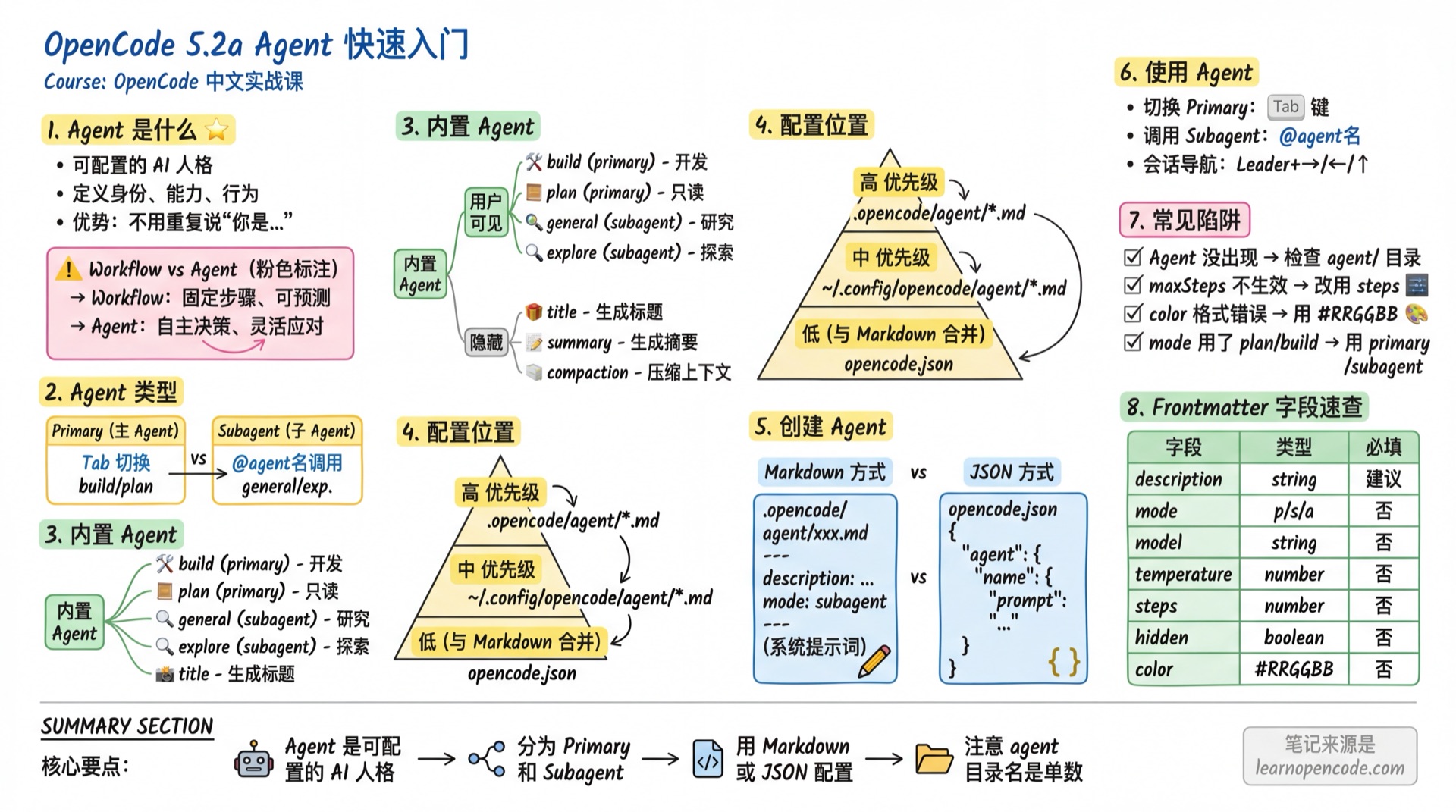
What You'll Learn
- Understand what an Agent is and why you need it
- Distinguish between Primary Agent and Subagent
- Create custom Agents using Markdown
- Create custom Agents using JSON
- Switch between and use Agents
What is an Agent
Anthropic's Definition
According to Anthropic's "Building Effective Agents":
| Type | Description | Characteristics |
|---|---|---|
| Workflow | LLMs and tools orchestrated through predefined code paths | Fixed steps, predictable |
| Agent | LLMs dynamically direct their own processes and tool usage | Autonomous decisions, flexible responses |
Agents in OpenCode
OpenCode's Agents are configurable AI personas. You can define:
- Identity: Who they are, what they excel at
- Capabilities: Which tools they can use
- Behavior: How they handle tasks, what constraints they have
Why Custom Agents
| Scenario | Without Agent | With Agent |
|---|---|---|
| Code Review | Say "You are a code review expert..." each time | Just @reviewer |
| Documentation | Say "Write in technical doc style..." each time | Just @docs-writer |
| Security Audit | Say "Check for security vulnerabilities..." each time | Just @security-auditor |
Agent Types
OpenCode has two types of Agents:
| Type | Description | How to Invoke |
|---|---|---|
| Primary | Main Agent you interact with directly | Tab key to switch |
| Subagent | Child Agent, invoked by Primary Agent for specific tasks | @agent-name or auto-invoked |
| All | Hybrid mode, can be both Primary and Subagent | Tab switch or @ invoke |
How They Collaborate
User ←→ Primary Agent (build/plan)
              ↓
         Task Tool (creates independent Session)
              ↓
         Subagent (explore/general/your custom Agent)
              ↓
         Returns result to Primary
Subagent Execution Mechanism (Important)
Understanding how subagents work is crucial for designing effective Agents:
Session Isolation (No Historical Memory) Subagents run in a brand new, independent Session. This means:
- Cannot see Primary Agent's conversation history: It doesn't know what you discussed with the Primary Agent.
- Context only contains the Prompt: Its world only has the task description (Prompt) you passed to it.
- Must provide complete context: You must include all necessary information in the prompt when invoking.
Dual Identity in All Mode When an Agent has
mode: "all":- When switched via Tab: It's a Primary Agent with full historical memory.
- When invoked via @: It's a Subagent, subject to Session isolation, cannot see the caller's history.
Built-in Agents
User-Visible Agents
| Name | Mode | Default Permissions | Description |
|---|---|---|---|
build | primary | All allowed | Default development Agent, all tools available |
plan | primary | edit: deny (only .opencode/plans/*.md allowed) | Read-only planning, doesn't modify code |
general | subagent | todoread/todowrite: deny | General research, multi-step tasks |
explore | subagent | Only grep/glob/list/bash/read/webfetch/websearch/codesearch allowed | Quick code exploration |
About Explore Agent's Search Depth: You can specify exploration depth levels when calling Explore. The AI automatically judges based on the task description, or you can explicitly specify in your prompt:
- quick: Basic search, quickly locate target files
- medium: Moderate exploration, balance speed and coverage
- very thorough: Comprehensive analysis, search across multiple locations and naming conventions
Source:
agent.ts:150
About Plan Agent: It's not "needs confirmation to edit", but editing is disabled by default, only files under
.opencode/plans/*.mdare allowed to be written. This helps you focus on thinking during the planning phase without being distracted by code modifications.Source:
agent.ts:69-83
Hidden Built-in Agents
These Agents are not directly used by you, but understanding them helps you understand the system:
| Name | Purpose | Description |
|---|---|---|
title | Generate session titles | Uses small_model |
summary | Generate session summaries | Used for compression |
compaction | Compress context | Auto-triggered when context is too long |
Source:
agent.ts:122-166
Configuration Locations
| Location | Scope | Priority |
|---|---|---|
.opencode/agent/*.md | Current project | High |
~/.config/opencode/agent/*.md | Global all projects | Medium |
agent field in opencode.json | Depends on file location | Merged with Markdown |
Filename is Agent Name:
docs-writer.mdcreates an Agent nameddocs-writer.
Create Your First Agent (Markdown Method)
Basic Structure
---
description: Brief description of what this Agent does
mode: subagent
---

This is the System Prompt.

Tell the Agent who they are, what they excel at, how to work.
Complete Example: Documentation Writer Agent
Create file .opencode/agent/docs-writer.md:
---
description: |
  Technical documentation expert, specializing in API docs, READMEs, user manuals.
  Best for: Writing new project docs, updating existing docs, explaining code functionality.
  Not for: Code review, bug fixes, feature implementation.
mode: subagent
temperature: 0.3
---

# Role

You are a technical documentation expert, skilled at explaining complex concepts in simple terms. Your docs are known as "read and use immediately".

# Documentation Standards

- Use Markdown format
- Code examples must be runnable
- Include input/output descriptions
- English preferred, keep technical terms in original

# Documentation Structure

1. Overview (one sentence explaining what it is)
2. Quick Start (can run in 30 seconds)
3. Detailed API (complete parameter descriptions)
4. Example Code (cover common scenarios)
5. FAQ (anticipate user questions)

# Working Principles

- Understand code before writing docs
- Verify uncertain parts
- Maintain consistent style

# Constraints

- ✅ Quick start code must be directly copyable and runnable
- ✅ Parameter descriptions must include type and default value
- ❌ Avoid assuming users have background knowledge

# Error Handling

- If code functionality is unclear, ask or check relevant source code first
- If context is missing, list what needs to be added
- If encountering unfamiliar framework, state it and suggest other Agents
Permission Configuration in Markdown
You can configure permissions directly in Frontmatter (using YAML syntax):
---
description: Read-only code audit Agent
mode: subagent
permission:
  edit: deny            # Disable editing
  bash:
    "*": deny           # Disable all commands
    "git log*": allow   # Only allow viewing logs
  task:
    "*": deny           # Disable calling other Agents
---
Complete Configuration Fields Reference
| Field | Type | Description |
|---|---|---|
description | string | Recommended. Agent summary, affects Primary Agent's auto-selection decisions |
mode | enum | subagent | primary | all. Default all |
model | string | Format provider/model. If empty, inherits Primary Agent's current model |
prompt | string | System prompt (for JSON config, use body text in Markdown) |
temperature | number | 0-1, controls response randomness |
top_p | number | 0-1, nucleus sampling parameter |
steps | number | Maximum iteration steps, prevents infinite loops |
hidden | boolean | If true, hides from @ autocomplete menu |
color | string | Hexadecimal color #RRGGBB, for UI differentiation |
permission | object | Permission configuration object |
disable | boolean | Whether to disable this Agent |
options | object | Pass-through parameter container for uncommon Provider parameters |
| Other fields | any | Unknown fields are automatically passed through to Provider (e.g., reasoningEffort) |
maxStepsis deprecated, please usesteps.
Create Your First Agent (JSON Method)
Configure in opencode.json. This is equivalent to the Markdown method, suitable for simple Agents or override configurations.
Configuration Merge Rules
You can mix Markdown and JSON. If an Agent with the same name exists in both places:
- JSON configuration has higher priority: Fields in
opencode.jsonoverride same-name fields in.md. - Use case: Typically use
.mdto define Prompt (easier to write long text), useopencode.jsonto fine-tune parameters (like temporarily disabling, changing model).
JSON Configuration Example
{
  "$schema": "https://opencode.ai/config.json",
  "agent": {
    "code-reviewer": {
      "description": "Code review expert, focusing on security, performance, maintainability. Best for PR reviews, code health checks.",
      "mode": "subagent",
      "model": "anthropic/claude-sonnet-4-20250514",
      "temperature": 0.2,
      "steps": 30,
      "color": "#4CAF50",
      "prompt": "You are a code review expert.\n\n## Check Points\n- Security vulnerabilities (SQL injection, XSS, hardcoded keys)\n- Performance issues (time complexity, resource leaks)\n- Code style (naming, structure, readability)\n- Maintainability (coupling, test coverage)\n\n## Output Format\n- 🔴 Critical issues (must fix, explain risk and solution)\n- 🟡 Suggestions (recommended fix, explain reason)\n- 🟢 Strengths (worth keeping)\n\n## Constraints\n- ✅ Issues must specify line numbers\n- ✅ Every issue must have a fix suggestion\n- ❌ Avoid criticism without solutions"
    }
  }
}
Using External Prompt Files
When the prompt is long, you can reference an external file:
{
  "agent": {
    "code-reviewer": {
      "description": "Code review expert",
      "mode": "subagent",
      "prompt": "{file:./prompts/code-reviewer.txt}"
    }
  }
}
Path is relative to the configuration file directory.
Using Agents
Switch Primary Agent
Press Tab to switch between primary agents (e.g., build ↔ plan).
You can also use shortcut <Leader>+a to open the Agent list and select.
Invoke Subagent
Method 1: Manual @ Mention
@docs-writer Help me write a READMEMethod 2: Auto Invocation
The Primary Agent automatically selects the appropriate subagent based on the task description and subagent's description.
This is why
descriptionis important—it determines when an Agent is auto-selected.
Session Navigation
When a subagent creates a child session:
| Shortcut | Action |
|---|---|
<Leader>+→ | Navigate forward (parent → child1 → child2 → parent) |
<Leader>+← | Navigate backward |
<Leader>+↑ | Return to parent session |
Disable Agents
Disable unwanted built-in Agents in opencode.json:
{
  "agent": {
    "explore": {
      "disable": true
    },
    "general": {
      "disable": true
    }
  }
}
Set Default Agent
Which primary agent to use by default when starting OpenCode:
{
  "default_agent": "plan"  // Use plan agent by default
}
If not set, default is
build.Source:
config.ts:817-821
Common Pitfalls
| Issue | Cause | Solution |
|---|---|---|
| Agent doesn't appear | Wrong file location | Confirm it's in agent/ directory, not agents/ |
| Agent ignores instructions | Prompt too long or vague | Simplify core rules, make it structured |
| Wrong mode | Used plan or build | Should be primary / subagent / all |
| description required error | Version issue | Actually optional, but recommended to fill |
| maxSteps not working | Deprecated | Use steps instead |
| color format error | Not hexadecimal | Use #RRGGBB format |
| Nested directory Agent name | Don't know how to call | If no name set, name includes path: folder/agent-name; if name set, it overrides the default name |
Lesson Summary
You learned:
- Agent Essence: Configurable AI personas
- Two Types: Primary and Subagent
- Seven Built-in Agents: build, plan, general, explore + 3 hidden
- Two Configuration Methods: Markdown and JSON
- Usage Methods: Tab switch, @ mention, auto invocation
Next Lesson Preview
You've learned to create Agents, but how do you design a good Agent? Next lesson we'll learn Agent design patterns, including industry best practices and real-world examples.
Next Lesson: 5.2b Agent Design Patterns
Having Issues?
Stuck on Agent configuration? Join the community and connect with 2000+ fellow learners for real-time Q&A.