

Model Provider List
OpenCode supports 75+ model providers via AI SDK and Models.dev
📝 Course Notes
Key takeaways from this lesson:
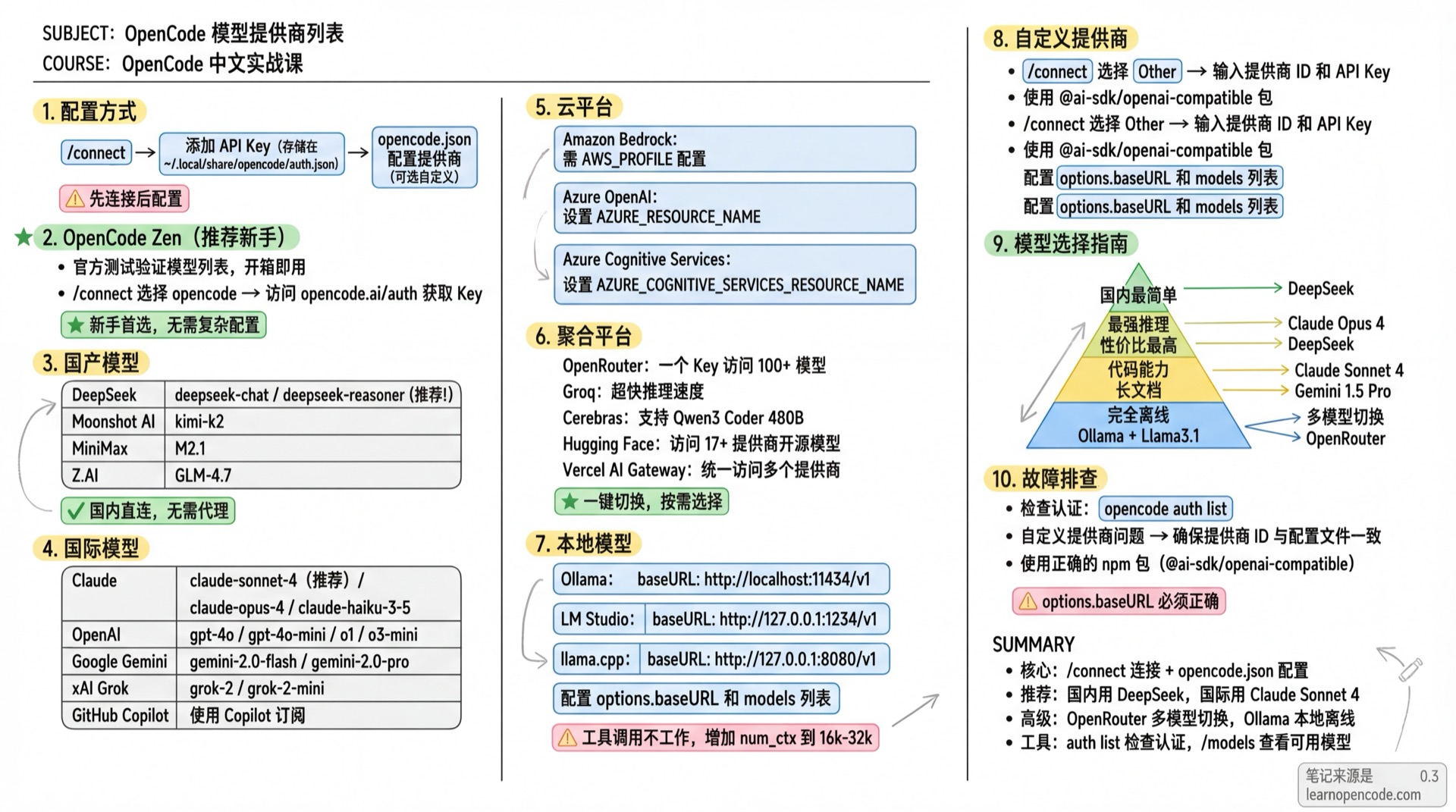
Configuration
Adding a provider requires two steps:
- Use
/connectcommand to add API Key (stored in~/.local/share/opencode/auth.json) - Configure provider in
opencode.json(optional, for custom options)
OpenCode Zen (Recommended for Beginners)
Official OpenCode verified model list, ready to use.
# 1. Run in TUI
/connect

# 2. Select opencode, visit opencode.ai/auth to get API Key

# 3. View available models
/models
Get API Key: opencode.ai/auth
International Models
Anthropic Claude
| Model | Description |
|---|---|
claude-sonnet-4-20250514 | Latest balanced (recommended) |
claude-opus-4-20250514 | Most powerful |
claude-3-5-haiku-20241022 | Fast model |
Configuration:
/connect  # Select Anthropic

# Options:
# - Claude Pro/Max (browser auth)
# - Create an API Key (create new key)
# - Manually enter API Key
Get API Key: console.anthropic.com
OpenAI
| Model | Description |
|---|---|
gpt-4o | Flagship multimodal |
gpt-4o-mini | Budget option |
o1 | Reasoning model |
o3-mini | Latest reasoning |
Configuration:
/connect # Search OpenAIGet API Key: platform.openai.com
Google Gemini
Via Vertex AI.
| Model | Description |
|---|---|
gemini-2.0-flash | Latest fast version |
gemini-2.0-pro | Professional |
gemini-1.5-pro | Long context |
Configuration:
# Set Google Cloud project ID (required)
export GOOGLE_CLOUD_PROJECT=your-project-id
# Or use GCP_PROJECT / GCLOUD_PROJECT

# Set region (optional, default us-east5)
export VERTEX_LOCATION=us-east5
# Or use GOOGLE_CLOUD_LOCATION
Google Vertex AI requires authentication via
gcloud auth application-default loginor service account. OpenCode automatically uses Application Default Credentials.
xAI Grok
| Model | Description |
|---|---|
grok-2 | Latest version |
grok-2-mini | Budget option |
Configuration:
/connect # Search xAIGet API Key: console.x.ai
Mistral
Open-source model leader, supports Mistral Large, Codestral, etc.
| Model | Description |
|---|---|
mistral-large-latest | Most capable |
mistral-small-latest | Fast response |
codestral-latest | Code optimized |
/connect # Search MistralGet API Key: console.mistral.ai
Cohere
Enterprise NLP capabilities, supports Rerank, Embed.
/connect # Search CohereGet API Key: dashboard.cohere.com
Perplexity
Integrated search capabilities, real-time information.
/connect # Search PerplexityGet API Key: perplexity.ai/settings/api
API Key format:
pplx-...
GitHub Copilot
Use Copilot subscription.
/connect  # Search GitHub Copilot
# Visit github.com/login/device to enter authorization code
Some models require Pro+ subscription, certain models need to be manually enabled in GitHub Copilot settings.
DeepSeek
Excellent value, works globally. Also popular in China for direct local access.
| Model | Description |
|---|---|
deepseek-chat | General chat |
deepseek-reasoner | Reasoning model (R1) |
Configuration:
# 1. Run /connect, search DeepSeek
/connect

# 2. Enter API Key

# 3. Select model
/models
Get API Key: platform.deepseek.com
Chinese Models
Moonshot AI
Kimi K2 model.
| Model | Description |
|---|---|
kimi-k2 | Latest model |
Configuration:
/connect # Search Moonshot AIGet API Key: platform.moonshot.ai
MiniMax
| Model | Description |
|---|---|
M2.7 | Latest model |
Configuration:
/connect # Search MiniMaxGet API Key: platform.minimax.io
Z.AI (Zhipu)
GLM series models.
| Model | Description |
|---|---|
GLM-5 | Latest model |
Configuration:
/connect  # Search Z.AI
# If subscribed to GLM Coding Plan, select Z.AI Coding Plan
Get API Key: z.ai
Cloud Platforms
Amazon Bedrock
# Environment variable
AWS_PROFILE=my-profile opencode

# Or config file{
"$schema": "https://opencode.ai/config.json",
"provider": {
"amazon-bedrock": {
"options": {
"region": "us-east-1",
"profile": "my-aws-profile"
}
}
}
}Azure OpenAI
/connect # Search Azure OpenAI
- If you encounter "I'm sorry, but I cannot assist" error, change content filter from DefaultV2 to Default.
- Azure OpenAI is configured via
/connect, credentials are automatically stored.
Azure Cognitive Services
/connect  # Search Azure Cognitive Services

# Set resource name
export AZURE_COGNITIVE_SERVICES_RESOURCE_NAME=your-resource-name
Cloudflare Workers AI
Cloudflare edge network, global low latency.
/connect  # Search Cloudflare Workers AI

# Or set environment variables
export CLOUDFLARE_API_KEY=your-api-token
export CLOUDFLARE_ACCOUNT_ID=your-account-id
Get API Token: dash.cloudflare.com → My Profile → API Tokens
GitLab
GitLab Duo Chat, deeply integrated with GitLab.
/connect  # Search GitLab

# For enterprise instances
export GITLAB_INSTANCE_URL=https://gitlab.company.com
Get Token: gitlab.com → Settings → Access Tokens
Token format:
glpat-...
Aggregation Platforms
OpenRouter
Access 100+ models with one API Key.
/connect # Search OpenRouterCustom Models:
{
  "$schema": "https://opencode.ai/config.json",
  "provider": {
    "openrouter": {
      "models": {
        "moonshotai/kimi-k2": {
          "options": {
            "provider": {
              "order": ["baseten"],
              "allow_fallbacks": false
            }
          }
        }
      }
    }
  }
}
Get API Key: openrouter.ai
Groq
Ultra-fast inference.
/connect # Search GroqGet API Key: console.groq.com
Cerebras
Ultra-fast inference, supports Qwen3 Coder 480B.
/connect # Search CerebrasGet API Key: inference.cerebras.ai
Fireworks AI
/connect # Search Fireworks AIGet API Key: app.fireworks.ai
Deep Infra
/connect # Search Deep InfraGet API Key: deepinfra.com/dash
Together AI
/connect # Search Together AIGet API Key: api.together.ai
Hugging Face
Access open-source models from 17+ providers.
/connect # Search Hugging FaceGet Token: huggingface.co/settings/tokens
Baseten
/connect # Search BasetenGet API Key: app.baseten.co
Cortecs
Supports Kimi K2 Instruct.
/connect # Search CortecsGet API Key: cortecs.ai
Nebius Token Factory
/connect # Search Nebius Token FactoryGet API Key: tokenfactory.nebius.com
IO.NET
Provides 17+ models.
/connect # Search IO.NETGet API Key: ai.io.net
Venice AI
/connect # Search Venice AIGet API Key: venice.ai
OVHcloud AI Endpoints
/connect # Search OVHcloud AI EndpointsGet API Key: ovh.com/manager → Public Cloud → AI & Machine Learning → AI Endpoints
SAP AI Core
Access 40+ models (OpenAI, Anthropic, Google, Amazon, Meta, etc.).
/connect # Search SAP AI CoreRequires Service Key JSON (containing clientid, clientsecret, url, serviceurls.AI_API_URL).
Cloudflare AI Gateway
Unified access to multiple providers via Cloudflare, with unified billing.
# Set environment variables
export CLOUDFLARE_ACCOUNT_ID=your-account-id
export CLOUDFLARE_GATEWAY_ID=your-gateway-id

/connect  # Search Cloudflare AI Gateway
Vercel AI Gateway
Unified access to multiple providers via Vercel, at-cost pricing with no markup.
/connect # Search Vercel AI GatewayConfigure Routing Order:
{
  "$schema": "https://opencode.ai/config.json",
  "provider": {
    "vercel": {
      "models": {
        "anthropic/claude-sonnet-4": {
          "options": {
            "order": ["anthropic", "vertex"]
          }
        }
      }
    }
  }
}
Helicone
LLM observability platform, provides logging, monitoring and analytics.
/connect # Search HeliconeGet API Key: helicone.ai
Custom Headers:
{
  "$schema": "https://opencode.ai/config.json",
  "provider": {
    "helicone": {
      "npm": "@ai-sdk/openai-compatible",
      "name": "Helicone",
      "options": {
        "baseURL": "https://ai-gateway.helicone.ai",
        "headers": {
          "Helicone-Cache-Enabled": "true",
          "Helicone-User-Id": "opencode"
        }
      }
    }
  }
}
ZenMux
/connect # Search ZenMuxGet API Key: zenmux.ai/settings/keys
Ollama Cloud
Cloud-based Ollama service.
/connect # Search Ollama CloudPull model info locally first:
ollama pull gpt-oss:20b-cloud
Get API Key: ollama.com → Settings → Keys
Local Models
Ollama
{
  "$schema": "https://opencode.ai/config.json",
  "provider": {
    "ollama": {
      "npm": "@ai-sdk/openai-compatible",
      "name": "Ollama (local)",
      "options": {
        "baseURL": "http://localhost:11434/v1"
      },
      "models": {
        "llama3.1": {
          "name": "Llama 3.1"
        }
      }
    }
  }
}
If tool calling doesn't work, try increasing Ollama's
num_ctx, recommended 16k-32k.
Install: ollama.ai
LM Studio
{
  "$schema": "https://opencode.ai/config.json",
  "provider": {
    "lmstudio": {
      "npm": "@ai-sdk/openai-compatible",
      "name": "LM Studio (local)",
      "options": {
        "baseURL": "http://127.0.0.1:1234/v1"
      },
      "models": {
        "google/gemma-3n-e4b": {
          "name": "Gemma 3n-e4b (local)"
        }
      }
    }
  }
}Install: lmstudio.ai
llama.cpp
{
  "$schema": "https://opencode.ai/config.json",
  "provider": {
    "llama.cpp": {
      "npm": "@ai-sdk/openai-compatible",
      "name": "llama-server (local)",
      "options": {
        "baseURL": "http://127.0.0.1:8080/v1"
      },
      "models": {
        "qwen3-coder:a3b": {
          "name": "Qwen3-Coder: a3b-30b (local)",
          "limit": {
            "context": 128000,
            "output": 65536
          }
        }
      }
    }
  }
}
Custom Providers
Add any OpenAI-compatible provider:
# 1. Run /connect, select Other
/connect

# 2. Enter provider ID (e.g., myprovider)

# 3. Enter API Key{
"$schema": "https://opencode.ai/config.json",
"provider": {
"myprovider": {
"npm": "@ai-sdk/openai-compatible",
"name": "My Provider",
"options": {
"baseURL": "https://api.myprovider.com/v1"
},
"models": {
"my-model": {
"name": "My Model",
"limit": {
"context": 200000,
"output": 65536
}
}
}
}
}
}Configuration Options:
npm- AI SDK package name, use@ai-sdk/openai-compatiblefor OpenAI-compatiblename- UI display nameoptions.baseURL- API endpointoptions.apiKey- API Key (optional, set when not using auth)options.headers- Custom request headersmodels- Available models listlimit.context- Max input tokenslimit.output- Max output tokens
Custom Base URL
Set custom endpoints for any provider (e.g., proxy services):
{
  "$schema": "https://opencode.ai/config.json",
  "provider": {
    "anthropic": {
      "options": {
        "baseURL": "https://my-proxy.com/v1"
      }
    }
  }
}
Model Selection Guide
| Requirement | Recommendation | Reason |
|---|---|---|
| Easiest to start | Claude Sonnet 4 | Best coding, reliable |
| Best reasoning | Claude Opus 4 | Industry leading |
| Best value | DeepSeek | Affordable, capable |
| Best coding | Claude Sonnet 4 | Professional programming |
| Long documents | Gemini 1.5 Pro | Ultra-long context |
| Fully offline | Ollama + Llama3.1 | Local runtime |
| Multi-model access | OpenRouter | One key for all |
Troubleshooting
Check Authentication: Run
opencode auth listto view configured credentialsCustom Provider Issues:
- Ensure provider ID in
/connectmatches config file - Use correct npm package (e.g.,
@ai-sdk/openai-compatible) - Check
options.baseURLis correct
- Ensure provider ID in
Related Resources
- Connect Models - Configuration tutorial
- Config Reference - Config file details