

Slash Commands Cheatsheet
Type
/in the input box to trigger the command menu, or pressCtrl+Pto open the command palette
📝 Course Notes
Key takeaways from this lesson:
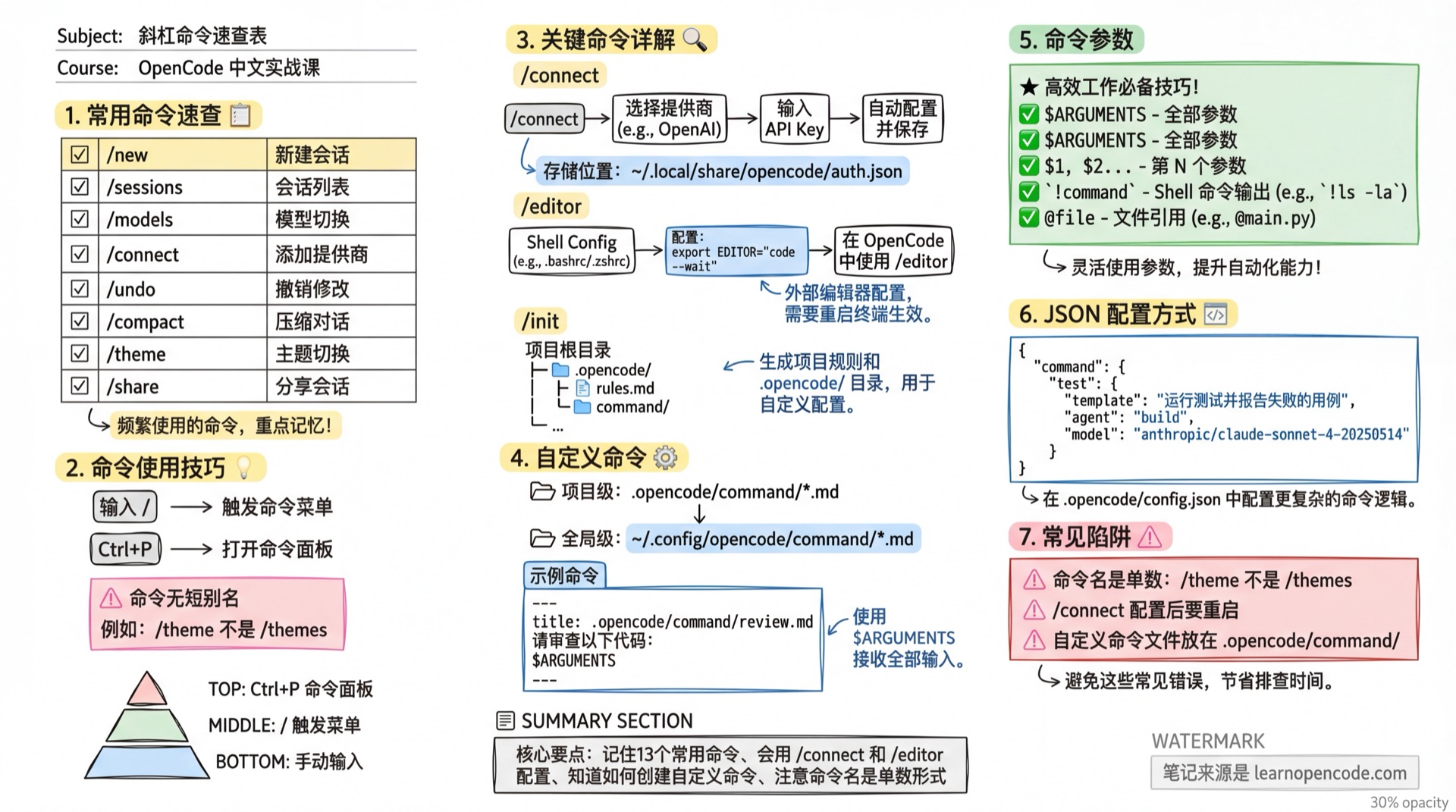
Built-in Commands
| Command | Function | Description |
|---|---|---|
/new | New Session | Create a new conversation |
/sessions | Session List | View historical sessions |
/models | Model Switch | Select model |
/connect | Add Provider | Configure API Key |
/undo | Undo | Undo file modifications |
/redo | Redo | Redo undone modifications |
/share | Share | Generate share link |
/unshare | Unshare | Cancel sharing |
/compact | Compact | Compact context |
/editor | Editor | Open external editor |
/export | Export | Export session |
/theme | Theme | Switch theme |
/init | Initialize | Generate project rules |
/help | Help | Show help |
Note: Commands have no short aliases. For example,
/themesshould be/theme.
Command Details
/new - New Session
Create a new conversation session, clearing the current context.
/newUse Cases:
- When starting a new task
- Current conversation is too long and needs a fresh start
- Switching to an unrelated topic
/sessions - Session Management
Open the session list to switch to historical sessions.
/sessionsFeatures:
- View all historical sessions
- Quickly switch between sessions
- Delete unwanted sessions
/models - Model Switch
Switch the currently used AI model.
/modelsFeatures:
- View available model list
- Switch main model
/connect - Add Provider
Interactively configure a new model provider.
/connectCredentials are stored in ~/.local/share/opencode/auth.json.
Supported Providers:
- DeepSeek, Moonshot, MiniMax, Z.AI, etc.
- Anthropic, OpenAI, Google, etc.
- Local models like Ollama
/undo and /redo - Undo/Redo
Undo or redo AI's file modifications.
/undo   # Undo last modification
/redo   # Redo undone modification
How it Works:
- Git-based implementation
- Automatic checkpoint creation for each file modification
- Multiple undo/redo operations supported
/share and /unshare - Share Session
Generate a session share link, or cancel sharing.
/share     # Generate share link
/unshare # Cancel sharingNotes:
- Anyone can view the session content after sharing
- Sensitive information (API Keys, etc.) is not shared
- Link becomes invalid immediately after canceling sharing
/compact - Compact Context
When the conversation is too long, compress historical messages to save tokens.
/compactUse Cases:
- Conversation exceeds context limit
- Want to save API costs
- AI starts "forgetting" early content
How it Works:
- AI summarizes historical conversation
- Retains key information
- Removes redundant content
/editor - External Editor
Open an external editor for editing long text.
/editorUse Cases:
- Input large blocks of code or text
- Need complex editing features
Configuration:
export EDITOR="code --wait"   # VS Code
export EDITOR=vim             # Vim
/export - Export Session
Export the current session as a JSON file.
/export/theme - Theme Switch
Switch the TUI interface theme.
/themeBuilt-in Themes:
opencode- Defaultsystem- Adaptive to terminaltokyonight- Tokyo Nightcatppuccin- Catppuccingruvbox- Gruvboxnord- Nord
Note: The command is
/theme, not/themes.
/init - Project Initialization
Generate rule files for the current project.
/initFeatures:
- Analyzes project structure
- Generates project rules
- Creates .opencode/ directory
/help - Help
Display help information and available commands.
/helpCustom Commands
You can create your own slash commands. See Custom Commands.
Command File Location
Project-level: .opencode/command/*.md
Global-level: ~/.config/opencode/command/*.md
Example: Creating /review Command
---
description: Code Review
---

Please review the following code:
$ARGUMENTS
Usage:
/review @src/main.tsCommand Parameters
| Placeholder | Description |
|---|---|
$ARGUMENTS | All arguments |
$1, $2, ... | Nth argument |
!command`` | Shell command output |
@file | File reference |
JSON Configuration
Source: commands.mdx
{
  "command": {
    "test": {
      "template": "Run tests and report failed cases",
      "description": "Run tests",
      "agent": "build",
      "model": "anthropic/claude-sonnet-4-20250514",
      "subtask": false
    }
  }
}
Configuration Options
| Option | Type | Required | Description |
|---|---|---|---|
template | string | ✅ | Prompt sent to LLM |
description | string | Optional | Command description displayed in TUI |
agent | string | Optional | Agent to execute the command |
model | string | Optional | Override default model |
subtask | boolean | Optional | Force execution as subtask (won't pollute main context) |
subtask Note: If the agent specified by the command is a subagent, it will trigger subtask invocation by default. Set
subtask: falseto disable this behavior; setsubtask: trueto force subtask execution even if the agent's mode is primary.
Quick Reference
| I want to... | Type |
|---|---|
| Start a new conversation | /new |
| View history | /sessions |
| Change model | /models |
| Add a provider | /connect |
| Undo modifications | /undo |
| Compact conversation | /compact |
| Change theme | /theme |
| Share session | /share |
Related Resources
- CLI Commands Reference - Command line arguments
- Custom Commands - Create custom commands
- Keyboard Shortcuts - Keyboard shortcuts