

CLI Command Reference
All commands and options for the
opencodeCLI tool
📝 Course Notes
Key takeaways from this lesson:
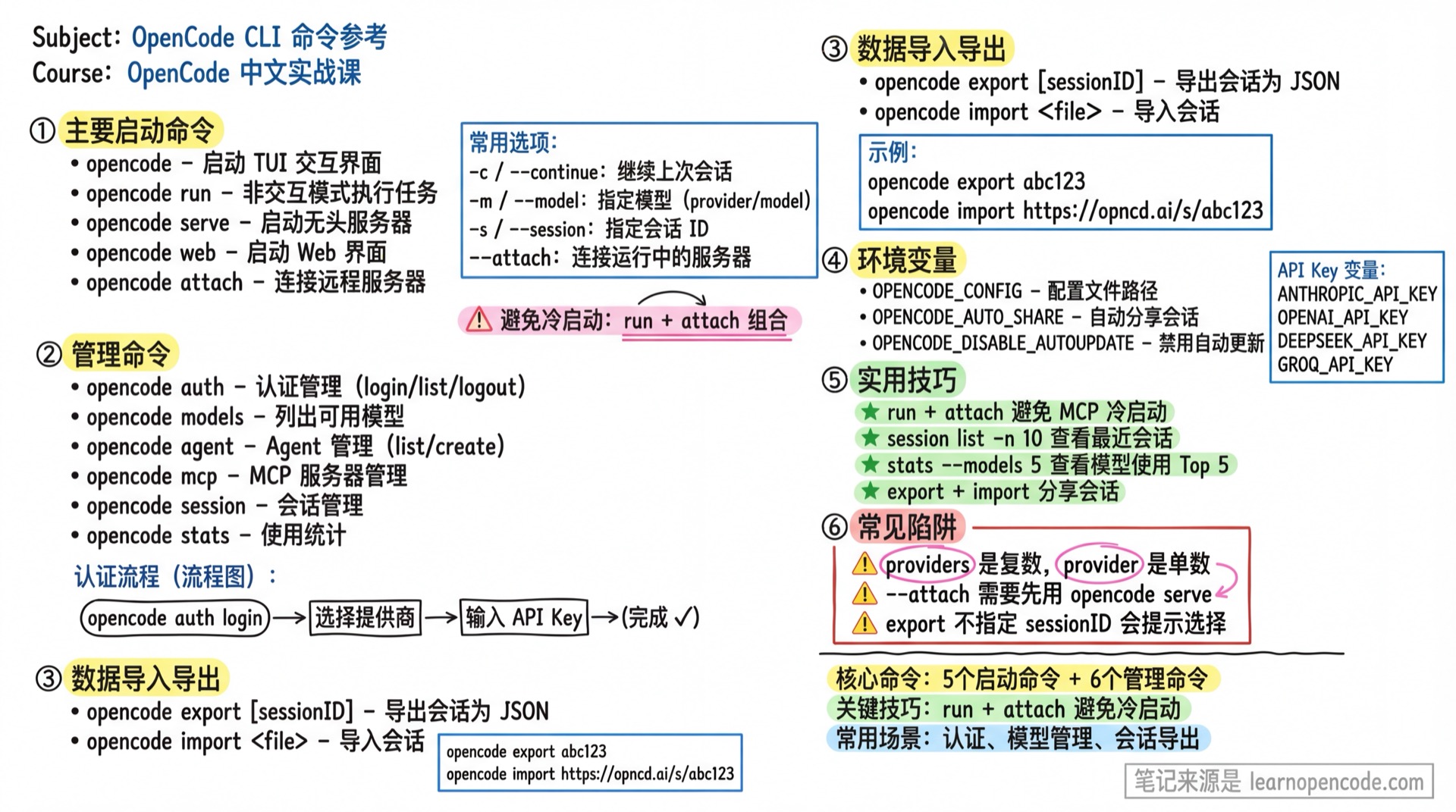
Command Overview
| Command | Function |
|---|---|
opencode | Start TUI interactive interface |
opencode --mini | Start the minimal interactive interface |
opencode run | Execute tasks in non-interactive mode |
opencode serve | Start headless server |
opencode web | Start Web interface |
opencode attach | Connect to remote server |
opencode auth | Authentication management |
opencode models | List available models |
opencode agent | Agent management |
opencode mcp | MCP server management |
opencode session | Session management |
opencode stats | Usage statistics |
opencode export | Export session |
opencode import | Import session |
opencode github | GitHub integration |
opencode pr | Pull and process PR |
opencode acp | ACP server |
opencode upgrade | Upgrade version |
opencode uninstall | Uninstall OpenCode |
Main Commands
opencode
Start the TUI interactive interface.
opencode [project]Options:
| Option | Short | Description |
|---|---|---|
--continue | -c | Continue last session |
--session | -s | Specify session ID |
--prompt | Initial prompt | |
--model | -m | Specify model (format: provider/model) |
--agent | Specify Agent | |
--auto | Automatically approve permission requests that are not explicitly denied (dangerous) | |
--mini | Start the minimal interactive interface | |
--no-replay | Do not replay history when Mini continues a session or the terminal is resized | |
--replay-limit | Replay at most the most recent N messages in Mini | |
--port | Listen port | |
--hostname | Listen address |
Examples:
# Start TUI
opencode

# Start with initial prompt
opencode --prompt "Help me analyze the code structure of this project"

# Use specific model
opencode -m anthropic/claude-sonnet-4-20250514

# Continue last session
opencode -c

# Start Mini; continuing a session replays history by default
opencode --mini -c

# Continue a session without replaying history
opencode --mini -c --no-replay
Mini is launched with opencode --mini, not opencode run --mini. Enter ! at the beginning of the Mini input to switch to Shell mode. Press Esc to exit immediately, or press Backspace while the cursor is at the start of the input.
--auto applies to the standard TUI. The target version still accepts the hidden --yolo compatibility alias, but new scripts should use the public --auto option. The Mini entry point does not forward this automatic-approval switch.
opencode run
Execute tasks in non-interactive mode, suitable for scripts and CI/CD.
opencode run [message..]Options:
| Option | Short | Description |
|---|---|---|
--command | Slash command name to execute, message as command arguments | |
--continue | -c | Continue last session |
--session | -s | Specify session ID |
--share | Share session | |
--model | -m | Specify model (format: provider/model) |
--agent | Specify Agent | |
--file | -f | Attach files (can be multiple) |
--format | Output format: default (formatted) or json (raw JSON) | |
--title | Session title | |
--attach | Connect to running server (e.g. http://localhost:4096) | |
--port | Local server port (random by default) | |
--variant | Model variant (reasoning effort: high, max, minimal) | |
--auto | Automatically approve permission requests that are not explicitly denied (dangerous) |
Examples:
# Basic usage
opencode run "Fix type errors in src/main.ts"

# Specify model
opencode run -m anthropic/claude-sonnet-4-5 "Review this code"

# Attach files (supports multiple files)
opencode run -f src/main.ts -f package.json "Analyze this project"

# Continue previous session
opencode run -c "What else needs to be done?"

# Use JSON output format (suitable for scripts)
opencode run --format json "List all TypeScript files"

# Connect to remote server (avoid MCP cold start)
opencode serve  # Start in another terminal
opencode run --attach http://localhost:4096 "Explain async/await"

# Use custom command
opencode run --command explain --file code.ts "How does this work?"

# Specify model variant (reasoning effort)
opencode run -m anthropic/claude-opus-4-5 --variant max "Analyze entire codebase"

# Auto-share session
opencode run --share "Generate project documentation"

# Specify session title
opencode run --title "Bug Fix" "Fix the login issue"

# Read input from stdin
echo "Count lines of code" | opencode run "Analyze"

# Run non-interactively and automatically approve permissions that would otherwise prompt
opencode run --auto "Run the tests and fix any failures"
opencode run is non-interactive by default. The hidden --yolo option remains compatible with --auto in the target version but should not be used in new scripts. Both options approve only requests that would otherwise prompt; rules configured as deny still block execution.
opencode serve
Start headless server mode, providing API access.
opencode serveOptions:
| Option | Description |
|---|---|
--port | Listen port |
--hostname | Listen address |
--mdns | Enable mDNS discovery |
--cors | Allowed CORS origins |
Examples:
# Start with default configuration
opencode serve

# Specify port and allow remote access
opencode serve --port 4096 --hostname 0.0.0.0
opencode web
Start the Web interface.
opencode webOptions:
| Option | Description |
|---|---|
--port | Listen port |
--hostname | Listen address |
--mdns | Enable mDNS discovery |
--cors | Allowed CORS origins |
Examples:
# Start Web interface
opencode web

# Specify port
opencode web --port 4096
opencode attach
Connect to a remote OpenCode server.
opencode attach [url]Options:
| Option | Short | Description |
|---|---|---|
--dir | TUI working directory | |
--session | -s | Specify session ID |
Examples:
# Start server in one terminal
opencode web --port 4096 --hostname 0.0.0.0

# Connect from another terminal
opencode attach http://10.20.30.40:4096
Management Commands
opencode auth
Manage authentication and API keys. Credentials are stored in ~/.local/share/opencode/auth.json.
opencode auth <subcommand>| Subcommand | Function |
|---|---|
login | Login (interactive provider selection) |
list / ls | List authenticated providers |
logout | Logout from provider |
Examples:
# Interactive login
opencode auth login

# List authenticated providers
opencode auth list

# Logout
opencode auth logout
opencode models
List available models.
opencode models [provider]Options:
| Option | Description |
|---|---|
--refresh | Refresh model cache |
--verbose | Show detailed info (including cost and other metadata) |
Examples:
# List all available models
opencode models

# List only Anthropic models
opencode models anthropic

# Refresh model list
opencode models --refresh
opencode agent
Manage Agent configurations.
opencode agent <subcommand>| Subcommand | Function |
|---|---|
list | List all Agents |
create | Create new Agent (interactive) |
Examples:
# List Agents
opencode agent list

# Create new Agent
opencode agent create
opencode mcp
Manage MCP servers.
opencode mcp <subcommand>| Subcommand | Function |
|---|---|
list / ls | List MCP servers and connection status |
add | Add MCP server (interactive) |
auth [name] | OAuth authentication |
auth list / auth ls | List OAuth-supported servers and auth status |
logout [name] | Remove OAuth credentials |
debug <name> | Debug OAuth connection issues |
Examples:
# List MCP servers
opencode mcp list

# Add new server
opencode mcp add

# OAuth authentication
opencode mcp auth context7

# List OAuth status
opencode mcp auth ls

# Debug connection
opencode mcp debug context7
opencode session
Manage sessions.
opencode session <subcommand>| Subcommand | Function |
|---|---|
list | List sessions |
Options (list):
| Option | Short | Description |
|---|---|---|
--max-count | -n | Limit to last N sessions |
--format | Output format: table or json |
Examples:
# List sessions
opencode session list

# List last 10 sessions
opencode session list -n 10

# Output as JSON
opencode session list --format json
opencode stats
View usage statistics.
opencode statsOptions:
| Option | Description |
|---|---|
--days | Statistics for last N days |
--tools | Number of tools to display (shows all by default) |
--models | Show model usage details (pass number for Top N) |
--project | Filter by project (empty string for current project) |
Examples:
# View statistics
opencode stats

# View last 7 days
opencode stats --days 7

# Show top 5 models
opencode stats --models 5
opencode export
Export session data as JSON.
opencode export [sessionID]If no session ID is specified, you will be prompted to select one.
Examples:
opencode export abc123opencode import
Import session data.
opencode import <file>Supports importing from local files or OpenCode share URLs.
Examples:
# Import from file
opencode import session.json

# Import from share URL
opencode import https://opncd.ai/share/abc123
opencode github
GitHub integration management.
opencode github <subcommand>| Subcommand | Function |
|---|---|
install | Install GitHub Actions workflow |
run | Run GitHub Agent (for Actions) |
run options:
| Option | Description |
|---|---|
--event | GitHub mock event |
--token | GitHub personal access token |
Examples:
# Install Actions
opencode github install
opencode pr
Pull and checkout a GitHub PR branch, then start OpenCode.
opencode pr <number>This command will:
- Use
gh pr checkoutto pull the PR to local branchpr/<PR-number> - Automatically add remote repository if it's a Fork PR
- Automatically import if PR description contains OpenCode session link
- Start OpenCode TUI
Prerequisites:
ghCLI installed and authenticated- Current directory is a Git repository
Examples:
# Pull PR #123 and start OpenCode
opencode pr 123

# You will see:
# Fetching and checking out PR #123...
# Successfully checked out PR #123 as branch 'pr/123'
# Starting opencode...
opencode acp
Start ACP (Agent Client Protocol) server.
opencode acpCommunicates via stdin/stdout using nd-JSON.
Options:
| Option | Description |
|---|---|
--cwd | Working directory |
--port | Listen port |
--hostname | Listen address |
opencode upgrade
Upgrade to the latest version or a specific version.
opencode upgrade [target]Options:
| Option | Short | Description |
|---|---|---|
--method | -m | Installation method: curl, npm, pnpm, bun, brew |
Examples:
# Upgrade to latest
opencode upgrade

# Upgrade to specific version
opencode upgrade v1.0.5

# Downgrade to 0.x
opencode upgrade 0.15.31
opencode uninstall
Uninstall OpenCode and delete related files.
opencode uninstallOptions:
| Option | Short | Description |
|---|---|---|
--keep-config | -c | Keep configuration files |
--keep-data | -d | Keep session data and snapshots |
--dry-run | Only show what will be deleted | |
--force | -f | Skip confirmation prompt |
Examples:
# Complete uninstall
opencode uninstall

# Keep configuration
opencode uninstall --keep-config

# Preview deletion content
opencode uninstall --dry-run
Global Options
All commands support the following global options:
| Option | Short | Description |
|---|---|---|
--help | -h | Show help |
--version | -v | Show version number |
--print-logs | Print logs to stderr | |
--log-level | Log level: DEBUG, INFO, WARN, ERROR |
Environment Variables
| Variable | Type | Description |
|---|---|---|
OPENCODE_CONFIG | string | Configuration file path |
OPENCODE_CONFIG_DIR | string | Configuration directory path |
OPENCODE_CONFIG_CONTENT | string | Inline JSON configuration |
OPENCODE_PERMISSION | string | Inline JSON permission configuration |
OPENCODE_AUTO_SHARE | boolean | Auto-share sessions |
OPENCODE_DISABLE_AUTOUPDATE | boolean | Disable auto-update check |
OPENCODE_DISABLE_PRUNE | boolean | Disable old data cleanup |
OPENCODE_DISABLE_TERMINAL_TITLE | boolean | Disable terminal title updates |
OPENCODE_DISABLE_DEFAULT_PLUGINS | boolean | Disable default plugins |
OPENCODE_DISABLE_LSP_DOWNLOAD | boolean | Disable LSP server auto-download |
OPENCODE_DISABLE_AUTOCOMPACT | boolean | Disable auto context compression |
OPENCODE_ENABLE_EXPERIMENTAL_MODELS | boolean | Enable experimental models |
OPENCODE_ENABLE_EXA | boolean | Enable Exa web search |
OPENCODE_CLIENT | string | Client identifier (default cli) |
OPENCODE_GIT_BASH_PATH | string | Windows Git Bash path |
Server Security
Authentication configuration for opencode serve and opencode web:
| Variable | Type | Description |
|---|---|---|
OPENCODE_SERVER_PASSWORD | string | Server password (strongly recommended) |
OPENCODE_SERVER_USERNAME | string | Username (default opencode) |
Security Notice
If OPENCODE_SERVER_PASSWORD is not set, the server will have no authentication protection, anyone can access it.
Examples:
# Set server authentication
export OPENCODE_SERVER_PASSWORD=your-secure-password
export OPENCODE_SERVER_USERNAME=admin

opencode serve --hostname 0.0.0.0
Provider API Keys
API keys for each provider are set via corresponding environment variables:
| Variable | Description |
|---|---|
ANTHROPIC_API_KEY | Anthropic API Key |
OPENAI_API_KEY | OpenAI API Key |
DEEPSEEK_API_KEY | DeepSeek API Key |
GROQ_API_KEY | Groq API Key |
Experimental Variables
Source: cli.mdx
| Variable | Type | Description |
|---|---|---|
OPENCODE_EXPERIMENTAL | boolean | Enable all experimental features |
OPENCODE_EXPERIMENTAL_ICON_DISCOVERY | boolean | Enable icon discovery |
OPENCODE_EXPERIMENTAL_DISABLE_COPY_ON_SELECT | boolean | Disable copy-on-select in TUI |
OPENCODE_EXPERIMENTAL_BASH_DEFAULT_TIMEOUT_MS | number | Bash default timeout (milliseconds) |
OPENCODE_EXPERIMENTAL_OUTPUT_TOKEN_MAX | number | LLM max output tokens |
OPENCODE_EXPERIMENTAL_FILEWATCHER | boolean | Enable directory file watching |
OPENCODE_EXPERIMENTAL_DISABLE_FILEWATCHER | boolean | Disable directory file watching |
OPENCODE_EXPERIMENTAL_OXFMT | boolean | Enable oxfmt formatter |
OPENCODE_EXPERIMENTAL_LSP_TOOL | boolean | Enable experimental LSP tool |
OPENCODE_EXPERIMENTAL_LSP_TY | boolean | Enable LSP type inference |
OPENCODE_ENABLE_EXA | boolean | Enable Exa code search |
Related Resources
- Configuration Reference - Detailed configuration file reference
- Slash Commands Cheat Sheet - Commands within TUI
- Model Providers List - Available models
Source Code Reference
The following behavior is pinned to v1.18.22:
| Behavior | Source | Lines |
|---|---|---|
run defaults to non-interactive mode; Mini entry point | packages/opencode/src/cli/cmd/run.ts | 3-15 |
--mini, replay, and --no-replay | packages/opencode/src/cli/cmd/tui.ts | 123-175 |
--auto and the hidden compatibility alias | packages/opencode/src/cli/cmd/run.ts | 242-274 |
| Automatic-approval option for the standard TUI | packages/opencode/src/cli/cmd/tui.ts | 108-121 |
| Mapping the standard TUI automatic-approval option | packages/opencode/src/cli/cmd/tui.ts | 287-295 |
| Mini Shell mode | packages/opencode/src/cli/cmd/run/footer.prompt.tsx | 1055-1094 |