

LSP Code Intelligence
📝 Course Notes
Key concepts from this lesson:
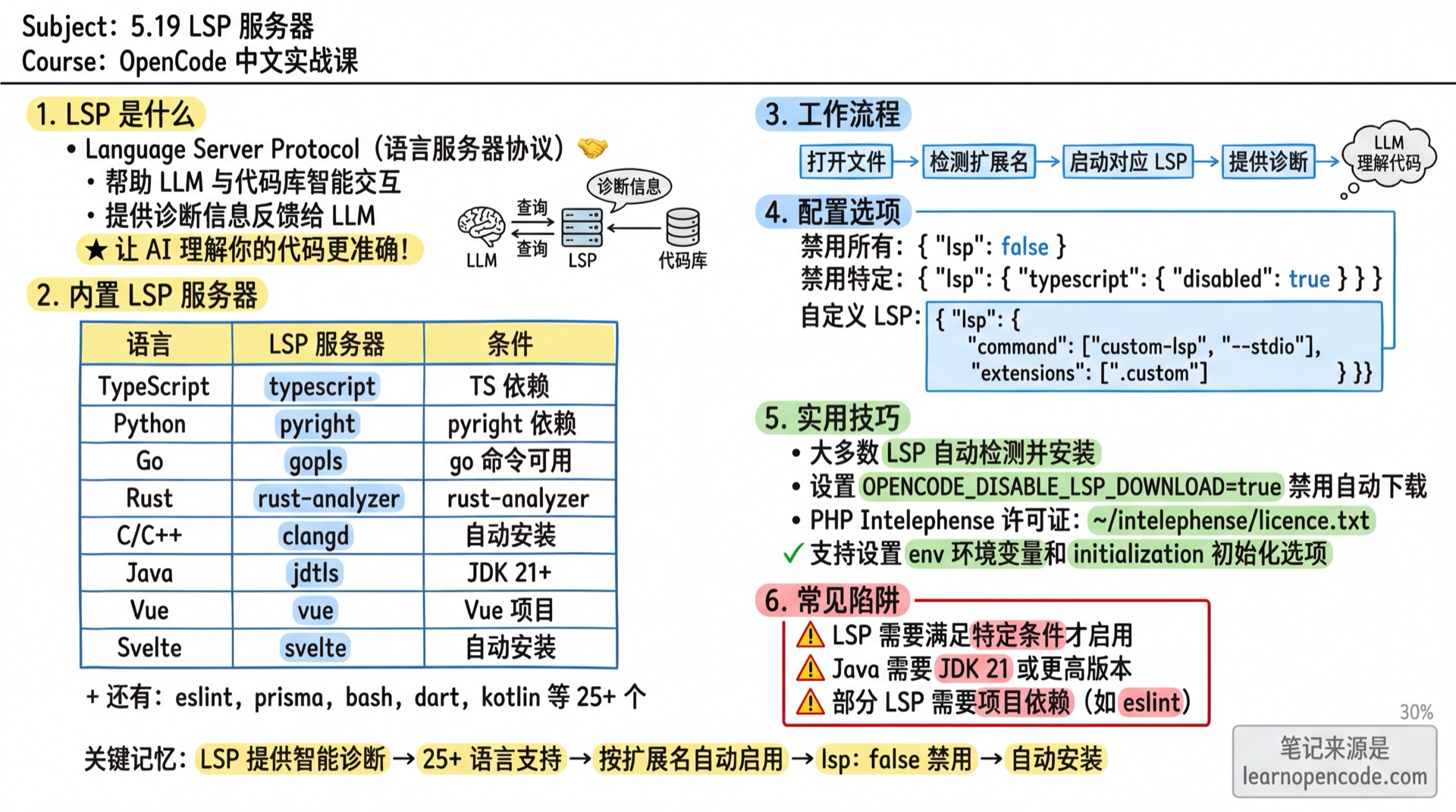
When AI helps you modify code, does it not know where functions are defined, which variables reference what, or which interfaces have implementations?
LSP (Language Server Protocol) solves this problem. It gives AI an "IDE brain," upgrading AI from "reading text" to "understanding code structure."
🤔 What is LSP?
LSP is a standard protocol proposed by Microsoft for communication between editors and language servers. The "Go to Definition" and "Find References" features you use in VS Code work through LSP.
OpenCode brings the same capabilities to terminal AI assistants.
What You'll Learn
🎯 Lesson Objectives
- Understand how LSP gives AI code intelligence
- Use 9 LSP operations: go to definition, find references, hover info, etc.
- Learn about OpenCode's 30+ built-in language servers
- Customize or disable LSP servers
- Troubleshoot LSP connection issues
Your Current Challenges
- "AI doesn't know where this function is defined, it can only guess"
- "Want to know where a variable is used, but AI can't find them all"
- "AI doesn't understand dependencies when modifying code, prone to errors"
- "Wish I could quickly navigate and view definitions like in an IDE"
When to Use This Feature
- Need to understand the structure of a large codebase
- Need to find definitions and references of functions/variables
- Want to understand impact scope before refactoring
- Need to get type information and documentation comments
🎒 Prerequisites
- [ ] Completed 5.1a Configuration Basics
- [ ] Can start OpenCode normally
- [ ] Have code files in your project (OpenCode will automatically detect language type)
Core Concept
The LSP workflow is simple:
- OpenCode detects the file type you open (e.g.,
.ts,.py,.go) - Automatically starts the corresponding language server
- When AI needs to understand code, it sends requests to the language server
- Language server returns precise code intelligence data
Most of the time you don't need any configuration, it works out of the box.
LSP vs Plain Text Search
| Aspect | Plain Text Search (grep) | LSP Code Intelligence |
|---|---|---|
| Search Method | String matching | Semantic symbol matching |
| Accuracy | May have false positives (same-name variables) | Precise positioning |
| Scope | Doesn't understand scope | Understands scope and import relationships |
| Type Information | None | Provides complete type signatures |
| Overload Distinction | Cannot distinguish | Can distinguish function overloads |
Built-in Language Servers
OpenCode has 30+ language servers built-in, ready to use.
Mainstream Languages
| LSP Server | Extensions | Requirements |
|---|---|---|
| typescript | .ts, .tsx, .js, .jsx, .mjs, .cjs, .mts, .cts | typescript dependency in project |
| pyright | .py, .pyi | Auto-installs pyright |
| gopls | .go | go command available |
| rust (rust-analyzer) | .rs | rust-analyzer command available |
| jdtls | .java | Java SDK installed (21+) |
| kotlin-ls | .kt, .kts | Auto-downloads and installs |
| clangd | .c, .cpp, .cc, .cxx, .c++, .h, .hpp, .hh, .hxx, .h++ | Auto-downloads and installs |
| csharp (csharp-ls) | .cs | .NET SDK installed |
| fsharp (fsautocomplete) | .fs, .fsi, .fsx, .fsscript | .NET SDK installed |
| sourcekit-lsp | .swift, .objc, .objcpp | Swift installed (Xcode on macOS) |
| dart | .dart | dart command available |
Other Languages
| LSP Server | Extensions | Requirements |
|---|---|---|
| ruby-lsp (rubocop) | .rb, .rake, .gemspec, .ru | ruby and gem commands available |
| elixir-ls | .ex, .exs | elixir command available |
| zls | .zig, .zon | zig command available |
| lua-ls | .lua | Auto-downloads and installs |
| php intelephense | .php | Auto-installs intelephense |
| ocaml-lsp | .ml, .mli | ocamllsp command available |
| gleam | .gleam | gleam command available |
| clojure-lsp | .clj, .cljs, .cljc, .edn | clojure-lsp command available |
| nixd | .nix | nixd command available |
| haskell-language-server | .hs, .lhs | haskell-language-server-wrapper command available |
| deno | .ts, .tsx, .js, .jsx, .mjs | deno command available (auto-detects deno.json) |
Frontend Frameworks
| LSP Server | Extensions | Requirements |
|---|---|---|
| vue | .vue | Auto-installs vue-language-server |
| svelte | .svelte | Auto-installs svelte-language-server |
| astro | .astro | Auto-installs astro-language-server |
Tools and Configuration
| LSP Server | Extensions | Purpose |
|---|---|---|
| eslint | .ts, .tsx, .js, .jsx, .mjs, .cjs, .mts, .cts, .vue | Code linting |
| oxlint | .ts, .tsx, .js, .jsx, etc. + .vue, .astro, .svelte | Fast linter |
| biome | .ts, .tsx, .js, .jsx, .json, .css, .vue, .astro, .svelte, etc. | Formatting + linter |
| yaml-ls | .yaml, .yml | YAML support |
| bash | .sh, .bash, .zsh, .ksh | Shell scripts |
| terraform | .tf, .tfvars | IaC configuration |
| prisma | .prisma | Database schema |
| texlab | .tex, .bib | LaTeX documents |
| tinymist | .typ, .typc | Typst typesetting |
| dockerfile | .dockerfile, Dockerfile | Docker configuration |
Auto-Installation Notes
Most servers will be automatically downloaded and installed on first use, in the ~/.local/share/opencode/bin/ directory.
A few servers (like rust-analyzer, dart, sourcekit-lsp) require you to install the corresponding toolchain in advance.
Set the environment variable OPENCODE_DISABLE_LSP_DOWNLOAD=true to disable auto-download.
9 LSP Operations
OpenCode provides 9 LSP operations that AI will automatically call as needed. You can also explicitly request them in conversations.
1. goToDefinition: Go to Definition
Find the definition location of functions, classes, and variables.
You: Find the definition of the formatDate function on line 15 of src/utils/format.tsAI will call LSP's goToDefinition and return the file and line number where the definition is located.
2. findReferences: Find References
Find all usages of a symbol throughout the project. Especially useful before refactoring.
You: Find where the User type on line 20 of src/api/user.ts is used3. hover: Hover Information
Get information like type signatures and documentation comments for symbols.
You: View the type signature of the login function on line 45 of src/services/auth.ts4. documentSymbol: Document Symbols
List all symbols in a file (functions, classes, variables, etc.) for quick file structure browsing.
You: List all functions and classes in src/controllers/user.ts5. workspaceSymbol: Workspace Symbol Search
Search for symbols across the entire project. Results are filtered to classes, functions, methods, interfaces, variables, constants, structs, and enums, returning up to 10 results.
You: Search for all classes containing "UserService" in the entire project6. goToImplementation: Go to Implementation
Find concrete implementations of interfaces or abstract classes.
You: Find all implementations of the Repository interface on line 10 of src/interfaces/Repository.ts7. prepareCallHierarchy: Prepare Call Hierarchy
Get call hierarchy information for a position, preparing for incoming/outgoing call analysis.
8. incomingCalls: Incoming Calls
Find all places that call the current function. Use this to evaluate impact scope before modifying a function.
You: Find where the validateEmail function on line 20 of src/utils/validator.ts is called9. outgoingCalls: Outgoing Calls
Find all other functions called by the current function for dependency analysis.
You: View which other functions the processPayment function on line 50 of src/services/payment.ts callsLSP Tool Parameter Description
All LSP operations require three parameters:
filePath: File path (absolute or relative)line: Line number (1-based, same as what you see in editor)character: Character offset (1-based)
AI will automatically fill these parameters, you just need to describe your needs in natural language.
Using LSP in Conversations
AI Automatic Usage
Most of the time you don't need to specifically mention LSP, AI will automatically judge when to use it:
You: Where is this formatDate function defined?

AI: [Automatically calls lsp goToDefinition]
    formatDate is defined on line 42 of src/utils/date.ts...
Manual Request
You can also explicitly ask AI to use LSP:
You: Use LSP to find all references to the UserService class
You: Use LSP to view the symbol list of config.ts file
You: Use LSP to analyze the call relationships of the processOrder function
Follow Along: Configuring LSP
Step 1: Verify LSP is Working
Why Most of the time LSP works out of the box, let's verify first.
Enter in an OpenCode conversation:
Help me view the symbol information on line 1 of src/index.tsYou should see: AI returned type information or documentation comments, indicating LSP is working.
If you see No LSP server available for this file type, it means the corresponding language server hasn't started. Check if the "Requirements" column conditions are met.
Step 2: Disable Unneeded Servers
Why Some projects may trigger multiple servers simultaneously (e.g., TypeScript and Deno), causing conflicts.
Disable specific servers in opencode.json:
{
  "lsp": {
    "deno": {
      "disabled": true
    }
  }
}
To globally disable all LSP (e.g., when debugging performance issues):
{
  "lsp": false
}
You should see: Disabled servers no longer start, logs will show LSP server xxx is disabled.
Step 3: Add Custom LSP Servers
Why If the language you're using doesn't have built-in support, you can configure it yourself.
{
  "lsp": {
    "my-lang": {
      "command": ["my-lsp-server", "--stdio"],
      "extensions": [".myl"],
      "env": {
        "MY_ENV": "value"
      }
    }
  }
}
Configuration field description:
| Field | Type | Required | Description |
|---|---|---|---|
command | string[] | ✅ (when enabling) | Startup command and arguments. Can be omitted when disabled, just need { "disabled": true } |
extensions | string[] | ✅ (custom servers) | List of file extensions |
disabled | boolean | ❌ | Whether to disable (default false) |
env | object | ❌ | Environment variables |
initialization | object | ❌ | LSP initialization parameters |
Note
Custom LSP servers must provide the extensions field, otherwise configuration validation will fail: For custom LSP servers, 'extensions' array is required.
Built-in servers can omit extensions since they already have default values.
You should see: When opening .myl files, AI can use LSP operations.
Checklist ✅
- [ ] Understand LSP's purpose: Upgrade AI from "reading text" to "understanding code structure"
- [ ] Know OpenCode has 30+ built-in language servers, most work out of the box
- [ ] Can name at least 3 LSP operations (go to definition, find references, hover info...)
- [ ] Know how to disable specific LSP servers
- [ ] Know how to add custom LSP servers
Common Issues
| Symptom | Cause | Solution |
|---|---|---|
No LSP server available for this file type | Corresponding language server not installed or conditions not met | Check "Requirements" column, install corresponding toolchain |
| LSP server starts in wrong directory | Project root directory detection incorrect | Ensure project root has marker files (like package.json, go.mod) |
File not found: /path/to/file.ts | File path error | Use path relative to project root |
| Long wait on first use | Server needs initialization and indexing on first start | Normal behavior, subsequent use will be much faster |
| TypeScript and Deno server conflict | Both servers process .ts files | Disable the unneeded one in opencode.json |
| High LSP memory usage | Large project indexing consumes memory | Disable unneeded servers, or set "lsp": false |
| Custom server fails to start | Missing environment variables or incorrect command path | Add env field in configuration, use absolute paths |
Additional Information
PHP Intelephense License
PHP Intelephense provides advanced features through a license key. You can place the license key in a text file:
- macOS/Linux:
$HOME/intelephense/licence.txt - Windows:
%USERPROFILE%/intelephense/licence.txt
The file should contain only the license key, nothing else.
Experimental Feature: ty Python Server
Set the environment variable OPENCODE_EXPERIMENTAL_LSP_TY=1 to enable the experimental ty Python server, replacing the default pyright. When enabled, pyright will be automatically disabled.
Experimental Feature
The ty server is still in experimental stage and may change with versions. For production environments, continue using pyright.
Lesson Summary
| Core Concept | Description |
|---|---|
| LSP Purpose | Give AI IDE-level code intelligence to understand code semantics |
| Auto Detection | Automatically starts corresponding server based on file extension |
| Built-in Support | 30+ language servers, most work out of the box |
| 9 Operations | Go to definition, find references, hover info, symbol search, go to implementation, call hierarchy, etc. |
| Configuration | opencode.json's lsp field, supports disabling and customization |
Remember: Most of the time you don't need to configure anything, LSP will work automatically. Only modify configuration when you encounter issues or need customization.
Next Lesson Preview
Next lesson we'll learn about Context Compaction.
You'll learn:
- Context compaction trigger mechanism
- What Context percentage means
- How to manually trigger compaction
- Impact of compaction on conversation quality
Related Lessons
- Code Formatters - Automatic code formatting
- Built-in Tools - Overview of all built-in tools
- Debugging Guide -
debug lspcommand for troubleshooting - Configuration Reference - Complete configuration options
Appendix: Source Code Reference
Click to expand source code locations
Last updated: 2026-02-14
| Feature | File Path | Line Numbers |
|---|---|---|
| LSP namespace and core logic | src/lsp/index.ts | 14-485 |
| LSP client acquisition and server startup | src/lsp/index.ts | 177-262 |
| goToDefinition implementation | src/lsp/index.ts | 386-395 |
| findReferences implementation | src/lsp/index.ts | 397-407 |
| hover implementation | src/lsp/index.ts | 303-317 |
| workspaceSymbol (filtering and 10-result limit) | src/lsp/index.ts | 359-369 |
| documentSymbol implementation | src/lsp/index.ts | 371-384 |
| goToImplementation implementation | src/lsp/index.ts | 409-418 |
| prepareCallHierarchy implementation | src/lsp/index.ts | 420-429 |
| incomingCalls implementation | src/lsp/index.ts | 431-442 |
| outgoingCalls implementation | src/lsp/index.ts | 444-455 |
| diagnostics information | src/lsp/index.ts | 291-301 |
| LSP tool definition (9 operations) | src/tool/lsp.ts | 10-96 |
| LSP tool description text | src/tool/lsp.txt | 1-20 |
| LSP configuration Schema | src/config/config.ts | 1115-1150 |
| LSPServer interface definition | src/lsp/server.ts | 53-59 |
| TypeScript server | src/lsp/server.ts | 89-116 |
| Python server (pyright) | src/lsp/server.ts | 505-557 |
| Go server (gopls) | src/lsp/server.ts | 358-398 |
| Rust server (rust-analyzer) | src/lsp/server.ts | 847-891 |
| Experimental ty Python server | src/lsp/server.ts | 441-503 |
| Experimental server filtering logic | src/lsp/index.ts | 64-77 |
| SymbolKind filtering (workspaceSymbol) | src/lsp/index.ts | 319-357 |
Key Types:
LSP.Range: Code range (start/end positions)LSP.Symbol: Symbol information (name, type, location)LSP.DocumentSymbol: Document symbol (contains child symbols)LSP.Status: LSP server status (id, name, root, status)LSPServer.Info: Server definition (id, extensions, root, spawn)
Key Constants:
operations: Enumerated list of 9 LSP operations (src/tool/lsp.tslines 10-20)kinds: Symbol types filtered for workspaceSymbol (Class, Function, Method, Interface, Variable, Constant, Struct, Enum)
Environment Variables:
OPENCODE_DISABLE_LSP_DOWNLOAD: Disable auto-download of LSP serversOPENCODE_EXPERIMENTAL_LSP_TY: Enable experimental ty Python server