

GitHub Integration
OpenCode integrates deeply with GitHub workflows. Mention /opencode or /oc in an Issue or PR comment, and OpenCode will execute tasks in your GitHub Actions runner.
📝 Course Notes
Key takeaways from this lesson:
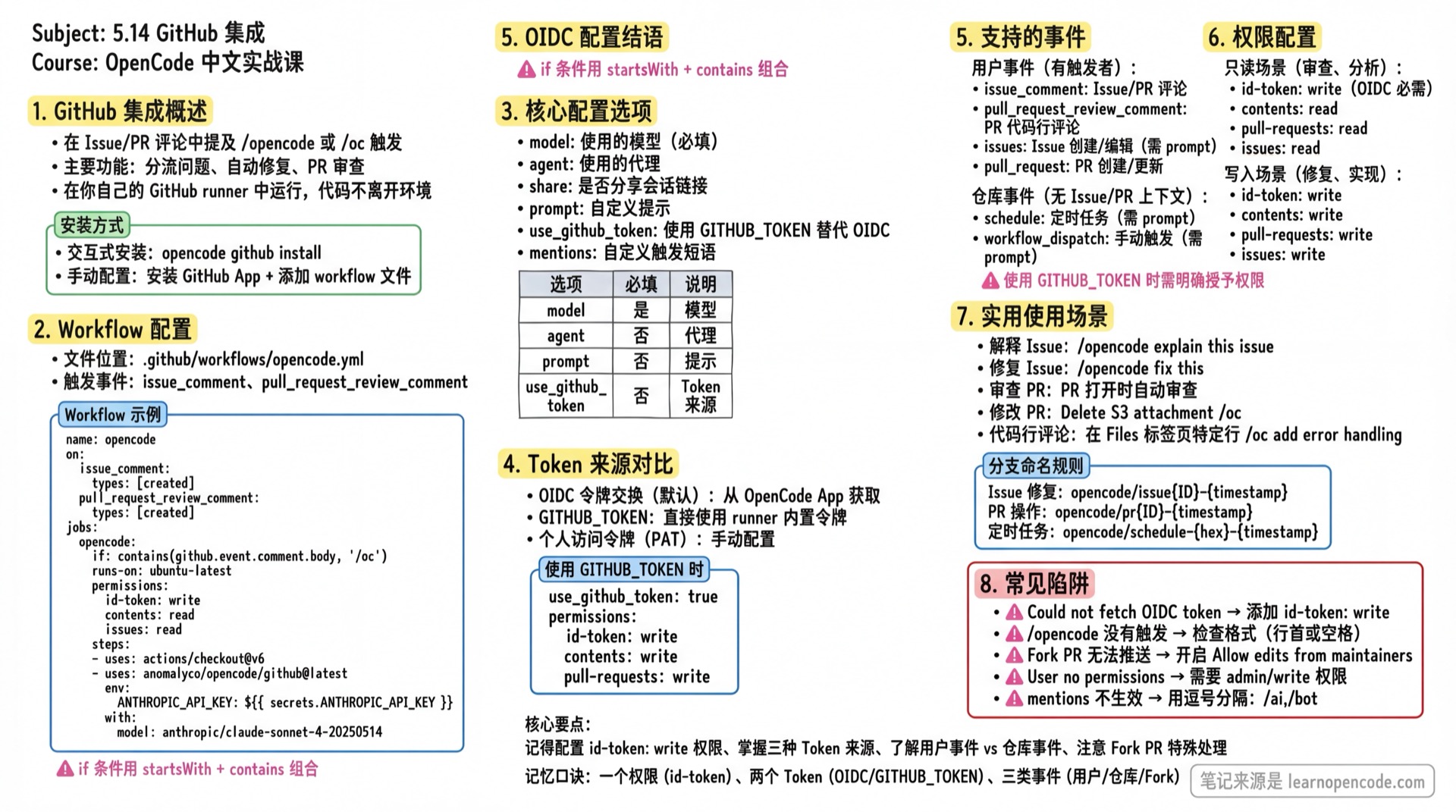
Features
- Triage Issues: Have OpenCode review an Issue and explain the problem
- Fix and Implement: Have OpenCode fix an Issue or implement a feature - it works in a new branch and submits a PR
- Review PRs: Automatically review Pull Request code quality
- Security: OpenCode runs in your own GitHub runner, code never leaves your environment
Installation
Run in your GitHub repository's project directory:
opencode github installThis guides you through: installing the GitHub App, selecting providers and models, creating workflow files, and setting up secrets.
Manual Setup
You can also set up manually:
1. Install GitHub App
Go to github.com/apps/opencode-agent and ensure it's installed on your target repository.
2. Add workflow
Add the following to your repository's .github/workflows/opencode.yml:
name: opencode

on:
  issue_comment:
    types: [created]
  pull_request_review_comment:
    types: [created]

jobs:
  opencode:
    if: |
      contains(github.event.comment.body, ' /oc') ||
      startsWith(github.event.comment.body, '/oc') ||
      contains(github.event.comment.body, ' /opencode') ||
      startsWith(github.event.comment.body, '/opencode')
    runs-on: ubuntu-latest
    permissions:
      id-token: write
      contents: read
      pull-requests: read
      issues: read
    steps:
      - name: Checkout repository
        uses: actions/checkout@v6

      - name: Run OpenCode
        uses: anomalyco/opencode/github@latest
        env:
          ANTHROPIC_API_KEY: ${{ secrets.ANTHROPIC_API_KEY }}
        with:
model: anthropic/claude-sonnet-4-20250514Note: The if condition uses a combination of
startsWithandcontains(' /oc')to ensure the trigger phrase is at the beginning of a line or preceded by a space, avoiding false matches in URLs or code.
3. Store API Keys
Add required API keys in Settings > Secrets and variables > Actions for your organization or project.
Configuration Options
| Option | Required | Default | Description |
|---|---|---|---|
model | Yes | - | Model to use, format is provider/model |
agent | No | default_agent from config or "build" | Agent to use, must be a primary agent |
share | No | true for public repos | Whether to share session links |
prompt | No | - | Custom prompt, overrides default behavior (required for schedule/workflow_dispatch/issues events) |
use_github_token | No | false | Use GITHUB_TOKEN instead of OpenCode App token exchange, skipping OIDC |
mentions | No | /opencode,/oc | Custom trigger phrases (comma-separated, case-insensitive) |
oidc_base_url | No | https://api.opencode.ai | Custom OIDC token exchange API URL, only needed when running a private GitHub App |
Source: opencode/github/action.yml:7-35
About Token Sources
By default, OpenCode uses OIDC token exchange to obtain an installation access token from the OpenCode GitHub App. Commits, comments, and PRs appear as coming from the app.
Alternative 1: Use GITHUB_TOKEN
Set use_github_token: true to skip OIDC token exchange and use the GitHub Action runner's built-in GITHUB_TOKEN:
- name: Run OpenCode
  uses: anomalyco/opencode/github@latest
  env:
    ANTHROPIC_API_KEY: ${{ secrets.ANTHROPIC_API_KEY }}
    GITHUB_TOKEN: ${{ secrets.GITHUB_TOKEN }}
  with:
    model: anthropic/claude-sonnet-4-20250514
    use_github_token: true
Grant permissions in the workflow:
permissions:
  id-token: write
  contents: write
  pull-requests: write
  issues: write
Alternative 2: Use Personal Access Token (PAT)
You can also use a Personal Access Token.
How It Works
Event Classification
OpenCode classifies GitHub events into two categories with different handling logic:
| Category | Event Types | Characteristics |
|---|---|---|
| User Events | issue_comment, pull_request_review_comment, issues, pull_request | Has trigger info, can add comments and reactions to Issues/PRs |
| Repository Events | schedule, workflow_dispatch | No Issue/PR context, output only logged or creates PR |
Source: opencode/packages/opencode/src/cli/cmd/github.ts:141-143
Processing Flow
1. Event triggers
   ↓
2. Check trigger phrase (/opencode or /oc)
   ↓
3. Obtain access token (OIDC exchange or GITHUB_TOKEN)
   ↓
4. Permission verification (user events only, requires admin or write permission)
   ↓
5. Add 👀 reaction (user events only, indicates processing)
   ↓
6. Process based on event type:
   - Issue: Create new branch → Execute task → Commit → Create PR
   - Local PR: Checkout branch → Execute task → Commit to same PR
   - Fork PR: Add fork remote → Execute task → Push to fork
   - Repo event: Create new branch → Execute task → Create PR
   ↓
7. Create comment and remove reaction
Branch Naming Rules
Branches automatically created by OpenCode follow these naming rules:
| Scenario | Branch Name Format | Example |
|---|---|---|
| Issue fix | opencode/issue{ID}-{timestamp} | opencode/issue42-20250108120000 |
| PR operation | opencode/pr{ID}-{timestamp} | opencode/pr15-20250108120000 |
| Scheduled task | opencode/schedule-{hex}-{timestamp} | opencode/schedule-a1b2c3-20250108120000 |
| Manual trigger | opencode/dispatch-{hex}-{timestamp} | opencode/dispatch-d4e5f6-20250108120000 |
Source: github.ts:1047-1059
Co-author Attribution
Commits by OpenCode automatically include Co-authored-by information, marking the trigger as a co-author:
Fix authentication issue

Co-authored-by: username <[email protected]>Note:
scheduleevents have no trigger, so no Co-author info is added.
Source: github.ts:1061-1100
Permission Configuration Details
Configure different permission levels based on your use case:
Read-only Scenarios (Review, Analysis)
permissions:
  id-token: write      # Required for OIDC token exchange
  contents: read       # Read code
  pull-requests: read  # Read PR info
  issues: read         # Read Issue info
Write Scenarios (Fix, Implement)
permissions:
  id-token: write       # Required for OIDC token exchange
  contents: write       # Create branches, commit code
  pull-requests: write  # Create/update PRs
issues: write # Create commentsTip: When using the OpenCode GitHub App, permissions are controlled by the App. When using
use_github_token: true, permissions must be explicitly granted in the workflow.
Supported Events
| Event Type | Trigger Method | Description |
|---|---|---|
issue_comment | Comment on Issue or PR | Mention /opencode or /oc in comment |
pull_request_review_comment | Comment on specific code line in PR | Mention trigger phrase during code review |
issues | Issue created or edited | Requires prompt input |
pull_request | PR created or updated | For automatic review |
schedule | Cron-based scheduled task | Requires prompt input, no comment output |
workflow_dispatch | Manual trigger from GitHub UI | Requires prompt input |
Scheduled Task Example
name: Scheduled OpenCode Task

on:
  schedule:
    - cron: "0 9 * * 1" # Every Monday at 9:00 UTC

jobs:
  opencode:
    runs-on: ubuntu-latest
    permissions:
      id-token: write
      contents: write
      pull-requests: write
      issues: write
    steps:
      - name: Checkout repository
        uses: actions/checkout@v6

      - name: Run OpenCode
        uses: anomalyco/opencode/github@latest
        env:
          ANTHROPIC_API_KEY: ${{ secrets.ANTHROPIC_API_KEY }}
        with:
          model: anthropic/claude-sonnet-4-20250514
          prompt: |
            Review the codebase for any TODO comments and create a summary.
If you find issues worth addressing, open an issue to track them.Note: Scheduled events require
promptinput because there's no comment to extract instructions from. Output is logged to Actions, and if there are code changes, a PR is created.
PR Auto-Review Example
name: opencode-review

on:
  pull_request:
    types: [opened, synchronize, reopened, ready_for_review]

jobs:
  review:
    runs-on: ubuntu-latest
    permissions:
      id-token: write
      contents: read
      pull-requests: read
      issues: read
    steps:
      - uses: actions/checkout@v6
      - uses: anomalyco/opencode/github@latest
        env:
          ANTHROPIC_API_KEY: ${{ secrets.ANTHROPIC_API_KEY }}
        with:
          model: anthropic/claude-sonnet-4-20250514
          prompt: |
            Review this pull request:
            - Check for code quality issues
            - Look for potential bugs
            - Suggest improvements
For pull_request events, if no prompt is provided, OpenCode defaults to reviewing the PR.
Issue Triage Example
Automatically triage new Issues. This example filters for accounts older than 30 days to reduce spam:
name: Issue Triage

on:
  issues:
    types: [opened]

jobs:
  triage:
    runs-on: ubuntu-latest
    permissions:
      id-token: write
      contents: write
      pull-requests: write
      issues: write
    steps:
      - name: Check account age
        id: check
        uses: actions/github-script@v7
        with:
          script: |
            const user = await github.rest.users.getByUsername({
              username: context.payload.issue.user.login
            });
            const created = new Date(user.data.created_at);
            const days = (Date.now() - created) / (1000 * 60 * 60 * 24);
            return days >= 30;
          result-encoding: string

      - uses: actions/checkout@v6
        if: steps.check.outputs.result == 'true'

      - uses: anomalyco/opencode/github@latest
        if: steps.check.outputs.result == 'true'
        env:
          ANTHROPIC_API_KEY: ${{ secrets.ANTHROPIC_API_KEY }}
        with:
          model: anthropic/claude-sonnet-4-20250514
          prompt: |
            Review this issue. If there's a clear fix or relevant docs:
            - Provide documentation links
            - Add error handling guidance for code examples
            Otherwise, do not comment.
Custom Trigger Phrases
Use the mentions parameter to customize trigger phrases:
- uses: anomalyco/opencode/github@latest
  with:
    model: anthropic/claude-sonnet-4-20250514
    mentions: "/ai,/bot,/help"
Now you can use /ai, /bot, or /help to trigger OpenCode.
Note: Trigger phrase matching is case-insensitive. Multiple phrases are comma-separated.
Fork PR Handling
OpenCode supports handling PRs from forked repositories. The processing logic differs slightly from local PRs:
Local PR vs Fork PR
| Aspect | Local PR | Fork PR |
|---|---|---|
| Branch source | Same repository | Fork repository |
| Checkout method | git fetch origin && git checkout | git remote add fork && git fetch fork |
| Push target | Original branch | Fork repository's branch |
| Branch name | Keeps original branch name | Creates new local branch opencode/pr{ID}-{timestamp} |
Workflow
- Detect if PR's
headRepositorydiffers frombaseRepository - Add fork repository as a remote
- Fetch fork branch code
- Create local branch to execute task
- Push changes back to fork repository's original branch
Source: github.ts:1035-1045
Note: Fork PRs require the fork maintainer to allow upstream pushes (check "Allow edits from maintainers" on the PR page).
CLI Commands
opencode pr
Quickly checkout a PR and start OpenCode:
opencode pr <PR-number>Execution flow:
- Automatically fetch PR branch
- Create local branch
pr/<PR-number> - Checkout to that branch
- Automatically start OpenCode
Example:
# Checkout PR #123
opencode pr 123
Fork PR Handling:
For PRs from forks, the command automatically:
- Adds fork as a remote
- Sets upstream tracking
- Ensures push to correct repository
Import Associated Session:
If the PR description contains an OpenCode Session link (e.g., https://opncd.ai/s/abc123), the command automatically imports the session history, letting you continue the previous conversation context.
opencode github install
Interactive installation of GitHub Agent:
opencode github installExecution flow:
- Detect current directory's Git repository info
- Guide installation of OpenCode GitHub App
- Select AI provider and model
- Generate
.github/workflows/opencode.ymlfile - Prompt to configure secrets
opencode github run
Run Agent in GitHub Actions (usually not needed manually):
opencode github runLocal Testing
For development debugging, simulate GitHub Actions environment locally:
MODEL=anthropic/claude-sonnet-4-20250514 \
  ANTHROPIC_API_KEY=sk-ant-api03-xxxxx \
  GITHUB_RUN_ID=dummy \
  opencode github run \
    --token github_pat_xxxxx \
    --event '{"eventName":"issue_comment","repo":{"owner":"your-username","repo":"repo-name"},"actor":"trigger-username","payload":{"issue":{"number":1},"comment":{"id":1,"body":"/opencode explain this issue"}}}'
Parameter description:
| Environment Variable/Parameter | Description |
|---|---|
MODEL | Model to use, format provider/model |
ANTHROPIC_API_KEY | Model provider API key |
GITHUB_RUN_ID | Simulate GitHub Actions environment, can be dummy for local testing |
--token | GitHub personal access token for permission verification and repository operations |
--event | Simulated GitHub event JSON |
Event JSON Templates
Issue Comment Event:
{
  "eventName": "issue_comment",
  "repo": {"owner": "owner", "repo": "repo-name"},
  "actor": "username",
  "payload": {
    "issue": {"number": 42},
    "comment": {"id": 1, "body": "/opencode explain this issue"}
  }
}
PR Comment Event:
{
  "eventName": "issue_comment",
  "repo": {"owner": "owner", "repo": "repo-name"},
  "actor": "username",
  "payload": {
    "issue": {"number": 15, "pull_request": {}},
    "comment": {"id": 1, "body": "/opencode optimize this code"}
  }
}
PR Code Line Comment Event:
{
  "eventName": "pull_request_review_comment",
  "repo": {"owner": "owner", "repo": "repo-name"},
  "actor": "username",
  "payload": {
    "pull_request": {"number": 15},
    "comment": {
      "id": 1,
      "body": "/opencode add error handling",
      "path": "src/utils/api.ts",
      "diff_hunk": "@@ -10,6 +10,8 @@\n async function fetchData() {\n-  return fetch(url)\n+  const response = await fetch(url)\n+  return response.json()\n }",
      "line": 12,
      "original_line": 10,
      "position": 5,
      "commit_id": "abc123",
      "original_commit_id": "def456"
    }
  }
}
Usage Examples
Explain an Issue
Add a comment in a GitHub Issue:
/opencode explain this issueOpenCode will read the entire thread (including all comments) and reply with an explanation.
Fix an Issue
In a GitHub Issue:
/opencode fix thisOpenCode will create a new branch, implement the fix, and open a PR.
Review PR and Make Changes
Leave a comment in a GitHub PR:
Delete the attachment from S3 when the note is removed /ocOpenCode will implement the requested changes and commit to the same PR.
Review Specific Code Lines
Leave a comment directly on a code line in the PR's "Files" tab. OpenCode automatically detects the file, line number, and diff context:
[Comment on specific line in Files tab]
/oc add error handling here
When commenting on a specific line, OpenCode receives:
- The exact file being reviewed
- The specific code line
- Surrounding diff context
- Line number information
This allows for more precise requests without manually specifying file paths or line numbers.
Common Pitfalls
| Symptom | Cause | Solution |
|---|---|---|
Error Could not fetch an OIDC token | Workflow missing id-token: write permission | Add permissions: id-token: write |
/opencode doesn't trigger | Trigger phrase format wrong in comment (e.g., in middle of URL) | Ensure trigger phrase at line start or preceded by space |
| Fork PR can't push changes | Fork maintainer hasn't allowed upstream pushes | Contact fork maintainer to enable "Allow edits from maintainers" |
| Schedule event has no comment output | Scheduled tasks have no Issue/PR context | This is expected behavior, output logged to Actions |
Error User xxx does not have write permissions | Trigger doesn't have repository write permission | Only collaborators with admin or write permission can trigger |
| Custom mentions don't work | Multiple phrases not correctly comma-separated | Use mentions: "/ai,/bot" format |
Insufficient permissions with use_github_token | Required workflow permissions not granted | Add contents: write, pull-requests: write etc. permissions |
Related Sections
- 5.15 GitLab Integration - If you use GitLab, refer to this section for configuration
- 5.16 Share Feature - Learn about OpenCode session sharing
- Quick Reference/CLI Reference - Complete CLI command list