

5.10a SDK Basics
TL;DR: Use the JavaScript/TypeScript SDK to control OpenCode programmatically for automated workflows and custom integrations.
Course Notes
Key takeaways from this lesson:
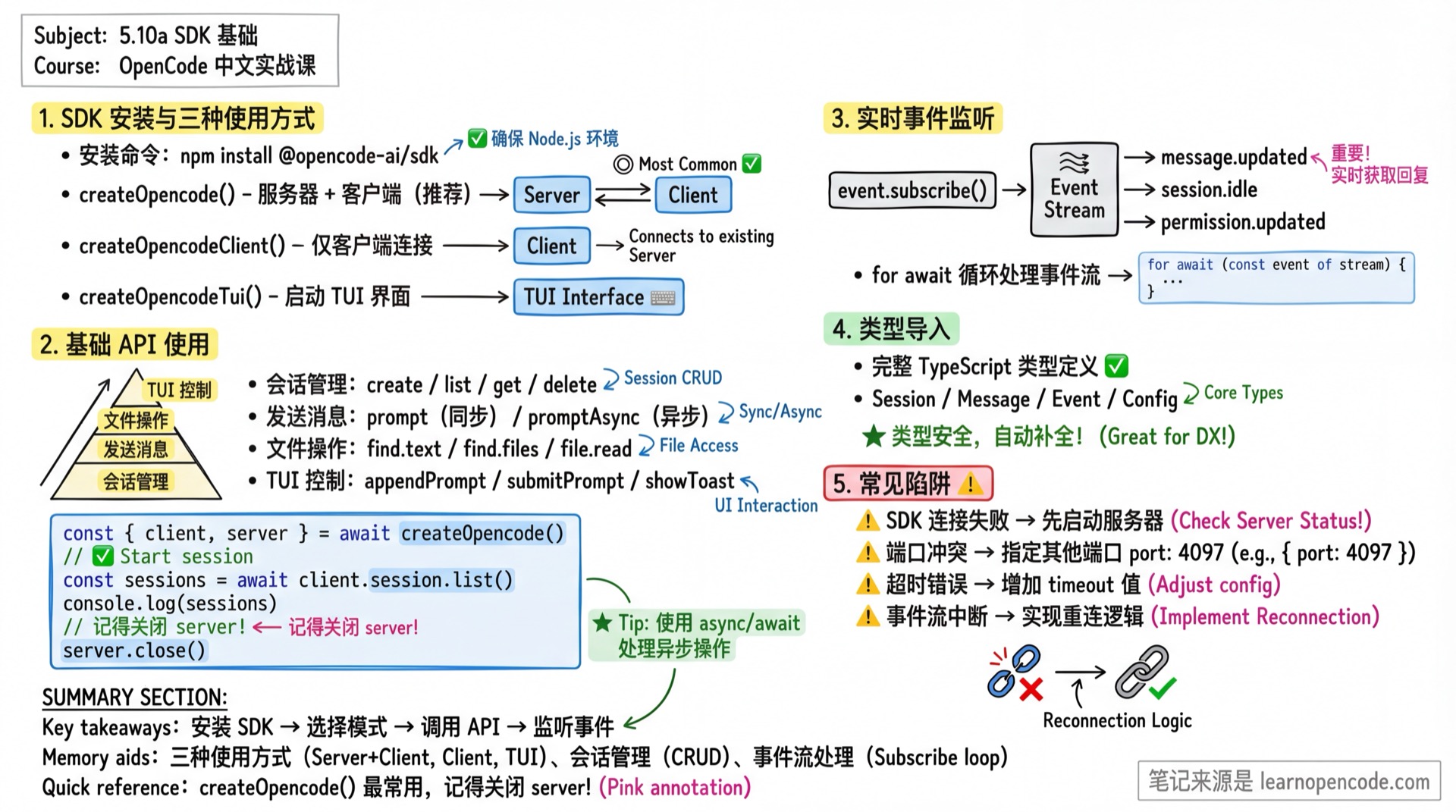
What You'll Learn
- Install and configure the OpenCode SDK
- Create server and client instances
- Launch the TUI interface
- Manage sessions and send messages
- Listen to real-time events
Your Current Challenges
- Want to call OpenCode from your own application
- Want to batch process tasks programmatically
- Want to build custom integrations (IDE plugins, CI/CD tools, etc.)
- Want to automate OpenCode operations in scripts
SDK Architecture Overview
┌─────────────────────────────────────────────────────────┐
│                    Your Application                       │
├─────────────────────────────────────────────────────────┤
│                   @opencode-ai/sdk                       │
│  ┌─────────────┐  ┌─────────────┐  ┌─────────────┐      │
│  │createOpencode│  │createOpencode│  │createOpencode│    │
│  │             │  │   Client    │  │    Tui      │      │
│  └──────┬──────┘  └──────┬──────┘  └──────┬──────┘      │
│         │                │                │              │
│  Server+Client     Client Only      Launch TUI          │
└─────────┼────────────────┼────────────────┼─────────────┘
          │                │                │
          ▼                ▼                ▼
┌─────────────────────────────────────────────────────────┐
│                  OpenCode Server                         │
│            HTTP API (default port 4096)                  │
└─────────────────────────────────────────────────────────┘
Install SDK
npm install @opencode-ai/sdkV1 and V2 Entry Points
The examples in this lesson use the V1 entry point, @opencode-ai/sdk. As of v1.18.22, V1 has not been removed. The same package also exports @opencode-ai/sdk/v2, which provides V2 extensions for sessions, questions, the current location, event streams, paginated history, runtime operations, and permission requests. The two entry points use different parameter structures—do not simply change the import and continue using V1-style { path, body } calls.
// V1: used by the remaining examples in this lesson
import { createOpencodeClient } from "@opencode-ai/sdk"

// V2: flat parameters; see Lesson 5.10c
import { createOpencodeClient as createV2Client } from "@opencode-ai/sdk/v2"
Source:
packages/sdk/js/package.json:12-20,V1 sdk.gen.ts:431-700,V2 location:5038-5058,V2 session:5171-5793
Three Usage Modes
1. Create Server + Client (Recommended)
Start both server and client, ideal for standalone scripts and automation:
import { createOpencode } from "@opencode-ai/sdk"

const { client, server } = await createOpencode()

// Use client to call APIs
const sessions = await client.session.list()
console.log(`Currently ${sessions.data?.length} sessions`)

// Close server when done
server.close()
ServerOptions Parameters
| Parameter | Type | Description | Default |
|---|---|---|---|
hostname | string | Server hostname | 127.0.0.1 |
port | number | Server port | 4096 |
signal | AbortSignal | Abort signal for cancellation | undefined |
timeout | number | Server startup timeout (ms) | 5000 |
config | Config | Config object to override opencode.json | {} |
Source:
packages/sdk/js/src/server.ts:5-11
Configuration Override Example
import { createOpencode } from "@opencode-ai/sdk"

const opencode = await createOpencode({
  hostname: "127.0.0.1",
  port: 4097,  // Use different port to avoid conflicts
  timeout: 10000,
  config: {
    model: "anthropic/claude-opus-4-5-thinking",
    logLevel: "DEBUG",
  },
})

console.log(`Server running at ${opencode.server.url}`)

// Close when done
opencode.server.close()
2. Client-Only Mode
Connect to a running OpenCode instance, ideal for plugin development:
import { createOpencodeClient } from "@opencode-ai/sdk"

const client = createOpencodeClient({
  baseUrl: "http://localhost:4096",
})

// Use client directly
const sessions = await client.session.list()
ClientOptions Parameters
| Parameter | Type | Description | Default |
|---|---|---|---|
baseUrl | string | Server URL | http://localhost:4096 |
fetch | function | Custom fetch implementation | globalThis.fetch |
parseAs | string | Response parsing: auto, json, text, blob, arrayBuffer, stream, formData | auto |
responseStyle | "data" | "fields" | Return style: data returns only data, fields returns full response | fields |
throwOnError | boolean | Throw on error instead of returning | false |
directory | string | Project directory (passed via X-Opencode-Directory header) | undefined |
Source:
packages/sdk/js/src/gen/client/types.gen.ts:10-52,packages/sdk/js/src/client.ts:33
Switching Project Directories
// Connect to different projects
const client = createOpencodeClient({
  baseUrl: "http://localhost:4096",
  directory: "/path/to/my-project",
})
Remote Connection (with Authentication)
When connecting to a remote OpenCode server with OPENCODE_SERVER_PASSWORD set, pass Basic Auth via headers:
import { createOpencodeClient } from "@opencode-ai/sdk"

// Remote connection (with auth)
const client = createOpencodeClient({
  baseUrl: "http://192.168.1.100:4096",
  headers: {
    // Basic Auth format: Base64(username:password)
    // Use btoa() in browser/Edge Runtime
    Authorization: `Basic ${btoa("opencode:your-password")}`
  },
  directory: "/projects/my-app"  // Specify remote project directory
})
Use Buffer in Node.js
// Node.js doesn't have btoa, use Buffer instead
Authorization: `Basic ${Buffer.from("opencode:password").toString("base64")}`| Scenario | Username | Description |
|---|---|---|
| Default | opencode | Server default username |
| Custom | Value of OPENCODE_SERVER_USERNAME env var | If server has custom username |
Source:
packages/opencode/src/server/auth.ts:36-42(Basic Auth header generation),packages/opencode/src/server/routes/instance/httpapi/middleware/authorization.ts(request parsing)
3. Launch TUI Interface
Programmatically start OpenCode's terminal interface:
import { createOpencodeTui } from "@opencode-ai/sdk"

const tui = createOpencodeTui({
  project: "/path/to/my-project",
  model: "anthropic/claude-opus-4-5-thinking",
  session: "abc123",  // Resume specific session
  agent: "build",
})

// User can interact in TUI
// ...

// Close TUI
tui.close()
TuiOptions Parameters
| Parameter | Type | Description |
|---|---|---|
project | string | Project directory path |
model | string | Model to use (format: provider/model) |
session | string | Session ID to resume |
agent | string | Agent to use (e.g., build, plan) |
signal | AbortSignal | Abort signal for cancellation |
config | Config | Configuration object |
Source:
packages/sdk/js/src/server.ts:13-20
Basic API Usage
Session Management
// Create new session
const session = await client.session.create({
  body: { title: "My Task" },
})
console.log(`Created session: ${session.data?.id}`)

// List all sessions
const sessions = await client.session.list()

// Get single session
const detail = await client.session.get({
  path: { id: session.data!.id },
})

// Delete session
await client.session.delete({
  path: { id: session.data!.id },
})
Send Messages
// Send prompt and wait for AI response
const result = await client.session.prompt({
  path: { id: sessionId },
  body: {
    model: { providerID: "anthropic", modelID: "claude-opus-4-5-thinking" },
    parts: [{ type: "text", text: "Please analyze the performance issues in this code" }],
  },
})

// Inject context (without triggering AI response)
await client.session.prompt({
  path: { id: sessionId },
  body: {
    noReply: true,
    parts: [{ type: "text", text: "You are a professional code review assistant." }],
  },
})
Async Send (Don't Wait for Response)
// Returns immediately, ideal for long tasks
await client.session.promptAsync({
  path: { id: sessionId },
  body: {
    parts: [{ type: "text", text: "Please refactor the entire module" }],
  },
})

// Get response via event listener
File Operations
// Search text content
const textResults = await client.find.text({
  query: { pattern: "function.*opencode" },
})

// Find files (supports glob patterns)
const files = await client.find.files({
  query: { query: "*.ts" },
})

// Find directories only
const dirs = await client.find.files({
  query: { query: "src", dirs: "true" },
})

// Read file content
const content = await client.file.read({
  query: { path: "src/index.ts" },
})

// Get file status (git changes)
const status = await client.file.status()
TUI Control
// Append text to input box
await client.tui.appendPrompt({
  body: { text: "Please check this file" },
})

// Submit current input
await client.tui.submitPrompt()

// Clear input
await client.tui.clearPrompt()

// Show notification
await client.tui.showToast({
  body: {
    message: "Task completed!",
    variant: "success",
    duration: 3000,  // Show for 3 seconds
  },
})

// Open dialogs
await client.tui.openHelp()
await client.tui.openSessions()
await client.tui.openThemes()
await client.tui.openModels()

// Execute TUI commands
await client.tui.executeCommand({
  body: { command: "agent_cycle" },
})
Real-time Event Listening
Subscribe to Event Stream
const events = await client.event.subscribe()

for await (const event of events.stream) {
  console.log(`Event type: ${event.type}`)
  console.log(`Event data:`, event.properties)

  // Handle by event type
  switch (event.type) {
    case "message.updated":
      console.log("Message updated:", event.properties.info)
      break
    case "session.idle":
      console.log("Session idle:", event.properties.sessionID)
      break
    case "permission.updated":
      console.log("Permission request:", event.properties)
      break
  }
}
Common Event Types
| Event Type | Description |
|---|---|
message.updated | Message content updated |
message.part.updated | Message part updated (includes delta) |
session.status | Session status changed (idle/busy/retry) |
session.idle | Session entered idle state |
permission.updated | Permission request pending |
file.edited | File was edited |
todo.updated | Todo list updated |
For complete event types, see 5.10b API Reference
Type Imports
SDK provides complete TypeScript type definitions:
import type {
  // Core types
  Session,
  Message,
  Part,

  // Event types
  Event,
  EventMessageUpdated,
  EventSessionIdle,

  // Config types
  Config,
  AgentConfig,
  ProviderConfig,

  // Others
  Todo,
  Permission,
  Agent,
  Provider,
  Model,
} from "@opencode-ai/sdk"
Error Handling
Standard Error Handling
try {
  const session = await client.session.get({
    path: { id: "invalid-id" }
  })
} catch (error) {
  console.error("Failed to get session:", (error as Error).message)
}
Using throwOnError Option
// Global configuration
const client = createOpencodeClient({
  baseUrl: "http://localhost:4096",
  throwOnError: true,  // Throw on all request errors
})

// Or use in single request
const result = await client.session.get({
  path: { id: sessionId },
  throwOnError: true,
})
Check Return Value
const result = await client.session.get({
  path: { id: sessionId },
})

if (result.error) {
  console.error("Error:", result.error)
} else {
  console.log("Session:", result.data)
}
Practical Example: Batch Code Review
import { createOpencode } from "@opencode-ai/sdk"
import { readdir } from "fs/promises"

async function batchCodeReview(directory: string) {
  const { client, server } = await createOpencode({
    config: {
      model: "anthropic/claude-opus-4-5-thinking",
    },
  })

  try {
    // Create session
    const session = await client.session.create({
      body: { title: `Batch Code Review - ${directory}` },
    })
    const sessionId = session.data!.id

    // Find all TypeScript files
    const files = await client.find.files({
      query: { query: "*.ts", directory },
    })

    console.log(`Found ${files.data?.length} files`)

    // Review each file
    for (const file of files.data ?? []) {
      console.log(`Reviewing: ${file}`)

      await client.session.prompt({
        path: { id: sessionId },
        body: {
          parts: [{
            type: "text",
            text: `Please review file ${file} for potential issues and improvement suggestions.`
          }],
        },
      })
    }

    console.log("Review complete!")
  } finally {
    server.close()
  }
}

batchCodeReview("./src")
Common Pitfalls
| Issue | Cause | Solution |
|---|---|---|
| SDK connection failed | Server not running | Run opencode serve first or use createOpencode() |
| Port conflict | Default port 4096 in use | Specify different port port: 4097 |
| Type errors | SDK version mismatch | Update to latest npm update @opencode-ai/sdk |
| Timeout error | Slow server startup or network issues | Increase timeout value |
| Event stream interrupted | Connection dropped | Implement reconnection logic |
| Response format confusion | responseStyle config | Default is fields, returns { data, error, request, response } |
Lesson Summary
You learned:
- Install SDK:
npm install @opencode-ai/sdk - Three usage modes:
createOpencode()- Server + ClientcreateOpencodeClient()- Client onlycreateOpencodeTui()- Launch TUI
- Basic APIs: Session management, message sending, file operations, TUI control
- Event listening: Real-time status change notifications
Related Resources
- 5.10b API Reference - Complete API documentation
- 5.9 Remote Development - HTTP Server details
- Official SDK Docs
Next Lesson Preview
5.10b API Reference covers all 20 API modules plus one permission-response method, complete type definitions, and 32 event types in detail.