

5.3c Skill Advanced Patterns
This lesson dives into advanced Skill applications: MCP collaboration, five workflow patterns, and distribution strategies to help you build enterprise-grade knowledge packages.
📝 Course Notes
Key concepts from this lesson:
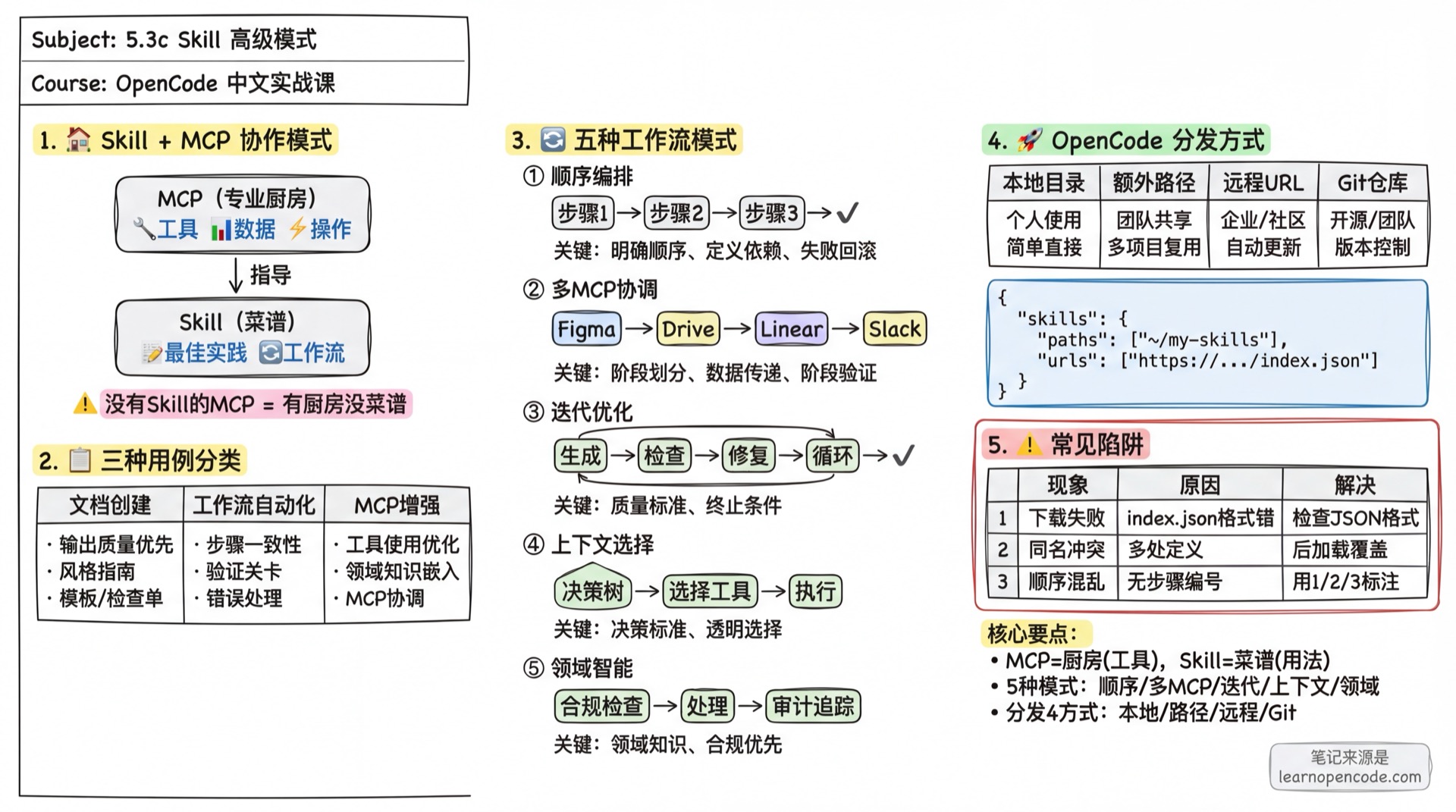
What You'll Be Able to Do
- Understand the Skill-MCP collaboration relationship (Kitchen vs. Recipe)
- Design five workflow patterns: Sequential Orchestration, Multi-MCP Coordination, Iterative Optimization, Context Selection, Domain Intelligence
- Choose appropriate Skill design strategies based on use case classification
- Distribute and share Skills via GitHub and API
Your Current Pain Points
You've learned how to create Skills, but in practice you encounter these issues:
Scenario 1: Company has 5 MCP services (Notion, Linear, Slack, Drive, GitHub)

User: Help me create a new project

AI: [Called Notion MCP, but didn't create Linear tasks or notify Slack]
Scenario 2: Skill can only do single-step operations
User: Help me generate a report and auto-optimize until quality standards are met
AI: I can only generate reports, what does "optimize" mean?Scenario 3: Team wants to share Skills
Developer A: I put the Skill on GitHub
Developer B: How do I use it? Do I need to download manually every time?Root Cause: Skill is not just a "knowledge package", it's a "workflow orchestrator". You need to understand how it collaborates with MCP and how to design complex workflow patterns.
When to Use This
- You have multiple MCP services that need coordination for complex tasks
- You need to design multi-step, iterative workflows
- You want to share Skills with your team or community
🎒 Prerequisites
- [ ] Completed 5.3b Skill Advanced
- [ ] Learned 5.7a MCP Basics
- [ ] Have a working MCP service (for practice)
Core Concepts
Skill + MCP: Kitchen and Recipe
Think of the MCP and Skill relationship as a professional kitchen:
┌─────────────────────────────────────────────────────────────────────┐
│                     Professional Kitchen (MCP)                       │
│  ┌──────────┐  ┌──────────┐  ┌──────────┐  ┌──────────┐            │
│  │ Stove    │  │ Fridge   │  │ Knives   │  │ Spice    │            │
│  │ (Tools)  │  │ (Data)   │  │ (Actions)│  │ (Resources)│          │
│  └──────────┘  └──────────┘  └──────────┘  └──────────┘            │
└─────────────────────────────────────────────────────────────────────┘
                              ↓
┌─────────────────────────────────────────────────────────────────────┐
│                         Recipe (Skill)                              │
│                                                                     │
│  "Kung Pao Chicken"                                                 │
│  1. Get 200g chicken from fridge                                    │
│  2. Dice with knives                                                │
│  3. Turn stove to high heat, add oil...                             │
│  4. Add spices: Sichuan peppercorn, dried chili...                  │
└─────────────────────────────────────────────────────────────────────┘
MCP Provides:
- Connections to various services (Notion, Linear, GitHub...)
- Real-time data access
- Tool invocation capabilities
Skill Provides:
- Best practices for using these tools
- Multi-step workflow orchestration
- Domain expertise
MCP without Skill is like "having a kitchen without recipes" — users know what tools are available, but not how to combine them effectively.
Three Use Case Categories
Based on practical experience, Skills primarily serve three use cases:
| Category | Characteristics | Skill Focus |
|---|---|---|
| 1. Document/Asset Creation | Output quality priority | Embed style guides, templates, quality checklists |
| 2. Workflow Automation | Multi-step consistency | Step definitions, validation gates, error handling |
| 3. MCP Enhancement | Tool usage optimization | Coordinate MCP calls, embed domain knowledge |
Five Workflow Patterns
Pattern 1: Sequential Workflow Orchestration
Best For: Multi-step processes requiring fixed order execution
Structure Example:
---
name: customer-onboarding
description: End-to-end customer onboarding workflow. Handles account creation,
  payment setup, subscription management. Use when user says "onboard new customer",
  "setup subscription", "create account".
---

# Customer Onboarding Workflow

## Step 1: Create Account
Call MCP tool: `create_customer`
Parameters: name, email, company

## Step 2: Setup Payment
Call MCP tool: `setup_payment_method`
Wait for: Payment method verification

## Step 3: Create Subscription
Call MCP tool: `create_subscription`
Parameters: plan_id, customer_id (from Step 1)

## Step 4: Send Welcome Email
Call MCP tool: `send_email`
Template: welcome_email_template

## Failure Rollback
If any step fails:
1. Log failure reason
2. Rollback created resources
3. Notify administrator
Key Techniques:
- Clear step ordering
- Define dependencies between steps (Step 3 needs Step 1 output)
- Provide failure rollback instructions
Pattern 2: Multi-MCP Coordination
Best For: Workflows spanning multiple services
Structure Example: Design to Development Handoff
---
name: design-to-dev
description: Generate development tasks from design files. Use when user mentions
  "design handoff", "Figma to tasks".
---

# Design to Development Handoff

## Phase 1: Design Export (Figma MCP)

1. Export design assets from Figma
2. Generate design specification document
3. Create asset manifest

## Phase 2: Asset Storage (Drive MCP)

1. Create project folder in Drive
2. Upload all assets
3. Generate share links

## Phase 3: Task Creation (Linear MCP)

1. Create development tasks
2. Attach asset links to tasks
3. Assign to engineering team

## Phase 4: Notification (Slack MCP)

1. Post handoff summary in #engineering
2. Include asset links and task references
Key Techniques:
- Clear phase separation
- Define data passing between phases
- Validate before proceeding to next phase
Pattern 3: Iterative Optimization
Best For: Output quality requires multiple improvement cycles
Structure Example: Report Generation
---
name: report-generator
description: Generate high-quality reports, auto-iterate until standards are met.
---

# Iterative Report Generation

## Initial Draft

1. Fetch data via MCP
2. Generate first version of report
3. Save to temporary file

## Quality Check

Run validation script: `scripts/check_report.py`
Check items:
- Missing sections
- Format inconsistencies
- Data validation errors

## Optimization Loop
WHILE quality not met: 1. Fix identified issues 2. Regenerate affected sections 3. Validate again
## Finalization

1. Apply final formatting
2. Generate summary
3. Save final version
Key Techniques:
- Clear quality standards
- Iterative improvement loop
- Know when to stop iterating
Pattern 4: Context-Aware Tool Selection
Best For: Same goal, different tools based on context
Structure Example: Smart File Storage
---
name: smart-storage
description: Automatically select best storage location based on file type and purpose.
---

# Smart File Storage

## Decision Tree

1. Check file type and size
2. Determine best storage location:
   - Large files (>10MB) → Cloud storage MCP
   - Collaborative docs → Notion/Docs MCP
   - Code files → GitHub MCP
   - Temporary files → Local storage

## Execute Storage

Based on decision:
- Call corresponding MCP tool
- Apply service-specific metadata
- Generate access link

## User Feedback

Explain why that storage location was chosen
Key Techniques:
- Clear decision criteria
- Provide fallback options
- Be transparent with user (explain reasoning)
Pattern 5: Domain Intelligence
Best For: Skill provides expertise beyond tool access
Structure Example: Financial Compliance
---
name: payment-compliance
description: Payment processing with compliance checks. Use for cross-border
  payments, large transactions.
---

# Compliant Payment Processing

## Pre-Processing (Compliance Check)

1. Get transaction details via MCP
2. Apply compliance rules:
   - Check sanctions list
   - Verify jurisdiction allowed
   - Assess risk level
3. Record compliance decision

## Processing

IF compliance passed:
    - Call payment processing MCP tool
    - Apply appropriate fraud checks
    - Process transaction
ELSE:
    - Flag for manual review
    - Create compliance case

## Audit Trail

- Log all compliance checks
- Record processing decisions
- Generate audit report
Key Techniques:
- Embed domain knowledge before action
- Compliance before operations
- Complete documentation trail
Distribution & Sharing
OpenCode provides multiple Skill distribution methods, from local to remote.
OpenCode Skill Search Path
OpenCode searches for Skills in the following order:
┌─────────────────────────────────────────────────────────────────────┐
│ Search Priority (later loaded overrides earlier)                     │
├─────────────────────────────────────────────────────────────────────┤
│ 1. Global External Directories                                       │
│    ~/.claude/skills/**/SKILL.md                                     │
│    ~/.agents/skills/**/SKILL.md                                     │
├─────────────────────────────────────────────────────────────────────┤
│ 2. Project External Directories (traverse from current dir to git)  │
│    .claude/skills/**/SKILL.md                                       │
│    .agents/skills/**/SKILL.md                                       │
├─────────────────────────────────────────────────────────────────────┤
│ 3. OpenCode Configuration Directories                               │
│    ~/.config/opencode/skill/**/SKILL.md                             │
│    .opencode/skill/**/SKILL.md                                      │
├─────────────────────────────────────────────────────────────────────┤
│ 4. Extra Paths from Config (skills.paths)                           │
├─────────────────────────────────────────────────────────────────────┤
│ 5. Remote URL Downloads (skills.urls)                               │
│    Cached to ~/.cache/opencode/skills/                              │
└─────────────────────────────────────────────────────────────────────┘
Method 1: Local Directory Placement
Simplest approach is to place directly in standard directories:
| Directory | Scope | Description |
|---|---|---|
.opencode/skill/<name>/SKILL.md | Current project | Project-specific |
~/.config/opencode/skill/<name>/SKILL.md | Global | Available to all projects |
Method 2: Configure Extra Paths
Specify additional Skill directories in opencode.json:
{
  "skills": {
    "paths": [
      "~/my-skills",                    // Absolute path (~ expands to home)
      "../shared-skills",               // Relative to project directory
      "/opt/company-skills"             // Absolute path
    ]
  }
}
Best For:
- Team-shared Skill library (on NAS or shared directory)
- Reusing same Skills across multiple projects
Method 3: Remote URL Discovery (Recommended for Teams/Community)
OpenCode supports automatic Skill downloads from remote servers:
Configuration:
{
  "skills": {
    "urls": [
      "https://your-company.com/.well-known/skills/",
      "https://skills.example.com/index.json"
    ]
  }
}
Server-side index.json format:
{
  "skills": [
    {
      "name": "project-setup",
      "description": "Project initialization workflow",
      "files": [
        "SKILL.md",
        "references/templates.md",
        "references/checklist.md"
      ]
    },
    {
      "name": "code-review",
      "description": "Code review assistant",
      "files": [
        "SKILL.md"
      ]
    }
  ]
}
Server directory structure:
https://your-company.com/.well-known/skills/
├── index.json              # Skill index
├── project-setup/
│   ├── SKILL.md
│   └── references/
│       ├── templates.md
│       └── checklist.md
└── code-review/
    └── SKILL.md
OpenCode will:
- Fetch
index.json - Download each Skill's files
- Cache to
~/.cache/opencode/skills/
Best For:
- Enterprise internal Skill library
- Open source community Skill distribution
- Regularly updated Skill collections
Method 4: Git Repository Sharing
Combine Git repository with extra path configuration:
Step 1: Create Skill repository
my-skills/
├── README.md               # Human-readable documentation
├── skills/
│   ├── project-setup/
│   │   └── SKILL.md
│   └── code-review/
│       └── SKILL.md
└── examples/
    └── screenshots/
Step 2: Team members clone and configure
# Clone to fixed location
git clone https://github.com/yourcompany/opencode-skills.git ~/opencode-skills

# Reference in project opencode.json{
"skills": {
"paths": ["~/opencode-skills/skills"]
}
}Step 3: Update Skills
cd ~/opencode-skills
git pull
Distribution Methods Comparison
| Method | Best For | Pros | Cons |
|---|---|---|---|
| Local Directory | Personal use | Simple and direct | Not easy to share |
| Extra Paths | Team sharing (NAS) | Configure once, use everywhere | Requires filesystem sharing |
| Remote URL | Enterprise/Community | Auto-update, version management | Requires server setup |
| Git Repository | Open source/Team | Version control, easy collaboration | Requires manual pull updates |
Common Pitfalls
| Issue | Cause | Solution |
|---|---|---|
| Remote Skill download fails | index.json format error | Check JSON format and files array |
| Skill not showing | Path config error | Verify skills.paths expands correctly |
| Same-name Skill conflict | Defined in multiple places | Later loaded overrides, check log warnings |
| MCP call fails but Skill loads | MCP service not connected | Check MCP config in opencode.json |
| Multiple MCP calls in wrong order | No explicit step numbering | Use "Step 1/2/3" to define order clearly |
| Iterative optimization infinite loop | Missing termination condition | Add "max N iterations" or quality threshold |
Lesson Summary
You learned:
- Skill + MCP Collaboration: MCP is the kitchen (provides tools), Skill is the recipe (guides usage)
- Three Use Case Categories: Document creation, workflow automation, MCP enhancement
- Five Workflow Patterns:
- Sequential Orchestration: Fixed steps, dependency passing
- Multi-MCP Coordination: Cross-service orchestration, phase separation
- Iterative Optimization: Quality loop, termination conditions
- Context Selection: Decision tree, transparent choices
- Domain Intelligence: Compliance first, audit trail
- OpenCode Distribution Methods: Local directory, extra paths, remote URL, Git repository
Further Reading
Next Lesson Preview
Next lesson we'll learn about shortcut commands to trigger common tasks with a single keystroke.
Continue Learning: 5.4 Shortcut Commands
Appendix: Source Code Reference
Click to expand source code locations
Last updated: 2026-02-14
| Feature | File Path | Lines |
|---|---|---|
| Skill Loading & Discovery | src/skill/skill.ts | 52-175 |
| Skill Info Schema | src/skill/skill.ts | 18-24 |
| External Skill Directory Scanning | src/skill/skill.ts | 90-122 |
| Remote Skill Download | src/skill/discovery.ts | 38-96 |
| Skill URL Configuration | src/config/config.ts | 664-668 |
| MCP Connection Management | src/mcp/index.ts | Full file |
Key Constants:
EXTERNAL_DIRS = [".claude", ".agents"]: External Skill search directoriesOPENCODE_SKILL_GLOB = "{skill,skills}/**/SKILL.md": Skill file match pattern
Key Functions:
Skill.state(): Scan and load all Skills (includes external directory scanning logic)Skill.get(name): Get specific SkillSkill.all(): Get all Skills listSkill.dirs(): Get all Skill directoriesDiscovery.pull(url): Download Skill from remote URL
Configuration Schema:
skills: {
  paths: string[]    // Additional Skill directory paths
  urls: string[]     // Remote Skill index URLs
}