

5.3b Advanced Skills
This lesson covers advanced Skill usage: three-layer progressive disclosure structure, executable scripts, 5-step creation process, testing and validation, and real-world examples.
📝 Course Notes
Key concepts from this lesson:
What You'll Be Able to Do
- Design a three-layer progressive disclosure structure
- Integrate executable scripts into Skills
- Create high-quality Skills using the 5-step process
- Systematically test and validate Skills
- Learn from real-world examples to improve your own Skills
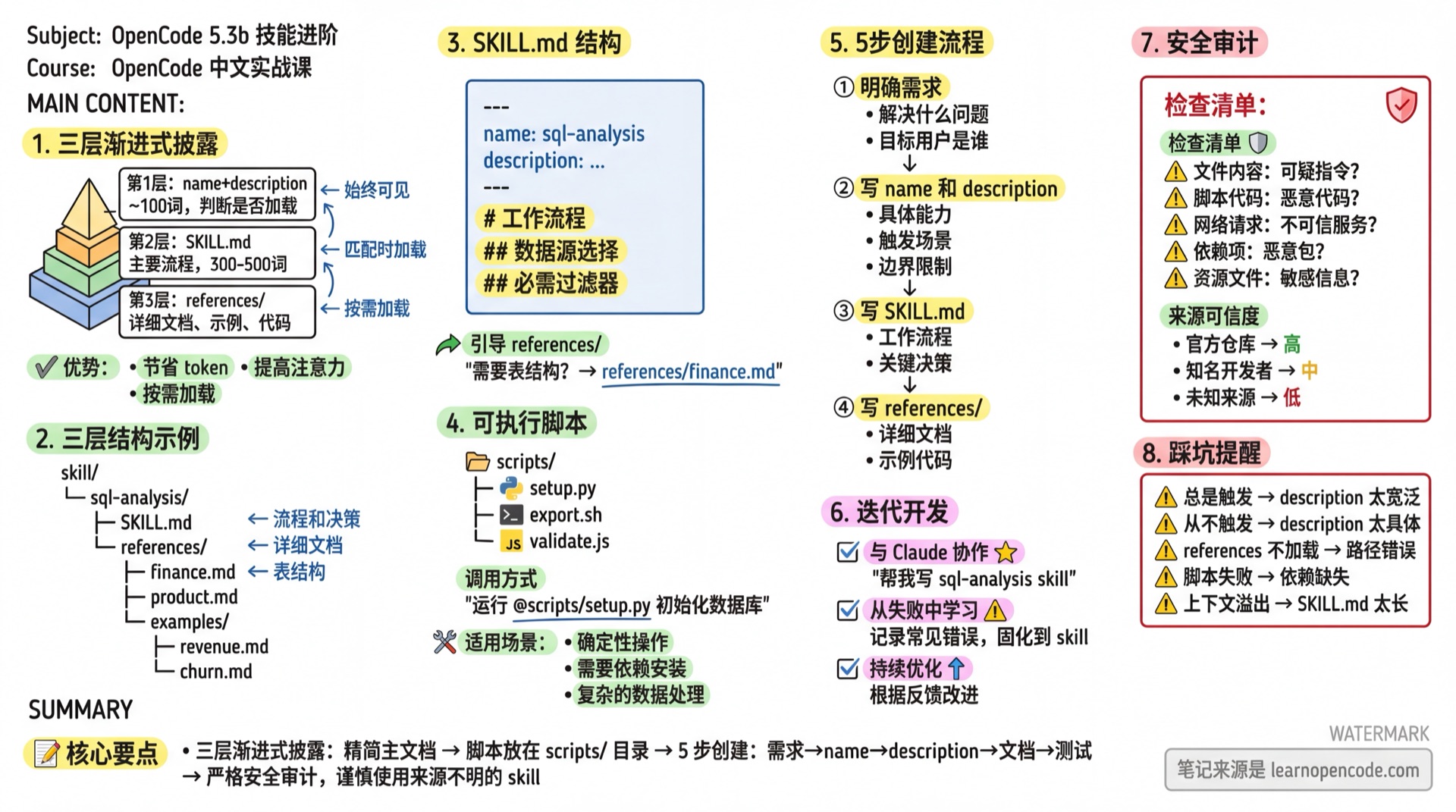
Three-Layer Progressive Disclosure Structure
Why Layering is Needed
Imagine your Skill contains:
- Detailed structures of 10 tables
- 50 common query examples
- Various edge case handling
If you put all of this into SKILL.md, it would cause:
- Rapid context window exhaustion
- Model attention scattered by irrelevant content
- Skyrocketing token costs
Solution: Organize Skills like a manual:
Table of Contents (always visible) → Chapters (read on demand) → Quick Reference (consult when needed)Three-Layer Structure Explained
skill/
└── sql-analysis/
    ├── SKILL.md                    # Layer 2: Main workflow
    └── references/                 # Layer 3: Detailed documentation
        ├── finance.md              # Financial table structures
        ├── product.md              # Product table structures
        ├── sales.md                # Sales table structures
        └── examples/
            ├── revenue-queries.md  # Revenue query examples
            └── churn-queries.md    # Churn analysis examples
Layer 1: name + description (~100 words)
- Always loaded into
<available_skills> - Used to determine if this Skill should be loaded
Layer 2: SKILL.md content
- Loaded when task matches
- Contains workflows, key logic, decision trees
- Keep it concise (recommended 300-2000+ words)
Layer 3: references/ directory
- Loaded only when specific details are needed
- Claude reads files on demand
- Can contain extensive detailed information
Implementation Example
SKILL.md (Layer 2):
---
name: sql-analysis
description: For analyzing business data: revenue, ARR, customer segmentation, product usage.
---

# SQL Analysis Skill

## Workflow

1. Clarify analysis requirements
2. Choose the correct data source
3. Apply standard filters
4. Validate results

## Data Source Selection

| Analysis Type | Recommended Table | Detailed Docs |
|--------------|-------------------|---------------|
| Revenue Analysis | monthly_revenue | `references/finance.md` |
| Product Usage | daily_usage | `references/product.md` |
| Sales Pipeline | pipeline_snapshot | `references/sales.md` |

## Required Filters

All queries must:
- Exclude test accounts: `account != 'Test'`
- Use only complete periods

Read corresponding files in references/ when specific table structures or query examples are needed.
references/finance.md (Layer 3):
# Financial Tables Detailed Structure

## monthly_revenue Table

| Field | Type | Description |
|-------|------|-------------|
| account_id | STRING | Account ID |
| month | DATE | Month (first day of each month) |
| mrr | FLOAT | Monthly Recurring Revenue |
| arr | FLOAT | Annual Recurring Revenue |
| segment | STRING | Customer segment |

## Common Queries

### Monthly Revenue by Segment

```sql
SELECT
  segment,
  DATE_TRUNC(month, MONTH) as period,
  SUM(mrr) as total_mrr
FROM monthly_revenue
WHERE account_id != 'Test'
GROUP BY 1, 2
ORDER BY 2 DESC, 3 DESC
Calculate Month-over-Month Growth
... (more query examples)
**Key Principle**: Information should only exist in either SKILL.md OR references/, not both.

---

## Executable Script Support

### Why Scripts are Needed

Some operations are more efficient and reliable when executed with code rather than generated with tokens:

| Task | Token Generation | Code Execution |
|------|-----------------|----------------|
| Sort 1000 numbers | Many tokens, error-prone | Milliseconds, 100% accurate |
| Parse PDF form fields | Need to load PDF into context | Direct file processing |
| Format conversion | Prone to format issues | Deterministic output |

### Script Directory Structure
skill/ └── pdf-skill/ ├── SKILL.md ├── references/ │ └── forms.md └── scripts/ ├── extract_form_fields.py ├── merge_pdfs.py └── convert_to_images.py
### Referencing Scripts in SKILL.md

```markdown
---
name: pdf
description: PDF processing toolkit: extract text and tables, create new PDFs, merge/split documents, process forms.
---

# PDF Processing Skill

## Extract Form Fields

No need to load PDF into context, run script directly:

```bash
python scripts/extract_form_fields.py input.pdf
Example output:
{
  "fields": [
    {"name": "full_name", "type": "text", "value": ""},
    {"name": "date", "type": "date", "value": ""}
  ]
}
Merge Multiple PDFs
python scripts/merge_pdfs.py file1.pdf file2.pdf -o output.pdfConvert to Images
python scripts/convert_to_images.py document.pdf --output-dir ./imagesSee references/scripts-guide.md for detailed parameter descriptions.
### Script Writing Principles

1. **Independently Executable**: Scripts should run independently without complex environment dependencies
2. **Clear Input/Output**: Explicit parameters and return formats
3. **Error Handling**: Gracefully handle exceptions
4. **Minimal Dependencies**: Only use necessary libraries

**Example Script** (`scripts/extract_form_fields.py`):

```python
#!/usr/bin/env python3
"""Extract PDF form field information"""

import sys
import json

def extract_fields(pdf_path: str) -> dict:
    """Extract form fields from PDF"""
    try:
        # Use PyPDF2 or other library
        from pypdf import PdfReader
        reader = PdfReader(pdf_path)
        fields = reader.get_fields() or {}

        result = []
        for name, field in fields.items():
            result.append({
                "name": name,
                "type": str(field.get("/FT", "unknown")),
                "value": str(field.get("/V", ""))
            })

        return {"fields": result, "count": len(result)}

    except Exception as e:
        return {"error": str(e)}

if __name__ == "__main__":
    if len(sys.argv) < 2:
        print(json.dumps({"error": "Usage: extract_form_fields.py <pdf_path>"}))
        sys.exit(1)

    result = extract_fields(sys.argv[1])
    print(json.dumps(result, indent=2, ensure_ascii=False))
5-Step Creation Process
Step 1: Clarify Requirements
Before writing anything, answer these questions:
| Question | Purpose |
|---|---|
| What specific problem does this Skill solve? | Clarify value |
| When should it be triggered? | Design description |
| What does successful output look like? | Define acceptance criteria |
| What are the edge cases? | Avoid omissions |
Good Candidate Scenarios:
- Knowledge reusable across projects
- Processes needed by multiple people
- Stable patterns that don't change often
Not Suitable for Skills:
- One-time tasks
- Frequently changing content
- Project-specific conventions (use CLAUDE.md)
Step 2: Write name
name: sql-analysisNaming principles:
- Short and clear
- Lowercase letters and numbers
- Single hyphen separator
- Reflect core functionality
Step 3: Write description (Most Important)
description determines triggering and is the most critical part.
Bad description:
description: Help process dataProblem: Too vague, what counts as "process data"?
Good description:
description: Extract tables from PDFs and convert to CSV format for data analysis workflows. Use when filling PDF forms or batch processing PDF documents. Not for simple PDF viewing or basic format conversion.description Checklist:
| Element | Example |
|---|---|
| Specific capability | "Extract tables and convert to CSV" |
| Trigger scenarios | "When filling PDF forms" |
| Target use case | "For data analysis workflows" |
| Boundary limits | "Not for simple PDF viewing" |
Step 4: Write Main Instructions
Structured, scannable, actionable:
# SQL Analysis Skill

## Workflow

1. **Clarify Requirements**
   - Time range? (default current year)
   - Customer segment?
   - For what decision?

2. **Select Data Source**
   - Prefer summary tables
   - Confirm required fields exist

3. **Execute Query**
   - Apply standard filters
   - Validate result reasonableness

## Standard Filters

All queries must include:
- `WHERE account_id != 'Test'`
- `WHERE month <= DATE_TRUNC(CURRENT_DATE(), MONTH)`

## Detailed Documentation

- Table structures → `references/tables.md`
- Query examples → `references/examples.md`
Writing Principles:
| Principle | Description |
|---|---|
| Use Markdown structure | Headers, lists, tables improve readability |
| Provide concrete examples | Code blocks show correct usage |
| State what it can't do | Avoid misuse |
| Reference detailed docs | Keep main file concise |
Step 5: Test and Validate
Systematically test Skills to ensure they work across various scenarios.
Test Matrix
| Test Type | Test Content | Expected Result | Priority |
|---|---|---|---|
| Trigger Test | "Help me query last quarter's revenue" | Skill activates | P0 |
| Boundary Test | "Query revenue" (no time range) | Ask then execute | P1 |
| Negative Test | "Help me write an email" | Doesn't activate | P0 |
| Output Test | Verify output format matches spec | Format correct | P1 |
| Error Test | Intentionally input wrong parameters | Graceful error | P2 |
Trigger Testing
# ✅ Should activate
"Use sql-analysis skill to analyze data" → Explicit request, must activate
"Help me check last quarter's ARR changes" → Natural request, semantic match activates
"Revenue trend analysis" → Keyword match, should activate

# ❌ Should NOT activate
"Help me write a SQL tutorial" → Teaching, not analysis
"Database performance tuning" → Out of scope (description states not applicable)
"Create new table" → DDL operation, not applicable
Functional Testing
| Check Item | Test Method | Pass Criteria |
|---|---|---|
| Output consistency | Run same input 3 times | Core content consistent |
| Novice usability | Let someone unfamiliar try | Successfully completes task |
| Documentation accuracy | Follow examples | Results match examples |
| Reference integrity | Check references/ paths | All references exist |
Test Script (Optional)
Create .opencode/skill/<name>/test.sh:
#!/bin/bash
# Skill automated test script

echo "=== Trigger Tests ==="
# Test 1: Normal trigger
opencode --prompt "Help me query last quarter's revenue" --check-skill "sql-analysis"

# Test 2: Negative test
opencode --prompt "Help me write email" --expect-no-skill "sql-analysis"

echo "=== Functional Tests ==="
# Test output format
opencode --prompt "Analyze ARR" | grep -q "## ARR Calculation" && echo "✅ Output format correct"
Test Checklist
Complete these checks before putting Skill into production:
- [ ] Trigger Test: All 3 positive cases activate
- [ ] Negative Test: All 3 boundary cases don't activate
- [ ] Output Test: Output format matches expectations
- [ ] Novice Test: Non-experts can successfully use
- [ ] Reference Test: All references/ files exist
- [ ] Error Test: Clear messages when wrong input
Iterative Development Method
Collaborating with Claude to Create Skills
Don't start from scratch, let Claude help extract knowledge:
User: Help me create a data warehouse skill. I'll describe our tables and business logic, you help me structure it.

Claude: Sure, tell me:
1. What are your main data tables?
2. What business terms need definition?
3. What rules must be followed when querying?

[Conversation continues, Claude asks questions and organizes information]

Claude: Based on our discussion, here's the SKILL.md structure:
...
Learning from Failures
When Skill execution goes wrong:
User: This query result is wrong, it didn't exclude test accounts

Claude: Let me reflect on the issue:
1. Standard filters weren't applied
2. Possibly because instructions weren't clear enough

Suggest updating SKILL.md:
- Bold emphasize in "Required Filters" section
- Add "Absolutely must not omit" warning
Solidify these reflections into the Skill.
Continuous Optimization
1. Use Skill in your work
2. Record successful patterns and failed cases
3. Periodically review and update Skill
4. Share with team members
Real-World Examples
Example 1: DOCX Creation Skill
Source: Anthropic Skills Repository
---
name: docx
description: "Document creation, editing, and analysis, supporting revisions, comments, format preservation, and text extraction. Use when Claude needs to process .docx files: (1) create new documents (2) modify content (3) handle revisions (4) add comments"
license: Proprietary. LICENSE.txt has complete terms
---

# DOCX Creation, Editing, and Analysis

## Overview

Users may request creating, editing, or analyzing .docx files. .docx is essentially a ZIP archive containing XML files.

## Workflow Decision Tree

### Read/Analyze Content
Use "Text Extraction" or "Raw XML Access" sections below

### Create New Document
Use "Create New Word Document" workflow

### Edit Existing Document
- **Your own document + simple changes**: Use "Basic OOXML Editing"
- **Someone else's document**: Use **Revision Workflow** (recommended default)
- **Legal, academic, business, government documents**: **Must** use revision workflow

## Text Extraction

Use pandoc to convert to markdown:

```bash
pandoc --track-changes=all path-to-file.docx -o output.md
Create New Word Document
Use docx-js, must read complete docx-js.md file first.
Detailed Documentation
- OOXML editing →
ooxml.md - docx-js syntax →
docx-js.md
**Highlights of this Skill**:
- Clear decision tree helps choose correct workflow
- Distinguishes handling for different scenarios
- References detailed docs instead of inline everything

### Example 2: Frontend Design Skill

Source: [Anthropic Engineering Blog](https://claude.com/blog/improving-frontend-design-through-skills)

```markdown
---
name: frontend-design
description: Create unique, production-grade frontend interfaces. For building web components, pages, or applications. Generate creative, refined code, avoiding generic AI aesthetics.
license: Complete terms in LICENSE.txt
---

# Frontend Design Skill

## Design Thinking

Before coding, understand context and determine **bold aesthetic direction**:

- **Purpose**: What problem does this interface solve? Who's using it?
- **Style**: Choose an extreme: minimalism, maximalism, retro-futuristic, natural organic, luxury refined, playful toy-like, editorial magazine...
- **Differentiation**: What makes this design memorable?

## Frontend Aesthetics Guide

### Typography
Choose distinctive fonts. Avoid generic ones like Arial, Inter.
Recommended: JetBrains Mono, Playfair Display, IBM Plex, Bricolage Grotesque

### Color
Commit to a unified aesthetic. Use CSS variables for consistency.
Primary color with sharp accent beats evenly distributed muted palette.

### Motion
Use animations for impact and micro-interactions.
A carefully choreographed page load (staggered reveal) is more delightful than scattered micro-interactions.

### Background
Create atmosphere and depth, not default solid colors.
Gradient meshes, noise textures, geometric patterns, layered transparency.

## Absolutely Avoid

- Inter, Roboto, Arial, system fonts
- White background with purple gradient (typical AI aesthetic)
- Predictable layout and component patterns
- Template designs lacking contextual character
Highlights of this Skill:
- Identifies clear problem (generic AI-generated aesthetics)
- Provides specific alternatives
- Has "absolutely avoid" checklist
Example 3: Brand Guidelines Skill
---
name: brand-guidelines
description: Apply company official brand colors and typography. For creating anything requiring company visual style: documents, presentations, interfaces.
---

# Brand Specifications

## Colors

**Primary Colors**:
- Dark: `#141413`
- Light: `#faf9f5`
- Medium Gray: `#b0aea5`

**Accent Colors**:
- Orange: `#d97757`
- Blue: `#6a9bcc`
- Green: `#788c5d`

## Typography

- **Headlines**: Poppins (24pt and above)
- **Body**: Lora
- **Fallback**: Arial / Georgia

## Application Rules

- Use Poppins for headlines, Lora for body
- Intelligently choose text color based on background
- Use accent color rotation for non-text shapes
Highlights of this Skill:
- Precise values (hex colors, font sizes)
- Information Claude doesn't know by default
- Concise and direct
Security Audit
Why Auditing is Needed
Skills can:
- Provide instructions to Claude
- Contain executable code
- Guide Claude to access network resources
Malicious Skills could cause data leaks or system damage.
Security Audit Checklist
| Check Item | Check Content | Risk |
|---|---|---|
| File Content | Read all .md files | Suspicious instructions |
| Script Code | Review .py/.js files | Malicious code |
| Network Requests | Check URLs and API calls | Connecting to untrusted services |
| Dependencies | Check import/require | Malicious packages |
| Resource Files | Check images, data files | Sensitive information |
Source Trustworthiness
| Source | Trust Level | Recommendation |
|---|---|---|
| Official repositories | High | Use directly |
| Well-known developers | Medium | Quick review then use |
| Unknown sources | Low | Full audit before use |
| Web downloads | Unknown | Use cautiously |
Audit Example
# 1. View all files
find my-skill/ -type f -name "*.md" -o -name "*.py" -o -name "*.js"

# 2. Check for network requests
grep -r "http" my-skill/
grep -r "fetch\|requests\|urllib" my-skill/

# 3. Check for filesystem operations
grep -r "open\|write\|delete\|remove" my-skill/

# 4. Check dependencies
cat my-skill/requirements.txt
cat my-skill/package.json
Common Pitfalls
| Symptom | Cause | Solution |
|---|---|---|
| Skill always triggers | description too broad | Add boundary limits: "Not for X" |
| Skill never triggers | description too narrow | Add more trigger scenarios |
| Multiple Skills conflict | description overlap | Clearly distinguish responsibilities |
| references don't load | Wrong path | Use relative paths like references/xxx.md |
| Script execution fails | Missing dependencies | Ensure environment has necessary packages |
| Inconsistent output | Vague instructions | Add specific examples and validation steps |
| Context overflow | SKILL.md too long | Split into references/ |
Lesson Summary
You learned:
Three-Layer Progressive Disclosure
- Layer 1: name + description (always visible)
- Layer 2: SKILL.md content (loaded on task match)
- Layer 3: references/ (loaded on demand)
Executable Scripts
- Suitable for deterministic operations
- Place in
scripts/directory - Explain how to call in SKILL.md
5-Step Creation Process
- Clarify requirements → Write name → Write description → Write instructions → Test and validate
Iterative Development
- Collaborate with Claude to extract knowledge
- Learn from failures and solidify into Skill
Security Audit
- Check files, scripts, network, dependencies
- Prefer trusted sources
Further Reading
- Anthropic Skills Official Repository
- Skills Marketplace
- Building Skills for Claude Code
- How to create Skills
Next Lesson Preview
Next lesson we'll learn about Advanced Skill Patterns.
You'll learn:
- Skill and MCP collaboration patterns (Kitchen vs Recipe)
- Five workflow patterns: sequential orchestration, multi-MCP coordination, iterative optimization, etc.
- Distribution and sharing strategies (GitHub, API)
- Enterprise-grade Skill design best practices