

5.2d Agent Advanced Techniques
Tool interface design, Prompt engineering, passthrough parameters, and debugging methods.
Course Notes
Key takeaways from this lesson:
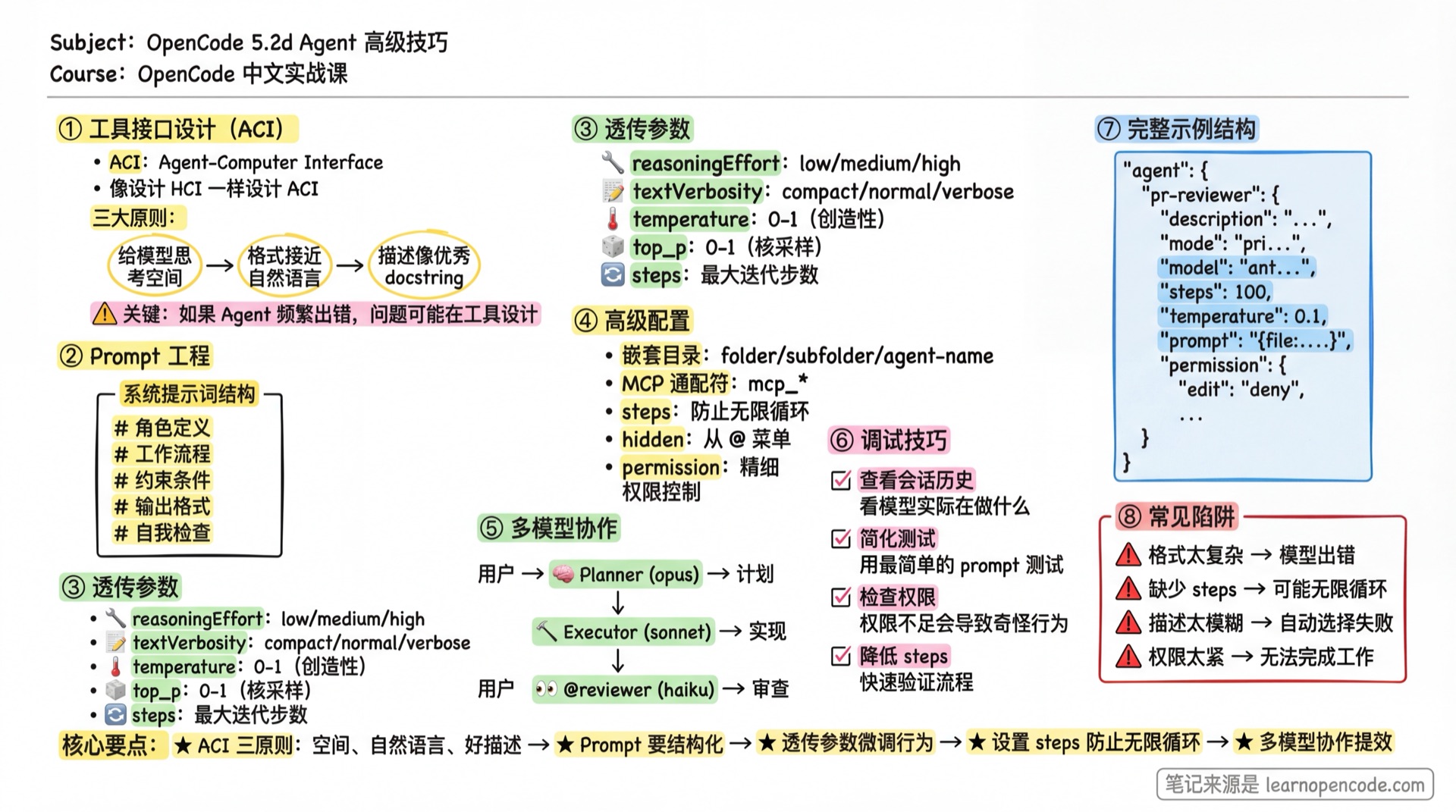
What You'll Learn
- Design excellent tool interfaces (ACI)
- Write high-quality Agent prompts
- Use passthrough parameters to fine-tune Agent behavior
- Troubleshoot and debug Agent issues
Tool Interface Design (ACI)
"Invest as much effort in designing the Agent-Computer Interface (ACI) as you would in designing the Human-Computer Interface (HCI)." — Anthropic
ACI (Agent-Computer Interface) is the interface through which Agents interact with tools. Well-designed ACI enables Agents to complete tasks efficiently; poorly-designed ACI leads to frequent errors.
Core Principles
1. Give the Model Room to Think
Avoid formats that "back the LLM into a corner."
<!-- Bad: Requires knowing line numbers in advance -->
Please output:
- Lines 1-5: Import statements
- Lines 6-20: Function definitions
- ...

<!-- Good: Natural language description -->
Organize the code with this structure:
1. Import statements
2. Constant definitions
3. Function definitions
4. Main logic
2. Format Close to Natural Language
Formats the model has seen on the internet are easier to generate.
<!-- Bad: Requires precise JSON escaping -->
Output format: {"code": "function foo() {\n  return \"bar\";\n}"}

<!-- Good: Markdown code blocks (the model has seen countless examples) -->
Output format:
```javascript
function foo() {
  return "bar";
}
#### 3. Descriptions Like Excellent Docstrings

Tool descriptions should include:
- **Functionality**: What this tool does
- **Usage examples**: Typical use cases
- **Edge cases**: When not to use it
- **Input format**: Parameter requirements

### Anthropic's Real-World Experience

> "When building the SWE-bench Agent, we spent more time optimizing tools than optimizing the overall prompt."

They found that models made errors when using relative paths (after the Agent moved out of the root directory). Solution: Require **absolute paths** instead—the model executed perfectly.

**Insight**: If an Agent frequently errors on a particular tool, the problem may be in the tool design, not the prompt.

---

## Prompt Engineering

<AdInArticle />

### System Prompt Structure

A good Agent prompt should include:

```markdown
---
description: Brief description (affects auto-selection)
mode: subagent
temperature: 0.2
---

# Role Definition
Who you are, what you're good at.

# Workflow
1. First step
2. Second step
3. ...

# Constraints
- What not to do
- When to stop

# Output Format
- How to organize output
- What sections to include

# Self-Check (Optional)
Questions to ask yourself before completion.
Complete Example
---
description: Security auditor focused on OWASP Top 10 vulnerability detection
mode: subagent
temperature: 0.1
steps: 30
permission:
  edit: deny
---

# Role

You are a security auditor focused on discovering security vulnerabilities in web applications.

Main detection areas:
- SQL Injection
- XSS (Cross-Site Scripting)
- CSRF (Cross-Site Request Forgery)
- Authentication/Authorization issues
- Sensitive data exposure
- Dependency vulnerabilities

# Workflow

## 1. Information Gathering
- Understand the project tech stack
- Identify entry points (APIs, forms, URL parameters)
- Review authentication mechanisms

## 2. Vulnerability Scanning
Check each OWASP Top 10 item:
1. Injection flaws
2. Broken authentication
3. Sensitive data exposure
4. XML external entities
5. Broken access control
6. Security misconfiguration
7. XSS
8. Insecure deserialization
9. Using components with known vulnerabilities
10. Insufficient logging and monitoring

## 3. Verify Findings
- Confirm vulnerabilities are exploitable
- Assess impact severity
- Rule out false positives

# Output Format

For each issue found:

## [Severity] Issue Title

**Location**: file_path:line_number

**Description**: What the problem is

**Impact**: Potential consequences

**Fix Suggestion**:
```code example```

**Reference**: Related CWE/CVE numbers

# Constraints

- Do not modify any code
- Do not execute potentially destructive commands
- Report critical vulnerabilities immediately, don't wait for scan completion

# Self-Check

Before completion, confirm:
1. Did I check all entry points?
2. Did I verify each finding?
3. Are the fix suggestions feasible?
Reflection Mechanism
Adding self-check steps to prompts can improve Agent accuracy.
# Pre-Completion Self-Check

Before submitting results, ask yourself:
1. Did I fully understand the user's requirements?
2. Is my solution complete?
3. Are there any missed edge cases?
4. If I were the user, would I be satisfied with this result?
Passthrough Parameters (Additional Options)
Unknown fields in Agent configuration are passed through to the provider. This allows you to use provider-specific parameters.
Source:
agents.mdx:569-591,config.ts:487,agent.ts:193
Configuration Example
{
  "agent": {
    "deep-thinker": {
      "description": "Deep thinking for complex problems",
      "model": "openai/o1",
      "reasoningEffort": "high",     // OpenAI-specific parameter
      "textVerbosity": "low"          // OpenAI-specific parameter
    },
    "quick-helper": {
      "description": "Quick response for simple questions",
      "model": "anthropic/claude-haiku-4-5",
      "temperature": 0.3
    }
  }
}
Common Passthrough Parameters
| Parameter | Provider | Description |
|---|---|---|
reasoningEffort | OpenAI o-series | high / medium / low |
textVerbosity | OpenAI | Output verbosity |
top_k | Anthropic | Sampling parameter |
max_tokens | Most providers | Maximum output tokens |
Check the specific provider's documentation for supported parameters.
Advanced Configuration Techniques
Nested Subdirectory Agents
Agents can be organized in subdirectories:
.opencode/agent/
├── review/
│   ├── security.md       → Name: review/security
│   └── performance.md    → Name: review/performance
├── docs/
│   └── api.md            → Name: docs/api
└── translator.md         → Name: translator
💡 Invocation Method
- Without
namefield: The system automatically uses the full path as the agent name, such asreview/security. Call it with@review/security - With
namefield: Overrides the auto-generated name. For example, if you setname: security, call it with@security
Recommended: Don't set the name field in frontmatter for nested agents, so the system automatically generates names with paths.
Usage:
@review/security Help me audit this codeSource:
config.ts:243-255
MCP Tool Wildcard Control
Disable all tools from an MCP server:
{
  "agent": {
    "safe-agent": {
      "permission": {
        "mymcp_*": "deny",           // Disable all mymcp tools
        "postgres_query": "ask"       // Database queries require confirmation
      }
    }
  }
}
Source:
agents.mdx:366-379
Steps Parameter Tuning
---
steps: 50  # Maximum iteration steps
---| Setting | Behavior |
|---|---|
| Not set | Unlimited, until model decides to stop |
| Set value | Force summary generation and stop when limit is reached |
Recommendations:
- Simple tasks: 10-20 steps
- Medium tasks: 30-50 steps
- Complex tasks: 50-100 steps
- Unlimited: For tasks that need thorough completion
Custom Color
---
color: "#FF5733"  # Hex color
---
Distinguish different Agents in the interface for easy identification.
Hidden Agent
---
hidden: true  # Hide from @ menu
---
Use cases:
- Internal tool Agents not meant for direct user invocation
- Only called by other Agents via Task tool
- System-level Agents
Source:
config.ts:468-471
Name Override
---
name: my-custom-name  # Override filename
description: ...
---
By default, the Agent name is the filename (without .md). Use the name field to override.
Source:
agent.ts:191
Agent Debugging Techniques
1. View Actual Conversations
OpenCode session data is stored in the .opencode/data/ directory.
# View recent sessions
ls -la .opencode/data/sessions/

# View specific session messages
cat .opencode/data/sessions/<session-id>/messages.json
2. Simplified Testing
When Agent behaves abnormally:
- Create a minimal version of the prompt
- Gradually add complexity
- Find the problematic part
<!-- Minimal version -->
---
description: Test Agent
mode: subagent
---

You are a test assistant. Answer user questions.
3. Check Permission Configuration
Permission issues are the most common source of problems.
# View current configuration (including merged permissions)
opencode config
Check:
- Whether rule order is correct (
*should come first) - Whether there are conflicting rules
- Whether Agent-level settings override expected global rules
4. Verify Model Capabilities
Different models have vastly different capabilities.
| Task Type | Recommended Model |
|---|---|
| Complex reasoning | Claude Opus, GPT-4, o1 |
| Code generation | Claude Sonnet, GPT-4 |
| Simple tasks | Claude Haiku, GPT-4o-mini |
If Agent performs poorly, try a stronger model.
5. Use Steps Limit for Debugging
Set a smaller steps value to observe Agent's first few actions:
---
steps: 5  # Stop after just 5 steps
---
Common Pitfalls
| Symptom | Cause | Solution |
|---|---|---|
| Agent ignores instructions | Prompt too long/vague | Simplify core rules, use structured format |
| Agent loops calling subagent | No stop condition | Set steps limit or task deny |
| Passthrough parameter not working | Provider doesn't support | Check provider documentation |
| Nested directory Agent not found | Path format error or name overridden | Use / separator: folder/agent; Check if name field is set in frontmatter |
| MCP tool permission ineffective | Wildcard match failed | Confirm tool name prefix matches |
| temperature not working | Some models don't support/have fixed value | Check model documentation |
| description not effective | Content too generic | Specifically state when to use this Agent |
| Wrong Agent auto-selected | Similar descriptions | Make each Agent's description clearly distinct |
| hidden Agent still shows | mode is not subagent | hidden only works for subagent |
| steps limit reached but task incomplete | Limit too small | Increase steps or optimize prompt |
Advanced Use Case Examples
Automated Code Review Bot
{
  "$schema": "https://opencode.ai/config.json",
  "agent": {
    "pr-reviewer": {
      "description": "PR review bot, automatically reviews code changes",
      "mode": "primary",
      "model": "anthropic/claude-opus-4-5-thinking",
      "steps": 100,
      "temperature": 0.1,
      "prompt": "{file:./prompts/pr-reviewer.md}",
      "permission": {
        "edit": "deny",
        "bash": {
          "*": "deny",
          "git log*": "allow",
          "git diff*": "allow",
          "git show*": "allow",
          "npm test": "allow"
        },
        "task": {
          "*": "deny",
          "security-auditor": "allow",
          "performance-checker": "allow",
          "style-checker": "allow"
        }
      }
    }
  }
}
Multi-Model Collaboration
{
  "agent": {
    "planner": {
      "description": "Planner: Analyze requirements, create plan",
      "mode": "primary",
      "model": "anthropic/claude-opus-4-5-thinking",
      "temperature": 0.2,
      "steps": 20
    },
    "executor": {
      "description": "Executor: Implement specific code",
      "mode": "primary",
      "model": "anthropic/claude-sonnet-4-20250514",
      "temperature": 0.3,
      "steps": 100
    },
    "reviewer": {
      "description": "Reviewer: Check code quality",
      "mode": "subagent",
      "model": "anthropic/claude-haiku-4-5",
      "temperature": 0.1,
      "permission": {
        "edit": "deny"
      }
    }
  }
}
Usage:
- Tab switch to planner, create plan
- Tab switch to executor, implement
@reviewerto invoke review
Chapter Summary
You learned:
- ACI Design Principles: Room to think, natural formats, excellent descriptions
- Prompt Engineering: Structured approach, reflection mechanism
- Passthrough Parameters: reasoningEffort, textVerbosity, etc.
- Advanced Configuration: Nested directories, MCP wildcards, steps, hidden
- Debugging Techniques: View sessions, simplified testing, check permissions
Further Reading
Agent System Learning Complete
Congratulations! You've completed the entire Agent system:
| Chapter | Content |
|---|---|
| 5.2a Quickstart | Create your first Agent |
| 5.2b Design Patterns | Five Workflow patterns |
| 5.2c Permissions and Security | Fine-grained permission control |
| 5.2d Advanced Techniques (This chapter) | ACI, passthrough parameters, debugging |
Next Lesson Preview
Agents can invoke Skills to gain specialized knowledge. Next lesson we'll learn about the Skill system.
Next Lesson: 5.3 Skill