

5.2c Agent Permissions & Security
Precisely control what Agents can and cannot do.
📝 Course Notes
Key concepts from this lesson:
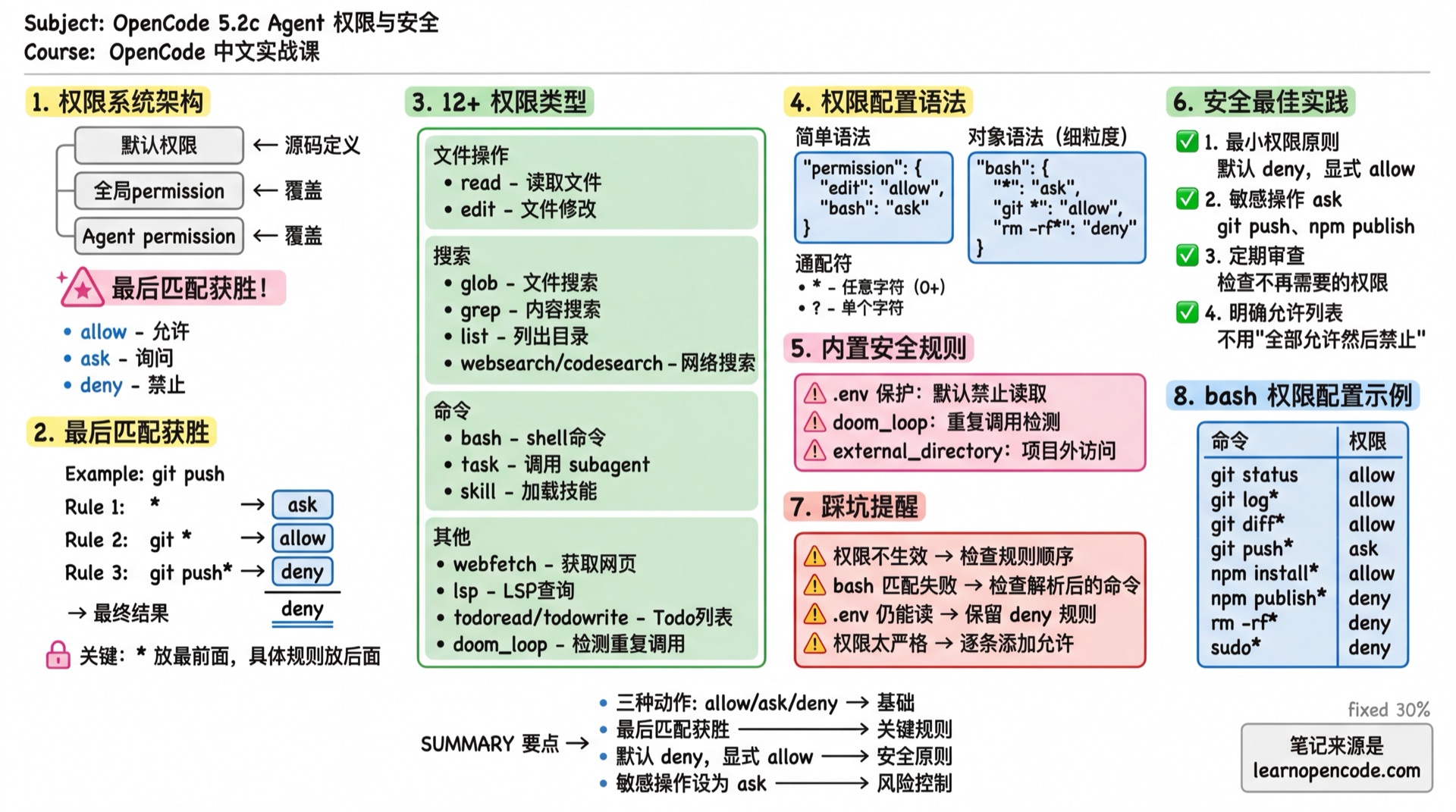
What You'll Learn
- Understand the permission system architecture
- Configure bash/edit/task/skill permissions
- Design secure Agent systems
- Implement the principle of least privilege
Permission System Architecture
Three Permission Actions
| Action | Description | Effect |
|---|---|---|
allow | Allow | Execute directly, no confirmation needed |
ask | Ask | Show confirmation dialog, user decides |
deny | Deny | Refuse to execute, Agent receives error |
Permission Configuration Hierarchy
Default Permissions (defined in source code)
    ↓ overrides
Global Config permission
    ↓ overrides
Agent-level permission
Later configurations override earlier ones.
Source:
packages/core/src/v1/config/permission.ts(schema definition) andpackages/opencode/src/agent/agent.ts:145(Permission.mergecall)
Rule Priority: Last Match Wins
This is the most important rule! When multiple rules match, the last matching rule wins.
{
  "permission": {
    "bash": {
      "*": "ask",           // Rule 1: All commands need confirmation
      "git *": "allow",     // Rule 2: git commands allowed
      "git push*": "deny"   // Rule 3: git push denied
    }
  }
}
Executing git push origin main:
- Matches Rule 1 (
*) → ask - Matches Rule 2 (
git *) → allow - Matches Rule 3 (
git push*) → deny - Final result: deny (Rule 3 is last)
Source:
agents.mdx:473,permissions.mdx:70
Configurable Permission Types
| Permission | Match Target | Description |
|---|---|---|
read | File path | Read files |
edit | File path | All file modifications (edit/write/patch) |
glob | glob pattern | File search |
grep | Regex pattern | Content search |
list | Directory path | List directory contents |
bash | Command string | Execute shell commands |
task | subagent name | Call sub-agents |
skill | skill name | Load skills |
lsp | - | LSP queries (currently no fine-grained support) |
todowrite | - | Read and write the todo list (gates the todowrite tool) |
webfetch | URL | Fetch web content |
websearch | Query string | Web search |
external_directory | - | Access paths outside project directory |
doom_loop | - | Detect repeated calls (same tool called 3 times with same input) |
question | - | Ask the user a question (defaults to deny to prevent subagents from interrupting the user) |
plan_exit | - | Exit Plan mode and switch to the build agent |
Source:
packages/core/src/v1/config/permission.ts:17-36
Permission Configuration Syntax
Simple Syntax: Single Action
{
  "permission": {
    "edit": "allow",      // All file edits allowed
    "bash": "ask",        // All commands need confirmation
    "webfetch": "deny"    // Web fetching denied
  }
}
Global Setting
{
  "permission": "allow"   // All permissions allowed
}
Object Syntax: Fine-grained Control
{
  "permission": {
    "bash": {
      "*": "ask",              // Default: need confirmation
      "git status": "allow",   // git status allowed
      "git log*": "allow",     // git log commands allowed
      "rm -rf*": "deny"        // rm -rf denied
    }
  }
}
Wildcards
| Symbol | Meaning | Example |
|---|---|---|
* | Match any characters (0 or more) | git * matches git status, git log |
? | Match single character | file?.txt matches file1.txt |
bash Permission Details
The bash permission matches the parsed command string.
Common Configuration
{
  "permission": {
    "bash": {
      "*": "ask",                    // Default: need confirmation

      // Git commands
      "git status": "allow",
      "git log*": "allow",
      "git diff*": "allow",
      "git branch*": "allow",
      "git checkout*": "ask",        // Branch switch needs confirmation
      "git push*": "ask",            // Push needs confirmation
      "git reset --hard*": "deny",   // Hard reset denied

      // Package management
      "npm install*": "allow",
      "npm run*": "allow",
      "npm publish*": "deny",        // Publishing denied

      // Dangerous commands
      "rm -rf*": "deny",
      "sudo*": "deny",
      "chmod 777*": "deny"
    }
  }
}
Best Practice for Plan Agent
{
  "agent": {
    "plan": {
      "permission": {
        "bash": {
          "*": "deny",               // Default: deny all
          "git log*": "allow",       // Read-only commands allowed
          "git diff*": "allow",
          "git status": "allow",
          "ls*": "allow",
          "cat*": "allow",
          "head*": "allow",
          "tail*": "allow"
        }
      }
    }
  }
}
edit Permission Details
The edit permission controls all file modification operations, including:
edittoolwritetoolpatchtool
Common Configuration
{
  "permission": {
    "edit": {
      "*": "allow",                    // Default: allow

      // Sensitive files
      "*.env": "deny",
      "*.env.*": "deny",
      "*.env.example": "allow",        // Example files allowed
      ".env.local": "deny",

      // System files
      "package-lock.json": "deny",     // Don't modify lock files
      "pnpm-lock.yaml": "deny",
      "yarn.lock": "deny",

      // Directories
      "node_modules/*": "deny",
      ".git/*": "deny",
      "dist/*": "deny"
    }
  }
}
Read-only Agent Configuration
{
  "agent": {
    "readonly-auditor": {
      "description": "Read-only code audit, no file modifications",
      "mode": "subagent",
      "permission": {
        "edit": "deny"                 // Deny all edits
      }
    }
  }
}
task Permission: Control Subagent Calls
The task permission controls which subagents an Agent can call.
How It Works
When task: deny is set:
- The subagent is completely removed from the Task tool's description
- The model won't attempt to call it (because it can't see it)
Note: Users can still manually call any subagent via
@agent-name. The task permission only affects automatic Agent calls.Source:
agents.mdx:557-565
Configuration Example
{
  "agent": {
    "safe-orchestrator": {
      "description": "Security orchestrator, can only call specified subagents",
      "mode": "primary",
      "permission": {
        "task": {
          "*": "deny",                   // Deny all
          "docs-writer": "allow",        // Allow docs
          "code-reviewer": "allow",      // Allow review
          "dangerous-agent": "deny"      // Explicitly deny
        }
      }
    }
  }
}
Using Wildcards
{
  "agent": {
    "orchestrator": {
      "permission": {
        "task": {
          "*": "deny",
          "safe-*": "allow",            // All safe-* allowed
          "internal/*": "allow",        // Nested directory allowed
          "code-reviewer": "ask"        // Needs confirmation
        }
      }
    }
  }
}
TaskTool Parameter Details
The complete parameter definition for the Task tool:
| Parameter | Type | Required | Description |
|---|---|---|---|
description | string | Yes | Task description (3-5 words), used as sub-session title |
prompt | string | Yes | Task prompt for the sub-agent to execute |
subagent_type | string | Yes | Sub-agent name to call (must be non-primary agent) |
task_id | string | No | Resume a previous task; pass its returned task_id to reuse the same subagent session |
command | string | No | Command that triggered this task (for debugging) |
background | boolean | No | Run in the background; requires OPENCODE_EXPERIMENTAL_BACKGROUND_SUBAGENTS=true |
Execution Flow
The TaskTool workflow:
Main Agent (Build)
    ↓
    1. Permission Check
       - Check if caller has task permission
       - Filter accessible subagents
       ↓
    2. Create Sub-session
       - Create independent session under main session
       - Title: description + (@subagent subagent)
       - Use the subagent's own permissions while inheriting the parent session's deny and external_directory rules
       ↓
    3. Call Sub-agent
       - Sub-agent executes in independent session
       - Context only contains passed prompt
       - Listen to PartUpdated events for progress
       ↓
    4. Return Result
       - Collect all tool call summaries
       - Generate conversation summary
       - Return to Main Agent
Key Point: Sub-agents run in independent Sessions and cannot see the Main Agent's conversation history. You must provide complete context when calling.
Background Execution and Nesting Depth
Background subagents remain experimental. Once enabled, the Task tool accepts background: true. The TUI can also move a synchronous subagent from the currently blocked session into the background. When it finishes, the result is automatically reported to the parent session—do not poll for progress.
export OPENCODE_EXPERIMENTAL_BACKGROUND_SUBAGENTS=trueThe top-level subagent_depth setting controls subagent nesting depth. Its default is 1, which means a subagent cannot create another subagent by default. To allow nesting, raise this value and explicitly configure task in the relevant subagent's own permissions:
{
  "subagent_depth": 2
}
Source:
runtime-flags.ts:43,task.ts:43-61,task.ts:96-117, andconfig.ts:84-86
Practical Usage Examples
Configure to Allow Specific Sub-agents
{
  "agent": {
    "orchestrator": {
      "description": "Task orchestration Agent, can call specialized sub-agents",
      "mode": "primary",
      "permission": {
        "task": {
          "docs-writer": "allow",      // Allow docs writing
          "code-reviewer": "allow",    // Allow code review
          "general": "allow",          // Allow general tasks
          "*": "deny"                  // Deny others
        }
      }
    }
  }
}
Agent Internal TaskTool Call
# Pseudo-code example
Main Agent receives: Help me write API documentation

1. Analyze task type → Determine docs-writer sub-agent is needed
2. Call TaskTool:
   - description: "Write API documentation"
   - prompt: "Write documentation for the following functions..."
   - subagent_type: "docs-writer"
3. Sub-agent executes → Returns documentation content
4. Main Agent receives result → Continues conversation
Resume a Task
When a subagent needs to execute in steps, pass the task_id returned by the previous call to continue its work:
TaskTool(
  description: "Complete documentation",
  prompt: "Check documentation completeness and fill in missing content",
  subagent_type: "docs-writer",
  task_id: "abc123"  // Continue the previous task
)skill Permission: Control Skill Loading
The skill permission controls which skills an Agent can load.
Configuration Example
{
  "agent": {
    "restricted-agent": {
      "description": "Restricted Agent, can only use specified skills",
      "mode": "subagent",
      "permission": {
        "skill": {
          "*": "deny",                   // Deny all skills
          "docs-writer": "allow",        // Only allow docs skill
          "translator": "allow"
        }
      }
    }
  }
}
Source:
skill.ts:15-21
Built-in Security Rules
OpenCode has some default security rules configured:
.env File Protection
// Built-in default configuration
{
  "permission": {
    "read": {
      "*": "allow",
      "*.env": "ask",           // .env files require confirmation (for security)
      "*.env.*": "ask",         // .env.xxx files also require confirmation
      "*.env.example": "allow"  // Example files allowed
    }
  }
}
Source:
agent.ts:130-135
doom_loop Detection
When the same tool is called 3 times consecutively with identical input, doom_loop detection is triggered.
{
  "permission": {
    "doom_loop": "ask"    // Default: prompt user for confirmation
  }
}
question Permission
Controls whether an Agent can use the question tool to ask the user a question.
| Default | Description |
|---|---|
subagent: deny | Prevents subagents from interrupting the user unnecessarily |
build agent: allow | Allows the primary Agent to ask questions |
Use case: Set this permission to allow when a subagent needs to confirm uncertainties with you.
{
  "agent": {
    "interactive-helper": {
      "permission": {
        "question": "allow"    // Allow this subagent to ask questions
      }
    }
  }
}
Source:
agent.ts:126andquestion.ts
external_directory Protection
When an Agent attempts to access paths outside the project directory:
{
  "permission": {
    "external_directory": "ask"    // Default: prompt user for confirmation
  }
}
plan_enter / plan_exit Permissions
Control whether an Agent can switch Plan mode:
plan_enter: Enter Plan mode. It remains available as a permission key, but there is no corresponding tool implementation in the source; the user enters it by pressing Tab to switch to the plan agent.plan_exit: Exit Plan mode and switch to the build agent. This action is implemented byPlanExitTool.
The target version does not implement a plan_enter tool, so retaining a permission key with that name does not let the Build Agent switch on its own. The Plan Agent uses plan_exit to request a return to Build, and the request is evaluated by the normal permission rules.
{
  "agent": {
    "plan": {
      "permission": {
        "plan_exit": "allow"      // Allow the Plan Agent to request a return to Build
      }
    }
  }
}
Source:
plan.tsandregistry.ts
Deprecated Field: tools
⚠️ The tools field is deprecated. Use permission instead.
Old syntax (deprecated):
{
  "agent": {
    "my-agent": {
      "tools": {
        "bash": false,      // Disable bash
        "edit": true        // Allow editing
      }
    }
  }
}
New syntax:
{
  "agent": {
    "my-agent": {
      "permission": {
        "bash": "deny",     // Disable bash
        "edit": "allow"     // Allow editing
      }
    }
  }
}
Migration notes:
write,edit, andpatchintoolsmap to theeditpermission.- Other legacy tool names may be converted into permission keys with the same name, but they do not create callable capabilities when the target version has no corresponding tool.
truebecomes"allow";falsebecomes"deny".- OpenCode converts old configurations automatically, but you should update them manually.
Source:
packages/core/src/v1/config/agent.ts:71-76
Subagent Permission Inheritance
When the Task tool creates a child session, its capabilities start with the subagent's own permissions; it does not inherit the parent Agent's allow or ask rules. To prevent the subagent from bypassing the parent session's security boundary, it does inherit every deny rule and every external_directory rule from the parent session.
Two additional denials are applied by default:
- If the subagent's own rules do not configure
todowrite, OpenCode appendstodowrite: deny. - If the subagent's own rules do not configure
task, OpenCode appendstask: deny.
These are defaults, not hardcoded restrictions that can never be overridden. Explicitly configuring the corresponding permissions still requires the call to satisfy subagent_depth. Tools listed in experimental.primary_tools continue to receive an appended deny rule in Task child sessions.
Source:
subagent-permissions.ts:4-26andtask.ts:139-170
Agent-level Permission Override
Permissions set in Agent configuration override global permissions.
JSON Configuration
{
  "permission": {
    "bash": {
      "*": "ask",
      "git status": "allow"
    }
  },
  "agent": {
    "build": {
      "permission": {
        "bash": {
          "git push": "allow"       // build agent additionally allows push
        }
      }
    },
    "plan": {
      "permission": {
        "bash": {
          "*": "deny",              // plan agent denies all commands
          "git log*": "allow"       // except viewing logs
        }
      }
    }
  }
}
Markdown Configuration
---
description: "Read-only audit Agent"
mode: "subagent"
permission:
  edit: "deny"
  bash:
    "*": "deny"
    "git log*": "allow"
    "git diff*": "allow"
  webfetch: "deny"
---

Only analyzes code, makes no modifications.
Security Best Practices
1. Principle of Least Privilege
Only grant the minimum permissions an Agent needs to complete its task.
// ❌ Bad: Too permissive
{
  "agent": {
    "my-agent": {
      "permission": "allow"
    }
  }
}

// ✅ Good: Explicitly list needed permissions
{
  "agent": {
    "my-agent": {
      "permission": {
        "read": "allow",
        "edit": {
          "docs/*": "allow"
        },
        "bash": "deny"
      }
    }
  }
}
2. Explicitly List Allowed Commands
// ❌ Bad: Allow all, then deny dangerous ones
{
  "permission": {
    "bash": {
      "*": "allow",
      "rm -rf*": "deny"
    }
  }
}

// ✅ Good: Deny all, then allow needed ones
{
  "permission": {
    "bash": {
      "*": "deny",
      "git status": "allow",
      "npm test": "allow"
    }
  }
}
3. Set Sensitive Operations to ask
{
  "permission": {
    "bash": {
      "*": "allow",
      "git push*": "ask",        // Push needs confirmation
      "npm publish*": "ask",     // Publish needs confirmation
      "docker *": "ask"          // Docker operations need confirmation
    }
  }
}
4. Regularly Review Permission Configuration
Checklist:
- [ ] Are there permissions no longer needed?
- [ ] Are all sensitive operations set to ask?
- [ ] Are new Agent permissions reasonable?
Common Pitfalls
| Symptom | Cause | Solution |
|---|---|---|
| Permission not working | Wrong rule order | Put * first, specific rules after |
| Subagent still callable | User @ calls are unrestricted | task permission only affects Task tool |
| bash command match fails | Matches parsed command | Check actual command format (with arguments) |
| .env can be read without confirmation | A custom rule overrode the default | Set .env to ask if you need to protect it |
| Permissions too strict | Set *: deny forgot to allow necessary ones | Add allow rules one by one |
Relationship with 5.5 Permission Control
This chapter focuses on Agent-level permission configuration.
For global permission configuration and more details, see 5.5 Permission Control.
Lesson Summary
You learned:
- Permission System Architecture: Three actions, configuration hierarchy, last match wins
- Common Permission Types: bash, edit, task, skill, question, plan_exit, and more
- Fine-grained Control: Using object syntax and wildcards
- TaskTool Mechanism: Sub-agent calls, parameter definition, execution flow
- Subagent Boundaries: Uses its own permissions, inherits the parent session's deny / external_directory rules, and is limited by the default nesting depth
- Built-in Security Rules: .env protection, doom_loop, external_directory
- Security Best Practices: Least privilege, explicit allow, sensitive operations ask
Next Lesson Preview
With permissions configured, there are more advanced techniques: tool interface design, pass-through parameters, debugging methods.
Next Lesson: 5.2d Agent Advanced Techniques