

5.2b Agent Design Patterns
Sources: Anthropic "Building Effective Agents", Lilian Weng "LLM Powered Autonomous Agents"
📝 Course Notes
Key takeaways from this lesson:
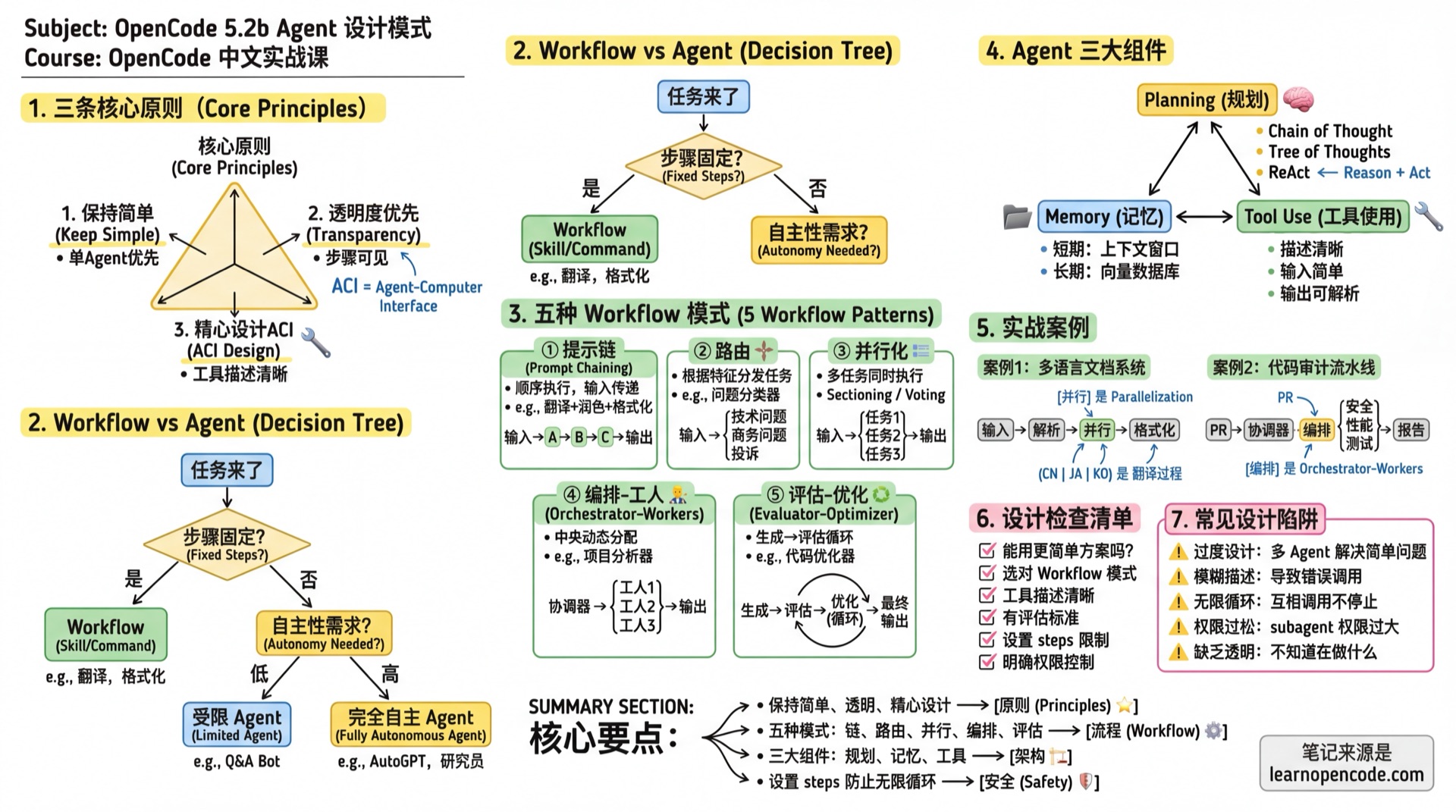
What You'll Be Able to Do
- Choose the right Agent architecture
- Implement five Workflow patterns
- Design complex multi-Agent collaboration systems
- Avoid common design pitfalls
Core Principles
After working with dozens of teams to build Agents, Anthropic summarized three core principles:
1. Keep It Simple
"The most successful implementations use simple, composable patterns rather than complex frameworks."
Practices:
- If a single Agent can solve it, don't use multiple
- If a fixed workflow works, don't use dynamic decisions
- If a prompt can solve it, don't add tools
2. Transparency First
"Explicitly show the Agent's planning steps."
Practices:
- The Agent's thinking process should be visible
- Each step has clear inputs and outputs
- Users can understand what the Agent is doing
3. Carefully Design Tool Interfaces (ACI)
"Invest as much effort in designing Agent-Computer Interface (ACI) as you would in Human-Computer Interface (HCI)."
Practices:
- Tool descriptions should be like excellent docstrings for junior developers
- Include usage examples and edge cases
- Avoid formats requiring precise counting or complex escaping
Workflow vs Agent: How to Choose
| Type | Characteristics | Use Cases | OpenCode Implementation |
|---|---|---|---|
| Workflow | Predefined code paths, fixed steps | Predictable tasks, clear structure | Skill, Command |
| Agent | LLM dynamic decisions, autonomous exploration | Open-ended problems, unpredictable steps | Agent + Task tool |
Decision Flowchart
Task arrives
    ↓
Are steps fixed?
    ├─ Yes → Use Workflow (Skill/Command)
    └─ No → How much autonomy needed?
              ├─ Low → Constrained Agent (steps + permission control)
              └─ High → Fully autonomous Agent
Five Workflow Patterns
Pattern 1: Prompt Chaining
Principle: Break down tasks into sequential steps, where each step's output is the next step's input.
Use Cases:
- Tasks can be clearly decomposed into fixed subtasks
- Willing to trade latency for accuracy
Example: Translation + Polishing + Formatting
---
description: "Multi-step translation processing"
mode: subagent
steps: 10
---

# Task Flow

Execute in the following steps, proceed to next step only after completing each:

## Step 1: Literal Translation
Translate the original text sentence by sentence, preserving original meaning.

## Step 2: Free Translation and Polishing
Based on literal translation, adjust for fluent Chinese expression.

## Step 3: Technical Term Check
Check if technical terms are accurate, keep English when necessary.

## Step 4: Formatting
Organize output in target format (Markdown).

# Output Requirements
Output intermediate results for each step, then provide final version.
Pattern 2: Routing
Principle: Route tasks to different specialized processing flows based on input characteristics.
Use Cases:
- Different categories need different handling
- Classification can be done accurately
Example: Code Issue Classifier
---
description: "Code issue classification router"
mode: subagent
---

# Role
You are a code issue classification expert, responsible for routing issues to the correct processing flow.

# Classification Rules

Analyze the user's code issue and determine which category it belongs to:

1. **Bug Fix** → Call @bug-fixer
   - Signs: Code errors, unexpected behavior

2. **Performance Optimization** → Call @performance-optimizer
   - Signs: Slow execution, high memory usage

3. **Security Audit** → Call @security-auditor
   - Signs: Involves authentication, data handling, external input

4. **Code Refactoring** → Call @refactor-expert
   - Signs: Code works but needs structural improvement

5. **New Feature Development** → Don't route, handle directly
   - Signs: Implementing new requirements

# Output Format
First explain the classification rationale, then call the corresponding subagent.
With Task Permission Control:
{
  "agent": {
    "router": {
      "description": "Code issue classification router",
      "mode": "primary",
      "permission": {
        "task": {
          "*": "deny",
          "bug-fixer": "allow",
          "performance-optimizer": "allow",
          "security-auditor": "allow",
          "refactor-expert": "allow"
        }
      }
    }
  }
}
Pattern 3: Parallelization
Principle: Execute multiple tasks simultaneously, then aggregate results.
Two Variants:
- Sectioning: Independent subtasks in parallel
- Voting: Same task from multiple perspectives for validation
Use Cases:
- Subtasks are independent of each other
- Need multiple perspectives to improve accuracy
- Time-sensitive, need acceleration
Example: Parallel Code Quality Check
---
description: "Parallel code quality checker"
mode: subagent
---

# Task
Perform multi-dimensional checks on given code simultaneously.

# Parallel Tasks

Call the following subagents **simultaneously** (using multiple Task tool calls):

1. @security-auditor - Security vulnerability check
2. @performance-reviewer - Performance analysis
3. @style-checker - Code style check
4. @test-coverage-analyzer - Test coverage analysis

# Aggregation Rules

After collecting all results, generate a comprehensive report:

## Overall Score
- Security: X/10
- Performance: X/10
- Code Style: X/10
- Test Coverage: X/10
- **Total**: X/40

## Issue Summary
Sort all discovered issues by severity.

## Priority Fix Recommendations
Top 3 issues that should be addressed first.
Pattern 4: Orchestrator-Workers
Principle: A central LLM (orchestrator) dynamically analyzes tasks, decomposes them, and assigns to specialized Worker Agents.
Use Cases:
- Cannot predict which subtasks are needed
- Task complexity is uncertain
- Need flexible response
Example: Project Analysis Orchestrator
---
description: "Project analysis orchestrator, dynamically assigns analysis tasks"
mode: primary
---

# Role
You are a project analysis orchestrator, responsible for understanding user needs and coordinating expert teams.

# Available Experts

You can call the following experts (choose as needed):

- @architecture-analyst - Architecture analysis, for "How is this project structured?"
- @dependency-auditor - Dependency audit, for "Any outdated/dangerous dependencies?"
- @security-auditor - Security audit, for "Any security risks?"
- @performance-profiler - Performance analysis, for "Where might bottlenecks be?"
- @docs-reviewer - Documentation review, for "Is documentation complete?"
- @test-analyzer - Test analysis, for "Is test coverage sufficient?"

# Workflow

1. **Understand Requirements**: Analyze what the user wants to know
2. **Plan**: Decide which experts to call, in what order
3. **Execute Analysis**: Call selected experts
4. **Integrate Results**: Aggregate all expert findings
5. **Provide Recommendations**: Give actionable advice based on overall analysis

# Principles
- Don't over-analyze, select necessary experts based on user needs
- If user question is simple, may not need any experts
- Expert analysis results may trigger more analysis needs
Pattern 5: Evaluator-Optimizer
Principle: One Agent generates content, another Agent evaluates, looping until standards are met.
Use Cases:
- Clear evaluation criteria exist
- Iterative improvement is valuable
- Similar to human "write-revise" process
Example: Code Optimization Loop
---
description: "Iterative code optimizer"
mode: subagent
steps: 15
---

# Role
You are a code optimization expert, improving code quality through iteration.

# Optimization Loop

Execute the following loop until goals are met or step limit reached:

## 1. Analysis Phase
- Read current code
- Identify optimization opportunities
- Evaluate current quality score (see scoring criteria)

## 2. Optimization Phase
- Select highest-impact optimization point
- Implement optimization
- Ensure functionality is not broken

## 3. Verification Phase
- Run tests to ensure functionality works
- Re-evaluate quality score

## 4. Decision Phase
- If quality score >= 8, stop optimization
- If quality score improvement < 0.5, stop (diminishing returns)
- Otherwise, continue next round

# Quality Scoring Criteria

| Score | Readability | Performance | Security | Test Coverage |
|-------|-------------|-------------|----------|---------------|
| 9-10 | Clear naming, complete comments | O(n) or better | No vulnerabilities | >90% |
| 7-8 | Reasonable naming, key comments | O(n log n) | Low risk | 70-90% |
| 5-6 | Basically readable | O(n²) | Medium risk | 50-70% |
| <5 | Hard to understand | O(n³)+ | High risk | <50% |

Composite Score = Readability×0.3 + Performance×0.3 + Security×0.25 + Test Coverage×0.15

# Output
Each round output:
- This round's optimization content
- Score breakdown by dimension
- Quality score change
- Decision rationale for continuing or not

Final output:
- Optimization summary
- Before/after comparison
- Further optimization suggestions (if any)

# Failure Handling
- Test failure: Immediately rollback this round's changes, record failure reason, try other optimization directions
- Steps exhausted: Output current best version and remaining optimization suggestions
- Cannot continue optimization: Explain reason, state achieved quality level
Three Major Agent Components
According to Lilian Weng's research, a complete Agent system contains three major components:
1. Planning
Task Decomposition Techniques:
| Technique | Description | Use Cases |
|---|---|---|
| Chain of Thought | "Think step by step" | General reasoning |
| Tree of Thoughts | Explore multiple reasoning paths | Complex decisions |
| ReAct | Think-Act-Observe loop | Need to interact with environment |
Applying in Agent prompt:
# Working Mode

Use ReAct pattern:

1. **Think**: Analyze current state, decide next step
2. **Act**: Execute specific operations (call tools)
3. **Observe**: Analyze operation results
4. **Repeat**: Until task is complete
2. Memory
| Type | Correspondence | Characteristics |
|---|---|---|
| Short-term Memory | Context window | Limited, about tens of thousands of tokens |
| Long-term Memory | External vector store | Unlimited, requires retrieval |
Implementation in OpenCode:
- Short-term: Session context
- Long-term: MCP integration with vector database
3. Tool Use
Tool Design Principles:
- Clear Description: Like docstrings for junior developers
- Simple Input: Avoid complex format requirements
- Parseable Output: Structured, easy for subsequent processing
- Friendly Errors: Clear error messages
Case Study 1: Multi-language Documentation Generation System
Requirement: Automatically translate API documentation into multiple languages.
System Design
User inputs API documentation
        ↓
    @doc-parser (Parse document structure)
        ↓
    @translator-zh (Translate to Chinese)
    @translator-ja (Translate to Japanese)  ← Parallel
    @translator-ko (Translate to Korean)
        ↓
    @doc-formatter (Format output)
        ↓
    Multi-language documentation
Configuration File
// opencode.json
{
  "$schema": "https://opencode.ai/config.json",
  "agent": {
    "doc-generator": {
      "description": "Multi-language documentation generation orchestrator",
      "mode": "primary",
      "prompt": "{file:./prompts/doc-generator.md}",
      "permission": {
        "task": {
          "*": "deny",
          "doc-parser": "allow",
          "translator-*": "allow",
          "doc-formatter": "allow"
        }
      }
    },
    "doc-parser": {
      "description": "Parse API documentation structure, extract translatable content",
      "mode": "subagent",
      "temperature": 0.1
    },
    "translator-zh": {
      "description": "English to Chinese expert, maintain technical term accuracy",
      "mode": "subagent",
      "temperature": 0.3
    },
    "translator-ja": {
      "description": "English to Japanese expert",
      "mode": "subagent",
      "temperature": 0.3
    },
    "translator-ko": {
      "description": "English to Korean expert",
      "mode": "subagent",
      "temperature": 0.3
    },
    "doc-formatter": {
      "description": "Document formatting, ensure consistent format across languages",
      "mode": "subagent",
      "temperature": 0.1
    }
  }
}
Orchestrator Prompt
<!-- prompts/doc-generator.md -->
---
description: "Multi-language documentation generation orchestrator"
mode: primary
---

# Role
You are the orchestrator for the multi-language documentation generation system.

# Workflow

## 1. Parsing Phase
Call @doc-parser to analyze input document:
- Extract title, description, parameters, return values etc.
- Mark which content needs translation
- Which content stays as-is (like code examples)

## 2. Translation Phase
**Parallel** call translation experts:
- @translator-zh: Translate to Chinese
- @translator-ja: Translate to Japanese
- @translator-ko: Translate to Korean

Tell each translation expert:
- Document structure
- Content to translate
- Glossary (if any)

## 3. Formatting Phase
Call @doc-formatter:
- Integrate all language versions
- Ensure format consistency
- Generate final output

# Output Format
Generate directory structure suggestion containing all language versions.
Case Study 2: Code Audit Pipeline
Requirement: Comprehensive code audit for PRs.
System Design
Using Parallelization + Orchestrator-Workers hybrid pattern.
PR code changes
        ↓
    @audit-coordinator (Coordinator)
        ↓
    ┌──────────────────────────────────┐
    │  Parallel Execution (Sectioning) │
    │  @security-auditor               │
    │  @performance-auditor            │
    │  @quality-auditor                │
    │  @test-auditor                   │
    └──────────────────────────────────┘
        ↓
    Aggregate all findings
        ↓
    @report-generator (Generate report)
        ↓
    Audit report
Configuration File
{
  "$schema": "https://opencode.ai/config.json",
  "agent": {
    "audit-coordinator": {
      "description": "Code audit coordinator, orchestrating multi-dimensional audits",
      "mode": "subagent",
      "model": "anthropic/claude-opus-4-5-thinking",
      "prompt": "{file:./prompts/audit-coordinator.md}",
      "steps": 50
    },
    "security-auditor": {
      "description": "Security vulnerability audit: injection, authentication, data leakage",
      "mode": "subagent",
      "temperature": 0.1,
      "prompt": "{file:./prompts/security-auditor.md}",
      "permission": {
        "edit": "deny"
      }
    },
    "performance-auditor": {
      "description": "Performance audit: complexity, memory, concurrency",
      "mode": "subagent",
      "temperature": 0.1,
      "permission": {
        "edit": "deny"
      }
    },
    "quality-auditor": {
      "description": "Code quality audit: readability, SOLID, duplicate code",
      "mode": "subagent",
      "temperature": 0.2,
      "permission": {
        "edit": "deny"
      }
    },
    "test-auditor": {
      "description": "Test audit: coverage, edge cases, mock quality",
      "mode": "subagent",
      "temperature": 0.1,
      "permission": {
        "edit": "deny",
        "bash": {
          "*": "deny",
          "npm test*": "allow",
          "npm run test*": "allow"
        }
      }
    },
    "report-generator": {
      "description": "Generate structured audit report",
      "mode": "subagent",
      "temperature": 0.2
    }
  }
}
Coordinator Prompt
<!-- prompts/audit-coordinator.md -->
# Code Audit Coordinator

## Responsibilities
Coordinate multiple specialized audit Agents for comprehensive code change audits.

## Audit Process

### 1. Change Analysis
First analyze the changes:
- Which files are affected
- Change type (new feature/bug fix/refactoring)
- Change scale

### 2. Audit Task Assignment
**Parallel** call the following audit experts:

| Expert | Focus |
|--------|-------|
| @security-auditor | SQL injection, XSS, auth bypass, sensitive data |
| @performance-auditor | O(n²) complexity, memory leaks, N+1 queries |
| @quality-auditor | Naming, function length, duplicate code, SOLID |
| @test-auditor | Test coverage, edge cases, mock quality |

### 3. Result Aggregation
Collect all audit results:

**Severity Definitions**:
| Level | Definition | Example |
|-------|------------|---------|
| Critical | Exploitable remotely, data breach risk | SQL injection, hardcoded keys |
| High | Requires login to exploit, functional defects | Auth bypass, resource leaks |
| Medium | Requires specific conditions | Unhandled boundary conditions |
| Low | Code style, minor performance | Non-standard naming |

**Conflict Resolution**:
- Same line flagged by multiple audits → Keep highest severity
- Contradictory recommendations → Mark as "needs manual review"
- False positive identification → Downgrade if 2+ auditors consider no issue

### 4. Report Generation
Call @report-generator to produce final report:
- Executive summary
- Detailed findings
- Fix recommendations
- Risk assessment

## Failure Handling
- Audit Agent timeout: Log and continue, note in report "partial audit incomplete"
- Audit Agent error: Retry once, skip and log if still fails
- No changes to audit: Return directly "no audit needed"

## Output
Output structured audit report.
Design Checklist
Before designing an Agent, ask yourself:
- [ ] Simplicity: Can a simpler solution work?
- [ ] Pattern Selection: Did you choose the right Workflow pattern?
- [ ] Tool Description: Is the description clear and understandable?
- [ ] Evaluation Criteria: How to judge if Agent completed the task?
- [ ] Failure Handling: How to recover from errors?
- [ ] Permission Control: Are unnecessary permissions restricted?
- [ ] Resource Limits: Are steps limits set?
Common Design Pitfalls
| Pitfall | Symptom | Solution |
|---|---|---|
| Over-engineering | Using multiple Agents for simple problems | Try single Agent first |
| Vague Description | description too generic causing wrong calls | Specify applicable scenarios |
| Infinite Loop | Agents call each other without stopping | Set steps limit |
| Loose Permissions | subagent can do anything | Define task/edit/bash permissions |
| Lack of Transparency | Don't know what Agent is doing | Require intermediate step output |
Lesson Summary
You learned:
- Three Core Principles: Simple, Transparent, Carefully designed ACI
- Five Workflow Patterns: Prompt Chaining, Routing, Parallelization, Orchestrator-Workers, Evaluator-Optimizer
- Three Agent Components: Planning, Memory, Tool Use
- Two Case Studies: Multi-language documentation system, Code audit pipeline
- Design Checklist: Avoid common pitfalls
Further Reading
- Anthropic: Building Effective Agents (2024.12)
- Lilian Weng: LLM Powered Autonomous Agents (2023.06)
- OpenAI: Agents Overview
Next Lesson Preview
After designing an Agent, how do you precisely control what it can and cannot do? Next lesson dives into the permission system.
Next Lesson: 5.2c Agent Permissions and Security