

C3 Learning Programming with AI
💡 One-sentence summary: Use AI as your private tutor to learn programming from scratch, practice while learning.
📝 Course Notes
Key knowledge points from this lesson:
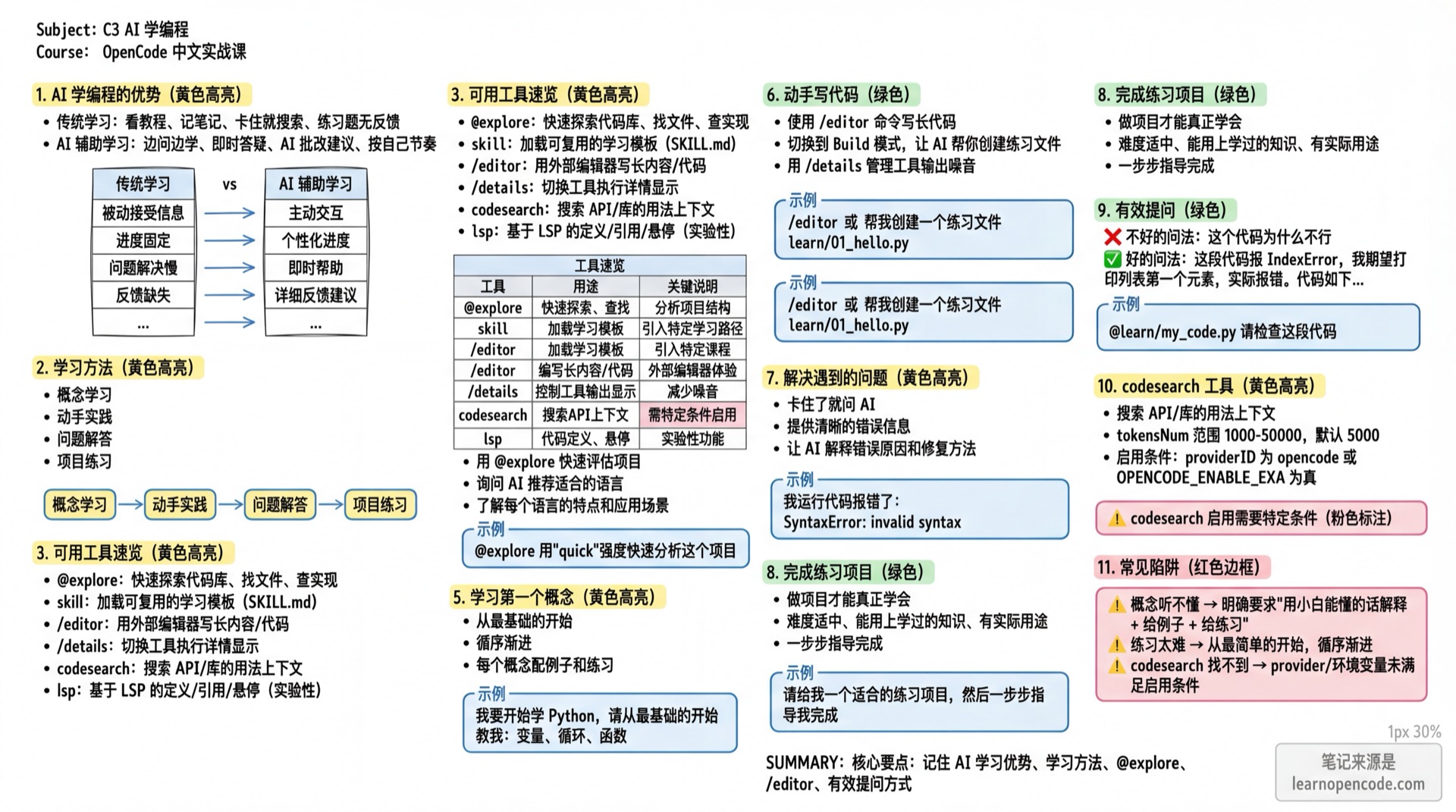
What You Can Do After This Lesson
- Learn new programming languages with AI
- Have AI explain code principles
- Complete practice projects
- Build correct methods for learning programming
Your Current Challenges
- Want to learn programming but don't know where to start
- Watching tutorials is easy, but getting stuck when writing code
- Don't know who to ask when encountering problems
When to Use This Approach
- When you need: To learn programming from scratch with a patient tutor
- And you don't want: To fall asleep watching tutorials by yourself
🎒 Preparations Before Starting
Make sure you have completed the following:
- [ ] Completed 2.1 Interface and Basic Operations
- [ ] Prepared a learning mindset
Core Concepts
Advantages of Learning Programming with AI
| Traditional Learning | AI-Assisted Learning |
|---|---|
| Watch tutorials, take notes | Learn by asking, instant Q&A |
| Get stuck, then search | Ask AI directly for explanations |
| No feedback on exercises | AI grading and suggestions |
| Fixed pace | Learn at your own pace |
Learning Method
Concept Learning → Hands-on Practice → Problem Solving → Project PracticeAvailable Tools/Commands (OpenCode)
| Tool/Command | Purpose | Key Notes (Verifiable) |
|---|---|---|
@explore subagent | Quickly explore codebase, find files, check implementations | Explore is a built-in subagent, can be invoked via @ manually (Official: opencode/packages/web/src/content/docs/agents.mdx:35~opencode/packages/web/src/content/docs/agents.mdx:40; opencode/packages/web/src/content/docs/agents.mdx:91~opencode/packages/web/src/content/docs/agents.mdx:97) |
skill tool | Load reusable learning templates (SKILL.md) | Supports .opencode/skill/*/SKILL.md and .claude/skills/*/SKILL.md paths (Official: opencode/packages/web/src/content/docs/skills.mdx:16~opencode/packages/web/src/content/docs/skills.mdx:20; Source: opencode/packages/opencode/src/skill/skill.ts:69~opencode/packages/opencode/src/skill/skill.ts:113) |
/editor | Write long content/code with external editor | Uses EDITOR environment variable (Official: opencode/packages/web/src/content/docs/tui.mdx:74~opencode/packages/web/src/content/docs/tui.mdx:115) |
/details | Toggle tool execution details display | Built-in TUI command (Official: opencode/packages/web/src/content/docs/tui.mdx:94~opencode/packages/web/src/content/docs/tui.mdx:103) |
codesearch | Search for "usage context" of APIs/libraries | Configurable tokens (1000-2000+, default 2000+) (Source: opencode/packages/opencode/src/tool/codesearch.ts:43~opencode/packages/opencode/src/tool/codesearch.ts:50); Availability depends on provider/environment variables (Source: opencode/packages/opencode/src/tool/registry.ts:122~opencode/packages/opencode/src/tool/registry.ts:127) |
lsp | LSP-based definition/reference/hover etc. | Tool only registered when OPENCODE_EXPERIMENTAL_LSP_TOOL is enabled (Source: opencode/packages/opencode/src/tool/registry.ts:107~opencode/packages/opencode/src/tool/registry.ts:109), operation list has fixed 9 items (Source: opencode/packages/opencode/src/tool/lsp.ts:9~opencode/packages/opencode/src/tool/lsp.ts:19) |
Tips
- Reference files in TUI:
@path/to/file(Official:opencode/packages/web/src/content/docs/tui.mdx:30~opencode/packages/web/src/content/docs/tui.mdx:43). - Boolean environment variables like
OPENCODE_ENABLE_EXAare recognized as true when set to"true"or"1"in the source code (Source:opencode/packages/opencode/src/flag/flag.ts:35~opencode/packages/opencode/src/flag/flag.ts:38).
Follow Along
Step 1: Choose a Language to Learn
Why Let AI help you evaluate where to start.
Use @explore to Quickly Assess a Project
@explore Use "quick" intensity to analyze this project:
1. Main language/framework
2. Directory structure (entry/core modules)
3. Top 3 files worth reading first for beginners
Note: Explore is a subagent specifically designed to "quickly find things/view structure" (Official:
opencode/packages/web/src/content/docs/agents.mdx:79~opencode/packages/web/src/content/docs/agents.mdx:84).
Ask AI for Recommendations (Zero Background)
I have zero programming background and want to learn programming to improve my work efficiency. Please help me analyze:
1. Which is suitable for me to start: Python, JavaScript, or Go
2. Characteristics and application scenarios of each language
3. Recommended learning path
Step 2: Learn the First Concept
Why
Start from the basics, progress step by step.
Assuming you choose Python:
I'm starting to learn Python, please teach me from the basics:
1. What is a variable
2. Give me a simple example
3. Let me do a small exercise
Step 3: Write Code Hands-on
Why Programming requires hands-on practice.
Use /editor Command to Write Long Code
/editor
/editorwill open the editor specified in yourEDITORenvironment variable (Official:opencode/packages/web/src/content/docs/tui.mdx:104~opencode/packages/web/src/content/docs/tui.mdx:115).
Switch to Build Mode, Let AI Help Create Practice Files
Help me create a practice file learn/01_hello.py:
- Print "Hello, World!"
- Create a variable to store my name
- Print a welcome message

After creating, teach me how to run it
Use /details to Manage "Tool Output Noise"
/detailsStep 4: Solve Problems Encountered
Why
Ask AI when stuck.
I got an error running the code:
SyntaxError: invalid syntax

What does this mean? How to fix it?
Step 5: Complete Practice Projects
Why
You truly learn by doing projects.
I've learned variables, conditions, and loops. Please give me a suitable practice project:
- Moderate difficulty
- Uses knowledge I've learned
- Has practical use

Then guide me step by step to complete it
Learning Tips
Asking Questions Effectively
# ❌ Bad way to ask
Why doesn't this code work

# ✅ Good way to ask
This code gives an IndexError, I expected it to print the first element of the list,
but it errored. Here's the code:
print(my_list[1])
Let AI Check Your Code (Use @ to Reference Files)
@learn/my_code.py Please check this code:
1. Are there any bugs
2. Are there any optimizations
3. Does it follow Python best practices
Checkpoint ✅
All must pass before continuing
- [ ] Used AI to understand which language to learn
- [ ] Learned at least one basic concept
- [ ] Wrote and ran code yourself
- [ ] Completed a small exercise
Common Pitfalls
| Issue | Cause | Solution |
|---|---|---|
| Can't understand concepts | Explanations too technical | Explicitly request "explain in beginner-friendly terms + give examples + give exercises" |
| Exercises too hard | Skipped steps | Start from the simplest, progress gradually |
codesearch not found/unavailable | Provider/environment variables don't meet activation conditions | See "codesearch Activation Conditions" below |
Advanced: Explore More Features
1) codesearch: Check API/Library Usage Context
Use codesearch to search: React useState hook examplesTips
codesearch.tokensNumrange 1000-2000+, default 2000+ (Source:opencode/packages/opencode/src/tool/codesearch.ts:43~opencode/packages/opencode/src/tool/codesearch.ts:50).- Activation condition: When providerID is
opencode, or environment variableOPENCODE_ENABLE_EXAis true,codesearch/websearchwill appear in the tool list (Source:opencode/packages/opencode/src/tool/registry.ts:122~opencode/packages/opencode/src/tool/registry.ts:127;opencode/packages/opencode/src/flag/flag.ts:26~opencode/packages/opencode/src/flag/flag.ts:28). - Official documentation writes OpenCode Zen models in
opencode/...format (Official:opencode/packages/web/src/content/docs/agents.mdx:334~opencode/packages/web/src/content/docs/agents.mdx:335).
2) LSP Tool (Experimental)
Note: The
lsptool is only available whenOPENCODE_EXPERIMENTAL_LSP_TOOL=true(orOPENCODE_EXPERIMENTAL=true) is enabled (Official:opencode/packages/web/src/content/docs/tools.mdx:216~opencode/packages/web/src/content/docs/tools.mdx:235; Source:opencode/packages/opencode/src/tool/registry.ts:107~opencode/packages/opencode/src/tool/registry.ts:109).
You can ask AI to perform these operations (choose 1 of 9):
goToDefinitionfindReferenceshoverdocumentSymbolworkspaceSymbolgoToImplementationprepareCallHierarchyincomingCallsoutgoingCalls
(Source: opencode/packages/opencode/src/tool/lsp.ts:9~opencode/packages/opencode/src/tool/lsp.ts:19)
For detailed LSP server configuration, see: 5.19 LSP Server.
3) skill: Make "Learning Process" Reusable Templates
Create a skill file (example):
Create .opencode/skill/python-basics/SKILL.md:
---
name: python-basics
description: Python basics teaching
---

## What I do

- Explain Python basic concepts
- Provide exercises and example code
- Help debug common errors

## When to use me

Use when learning Python basic syntax, data types, control flow.
Discoverable paths for skills include:
.opencode/skill/<name>/SKILL.md~/.config/opencode/skill/<name>/SKILL.md.claude/skills/<name>/SKILL.md~/.claude/skills/<name>/SKILL.md
(Official: opencode/packages/web/src/content/docs/skills.mdx:16~opencode/packages/web/src/content/docs/skills.mdx:20)
4) Configuration Variable Substitution (env/file)
OpenCode supports {env:VAR} and {file:path} variable substitution (Official: opencode/packages/web/src/content/docs/config.mdx:75~opencode/packages/web/src/content/docs/config.mdx:95; Source: opencode/packages/opencode/src/config/config.ts:1023~opencode/packages/opencode/src/config/config.ts:1026).
Example (using provider.openai.options.apiKey, note apiKey is under options):
{
  "$schema": "https://opencode.ai/config.json",
  "provider": {
    "openai": {
      "options": {
        "apiKey": "{env:OPENAI_API_KEY}"
      }
    }
  }
}
Evidence Index (OpenCode Behaviors Covered in This Lesson)
| Topic | Conclusion | Evidence |
|---|---|---|
| Built-in subagent | Explore can be invoked via @ | opencode/packages/web/src/content/docs/agents.mdx:35~opencode/packages/web/src/content/docs/agents.mdx:40 |
codesearch tokens range | 1000-2000+, default 2000+ | opencode/packages/opencode/src/tool/codesearch.ts:43~opencode/packages/opencode/src/tool/codesearch.ts:50 |
codesearch activation condition | providerID=opencode or OPENCODE_ENABLE_EXA | opencode/packages/opencode/src/tool/registry.ts:122~opencode/packages/opencode/src/tool/registry.ts:127 |
OPENCODE_ENABLE_EXA truth value | Recognizes true/1 | opencode/packages/opencode/src/flag/flag.ts:35~opencode/packages/opencode/src/flag/flag.ts:38 |
lsp tool operations | Fixed 9 operations | opencode/packages/opencode/src/tool/lsp.ts:9~opencode/packages/opencode/src/tool/lsp.ts:19 |
| Skills paths | .opencode and .claude compatible directories | opencode/packages/web/src/content/docs/skills.mdx:16~opencode/packages/web/src/content/docs/skills.mdx:20 |
{env:...} substitution | Replaced with empty string when not set | opencode/packages/web/src/content/docs/config.mdx:94~opencode/packages/web/src/content/docs/config.mdx:95 |
Lesson Summary
You have learned:
- Use AI to plan your programming learning path
- Learn while asking, progress step by step
- Let AI help you check and explain code
- Consolidate knowledge through projects
Next Lesson Preview
In the next lesson, we will learn about automation scripts, using AI to help you write scripts to free yourself from repetitive tasks.