

Air-gapped / On-premise Deployment
💡 TL;DR: Use 5 switches to disable external network requests and run OpenCode in isolated enterprise environments.
📝 Course Notes
Key takeaways from this lesson:
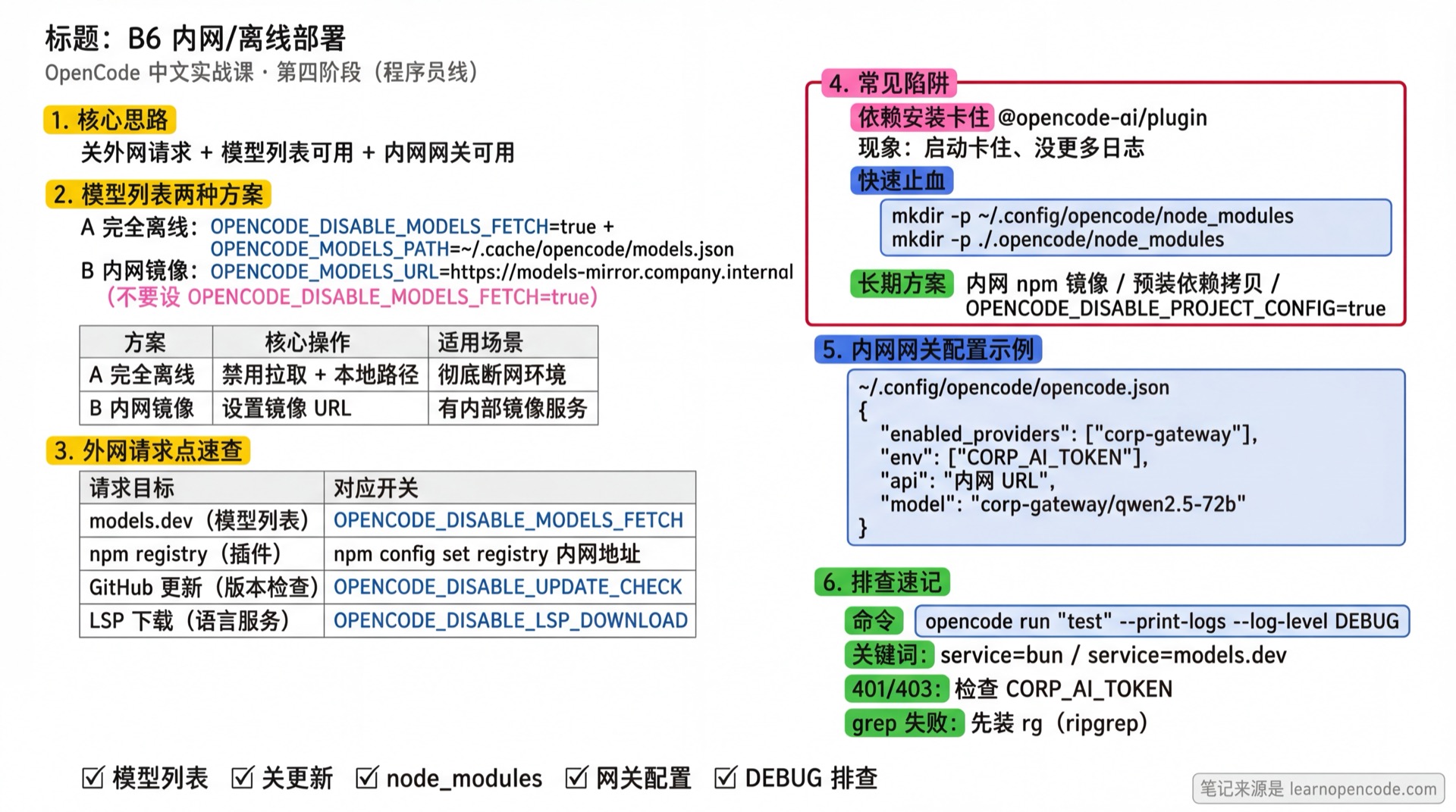
What You'll Be Able to Do
- Run OpenCode in completely air-gapped environments with no internet access
- Use locally cached model lists without relying on models.dev
- Connect to internal AI gateways without triggering any external network requests
- Troubleshoot common on-premise issues like "startup hangs" and "network timeouts"
- Resolve the most common dependency installation hang issue (
@opencode-ai/plugin)
Your Current Challenge
- Corporate network blocks external internet access, OpenCode hangs on startup
- You set
OPENCODE_DISABLE_MODELS_FETCH=true, but it still hangs - You don't know which external URLs OpenCode tries to reach
- You want to use your company's internal AI gateway but don't know how to configure it
- Core issue: No error messages after startup, but nothing happens. Logs show no "loading plugin" output (typical sign of
@opencode-ai/pluginSDK installation hanging)
When to Use This Approach
- Air-gapped enterprise environments where machines cannot access the internet
- Security and compliance requirements that prohibit any data leaving the internal network
- On-premise development environments (isolated data centers, secure facilities)
- CI/CD pipelines where you want faster startup and want to avoid network flakiness
🎒 Prerequisites
- [ ] A working internal AI gateway (or local Ollama)
- [ ] Ability to download
https://models.dev/api.jsonfrom an internet-connected machine - [ ] Familiarity with 1.4 Connect Models basic configuration
- [ ] (Optional) Verify ripgrep is installed:
rg --version
💡 Check ripgrep
In air-gapped environments, verify rg is pre-installed to avoid failures when using AI's grep functionality.
Core Concept
OpenCode makes the following external network requests on startup:
| Request | Purpose | How to Disable |
|---|---|---|
models.dev/api.json | Fetch model list | Option A (Fully offline): OPENCODE_DISABLE_MODELS_FETCH=true + OPENCODE_MODELS_PATH=...; Option B (Internal mirror): Only set OPENCODE_MODELS_URL=https://... (do NOT set OPENCODE_DISABLE_MODELS_FETCH=true) |
| npm registry | Install built-in plugins | OPENCODE_DISABLE_DEFAULT_PLUGINS |
| GitHub releases | Check for updates | OPENCODE_DISABLE_AUTOUPDATE or autoupdate: false |
| LSP server downloads | Language servers | OPENCODE_DISABLE_LSP_DOWNLOAD |
📖 Two Model List Options
- Fully offline: Download
models.json, setOPENCODE_MODELS_PATH, and enableOPENCODE_DISABLE_MODELS_FETCH=true - Internal mirror: Provide
https://<host>/api.jsonon your internal network, setOPENCODE_MODELS_URL=https://<host>, do NOT setOPENCODE_DISABLE_MODELS_FETCH=true
If both OPENCODE_MODELS_PATH and OPENCODE_MODELS_URL are set, PATH takes priority.
Disable all 4 request types, and OpenCode will run in a fully isolated environment.
Step-by-Step Guide
Step 1: Download the Model List File
Why
OpenCode needs to know which models are available. Download this file from an internet-connected machine first, then copy it to your air-gapped environment.
On an internet-connected machine:
curl -o models.json https://models.dev/api.jsonExpected result: A models.json file (~2000+KB) is created in the current directory.
Step 2: Transfer Model List to Air-gapped Machine
Why
The air-gapped machine needs this file to understand model capabilities (context limits, tool_call support, etc.).
Copy models.json to a fixed location on the air-gapped machine:
# Recommended location: ~/.cache/opencode/
mkdir -p ~/.cache/opencode
cp models.json ~/.cache/opencode/models.json
Step 3: Configure Environment Variables
Why
This is the core step. After setting these environment variables, OpenCode won't attempt any external network requests.
export OPENCODE_DISABLE_MODELS_FETCH=true
export OPENCODE_MODELS_PATH=~/.cache/opencode/models.json
export OPENCODE_DISABLE_DEFAULT_PLUGINS=true
export OPENCODE_DISABLE_AUTOUPDATE=true
export OPENCODE_DISABLE_LSP_DOWNLOAD=true# Add to ~/.bashrc or ~/.zshrc
cat >> ~/.zshrc << 'EOF'
# OpenCode air-gapped configuration
export OPENCODE_DISABLE_MODELS_FETCH=true
export OPENCODE_MODELS_PATH=~/.cache/opencode/models.json
export OPENCODE_DISABLE_DEFAULT_PLUGINS=true
export OPENCODE_DISABLE_AUTOUPDATE=true
export OPENCODE_DISABLE_LSP_DOWNLOAD=true
EOF
source ~/.zshrc$env:OPENCODE_DISABLE_MODELS_FETCH = "true"
$env:OPENCODE_MODELS_PATH = "$env:USERPROFILE\.cache\opencode\models.json"
$env:OPENCODE_DISABLE_DEFAULT_PLUGINS = "true"
$env:OPENCODE_DISABLE_AUTOUPDATE = "true"
$env:OPENCODE_DISABLE_LSP_DOWNLOAD = "true"Step 4: Resolve Dependency Installation Hang (Critical for Air-gapped ⚠️)
⚠️ Important
This is the most common cause of startup hangs in air-gapped environments! Even with OPENCODE_DISABLE_DEFAULT_PLUGINS=true, OpenCode still attempts to install the @opencode-ai/plugin SDK, which is not controlled by any environment variable.
Root cause: The installation logic in src/config/config.ts:237-257 executes bun add and bun install, which hangs in air-gapped environments.
Solution (Recommended - Option 1):
# Create an empty node_modules directory to skip installation checks
mkdir -p ~/.config/opencode/node_modules

# Verify the directory was created
ls -la ~/.config/opencode/
# You should see the node_modules directory
💡 Alternative Solutions
If Option 1 doesn't work for you:
- Option 2: Configure an internal npm mirror (
~/.bunfig.tomlor.npmrc) - Option 3: Pre-install dependencies on an internet-connected machine, then copy
~/.config/opencode/(and project.opencode/) to the air-gapped machine - Option 4: Temporarily disable project config scanning:
OPENCODE_DISABLE_PROJECT_CONFIG=true
See "Pitfalls → Dependency Installation Hang (@opencode-ai/plugin)" below for details.
Step 5: Configure Internal AI Gateway
Why
After disabling external network access, you need to tell OpenCode which internal models to use.
Create or edit ~/.config/opencode/opencode.json:
{
  "$schema": "https://opencode.ai/config.json",

  // Disable auto-update (belt and suspenders, env var already set)
  "autoupdate": false,

  // Only enable your internal provider
  "enabled_providers": ["corp-gateway"],

  // Configure internal AI gateway
  "provider": {
    "corp-gateway": {
      "name": "Corporate AI Gateway",
      "env": ["CORP_AI_TOKEN"],
      "api": "https://ai-gateway.company.internal/v1",
      "npm": "@ai-sdk/openai-compatible",
      "models": {
        "qwen2.5-72b": {
          "name": "Qwen 2.5 72B",
          "tool_call": true,
          "reasoning": true,
          "temperature": true,
          "limit": { "context": 128000, "output": 8192 }
        },
        "glm-4": {
          "name": "GLM-4",
          "tool_call": true,
          "temperature": true,
          "limit": { "context": 128000, "output": 4096 }
        }
      }
    }
  },

  // Default to internal model
  "model": "corp-gateway/qwen2.5-72b"
}
💡 Using Local Ollama
Change api to http://localhost:11434/v1, see 1.4g Ollama Configuration.
Step 6: Set API Token
Why
Internal gateways typically require authentication.
export CORP_AI_TOKEN="your-internal-token"Step 7: Verify Configuration
Why
Ensure all configurations are effective and OpenCode can start normally.
opencode run -m corp-gateway/qwen2.5-72b "1+1=?" --print-logsExpected result:
- No network timeout errors
- Model returns result correctly (e.g.,
2)
If it still hangs, add --log-level DEBUG for detailed logs:
opencode run -m corp-gateway/qwen2.5-72b "1+1=?" --print-logs --log-level DEBUGChecklist ✅
All items must pass to continue; if any fail, return to the corresponding step
- [ ] A working internal AI gateway (or local Ollama)
- [ ] Ability to download
https://models.dev/api.jsonfrom an internet-connected machine - [ ] Familiarity with 1.4 Connect Models basic configuration
- [ ] Model list ready:
~/.cache/opencode/models.jsonexists andOPENCODE_MODELS_PATHpoints to it (or using internal mirrorOPENCODE_MODELS_URL) - [ ] Environment variables set (check with
env | grep OPENCODE) - [ ] Created
~/.config/opencode/node_modules(also create./.opencode/node_modulesif current project has.opencode/) - [ ]
opencode.jsonconfigured with internal provider - [ ]
opencode runreturns results without network errors - [ ] (Optional) ripgrep installed (
rg --versionoutputs version)
Pitfalls
| Symptom | Possible Cause | Solution |
|---|---|---|
| Startup hangs, no more logs | Dependency installation hanging in air-gapped environment (@opencode-ai/plugin) | See "Dependency Installation Hang (@opencode-ai/plugin)" |
| "model not found" error | models.json path or content incorrect | Check if OPENCODE_MODELS_PATH points to correct file |
| "provider not found" error | enabled_providers doesn't match provider id | Check enabled_providers, provider key, and model prefix |
| Model call returns 401/403 | Token not injected or expired | Check if CORP_AI_TOKEN is correct and exported |
| grep tool fails | ripgrep not installed and cannot download | Manually install rg (see "grep tool special case") |
Dependency Installation Hang (@opencode-ai/plugin)
Why It Hangs
When scanning configuration directories, OpenCode triggers dependency installation (source: src/config/config.ts:157-159 and src/config/config.ts:237-257). It executes:
bun add @opencode-ai/plugin@<version> --exact
bun install
If node_modules/ doesn't exist in a directory, OpenCode waits for installation to complete before continuing; in air-gapped environments without npm registry access, this appears as "hanging".
First, Confirm This Is the Issue
Run with DEBUG logging:
opencode run "test" --print-logs --log-level DEBUGIf you see cmd=[..., "add", "@opencode-ai/plugin@..."] in logs with service=bun, it's likely the dependency installation hanging.
Quick Fix (Stop Waiting for Installation)
Add node_modules/ to all directories OpenCode might scan:
# Global config directory
mkdir -p ~/.config/opencode/node_modules

# If running in a project with .opencode/, add one there too
mkdir -p ./.opencode/node_modules
This prevents OpenCode from await installDependencies(...) during startup.
⚠️ Not a Complete Solution
installDependencies(dir) is still triggered (just won't block startup). If you need actual installation, you still need an internal npm mirror or pre-installed dependencies.
Long-term Solutions (Recommended)
- Configure internal npm mirror (Bun uses your config)
~/.bunfig.toml:
[install]
registry = "http://your-internal-npm-registry/"- Pre-install and copy dependencies
On an internet-connected machine, let ~/.config/opencode/ and project .opencode/ complete dependency installation, then copy both directories to the air-gapped machine.
- Temporarily disable project config scanning
If you don't need project-level .opencode/ (using only global config):
export OPENCODE_DISABLE_PROJECT_CONFIG=truegrep Tool Special Case
Symptom: AI's grep tool fails, complaining about missing rg binary.
Cause: The grep tool depends on ripgrep (rg). If rg isn't in the system, OpenCode tries to download it from GitHub (fails in air-gapped environments).
Solution:
# macOS
brew install ripgrep

# Linux
apt install ripgrep  # Ubuntu/Debian
yum install ripgrep  # CentOS/RHEL

# Windows
scoop install ripgrep
# or
choco install ripgrep

rg --version
How to Verify Environment Variables Are Set?
env | grep OPENCODEHow to Identify External Network Requests?
opencode run "test" --print-logs --log-level DEBUGCommon keywords:
service=models.dev: Fetching model listservice=bun: Executing bun add/install (installing dependencies or plugins)
Configuration Quick Reference
Environment Variables
| Variable | Purpose | Value |
|---|---|---|
OPENCODE_DISABLE_MODELS_FETCH | (Fully offline mode) Disable model list fetching | true |
OPENCODE_MODELS_PATH | (Fully offline mode) Local model list file path | Absolute file path |
OPENCODE_MODELS_URL | (Internal mirror mode) Point models.dev to internal address (must provide /api.json) | https://models-mirror.company.internal |
OPENCODE_DISABLE_DEFAULT_PLUGINS | Disable built-in plugin installation | true |
OPENCODE_DISABLE_AUTOUPDATE | Disable auto-update check | true |
OPENCODE_DISABLE_LSP_DOWNLOAD | Disable LSP server downloads | true |
OPENCODE_DISABLE_PROJECT_CONFIG | (Optional) Disable project-level .opencode/ scanning | true |
💡 Priority Notes
- If both
OPENCODE_MODELS_PATHandOPENCODE_MODELS_URLare set,OPENCODE_MODELS_PATHtakes priority - For "internal mirror mode", do NOT set
OPENCODE_DISABLE_MODELS_FETCH=true, otherwise fetching won't occur
One-click Setup Scripts
Basic Script (Fully Offline: Manually download models.json):
#!/bin/bash
# save as: setup-airgapped.sh

# Create directories
mkdir -p ~/.cache/opencode

# Check model list file
if [ ! -f ~/.cache/opencode/models.json ]; then
    echo "❌ Please download models.json to ~/.cache/opencode/models.json first"
    exit 1
fi

# Resolve SDK installation hang (critical step!)
mkdir -p ~/.config/opencode/node_modules
echo "✅ Created ~/.config/opencode/node_modules directory"

# If current directory has .opencode/, add one there too
if [ -d ./.opencode ]; then
  mkdir -p ./.opencode/node_modules
  echo "✅ Created ./.opencode/node_modules directory"
fi

# Add environment variables to shell config
SHELL_RC="$HOME/.$(basename $SHELL)rc"
cat >> "$SHELL_RC" << 'EOF'

# OpenCode air-gapped configuration
export OPENCODE_DISABLE_MODELS_FETCH=true
export OPENCODE_MODELS_PATH=~/.cache/opencode/models.json
export OPENCODE_DISABLE_DEFAULT_PLUGINS=true
export OPENCODE_DISABLE_AUTOUPDATE=true
export OPENCODE_DISABLE_LSP_DOWNLOAD=true
EOF

echo "✅ Environment variables added to $SHELL_RC"
echo "Please run: source $SHELL_RC"
Advanced Script (Internal Mirror: Auto-fetch model list):
#!/bin/bash
# save as: setup-airgapped-advanced.sh

# Company internal models.dev server
MODELS_MIRROR="https://models-mirror.company.internal"

# Add environment variables to shell config
SHELL_RC="$HOME/.$(basename $SHELL)rc"
cat >> "$SHELL_RC" << EOF

# OpenCode air-gapped configuration (using internal mirror)
unset OPENCODE_DISABLE_MODELS_FETCH
export OPENCODE_MODELS_URL="$MODELS_MIRROR"
export OPENCODE_DISABLE_DEFAULT_PLUGINS=true
export OPENCODE_DISABLE_AUTOUPDATE=true
export OPENCODE_DISABLE_LSP_DOWNLOAD=true
EOF

# Resolve SDK installation hang
mkdir -p ~/.config/opencode/node_modules
echo "✅ Created ~/.config/opencode/node_modules directory"

echo "✅ Environment variables added to $SHELL_RC"
echo "Configured internal models.dev mirror: $MODELS_MIRROR"
echo "Please run: source $SHELL_RC"
💡 Model List Options Comparison
| Option | Pros | Cons |
|---|---|---|
OPENCODE_MODELS_PATH | Fully offline, version controlled | Manual models.json updates required |
OPENCODE_MODELS_URL | Auto-updates, multi-machine sync | Depends on internal mirror server |
Lesson Summary
You learned:
- 5 Key Switches: Fully offline (
OPENCODE_DISABLE_MODELS_FETCH+OPENCODE_MODELS_PATH) or internal mirror (OPENCODE_MODELS_URL), plus disable built-in plugins/auto-update/LSP download - Local Model List: Download
models.jsonfrom internet, transfer to air-gapped machine (or useOPENCODE_MODELS_URLto point to internal mirror) - Internal Provider Configuration: Use
enabled_providersto enable only internal gateways - Critical SDK Installation Issue: Solve by creating empty
node_modulesdirectory or other solutions - Troubleshooting Techniques: Use
--print-logs --log-level DEBUGto identify where it hangs
💡 Additional Tip
If your company has an internal models.dev server, you can use OPENCODE_MODELS_URL instead of OPENCODE_MODELS_PATH:
export OPENCODE_MODELS_URL=https://models-mirror.company.internalThis way OpenCode fetches the model list from your internal server without manual models.json download.
Next Lesson
If you want to take it further with centralized authentication management (so your team doesn't each need to configure tokens), check out 5.11a Enterprise Authentication Integration.
It introduces the
/.well-known/opencodemechanism for "one-command login + automatic organization config delivery".
Appendix: Source Code Reference
Click to expand source code locations
Last updated: 2026-02-05
| Feature | File Path | Line Numbers |
|---|---|---|
Environment variable definitions (all OPENCODE_* flags) | src/flag/flag.ts | 12-50 |
Model list loading logic (OPENCODE_DISABLE_MODELS_FETCH, OPENCODE_MODELS_PATH, OPENCODE_MODELS_URL) | src/provider/models.ts | 83-99 |
Config directory scanning and dependency installation waiting (node_modules check) | src/config/config.ts | 157-160 |
Dependency installation commands (bun add + bun install) | src/config/config.ts | 236-257 |
Plugin loading (built-in plugin list, OPENCODE_DISABLE_DEFAULT_PLUGINS check) | src/plugin/index.ts | 18-49 |
| Bun package installation logic (may cause startup hang) | src/bun/index.ts | 64-133 |
| ripgrep download logic (often fails in air-gapped environments) | src/file/ripgrep.ts | 125-199 |
Auto-update check (OPENCODE_DISABLE_AUTOUPDATE) | src/cli/upgrade.ts | 6-25 |
LSP server download check (OPENCODE_DISABLE_LSP_DOWNLOAD) | src/lsp/server.ts | 135, 177, 372... |
Key Constants:
BUILTIN = ["[email protected]", "@gitlab/[email protected]"]: Built-in plugin listFlag.OPENCODE_DISABLE_MODELS_FETCH: Disable model list fetchingFlag.OPENCODE_MODELS_PATH: Local model list file pathFlag.OPENCODE_MODELS_URL: Internal models.dev server URLFlag.OPENCODE_DISABLE_DEFAULT_PLUGINS: Disable built-in plugin installation
Network Request Priority:
OPENCODE_MODELS_PATH: If set, takes priority overOPENCODE_MODELS_URLOPENCODE_MODELS_URL: Points to internal models.dev serverhttps://models.dev: Default address (when above not set andOPENCODE_DISABLE_MODELS_FETCH=false)