

B4 CI/CD Integration
💡 TL;DR: Connect OpenCode to your repo with GitHub Agent; trigger it with
/ocor/opencodein comments.
📝 Course Notes
Key takeaways from this lesson:
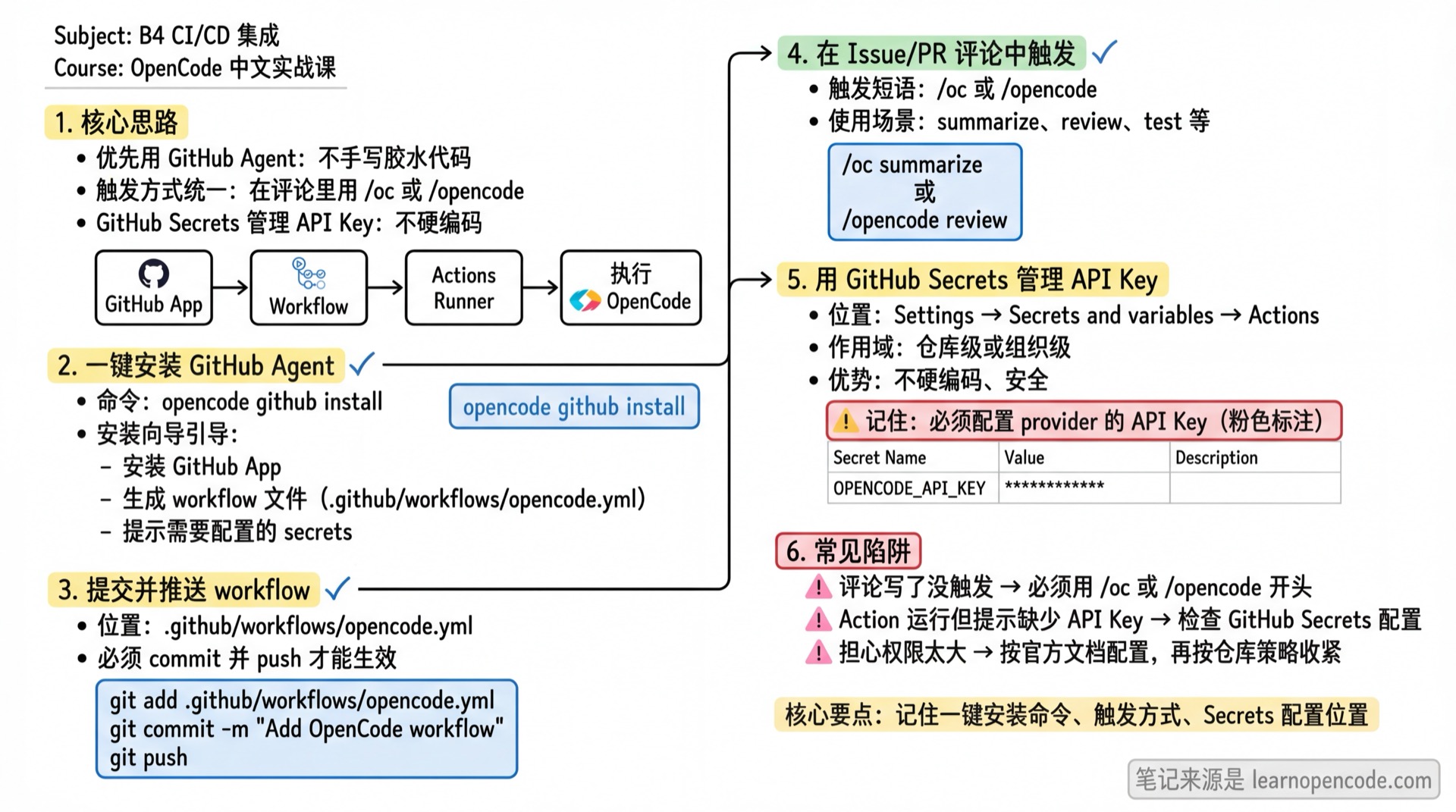
What You'll Learn
- One-click GitHub Agent installation (auto-generates workflow)
- Trigger OpenCode to execute tasks automatically in Issue/PR comments
- Manage API Keys with GitHub Secrets (no hardcoding)
Core Approach (Best Practices)
- Prefer GitHub Agent: Don't write glue code for "install CLI + run script + post comment" in workflow yourself.
- Unified Trigger: Use
/ocor/opencodein comments to execute on Actions runner.
Official docs: https://opencode.ai/docs/github
Follow Along
Step 1: Run the Installation Wizard
Execute in your GitHub repository root:
bash
opencode github installThe wizard will guide you through: installing GitHub App, generating workflow files, and prompting which secrets to configure.
Step 2: Commit and Push Workflow
Commit and push the generated workflow file to your repository (usually .github/workflows/opencode.yml).
Step 3: Trigger via Comment
Comment in an Issue or PR (example):
text
/oc summarizeOr:
text
/opencode summarizeCommon Issues
| Issue | Cause | Solution |
|---|---|---|
| Comment posted but not triggered | Didn't use /oc or /opencode | Include the trigger phrase in your comment (e.g., /oc summarize) |
| Action runs but reports missing API Key | Provider's API key not configured in GitHub Secrets | Follow the wizard prompts to add secrets to your repo/organization, then retry |
| Concerned about permissions | Workflow permissions unclear | Start with the official docs example, then tighten per your repo policy |
Further Reading
- Official GitHub Integration Docs: https://opencode.ai/docs/github
- CLI
opencode run(script automation for non-GitHub scenarios): Appendix/CLI Reference
Next Lesson Preview
Next lesson: Learn how to create custom development agents like Code Reviewer, Security Auditor.