

Project Initialization: Let AI Understand Your Project
💡 One-liner: Use the
/initcommand to generate AGENTS.md, letting AI understand your project specifications and preferences.
📝 Course Notes
Key takeaways from this lesson:
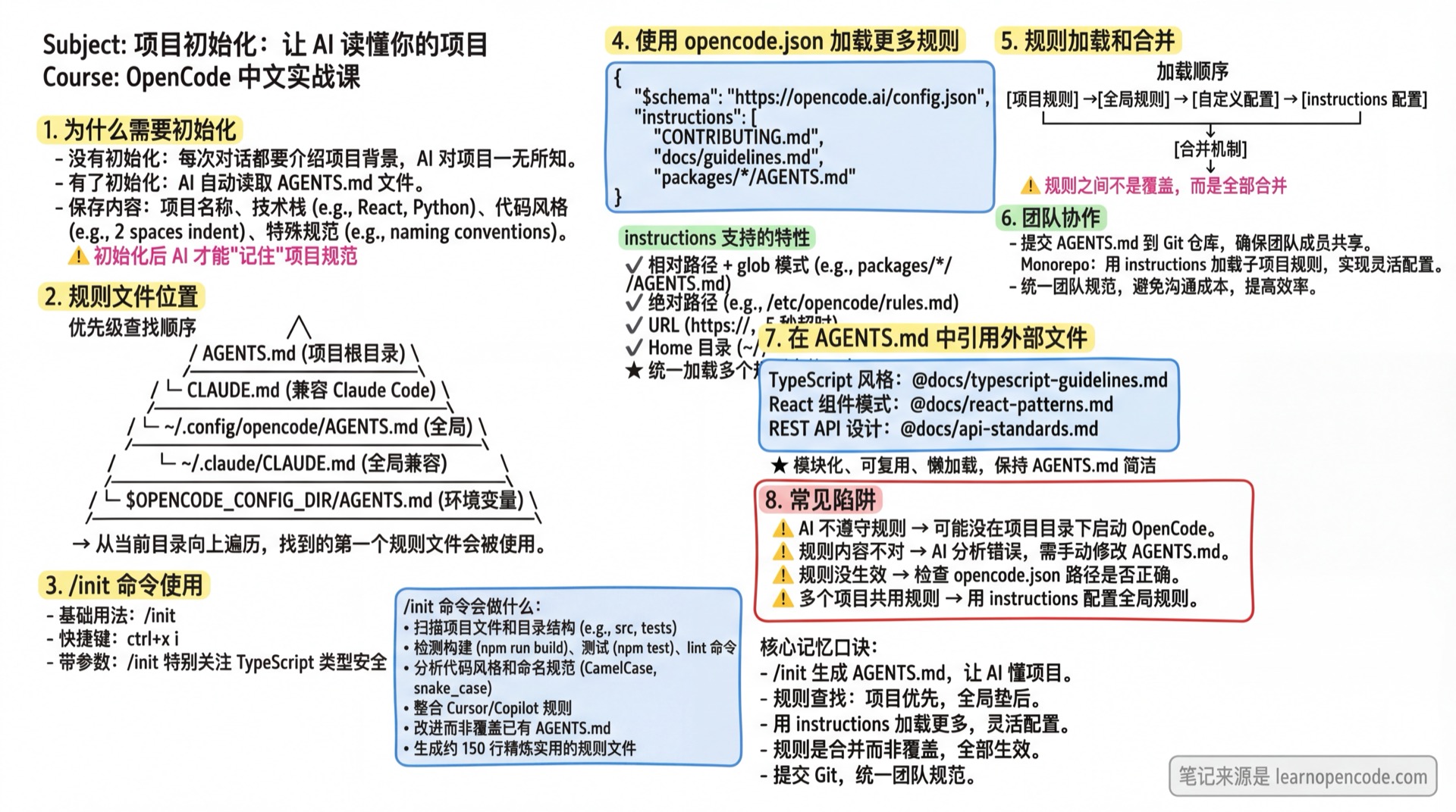
What You'll Be Able to Do
- Understand why project initialization is needed
- Generate a project rules file with
/init - Review and adjust generated rules
- Know where to place rules files
Your Current Struggle
- Re-explaining project context at the start of every conversation
- AI doesn't know the tech stack or code style being used
- Wishing AI could "remember" project conventions
When to Use This
- When you need: AI to automatically understand project context and conventions
- And don't want: Starting every conversation with "This is a React project..."
🎒 Prerequisites
Make sure you've completed the following:
- [ ] Completed 3.2 Understanding Agents
- [ ] Have a real project directory
- [ ] Started OpenCode in the project root directory
Core Concept
Why Initialization Is Needed
Without initialization, you have to tell AI every time:
- What kind of project this is
- What tech stack is used
- What the code style is
- Any special conventions
After initialization, this information is saved in an AGENTS.md file that AI reads automatically every time.
Rules File Locations
OpenCode looks for rules files in this order:
| Location | Scope |
|---|---|
Project root/AGENTS.md | Current project |
Project root/CLAUDE.md | Claude Code compatible |
~/.config/opencode/AGENTS.md | Global (all projects) |
~/.claude/CLAUDE.md | Global (Claude Code compatible) |
$OPENCODE_CONFIG_DIR/AGENTS.md | Global (via environment variable) |
💡 Lookup Mechanism
OpenCode traverses from the current directory upward until reaching the root of the working directory (worktree). The first rules file found will be used. Global rules are merged with project rules.
Follow Along
Step 1: Enter Project Directory
Why
Initialize in the project root to generate rules specific to this project.
cd ~/your-project
opencode
Step 2: Run Initialization
Why
Let AI analyze the project and generate a rules file.
Enter:
/initYou should see: AI starts analyzing project structure, tech stack, and code style
Advanced Usage
No default shortcut, enter
/initmanually
Run with parameters:
/init Pay special attention to TypeScript type safety and error handlingThe /init command will:
- Scan project files and directory structure
- Detect build, test, and lint commands
- Analyze code style and naming conventions
- Automatically integrate Cursor rules (
.cursor/rules/,.cursorrules) or Copilot rules (.github/copilot-instructions.md) if found - Improve rather than overwrite if
AGENTS.mdalready exists - Generate a rules file of about 150 lines, ensuring concise and practical content
Step 3: Review Generated Rules
Why
AI-generated rules may not be entirely accurate and need human review.
AI will generate an AGENTS.md file with content like:
# SST v3 Monorepo Project

This is an SST v3 monorepo with TypeScript. The project uses bun workspaces for package management.

## Project Structure

- `packages/` - Contains all workspace packages (functions, core, web, etc.)
- `infra/` - Infrastructure definitions split by service (storage.ts, api.ts, web.ts)
- `sst.config.ts` - Main SST configuration with dynamic imports

## Code Standards

- Use TypeScript with strict mode enabled
- Shared code goes in `packages/core/` with proper exports configuration
- Functions go in `packages/functions/`
- Infrastructure should be split into logical files in `infra/`

## Monorepo Conventions

- Import shared modules using workspace names: `@my-app/core/example`
Check if this content is correct. For complete AGENTS.md examples, refer to the official documentation: https://github.com/anomalyco/opencode/blob/dev/packages/web/src/content/docs/rules.mdx
Advanced: Loading More Rules with opencode.json
Besides AGENTS.md, you can specify additional rules files in the configuration:
{
  "$schema": "https://opencode.ai/config.json",
  "instructions": [
    "CONTRIBUTING.md",
    "docs/guidelines.md",
    "packages/*/AGENTS.md"
  ]
}
instructions supported features:
- Relative paths: Searched from project directory to working directory root, supports glob patterns
- Glob patterns: Like
packages/*/AGENTS.mdto match multiple files - Absolute paths: Specify complete paths directly
- URLs: Supports
https://orhttp://to load remote rules (5 second timeout) - Home directory: Paths starting with
~/are automatically expanded
Example:
{
  "instructions": [
    "~/team-rules/typescript.md",
    "https://example.com/company-coding-standards.md",
    "docs/**/*.md"
  ]
}
All files specified via instructions are merged with AGENTS.md.
Step 4: Modify Rules (If Needed)
Why
Add conventions AI missed, or correct errors.
Open AGENTS.md in your editor and add your additions:
## Additional Rules
- Always use Chinese comments
- Prefer async/await over callbacks
- Error messages should be user-friendly
Step 5: Verify Rules Are Working
Why
Confirm AI actually read your rules.
Enter:
What tech stack does this project use?You should see: AI's answer should match what's defined in AGENTS.md
Rules File Loading and Merging
Loading Order
OpenCode loads rules in this order:
- Project rules: Traverse from current directory upward to working directory root, looking for
AGENTS.mdorCLAUDE.md - Global rules: Load
~/.config/opencode/AGENTS.mdor~/.claude/CLAUDE.md - Custom config directory: If
OPENCODE_CONFIG_DIRenvironment variable is set, loadAGENTS.mdfrom there - Configured rules: Load all files specified in
instructionsinopencode.json
💡 URL Timeout
instructions supports loading rules files from remote URLs, but uses a 5 second timeout limit.
Merging Mechanism
All found rules files are merged and provided to AI together. This means:
- You can define general conventions in project-level rules
- Define personal preferences in global rules
- Reference team-shared standard documents in
instructions - Rules don't override each other - all take effect
Team Collaboration
Commit AGENTS.md to Git
💡 Team Collaboration
Commit the project's AGENTS.md to version control to ensure team members use the same project conventions.
Handling Monorepos
For Monorepo projects, it's recommended to use the instructions configuration to uniformly load all subproject rules:
{
  "instructions": ["packages/*/AGENTS.md"]
}
This way each subproject can have its own rules while being loaded together.
Advanced Tip: Referencing External Files in AGENTS.md
While OpenCode doesn't automatically parse file references, you can explicitly instruct AI in AGENTS.md to read external files:
# Project Rules

## External File References

When encountering file references (like `@docs/xxx.md`), use the Read tool to load on demand:
- Don't preload all references, load lazily as needed
- Loaded content is treated as mandatory instructions
- Recursively load references when necessary

## Technical Specifications

TypeScript style: @docs/typescript-guidelines.md
React component patterns: @docs/react-patterns.md
REST API design: @docs/api-standards.md
Testing strategy: @test/testing-guidelines.md
This approach lets you:
- Create modular, reusable rules files
- Share rules across projects via symlinks or Git submodules
- Keep
AGENTS.mdconcise while referencing detailed guides - Ensure related rules are only loaded when needed
Checklist ✅
Must pass all to continue
- [ ]
/initsuccessfully generates AGENTS.md - [ ] File content correctly describes the project
- [ ] AI can answer questions about the project
Common Pitfalls
| Issue | Cause | Solution |
|---|---|---|
| AI doesn't follow rules | May not have started in project directory | Confirm current directory has AGENTS.md |
| Rules content is wrong | AI analysis error | Manually edit AGENTS.md |
| Want global rules | Apply to all projects | Put in ~/.config/opencode/AGENTS.md or ~/.claude/CLAUDE.md |
| Rules not taking effect | Config file path error | Check instructions paths in opencode.json |
| Multiple projects sharing rules | Copying rules files is inconvenient | Use instructions config or symlinks |
Lesson Summary
You learned:
- Why project initialization is needed (avoid repetitive project introductions)
- Generate AGENTS.md with
/init, including with parameters and shortcuts - Rules file lookup locations and loading order
- Use
opencode.jsoninstructionsto load more rules - Rules file merging mechanism (project + global + config)
- Team collaboration: commit AGENTS.md to Git, Monorepo handling
- How to reference external files in AGENTS.md
🎉 Congratulations on completing the required stage! You can now choose scenario-based courses based on your role.
Next Lesson Preview
Enter Stage 4 [Scenario Practice], choose your learning path based on your role:
- ✍️ Content Creator → A1 Writing Workflow
- 💻 Developer → B1 Development Daily
- 📊 Productivity Enthusiast → C1 File Organization