

Connect MiniMax (M2.7)
Estimated time: 10-15 minutes
MiniMax M2.7 is a top-tier domestic model, optimized for code and Agent tasks, supporting model self-evolution.
Recommended: Token Plan
Tutorial users get 10% off. We recommend the Max or Pro plan for best value.
If you haven't read "What is an API Key", we recommend going back to 1.4 Overview.
What You'll Be Able to Do
- Get MiniMax API Key
- Connect MiniMax in OpenCode
- Select a model and complete your first conversation
🎒 Before You Start
- [ ] Completed 1.2 Installation and can run
opencode - [ ] Have access to MiniMax console and obtained API Key
Follow Along
Step 1: Register and Get API Key
Visit MiniMax platform (10% off for tutorial users):
https://platform.minimaxi.com/subscribe/token-plan?code=2OOzWR9jAE&source=link
Recommended Plans
We recommend Token Plan Max or Pro plans:
- Max: Best for heavy users, great value for high volume
- Pro: Suitable for daily development, cost-effective
After subscribing, copy your exclusive API Key from the "Plan Management" page:
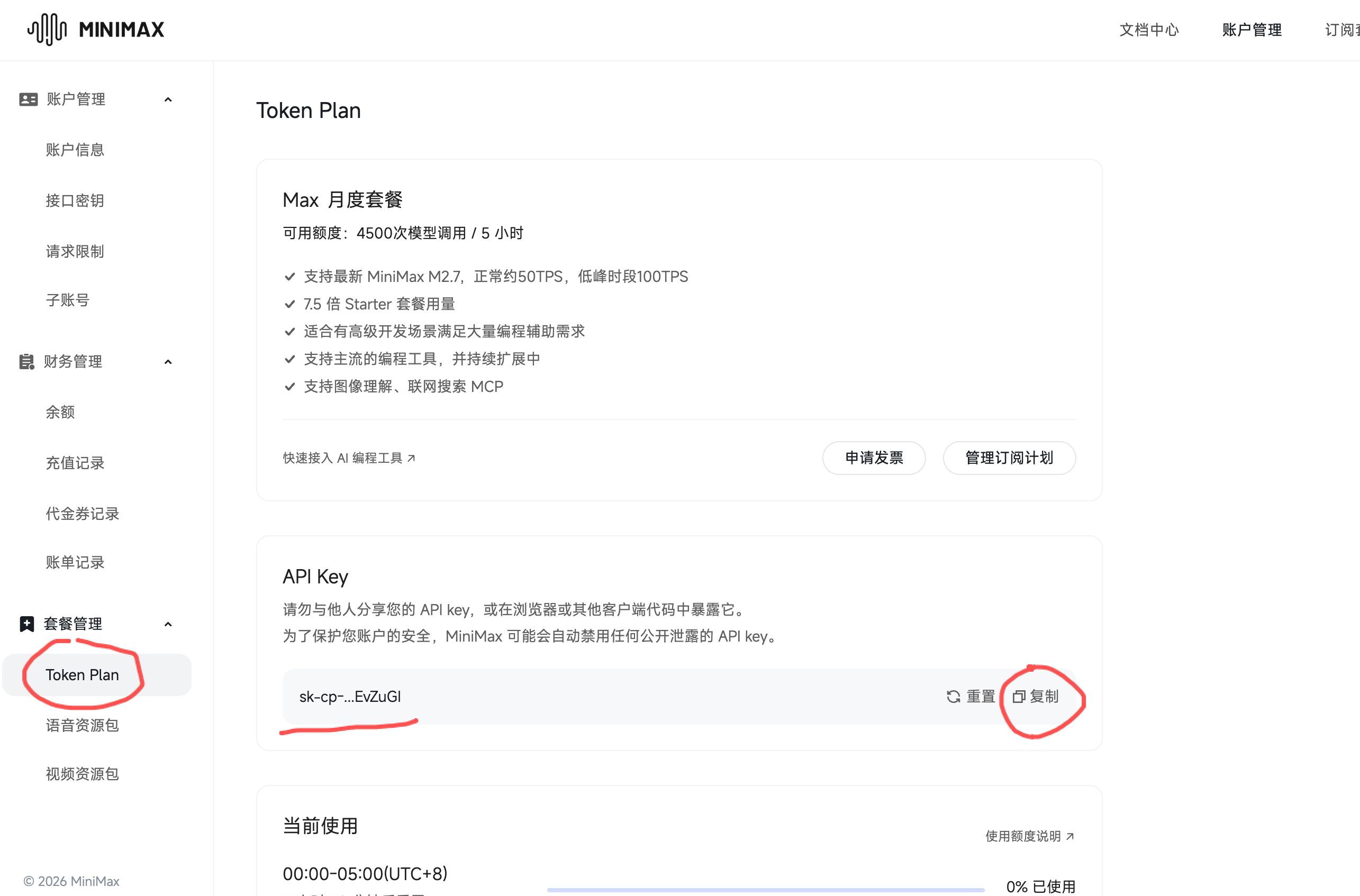
💡 The screenshot shows the Token Plan page. Select "Token Plan" in the left navigation, then click the "Copy" button in the API Key section to get your key.
Why recommend MiniMax M2.7?
- 🏆 Top-tier domestic model: Ranked top 5 globally on Artificial Analysis, #1 in open source
- 🚀 Self-evolution capability: Can build complex Agent Harness, participate in model iteration
- 💻 Software engineering expertise: SWE-Pro 56.22%, close to Opus level
- 📦 End-to-end delivery: VIBE-Pro 55.6%, supports complete project development
- 🤝 Agent Teams: Native multi-agent collaboration support
- 💰 High cost-effectiveness: Maintains consistent price advantages
Step 2: Connect MiniMax in OpenCode
Method A (Recommended to try first):
- Start OpenCode:bash
opencode - Enter:
/connect - Search
MiniMax, select MiniMax Coding Plan (minimaxi.com), then paste your API Key
💡 China users should select the option with
(minimaxi.com)suffix.
Step 3: Select Model and Verify
Enter:
/modelsSelect MiniMax-M2.7 or MiniMax-M2.7-highspeed (or other models in your configuration/list), then send a test message:
Hello, please introduce yourselfChecklist ✅
- [ ] Can see and select MiniMax models in
/models - [ ] Can receive AI responses after sending messages
Common Issues
| Symptom | Cause | Solution |
|---|---|---|
Cannot read properties of undefined | Incomplete configuration or wrong Key | Check baseURL and apiKey configuration |
| No response | Environment variable conflict | Clear ANTHROPIC_AUTH_TOKEN and other environment variables |
Next Steps
- Return to 1.4 Overview to choose another route, or proceed to 2.1 Interface and Basic Operations