

Connect to GLM-5
📝 Course Notes
Key takeaways from this lesson:
Estimated time: 5 minutes
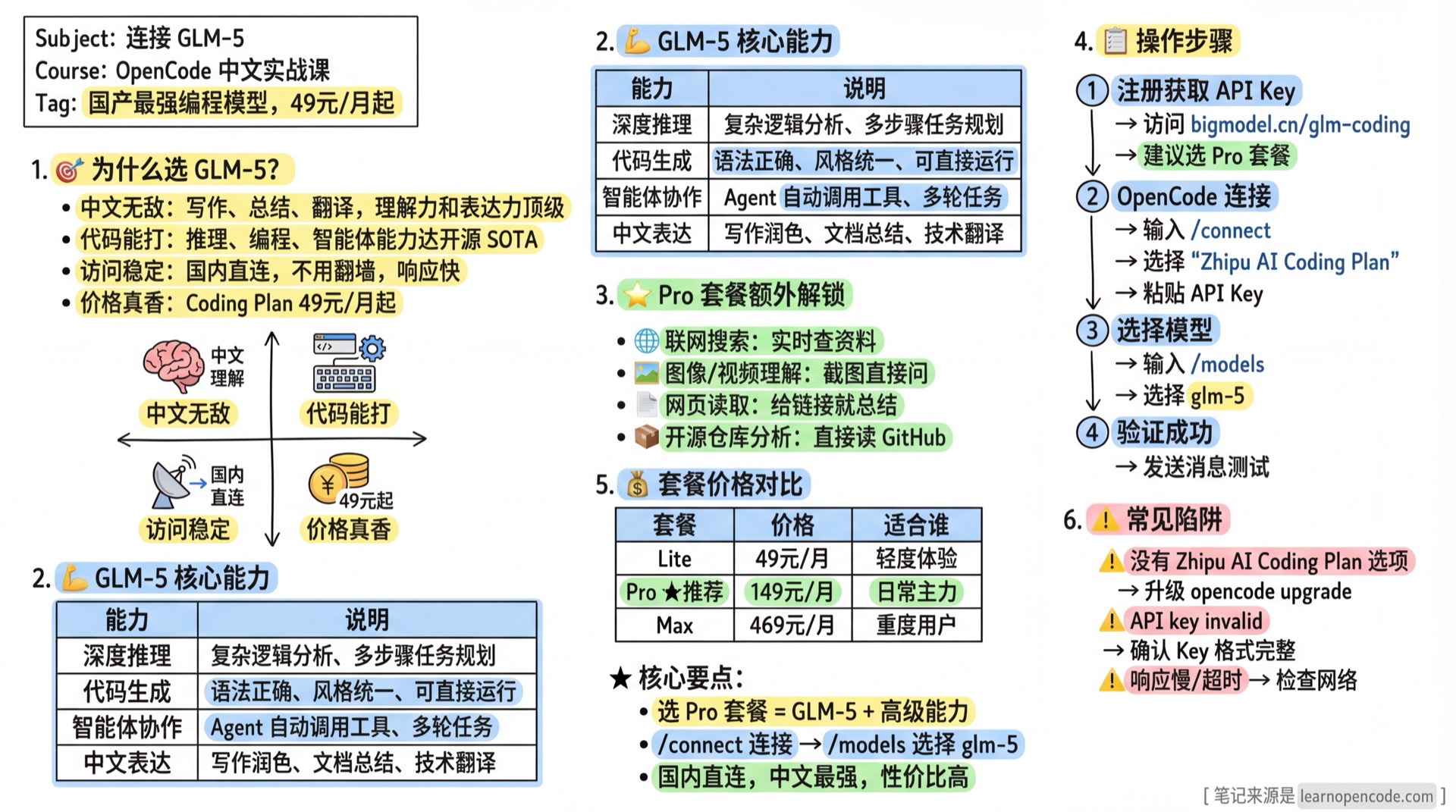
Which Chinese AI model is worth buying? GLM-5 offers the best value:
- Excellent Chinese: Top-tier comprehension and expression for writing, summarizing, and translation
- Strong Coding: Reasoning, programming, and agent capabilities at SOTA level
- Stable Access: Direct connection from China, no VPN needed, fast response
- Great Value: Coding Plan starts at ¥49/month, much cheaper than pay-per-use
🎯 GLM-5 Key Advantages
| Capability | Description |
|---|---|
| Deep Reasoning | Complex logic analysis, multi-step task planning |
| Code Generation | Correct syntax, consistent style, ready to run |
| Agent Collaboration | Supports automatic tool calling, multi-turn tasks |
| Chinese Expression | Writing polish, document summary, technical translation |
Pro Plan Additional Features (highly recommended):
- 🌐 Web Search: Real-time information retrieval
- 🖼️ Image/Video Understanding: Drop screenshots and ask questions
- 📄 Web Page Reading: Summarize content from URLs
- 📦 Open Source Analysis: Read GitHub repositories directly
If you haven't read "What is an API Key", we recommend going back to 1.4 Overview first.
What You'll Learn
- Get a Zhipu AI API Key
- Connect Zhipu provider in OpenCode
- Select GLM-5 model and complete your first conversation
🎒 Prerequisites
- [ ] Completed 1.2 Installation, can run
opencode - [ ] Can access Zhipu console and obtain an API Key
Follow Along
Step 1: Register and Get API Key
Register/login through the following link:
- Official Link: https://open.bigmodel.cn
Note for International Users:
- Zhipu AI platform is accessible globally - international users can register and use the service
- We recommend the Pro plan to use GLM-5 and unlock advanced features like web search
- Save your Key securely (don't share in groups, don't commit to GitHub)
Step 2: Connect Zhipu in OpenCode
Start OpenCode:
bash
opencodeEnter:
/connectSearch and select in the provider list:
Zhipu AI Coding Plan
Then paste your API Key.
Step 3: Select GLM-5 Model
Enter:
/modelsSelect glm-5.
Step 4: Send Your First Message (Verify Success)
Hello, please introduce yourselfIf you receive a response, the connection is successful.
Checklist ✅
- [ ] Can see
glm-5model in/models - [ ] Can receive AI responses when sending messages
- [ ] Fast response with natural Chinese output
Troubleshooting
| Issue | Cause | Solution |
|---|---|---|
No Zhipu AI Coding Plan option | OpenCode version too old | Upgrade: opencode upgrade |
API key invalid | Key format error | Confirm complete Key (format like xxx.xxx) |
| Slow response or timeout | Network fluctuation | Check network, or try again later |
💡 Plan Selection
Coding Plan has three tiers (monthly subscription):
| Plan | Price | Best For |
|---|---|---|
| Lite | ¥49/month | Light usage |
| Pro | ¥149/month | Daily use, best value (recommended) |
| Max | ¥469/month | Heavy users, generous quota |
We highly recommend Pro:
- ✅ Supports latest GLM-5 flagship model
- ✅ Sufficient quota for daily development
- ✅ Unlocks advanced features: web search, image understanding, repository analysis
- ✅ Faster generation speed than Lite
Next Steps
- Return to 1.4 Overview to choose another path, or proceed to 2.1 Interface & Basic Operations