

Understand OpenCode in 5 Minutes
📝 Lesson Notes
Key takeaways from this lesson:
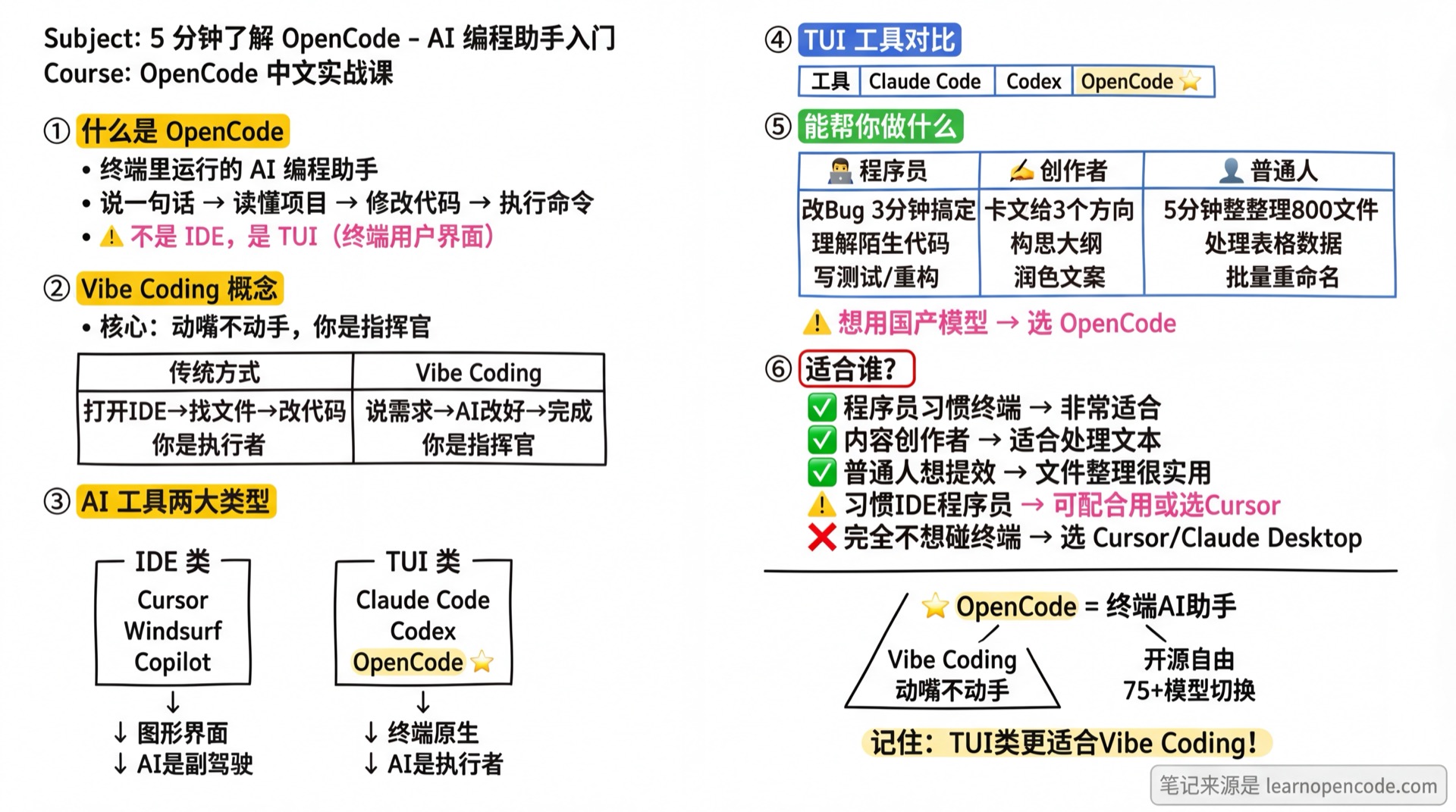
In One Sentence
OpenCode is an AI coding assistant that runs in your terminal.
You speak, and it: understands your project, modifies code, executes commands, and completes multi-step tasks automatically.
Vibe Coding: Just Speak, Don't Touch
There's a trending concept: Vibe Coding.
Core idea: To modify code or write content, just speak — no need to do it yourself.
| Traditional Way | Vibe Coding |
|---|---|
| Open IDE → Find file → Locate code → Manually edit → Save → Test | You say "add error handling" → AI fixes it → Tests pass → Done |
| You are the executor | You are the commander, AI is the executor |
If speaking is enough, why do you need an IDE?
Two Types of AI Coding Tools
IDE-based
Examples: Cursor, Windsurf, GitHub Copilot, Trae
Features:
- GUI, what you see is what you get
- AI as the editor's "copilot"
- You're still the primary operator, need to watch the screen
Best for: IDE users who prefer visual editing
TUI-based (Terminal Interface)
Examples: Claude Code, Codex CLI, OpenCode
Features:
- Native terminal, lightweight and fast
- AI is the executor, you are the commander
- Run multiple tasks in parallel without watching the screen
- Programmable, automatable, CI/CD embeddable
Best for: Vibe Coding, terminal users, automation needs
OpenCode belongs to the TUI category.
TUI Tools Comparison
Among TUI tools, there are three main choices:
Claude Code (by Anthropic)
- Models: Claude 4.5 series (Opus, Sonnet)
- Pros: Official Anthropic product, polished experience, VS Code/JetBrains plugins
- Cons: Locked to Claude models, region restrictions
Codex CLI (by OpenAI)
- Models: GPT-5.2 / GPT-5-Codex
- Pros: Cloud async execution, parallel tasks, auto-run tests
- Cons: Locked to GPT series, region restrictions
OpenCode (Open Source)
- Models: 75+ models supported — Claude, GPT, Gemini, Llama, DeepSeek, Qwen, and more
- Pros: Data privacy (direct API/local), open source, model freedom, native support for Chinese AI providers, cross-platform (macOS/Linux/Windows)
Which to Choose?
| Your Situation | Recommendation |
|---|---|
| Want official experience, budget OK | Claude Code or Codex CLI |
| Want open source & control | OpenCode |
| Want model flexibility | OpenCode |
What It Can Do For You
Developers: 3 Minutes for a 30-Minute Task
You: @src/components/Button.tsx Button click not responding, help me check

AI: Issue at line 23, handleClick didn't call preventDefault(),
    button inside form triggers submit causing page refresh. Fix it?

You: Go ahead

AI: Done, refresh the page to test
Also: Understand unfamiliar code, write features, refactor, write tests, code review
Content Creators: Three Directions When Stuck
You: @chapter42.md Stuck. Protagonist discovers heroine's secret,
     not sure how to write his reaction

AI: Based on protagonist's character, three directions:
    1. Suppressed - Pretend not to know, distance silently
    2. Confrontational - Direct showdown, escalate conflict
    3. Probing - Hint around, add suspense
    Suggest direction 3, want me to write an opening?
Also: Brainstorm outlines, design characters, polish copy, format scripts
General Users: Organize 800 Files in 5 Minutes
You: @./temp-folder Help me organize by type

AI: Found 847 files: 126 PDFs, 589 images, 95 docs, 37 others
    Suggest creating subfolders by type, PDFs by year. Execute?

You: Execute

AI: Done, moved 847 files
Also: Process spreadsheets, batch rename, generate reports, learn programming
Who Is It For
| Who You Are | Fit? | Reason |
|---|---|---|
| Developer, terminal user | ✅ Perfect fit | Native environment, quick start |
| Developer, IDE user | ⚠️ Depends | Can use alongside IDE, or try Cursor |
| Content creator | ✅ Good fit | Great for text file processing |
| General user wanting efficiency | ✅ Good fit | File organization, data processing |
| Don't want to touch terminal | ❌ Not ideal | OpenCode is a terminal tool |
Honest Advice
If you really don't want to touch the command line, Cursor or Claude Desktop might suit you better. This course helps you quickly understand what OpenCode can do — you decide if it's for you.
Checkpoint ✅
Understanding check — if you can answer these, you're ready to continue
[ ] What is Vibe Coding?
- Answer: Speak, don't touch. You state requirements, AI executes
[ ] Difference between IDE-based and TUI-based tools?
- Answer: IDE you still operate the editor; TUI you speak, AI works
[ ] Main differences between OpenCode and Claude Code/Codex CLI?
- Answer: Open source, model freedom, 75+ models supported
Which Path Suits You?
This course has three tracks. Choose based on your situation:
| Who You Are | Recommended Track | What You'll Learn |
|---|---|---|
| Developer | Track B | Use AI to write code, fix bugs, refactor, write tests |
| Content Creator | Track A | Use AI for blogs, social media, copywriting, translation |
| General user wanting efficiency | Track C | Use AI to organize files, process data, learn programming |
No rush to choose — decide after learning the basics.
Lesson Summary
- What is OpenCode: AI coding assistant in the terminal
- Vibe Coding: Speak, don't touch — you're the commander
- IDE vs TUI: TUI is better for Vibe Coding
- vs Claude Code/Codex CLI: Open source, model freedom, 75+ models supported
Next Lesson Preview
Next lesson we'll install OpenCode. Don't worry, it really only takes 5 minutes.
You'll learn:
- One command installation (macOS/Linux/Windows)
- What successful installation looks like (full output included)
- What to do if installation fails (solutions for common issues)