

OpenCode 配置详解
本文档介绍
opencode.json主配置和独立的tui.json界面配置。两者都支持.jsonc后缀。
📝 课程笔记
本课核心知识点整理:
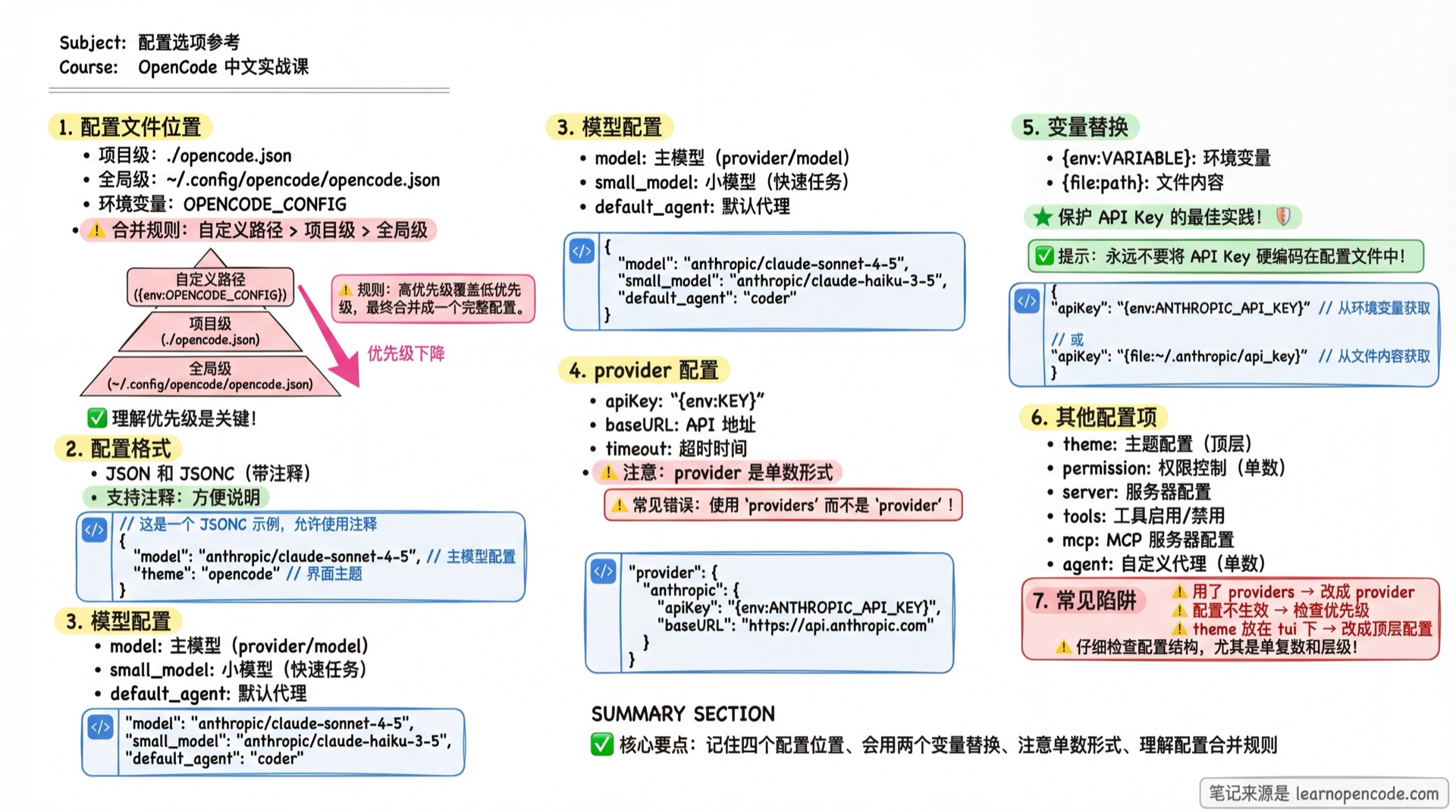
配置文件位置与优先级
OpenCode 按以下顺序加载配置(优先级从低到高,后者覆盖前者):
| 优先级 | 位置 | 说明 |
|---|---|---|
| 1(最低) | 远程 .well-known/opencode | 远程组织默认配置(通过 Auth 机制获取) |
| 2 | ~/.config/opencode/opencode.json | 全局用户配置 |
| 3 | OPENCODE_CONFIG 环境变量 | 自定义配置文件路径 |
| 4 | ./opencode.json | 项目根目录配置 |
| 5 | ./.opencode/opencode.json | 项目 .opencode 目录配置 |
| 6 | OPENCODE_CONFIG_CONTENT 环境变量 | 内联配置内容(JSON 字符串) |
| 7(最高) | 受管配置目录 | 企业部署,管理员控制 |
受管配置目录(企业部署,最高优先级):
| 平台 | 路径 |
|---|---|
| macOS | /Library/Application Support/opencode |
| Windows | %ProgramData%\opencode |
| Linux | /etc/opencode |
顶层配置 (Top Level)
配置文件的根对象中包含的字段。
基础设置
| 字段 | 类型 | 说明 | 默认值 |
|---|---|---|---|
username | string | 在对话中显示的用户名。如果不设置,使用系统用户名。 | 系统用户 |
autoupdate | boolean | "notify" | 自动更新行为。true=自动更新,false=禁用,"notify"=仅通知。 | - |
logLevel | enum | 日志级别。可选值:"DEBUG", "INFO", "WARN", "ERROR"。 | - |
snapshot | boolean | 是否启用 Git 快照备份机制。设为 false 禁用。 | 未设置时启用 |
模型与 Agent
| 字段 | 类型 | 说明 |
|---|---|---|
model | string | 主模型 ID (格式: provider/model),用于复杂任务。 |
small_model | string | 小模型 ID,用于生成标题、摘要等简单任务。 |
default_agent | string | 默认启动的 Primary Agent 名称。默认为 build。 |
行为控制
| 字段 | 类型 | 说明 | 默认值 |
|---|---|---|---|
share | enum | 会话分享行为。"manual"(手动), "auto"(自动), "disabled"(禁用)。 | "manual" |
disabled_providers | string[] | 禁用的 Provider 列表。即使有 Key 也不会加载。 | [] |
enabled_providers | string[] | 仅启用的 Provider 列表。设置后,不在列表中的都会被忽略。 | - |
TUI 界面配置 (tui.json)
终端界面配置使用独立的 tui.json 或 tui.jsonc。theme、keybinds 和其他界面字段都直接位于根对象,不能写在主 opencode.json,也不需要再套一层 tui。
{
  "$schema": "https://opencode.ai/tui.json",
  "theme": "tokyonight",
  "keybinds": {
    "session_new": "<leader>n"
  },
  "scroll_speed": 3,
  "diff_style": "auto",
  "cursor": {
    "style": "block",
    "blinking": true
  }
}| 字段 | 类型 | 说明 | 默认值 |
|---|---|---|---|
scroll_speed | number | 鼠标滚轮滚动速度倍率(最小 0.001)。 | 3 |
scroll_acceleration | object | 滚动加速配置。 | - |
scroll_acceleration.enabled | boolean | 是否启用 macOS 风格的惯性滚动加速。 | false |
diff_style | enum | 差异对比显示样式。"auto"(自适应), "stacked"(始终单列)。 | "auto" |
theme | string | 界面主题名称。详见 主题列表。 | - |
keybinds | object | 快捷键覆盖映射,会与内置默认值合并。 | {} |
cursor.style | enum | "block"、"underline"、"line" 或 "default"。 | 配置了 cursor 时为 "block" |
cursor.blinking | boolean | 光标是否闪烁;style 为 default 时无效。 | 配置了 cursor 时为 true |
TUI 配置加载优先级
优先级从低到高:
- 全局
~/.config/opencode/tui.json、tui.jsonc OPENCODE_TUI_CONFIG指定的文件- 从当前打开目录向文件系统根逐层发现,再按根侧到当前目录应用的
tui.json、tui.jsonc,越靠近当前目录优先级越高 - 逐层
.opencode/tui.json、tui.jsonc OPENCODE_CONFIG_DIR中的同名文件
同一配置目录同时存在时先加载 .json,再加载 .jsonc。各层配置深度合并,项目配置可以覆盖 OPENCODE_TUI_CONFIG 中的值。普通项目文件按根侧到当前目录应用,越近当前目录越优先;多个 .opencode 目录则按当前侧到根侧合并,冲突时更靠根侧者后加载并取胜。OPENCODE_CONFIG_DIR 最后加载。
旧配置迁移规则
启动 TUI 时会逐目录检查旧主配置:
- 迁移检查覆盖全局主配置、从当前目录向上发现的项目主配置、配置目录中的主配置,以及
OPENCODE_CONFIG指定文件。 - 同目录已存在目标
tui.json时,整个目录跳过迁移;只有tui.jsonc不会触发跳过。 - 目标不存在时,识别
theme字符串和keybinds对象;旧tui的scroll_speed、scroll_acceleration、diff_style会在迁移阶段直接按对应 Schema 解码,无效值不会写入新的扁平tui.json。生成文件加载时还会执行完整 Schema 校验。 - 新文件写入成功后,先创建
<原主配置>.tui-migration.bak;备份已存在则复用,不覆盖。 - 只有备份成功后才删除原主配置中的三个旧字段。迁移不是事务操作:新
tui.json写入后,即使备份或原配置回写失败也不会回滚;此时旧字段可能仍在,且下次启动会因目标文件已存在而跳过,不会自动重试。 - 无论迁移是否发生,主配置加载器都会忽略
theme、keybinds和tui。
Provider 配置 (provider)
配置模型提供商的 API Key、端点和模型参数。
键名:provider (单数)
类型:Record<string, ProviderConfig>
"provider": {
  "anthropic": {
    "options": {
      "apiKey": "sk-...",
      "timeout": 600000
    }
  }
}
通用选项 (options)
所有 Provider 都支持的 options 字段:
| 字段 | 类型 | 说明 |
|---|---|---|
apiKey | string | API 密钥。建议使用 {env:VAR} 引用环境变量。 |
baseURL | string | 自定义 API 端点地址(用于代理或兼容服务)。 |
timeout | number | false | 请求超时时间(毫秒)。默认 300000 (5分钟)。false 禁用超时。 |
setCacheKey | boolean | 是否启用 Prompt Cache 键(用于 Anthropic/DeepSeek 等)。默认 false。 |
enterpriseUrl | string | GitHub Enterprise URL (仅 Copilot Provider)。 |
Provider 级字段
Provider 对象本身还支持以下字段:
| 字段 | 类型 | 说明 |
|---|---|---|
name | string | Provider 显示名称。 |
env | string[] | 环境变量名列表(用于自动检测 API Key)。 |
whitelist | string[] | 仅允许使用的模型列表。 |
blacklist | string[] | 禁止使用的模型列表。 |
模型特定配置 (models)
针对特定模型进行微调:
"provider": {
  "anthropic": {
    "models": {
      "claude-3-7-sonnet": {
        "variants": {
          "thinking": { "disabled": true }
        }
      }
    }
  }
}
Agent 配置 (agent)
定义或覆盖 Agent 的行为。
键名:agent (单数)
类型:Record<string, AgentConfig>
"agent": {
  "code-reviewer": {
    "mode": "subagent",
    "prompt": "You are a code reviewer...",
    "permission": { "edit": "deny" }
  }
}| 字段 | 类型 | 说明 |
|---|---|---|
description | string | Agent 的简短描述,显示在 /agents 列表和 Agent 选择界面中。 |
mode | enum | Agent 类型。"primary"(独立模式), "subagent"(子代理), "all"。 |
model | string | 该 Agent 专用的模型 ID。 |
variant | string | 默认模型变体(仅在使用该 Agent 配置的模型时生效)。 |
prompt | string | System Prompt (人设指令)。 |
temperature | 有限 number | 温度系数;可用范围由模型和 Provider 决定,OpenCode Schema 不统一限制为 0–1。 |
top_p | 有限 number | 核采样参数;可用范围由模型和 Provider 决定,OpenCode Schema 不统一限制为 0–1。 |
steps | 正整数 | 最大自动迭代步数;达到上限后输出最终纯文本响应。 |
color | string | 在界面中显示的颜色 (Hex 格式,如 #FF0000),或主题色名(如 primary)。 |
hidden | boolean | 是否在 @ 自动补全菜单中隐藏此 Agent。 |
permission | object | 该 Agent 的专用权限配置 (覆盖全局权限)。 |
disable | boolean | 是否禁用此 Agent。 |
权限配置 (permission)
控制 OpenCode 访问系统资源的权限。
键名:permission (单数)
类型:已知权限键按下方两组校验;额外自定义权限键可使用 Rule
值可以是以下字符串之一(Action):
"allow": 自动允许"ask": 每次询问"deny": 拒绝
支持对象规则(Rule)的权限键可以按命令或路径模式做更细粒度控制。
"permission": {
  "edit": "ask",
  "bash": {
    "*": "ask",
    "git *": "allow",
    "rm *": "deny"
  }
}
支持 Rule 或 Action:
read、edit、glob、grep、listbash、task、external_directory、lsp、skill
仅支持 Action:
todowrite、questionwebfetch、websearch、doom_loop
额外的自定义权限键可以使用对象规则(Rule)。
命令配置 (command)
定义自定义斜杠命令。
键名:command (单数)
类型:Record<string, CommandConfig>
"command": {
  "commit": {
    "template": "Generate a commit message for these changes:\n$DIFF",
    "agent": "build"
  }
}| 字段 | 类型 | 说明 |
|---|---|---|
template | string | 提示词模板。支持 $ARGUMENTS 等变量。 |
description | string | 命令描述。 |
agent | string | 执行此命令的 Agent。 |
model | string | 执行此命令的模型。 |
subtask | boolean | 是否作为子任务运行。 |
快捷键配置 (tui.json → keybinds)
自定义快捷键。
键名:keybinds (复数,位于 tui.json 顶层)
{
  "$schema": "https://opencode.ai/tui.json",
  "keybinds": {
    "leader": "ctrl+x",
    "session_new": "<leader>n"
  }
}
绑定值可设为 "none" 或 false 来禁用,也可使用单个绑定或绑定数组。
常用配置项(完整列表见快捷键速查):
leader: 前缀键(默认ctrl+x)app_exit: 退出应用session_new: 新建会话session_list: 会话列表model_list: 切换模型agent_list: 切换 Agentinput_submit: 发送消息input_newline: 换行
服务器配置 (server)
配置 opencode serve 或 opencode web 的行为。
"server": {
  "port": 4096,
  "hostname": "0.0.0.0",
  "mdns": true,
  "mdnsDomain": "opencode.local"
}| 字段 | 类型 | 说明 | 默认值 |
|---|---|---|---|
port | number | 监听端口。 | 4096 |
hostname | string | 监听地址。启用 mdns 时默认为 0.0.0.0。 | 127.0.0.1 |
mdns | boolean | 是否启用 mDNS 本地网络发现。 | false |
mdnsDomain | string | mDNS 服务的自定义域名。 | opencode.local |
cors | string[] | 允许跨域请求的来源列表。 | - |
实验性功能 (experimental)
启用正在开发中的实验性功能。注意:这些功能不稳定,可能随时变更。
"experimental": {
  "batch_tool": true,
  "openTelemetry": true
}| 字段 | 类型 | 说明 |
|---|---|---|
batch_tool | boolean | 启用批量操作工具。 |
openTelemetry | boolean | 启用 OpenTelemetry 链路追踪。 |
disable_paste_summary | boolean | 禁用粘贴大段文本时的自动摘要。 |
continue_loop_on_deny | boolean | 当工具调用被用户拒绝时,是否让 Agent 继续思考(而不是中断)。 |
primary_tools | string[] | 指定仅限 Primary Agent 使用的工具列表。 |
mcp_timeout | number | MCP 请求的全局超时时间(毫秒)。 |
Hook(事件钩子)功能通过插件系统实现,不是
experimental配置。详见 Hooks 机制。
其他配置
compaction (压缩)
控制上下文压缩行为。
"compaction": {
  "auto": true,
  "prune": true,
  "reserved": 10000
}| 字段 | 类型 | 说明 | 默认值 |
|---|---|---|---|
auto | boolean | 上下文满时自动触发压缩。 | true |
prune | boolean | 压缩时移除旧的工具输出。 | true |
reserved | number | 压缩时的 Token 缓冲区,预留足够窗口避免溢出。 | - |
watcher (监视器)
控制文件系统监视。
"watcher": {
  "ignore": ["node_modules/**", ".git/**"]
}ignore: 忽略监视的文件 glob 模式列表。
instructions (指令)
"instructions": ["docs/rules.md", ".cursor/rules/*.md"]指定额外的全局指令文件列表。
plugin (插件)
"plugin": ["opencode-helicone-session", "./my-plugin.js"]要加载的插件列表。支持 npm 包名或本地文件路径。
skills (技能路径)
"skills": {
  "paths": ["./skills", "~/shared-skills"],
  "urls": ["https://example.com/.well-known/skills/"]
}| 字段 | 类型 | 说明 |
|---|---|---|
paths | string[] | 额外的 Skill 文件夹路径。 |
urls | string[] | 远程 Skill 获取地址。 |
mcp (扩展协议)
配置 Model Context Protocol 服务器。详见 MCP 文档。
formatter (格式化)
配置代码格式化工具。详见 格式化器文档。
lsp (语言服务)
配置 LSP 服务器。详见 LSP 文档。
enterprise (企业版)
"enterprise": {
  "url": "https://github.example.com"
}
配置 GitHub Enterprise 实例地址。
附录:源码参考
点击展开查看源码位置
目标版本:v1.18.22(commit
47b6b6f5f4f9b42d2bce7af1c4e5bf6efaf22ba7)